
Fanvil X305
Fanvil X305 Big Button IP foonu olumulo Afowoyi
Model: X305 | Brand: Fanvil
1. Ifihan
The Fanvil X305 is a purpose-built IP phone designed for ease of use, particularly for seniors in environments such as nursing homes and hospitals. It combines robust communication features with user-friendly design elements to ensure accessibility and reliability.
Awọn ẹya pataki pẹlu:
- Large buttons and a 3.5-inch color display for easy operation.
- Support for two SIP lines for multiple call handling.
- Built-in dual-band Wi-Fi (2.4GHz and 5GHz) and Bluetooth 4.2.
- Dual Gigabit Ethernet ports with Power over Ethernet (PoE) support.
- Compatibility with 433MHz wireless emergency buttons (e.g., Fanvil KT series).
- High-definition audio with G.722 and Opus codecs.
- Four customizable speed dial buttons.
- Hearing Aid Compatible (HAC).
2. Package Awọn akoonu
Jọwọ rii daju pe gbogbo awọn ohun kan wa ninu apo rẹ:
- Fanvil X305 IP Phone Unit
- Foonu ati Okùn Foonu
- àjọlò Cable
- Iduro Iduro
- Awọn ọna fifi sori Itọsọna
Note: Power adapter may be sold separately if not using PoE.
3. Eto ati fifi sori
3.1 Fifi sori ti ara
- So Iduro Tabili So: Align the stand with the slots on the back of the phone and slide it into place until it clicks.

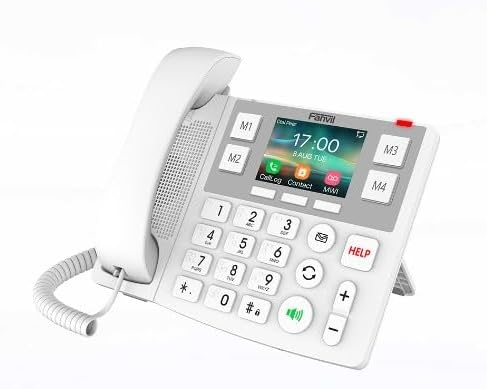
Figure 3.1: Fanvil X305 with desk stand for optimal viewigun igun. - So foonu pọ: Pulọọgi opin okun foonu ti a fi sinu foonu ati opin keji sinu ibudo foonu lori ipilẹ foonu.
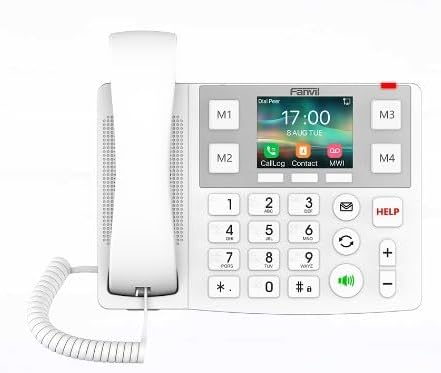
olusin 3.2: Iwaju view of the Fanvil X305, showing the handset connection. - Connect to Network/Power:
- Lilo PoE (Agbara lori Ethernet): Connect one end of the Ethernet cable to the LAN port on the phone and the other end to a PoE-enabled switch or router. The phone will receive both power and network data through this single cable.
- Using Power Adapter (Optional): If PoE is not available, connect a compatible power adapter (not included) to the power port on the phone and plug it into a power outlet. Then, connect the Ethernet cable from the LAN port on the phone to your network router or switch.
olusin 3.3: Apa view of the Fanvil X305, illustrating connectivity ports.
3.2 Network Configuration (Initial Boot)
Upon first boot, the phone will attempt to obtain an IP address via DHCP. If successful, the display will show network information. If manual configuration is required, access the phone's web interface or local menu (refer to advanced configuration guide).
3.3 Wi-Fi and Bluetooth Setup
- Wi-Fi: Navigate to the phone's menu, select "Network" > "Wi-Fi". Scan for available networks, select your desired network, and enter the password if prompted.
- Bluetooth: Navigate to the phone's menu, select "Bluetooth". Enable Bluetooth and pair with compatible devices such as headsets or emergency buttons.
4. Awọn ilana Iṣiṣẹ
4.1 Ṣiṣe ipe kan
- Pick up the handset or press the Speakerphone button (aami agbohunsoke).
- Tẹ nọmba foonu ti o fẹ nipa lilo bọtini itẹwe nọmba nla naa.
- Press the Dial/Send button (green phone icon) lati pilẹṣẹ ipe.
4.2 Ndahun ipe kan
- When the phone rings, pick up the handset or press the Speakerphone button (aami agbohunsoke).
4.3 Using Speed Dial Buttons (M1-M4)
The Fanvil X305 features four customizable speed dial buttons (M1, M2, M3, M4) located around the display. These can be programmed for quick access to frequently called contacts.
- Si Eto: Access the phone's menu or web interface to assign contacts to M1-M4. You can also assign images to these buttons for visual recognition.
- Lati Lo: Simply press the desired M1-M4 button to dial the pre-programmed contact.
4.4 Emergency Button Support (HELP)
The phone supports 433MHz wireless emergency buttons (e.g., Fanvil KT series). When a paired emergency button is activated, the phone can be configured to automatically dial a pre-set emergency number.
- Si Eto: Configure the emergency number and response settings via the phone's menu or web ni wiwo.
- Lati Lo: Press the dedicated "HELP" button on the phone or activate your paired wireless emergency button.
4.5 iwọn didun tolesese
Lo awọn + ati - buttons on the right side of the keypad to adjust the call volume during a conversation or the ringer volume when idle.
4.6 Redial and Mute
- Titun: Press the Redial button (circular arrow icon) to redial the last number called.
- Pa ẹnu mọ́: Tẹ bọtini Mute naa (gbohungbohun pẹlu aami idinku) during a call to mute your microphone. Press again to unmute.
5. Itọju ati Itọju
To ensure the longevity and optimal performance of your Fanvil X305 IP Phone, please follow these maintenance guidelines:
- Ninu: Lo asọ, gbẹ, asọ ti ko ni lint lati nu dada foonu ati iboju. Fun awọn ami alagidi, die-die dampen awọn asọ pẹlu omi. Yẹra fun lilo awọn kẹmika ti o lewu, awọn olutọpa gbigbẹ, tabi awọn nkanmimu, nitori iwọnyi le ba opin foonu jẹ.
- Ayika: Keep the phone in a dry environment, away from direct sunlight, excessive heat, and moisture. Do not expose it to extreme temperatures.
- Mimu: Mu foonu naa pẹlu abojuto. Yẹra fun sisọ silẹ tabi tẹriba si awọn ipa to lagbara.
- Awọn okun: Ensure all cords (handset, Ethernet) are not kinked or pinched, which can lead to damage.
6. Laasigbotitusita
This section addresses common issues you might encounter with your Fanvil X305 IP Phone. If the problem persists, please contact technical support.
| Isoro | Owun to le Fa | Ojutu |
|---|---|---|
| Foonu ko ṣiṣẹ. | Ko si asopọ agbara tabi okun waya/adapta ti ko ni abawọn. |
|
| No dial tone / Cannot make calls. | Network issue, SIP registration failure, or incorrect configuration. |
|
| Didara ohun ti ko dara (iwoyi, aimi). | Network congestion, faulty handset/speaker, or environmental interference. |
|
| Wi-Fi or Bluetooth not connecting. | Ọrọigbaniwọle ti ko tọ, ko si ni ibiti o ti le ri, tabi ẹrọ ko ṣe awari. |
|
7. Awọn pato
| Ẹya ara ẹrọ | Apejuwe |
|---|---|
| Awoṣe | X305 |
| Awọn iwọn Ọja (L x W x H) | 10 x 2 x 2.7 inches |
| Iwọn Nkan | 2 iwon |
| Ifihan | 3.5-inch Awọ Iboju |
| SIP Lines | 2 |
| Asopọmọra | Dual Gigabit Ethernet ports, PoE, Dual-Band Wi-Fi (2.4GHz/5GHz), Bluetooth 4.2 |
| Emergency Button Support | 433MHz Wireless Emergency Buttons (e.g., Fanvil KT series) |
| Awọn kodẹki ohun | G.722, Opus (HD Audio) |
| Pataki Awọn ẹya ara ẹrọ | Large Buttons, Braille Dots on 10-digit keys, 4 Customizable Speed Dial Buttons, HAC (Hearing Aid Compatible) |
| Fifi sori ẹrọ | Ojú-iṣẹ / Odi-agesin |
| Ohun elo | Ṣiṣu |
8. Atilẹyin ọja ati Support
The Fanvil X305 IP Phone comes with a standard manufacturer's warranty. For specific warranty terms and conditions, please refer to the documentation provided with your purchase or visit the official Fanvil webojula.
Oluranlowo lati tun nkan se:
If you encounter issues that cannot be resolved using the troubleshooting guide, or require further assistance, please contact Fanvil technical support or your product vendor.
- Awọn orisun Ayelujara: Visit the Fanvil official website for FAQs, firmware updates, and detailed product documentation.
- Ibi iwifunni: Refer to your product packaging or the Fanvil webojula fun onibara iṣẹ awọn alaye olubasọrọ.
Extended protection plans may be available for purchase from your retailer:
- 3-odun Idaabobo Eto
- 4-odun Idaabobo Eto
- Idaabobo pipe ( ṣiṣe alabapin oṣooṣu)
Note: Protection plans are typically offered by third-party providers and their terms may vary.
9. Awọn fidio ọja osise
Ko si awọn fidio ọja osise lati ọdọ olutaja ti o wa fun ifibọ ni akoko yii.
Ask a question about this manual
Ask about setup, troubleshooting, compatibility, parts, safety, or missing instructions. Manuals+ will review the question and use this page’s manual context to help answer it.