
Casio Illuminator AE1500WH Digital Watch User Manual
Model: AE1500WH
1. Ti pariview
The Casio Illuminator AE1500WH is a digital watch designed for durability and functionality. It features an extra-large, high-visibility LCD display for easy reading of time, date, and various functions. Key features include a 10-year battery life, 100-meter water resistance, multiple alarms, a stopwatch, and a countdown timer.
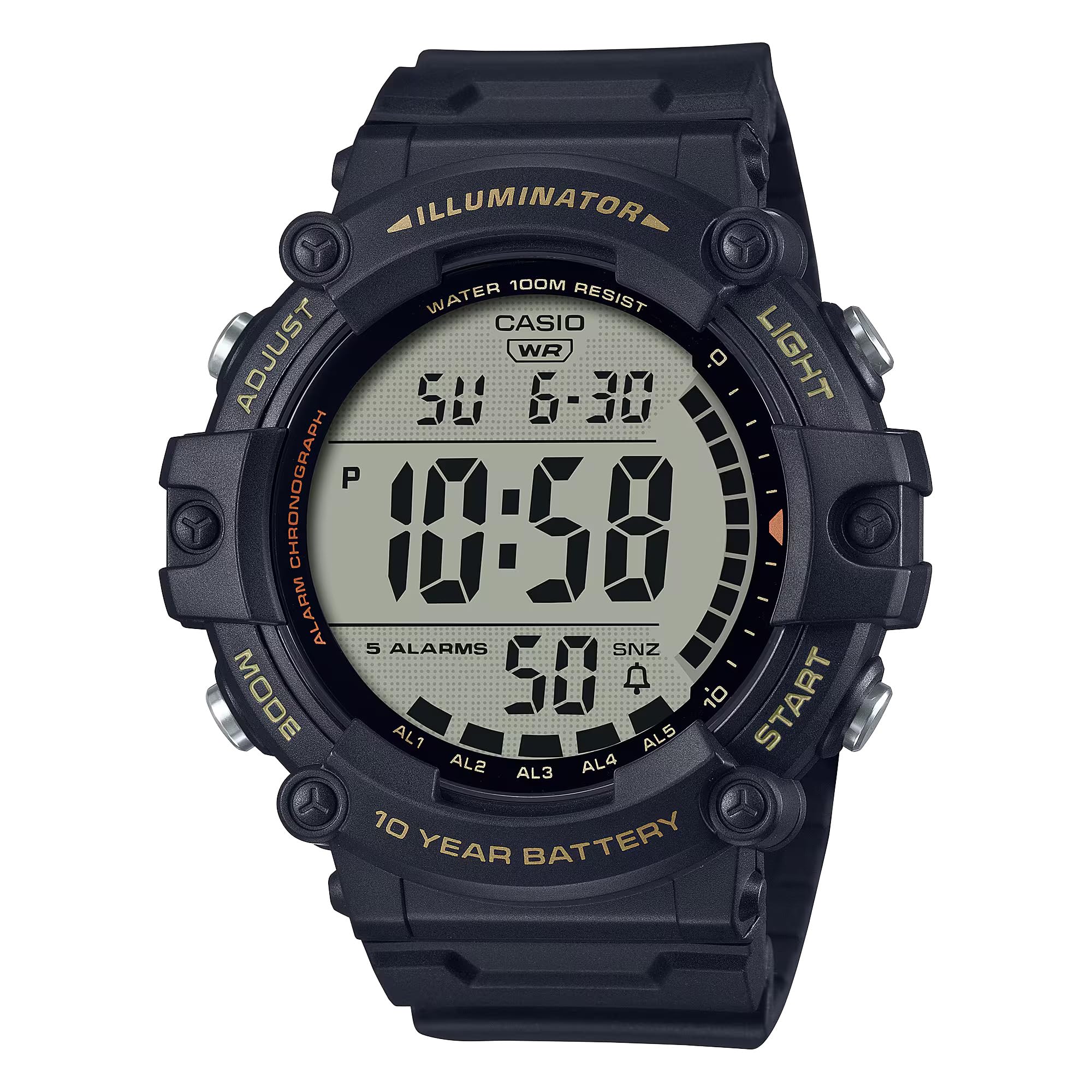
Aworan: Iwaju view of the Casio Illuminator AE1500WH digital watch, displaying the time and date.
2. Eto
Aago Ibẹrẹ ati Eto Ọjọ
To set the time and date on your Casio AE1500WH watch, follow these steps:
- Ni Ipo Ṣiṣe Aago, tẹ mọlẹ ṢAtunṣe button (top left) until the seconds begin to flash, indicating the setting screen.
- Tẹ awọn MODE Bọtini (isalẹ apa osi) lati yika nipasẹ awọn eto: Awọn iṣẹju-aaya → Wakati → Iṣẹju → Ọdun → Oṣu → Ọjọ.
- Lo awọn Bẹrẹ/Duro button (top right) to increase the flashing value. Use the Tunto button (bottom right) to decrease the value (if applicable, for some settings).
- Ni kete ti gbogbo eto ti wa ni titunse, tẹ awọn ṢAtunṣe Bọtini lati jade kuro ni iboju eto ati pada si Ipo Ṣiṣe Aago.
The watch supports both 12-hour and 24-hour formats. To switch between formats, press the Bẹrẹ/Duro bọtini nigba ti wakati / iseju eto ti wa ni ìmọlẹ.
Video: A demonstration of setting the time and date on the Casio AE1500WH digital watch, including how to use the adjustment buttons.
3. Awọn ilana Iṣiṣẹ
Ipo Lilọ kiri
Tẹ awọn MODE button (bottom left) to cycle through the different modes: Timekeeping → World Time → Alarm → Stopwatch → Countdown Timer.
Video: A visual guide demonstrating how to navigate through the different operational modes of the watch using the mode button.
Awọn itaniji
Agogo naa ṣe awọn itaniji iṣẹ-pupọ 5, pẹlu itaniji didun lẹẹkọọkan, ati hourly akoko ifihan agbara.
- In Alarm Mode, use the Bẹrẹ/Duro button (top right) to select the desired alarm (AL1 to AL5 or SNZ for snooze).
- Tẹ mọlẹ ṢAtunṣe button until the alarm time begins to flash.
- Lo awọn MODE bọtini lati yan laarin awọn eto wakati ati iṣẹju.
- Lo awọn Bẹrẹ/Duro bọtini lati yi ìmọlẹ iye.
- Tẹ ṢAtunṣe lati fipamọ eto itaniji.
- To turn an alarm on or off, select the alarm in Alarm Mode and press the Tunto button (bottom right).
Aago iṣẹju-aaya
The 1/100-second stopwatch measures elapsed time, split times, and 1st-2nd place times.

Image: Icon representing the stopwatch function.
- Navigate to Stopwatch Mode.
- Tẹ awọn Bẹrẹ/Duro bọtini lati bẹrẹ aago iṣẹju-aaya.
- Tẹ Bẹrẹ/Duro lẹẹkansi lati da o.
- Tẹ awọn Tunto bọtini lati tun aago iṣẹju-aaya pada si odo.
- Fun awọn akoko pipin, tẹ Tunto nigba ti aago iṣẹju-aaya nṣiṣẹ lati ṣafihan akoko pipin. Tẹ Tunto lẹẹkansi lati pada si wiwọn akoko ti o ti kọja.
Aago kika
The 24-hour countdown timer features an auto-repeat function.

Image: Icon representing the countdown timer function.
- Lọ sí Ipò Àkókò Kíkà.
- Tẹ mọlẹ ṢAtunṣe button until the timer setting begins to flash.
- Lo awọn MODE bọtini lati yan laarin awọn eto wakati ati iṣẹju.
- Lo awọn Bẹrẹ/Duro bọtini lati yi ìmọlẹ iye.
- Tẹ ṢAtunṣe to save the timer setting.
- Tẹ Bẹrẹ/Duro lati bẹrẹ tabi da kika.
- Tẹ Tunto lati tun aago pada si iye ti a ṣeto.
Meji Aago
Ipo Akoko Meji gba ọ laaye lati tọju agbegbe akoko keji.
- Navigate to World Time Mode.
- Tẹ mọlẹ ṢAtunṣe button until the city code begins to flash.
- Lo awọn Bẹrẹ/Duro button to scroll through city codes (time zones).
- Tẹ ṢAtunṣe to set the desired city code. The time for that city will be displayed.
Atilẹyin LED
The watch features an amber LED backlight with afterglow for visibility in low-light conditions.
- Tẹ awọn Imọlẹ button (top right) to activate the backlight.
- The backlight will illuminate for a few seconds.
Video: A demonstration of the watch's LED backlight function, showing how it illuminates the display in dark conditions.
4. Itọju
Igbesi aye batiri
The Casio AE1500WH is powered by a CR2032 battery, providing approximately 10 years of operation. Battery replacement should be performed by a qualified technician to ensure water resistance is maintained.

Image: Graphic indicating a 10-year battery life.
Omi Resistance
The watch is rated for 100-meter water resistance, making it suitable for swimming and general water activities. Avoid operating buttons while the watch is submerged to prevent water intrusion.

Image: Icon representing 100-meter water resistance.
Ninu ati Itọju
Clean the watch with a soft, dry cloth. For stubborn dirt, use a mild soap solution and rinse thoroughly. Avoid harsh chemicals or abrasive cleaners. Store the watch away from extreme temperatures and strong magnetic fields.
5. Laasigbotitusita
Ifihan jẹ òfo tabi baibai
- Check if the battery is low. Although designed for 10 years, environmental factors can affect battery life.
- Rí i dájú pé aago náà kò fara hàn sí òtútù líle, èyí tí ó lè mú kí LCD náà bàjẹ́ fún ìgbà díẹ̀.
Awọn bọtini ko dahun
- Ensure the watch is not in a locked mode (if applicable, refer to specific module instructions for lock functions).
- If the watch has been submerged, ensure it is dry, as water can sometimes affect button responsiveness.
Akoko ko pe
- Tun ṣeto akoko ati ọjọ ti o tẹle awọn itọnisọna ni Abala 2.
- If inaccuracy persists, the battery may be nearing the end of its life.
6. Awọn pato
| Ẹya ara ẹrọ | Sipesifikesonu |
|---|---|
| Nọmba awoṣe | AE-1500WHX-1AVCF |
| Ifihan Iru | Oni-nọmba |
| Iṣipopada Iru | Kuotisi |
| Ohun elo ọran | Resini |
| Ohun elo Band | Resini |
| Omi Resistance | 100 mita (330 ẹsẹ) |
| Igbesi aye batiri | Approx. 10 years (CR2032) |
| Awọn itaniji | 5 multi-function alarms (1 snooze) |
| Aago iṣẹju-aaya | 1/100-aaya, agbara wiwọn: 23:59'59.99'' |
| Aago kika | Measuring unit: 1 second, countdown range: 24 hours, auto-repeat |
| Imọlẹ ẹhin | Amber LED with afterglow |
| Kalẹnda | Full auto-calendar (to year 2099) |
| Yiye | ± 30 aaya fun osu kan |
| Case Opin | 5.1 centimeters |
| Ọran Sisanra | 16 milimita |
| Band Gigun | 23.5 centimeters |
7. Atilẹyin ọja ati Support
Alaye atilẹyin ọja
This Casio watch comes with a limited manufacturer's warranty. Please refer to the warranty card included with your purchase for specific terms and conditions, including coverage duration and what is covered.
Onibara Support
Fun iranlọwọ siwaju sii, atilẹyin imọ-ẹrọ, tabi awọn ibeere iṣẹ, jọwọ ṣabẹwo si Casio osise naa website or contact their customer service department. Contact information can typically be found on the Casio webaaye tabi ninu iwe ti a pese pẹlu aago rẹ.
You can also refer to the official Casio store on Amazon for additional product information: Ile Itaja Casio


