
1. Ọja Ipariview
The Superfire G12 Workshop Flashlight is a versatile and durable lighting tool designed for various tasks. It integrates two powerful light sources, a high-capacity rechargeable battery, and practical features like a digital display and power bank functionality. Its robust construction and adaptable mounting options make it an essential tool for workshops, outdoor activities, and emergency situations.
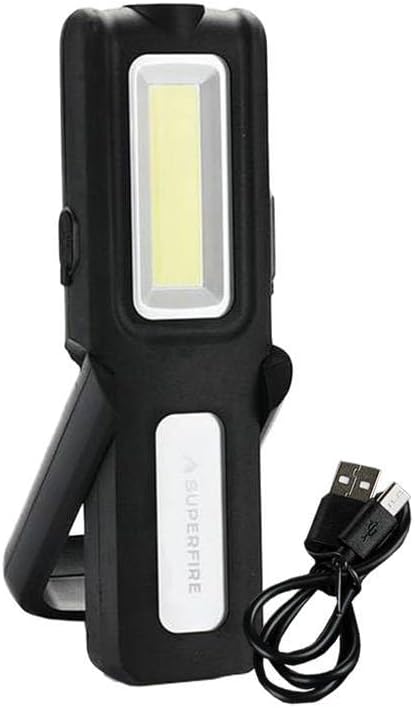
Image 1.1: The Superfire G12 Workshop Flashlight shown with its included USB charging cable. The flashlight features a main rectangular COB LED light panel and a smaller top LED spotlight. It has a black body with a white panel displaying the 'SUPERFIRE' logo and a foldable stand/handle.
2. Key Awọn ẹya ara ẹrọ
- Awọn orisun Imọlẹ Meji: Equipped with a main COB LED panel for wide area illumination and a top LED spotlight for focused, long-range lighting.
- Imọlẹ Adijositabulu: Easily control light intensity using dedicated '+' and '-' buttons.
- Batiri Agbara giga: Features a 1200mAh battery for extended operation.
- Iṣẹ Bank Power: Can be used to charge other devices via its USB output.
- Ifihan Batiri oni-nọmba: A clear digital screen indicates the remaining battery percentage.
- Ikole ti o tọ: Made from robust TPR plastic with structural reinforcements for wear resistance.
- Iṣagbesori pupọ: Includes a 180° rotating handle, a 360° hanging hook, and strong magnetic elements for hands-free use on metal surfaces.
3. Package Awọn akoonu
Jọwọ ṣayẹwo package fun awọn nkan wọnyi:
- 1 x Superfire G12 Workshop Flashlight
- 1 x Okun Ngba agbara USB
4. Eto
4.1 Gbigba agbara akọkọ
Before using your Superfire G12 flashlight for the first time, it is recommended to fully charge the battery. Connect the smaller end of the provided USB charging cable to the flashlight's micro USB port and the larger end to a standard USB power adapter (not included) or a computer's USB port. The digital display will show the charging status and battery percentage. Charging is complete when the display shows 100%.
5. Awọn ilana Iṣiṣẹ
5.1 Agbara Tan / Pa ati Aṣayan Ipo
- To turn on the flashlight, press the power button located on the side of the device.
- Subsequent presses of the power button will cycle through the different lighting modes: Main COB LED → Top LED Spotlight → Off.
5.2 Atunṣe Imọlẹ
While the flashlight is on, use the '+' and '-' buttons to adjust the brightness level of the active light source. Pressing '+' will increase brightness, and pressing '-' will decrease it. The digital display may show the current brightness level or battery percentage depending on the model's specific implementation.
5.3 Using the Mounting Features
- Imudani Yiyi: Adjust the integrated handle to your desired angle for comfortable handheld use or to position the light. The handle rotates 180 degrees.
- Ìkọ́ ìkọkọ́: Extend the 360-degree rotating hook from the top of the flashlight to hang it from ropes, branches, or other fixtures.
- Ipilẹ oofa: The strong magnets on the base allow you to securely attach the flashlight to any ferrous metal surface for hands-free operation.
6. Gbigba agbara ati Power Bank Išė
6.1 Recharging the Flashlight
When the battery level is low, as indicated by the digital display, recharge the flashlight using the provided USB cable. Connect the micro USB end to the flashlight and the USB-A end to a compatible power source (e.g., computer USB port, wall adapter, car charger). The digital display will show the charging progress.
6.2 Lilo bi Bank Power
The Superfire G12 can serve as an emergency power bank for small electronic devices. Connect your device's charging cable to the USB output port on the G12 flashlight. The flashlight's battery will then begin to charge your connected device. Monitor the G12's digital display to keep track of its remaining battery percentage.
7. Itọju
- Ninu: Wipe the flashlight's exterior with a soft, slightly damp Aṣọ. Má ṣe lo àwọn kẹ́míkà líle, àwọn ohun ìfọmọ́ tí ó máa ń pa ara, tàbí kí o fi omi tẹ ẹ̀rọ náà mọ́lẹ̀.
- Ibi ipamọ: Store the flashlight in a cool, dry place away from direct sunlight and extreme temperatures. If storing for extended periods, charge the battery every 3-6 months to maintain its lifespan.
- Itọju Batiri: Avoid fully depleting the battery frequently. Recharge it when the battery indicator shows low levels.
8. Laasigbotitusita
| Isoro | Owun to le Fa | Ojutu |
|---|---|---|
| Ina filaṣi ko tan. | Batiri ti dinku. | Charge the flashlight fully using the provided USB cable. |
| Imọlẹ jẹ baibai tabi flickers. | Ipele batiri kekere. | Saji si flashlight. |
| Cannot charge external device (power bank function). | Flashlight battery is too low or cable is faulty. | Ensure the flashlight is sufficiently charged. Try a different USB cable. |
9. Awọn pato
| Iwa | Iye |
|---|---|
| Brand | Superfire |
| Itọkasi awoṣe | G12 |
| Ijade Lumen | 566 lm |
| Agbara Batiri | 1200mAh |
| Gbigba agbara Port | Micro USB |
| Ohun elo | TPR Plastic |
| ASIN | B0CWS6YMHY |
| Akọkọ Wa Ọjọ | Oṣu Kẹta Ọjọ 29, Ọdun 2024 |
10. Atilẹyin ọja ati Support
For detailed warranty information, product registration, or technical support, please refer to the warranty card included with your purchase or visit the official Superfire webojula. O tun le kan si aaye rira rẹ fun iranlọwọ.
Jọwọ ṣe idaduro ẹri rira rẹ fun eyikeyi awọn ibeere atilẹyin ọja.