
Ọja Pariview
The Conambo K10 Wireless Bluetooth Headset V5.2 is designed for clear communication and extended use, featuring advanced noise-canceling technology and a portable charging case. This manual provides detailed instructions for setup, operation, and maintenance to ensure optimal performance.
Ohun ti o wa ninu Apoti
- Conambo K10C Headset (1 unit)
- 750mAh Charging Case (1 unit)
- Okùn gbigba agbara USB-C (ẹyọ kan)
- Àwọn etí etí (ọ̀pọ̀lọpọ̀ ìwọ̀n)
- Afowoyi Olumulo (iwe-ipamọ yii)
Ọja Awọn ẹya ara ẹrọ
- Àkókò Ọ̀rọ̀ Sísọ Tí Ó Gbéṣẹ́: Up to 16 hours on a single charge, with an additional 48 hours provided by the 750mAh charging case, totaling 60 hours.
- Advanced Noise Canceling: Features CVC8.0 Dual Mic and ENC noise-canceling technology, reducing 96% of ambient noise for clear calls.
- Bluetooth 5.2 & Qualcomm aptX HD: Ensures stable connectivity and high-definition voice quality.
- Multipoint Technology: Connects to two phones simultaneously, allowing calls from either device.
- Apẹrẹ itunu: Rigorously tested for stability and comfort, includes 9 different sizes of ear tips for a personalized fit.
- Awọn iṣakoso ogbon: Easy access to media, volume, and call controls, including a mute button and activation for Siri/Google Assistant.
- Omi Resistance: IPX4 rated for splash resistance.

Image: Conambo K10 Headset with charging case, highlighting 16 hours of talk time on a single charge and 60 hours total with the charging case.

Image: Conambo K10 Headset with visual representation of CVC8.0 & ENC Dual Mic Noise Cancelling for clear calls in various environments.
Ṣeto
- Gba agbara si Agbekọri: Before first use, fully charge the headset and its charging case. Connect the provided USB-C cable to the charging case and a power source. The headset can be charged by placing it inside the case or by connecting the cable directly to the headset.
- Agbara Tan: Slide the Power On/Off switch on the headset to the 'ON' position. The indicator light will flash, indicating it's ready for pairing.
- Pipọpọ:
- Mu Bluetooth ṣiṣẹ lori ẹrọ alagbeka rẹ.
- Wa fun 'Conambo K10C' in the list of available Bluetooth devices.
- Select 'Conambo K10C' to connect. Once connected, the indicator light will stop flashing and remain solid.
- For multipoint connection, repeat the pairing process with a second device.
- Ṣatunṣe ibamu: Select the most comfortable ear tip size from the provided options. Gently adjust the headset on your ear for a secure and comfortable fit.
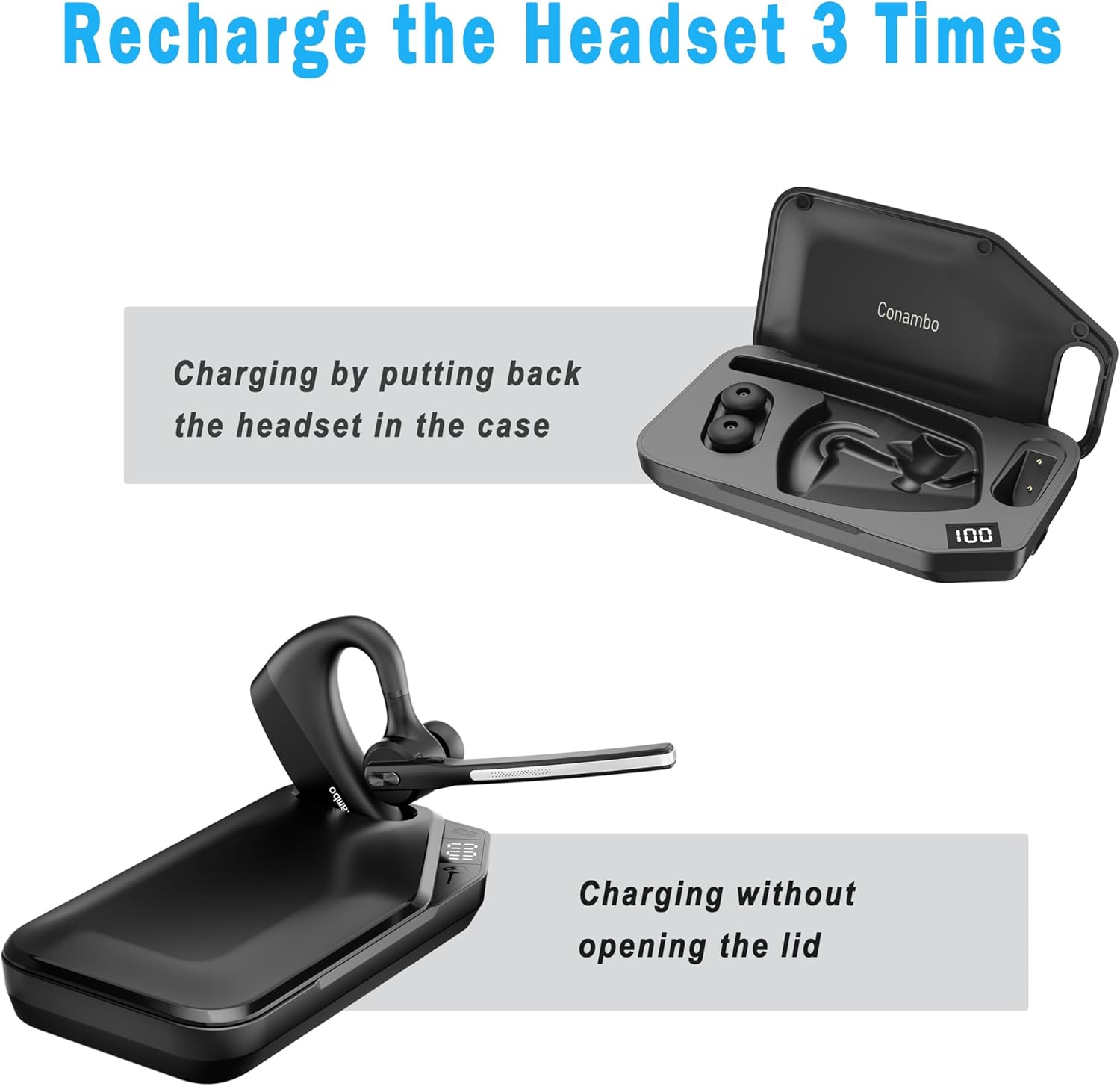
Image: The Conambo K10 Headset being charged by placing it inside its dedicated charging case.
Awọn ilana Iṣiṣẹ
Isakoso Ipe
- Idahun/Ipe Ipari: Tẹ bọtini iṣẹ-ọpọlọpọ lẹẹkan.
- Kọ Ipe: Tẹ mọlẹ bọtini iṣẹ-ọpọlọpọ fun iṣẹju-aaya 2.
- Pakẹ́/Yipadanu: Press the mute button on the boom arm.
- Oluranlọwọ ohun: Press and hold the mute button for 3 seconds to activate Siri or Google Assistant.
Iṣakoso iwọn didun
- Mu iwọn didun pọ si: Tẹ bọtini '+'.
- Din iwọn didun silẹ: Tẹ bọtini '-'.
Sisisẹsẹhin Media
- Ṣiṣẹ/Daduro: Tẹ bọtini iṣẹ-ọpọlọpọ lẹẹkan.
- Orin t’okan: Double-tẹ awọn olona-iṣẹ bọtini.
- Tẹlẹ Orin: Meta-tẹ awọn olona-iṣẹ bọtini.

Aworan: Alaye view of the Conambo K10 Headset, illustrating the location of the Power On/Off switch, Volume +/- buttons, and Mute button.
Itoju
- Ninu: Regularly wipe the headset and charging case with a soft, dry cloth. For ear tips, remove them and clean with mild soap and water, then dry thoroughly before reattaching.
- Ibi ipamọ: Store the headset in its charging case when not in use to protect it from dust and damage. Keep in a cool, dry place away from extreme temperatures.
- Itọju Batiri: To prolong battery life, avoid fully discharging the battery frequently. Charge the headset regularly, even if not in constant use.
Laasigbotitusita
| Isoro | Ojutu |
|---|---|
| Headset won't power on | Ensure the battery is charged. Connect to the charging cable or place in the charging case. |
| Ko le so pọ pẹlu ẹrọ | Ensure Bluetooth is enabled on your device and the headset is in pairing mode (flashing indicator light). Try restarting both devices. |
| Didara ohun afetigbọ | Check the headset's position on your ear. Ensure no obstructions are blocking the microphone. Move closer to your paired device to avoid interference. |
| Charging case not charging headset | Ensure the charging case itself is charged. Verify the headset is correctly seated in the case. |
Awọn pato
- Orukọ awoṣe: K10C
- Imọ-ẹrọ Asopọmọra: Ailokun (Bluetooth 5.2)
- Ibiti Bluetooth: 10 Mita
- Battery Life (Headset): 16 Hours talk time
- Igbesi aye batiri (pẹlu apoti gbigba agbara): Up to 60 Hours talk time
- Noise Control Features: CVC8.0 Dual Mic Noise Cancellation, ENC
- Iru Iṣakoso: Media Control, Volume, Call Control (Touch)
- Ohun elo: Ṣiṣu, Silikoni
- Omi Resistance: IPX4
- Awọn ẹrọ ibaramu: Bluetooth-enabled devices (iPhone, Android, etc.)
Alaye atilẹyin ọja
The Conambo K10 Wireless Bluetooth Headset V5.2 comes with a standard manufacturer's warranty. Please refer to the warranty card included in your product packaging for specific terms and conditions, including warranty duration and coverage details. Keep your proof of purchase for any warranty claims.
Atilẹyin
For further assistance, technical support, or to inquire about replacement parts, please visit the official Conambo website or contact their customer service. Contact details can typically be found in the warranty information or on the product packaging.