
1. Ifihan
This manual provides comprehensive instructions for the installation, operation, and maintenance of your Lloyd's Smart Full HD 1080P Video Intercom System. This system is designed to provide secure access control for your home or office, allowing you to monitor, communicate with, and grant access to visitors remotely.
Please read this manual thoroughly before using the product to ensure proper function and safety. Keep this manual for future reference.
2. Alaye Aabo
Láti dènà ìbàjẹ́ sí ọjà náà tàbí ìpalára fún ara rẹ tàbí àwọn ẹlòmíràn, jọ̀wọ́ tẹ̀lé àwọn ìlànà ààbò wọ̀nyí:
- Rii daju pe gbogbo agbara ti ge asopọ ṣaaju fifi sori ẹrọ tabi itọju.
- Onímọ̀ ẹ̀rọ iná mànàmáná tó mọ̀ nípa rẹ̀ ló yẹ kó fi sori ẹ̀rọ náà tí o kò bá mọ̀ nípa wáyà iná mànàmáná.
- Ma ṣe fi ọja han si awọn iwọn otutu to gaju, ọriniinitutu, tabi oorun taara.
- Lo adapter agbara ati awọn ẹya ẹrọ ti a pese nikan.
- Pa ọja naa kuro ninu omi ati awọn olomi miiran.
- Má ṣe gbìyànjú láti tú tàbí tún ẹ̀rọ náà ṣe fúnra rẹ. Pe olùrànlọ́wọ́ oníbàárà fún ìrànlọ́wọ́.
3. Package Awọn akoonu
Jẹrisi pe gbogbo awọn ohun kan wa ninu package:
- 1 x Monitor (7'' Color LCD Touchscreen)
- 1 x Outdoor Unit (Doorbell with Camera and Keypad)
- 1 x Itọsọna olumulo
- 1 x Ibugbe
- 1 x Rain Cover Bracket
- 1 x Recessed Box
- 1 x Adaṣe AC / DC
- 1 x Atọka iṣagbesori
- Wall Plugs and Mounting Screws
- 3 x Awọn asopọ
- 1 x Allen Screwdriver
- 4 x Connection Cables

Olusin 3.1: Pariview of the Lloyd's Smart Video Intercom System components and packaging.
4. Ọja Ipariview
4.1. Monitor (Indoor Unit)
- Ifihan: 7-inch color LCD touchscreen with 1020 x 600 px resolution.
- Awọn Eto Atunṣe: Brightness, contrast, and volume.
- Awọn iṣẹ: Hands-free intercom, call transfer (requires additional monitor), date, time, and weather display.
- Ibi ipamọ: Integrated memory for up to 30 photos, supports up to 128 GB memory card (not included).
- Asopọmọra: 2.4 GHz Wi-Fi for stable connection in large areas.
4.2. Outdoor Unit (Doorbell)
- Kamẹra: 2MP Full HD (1920x1080) resolution.
- Iran Alẹ: Yes, with LED numeric panel.
- Viewigun Angle: 120 iwọn.
- Iwari išipopada: Detection distance of less than or equal to 3 meters.
- Ohun: 2-way audio with adjustable microphone and speaker volume.
- Iṣakoso Wiwọle: Works with a 12 VDC electric lock (not included), supports 4-6 digit password entry.
- Tamper Button: Sends alerts to your smartphone and triggers an alarm if the outdoor unit is forced.
- Iduroṣinṣin: IP65 rating for indoor or outdoor use.
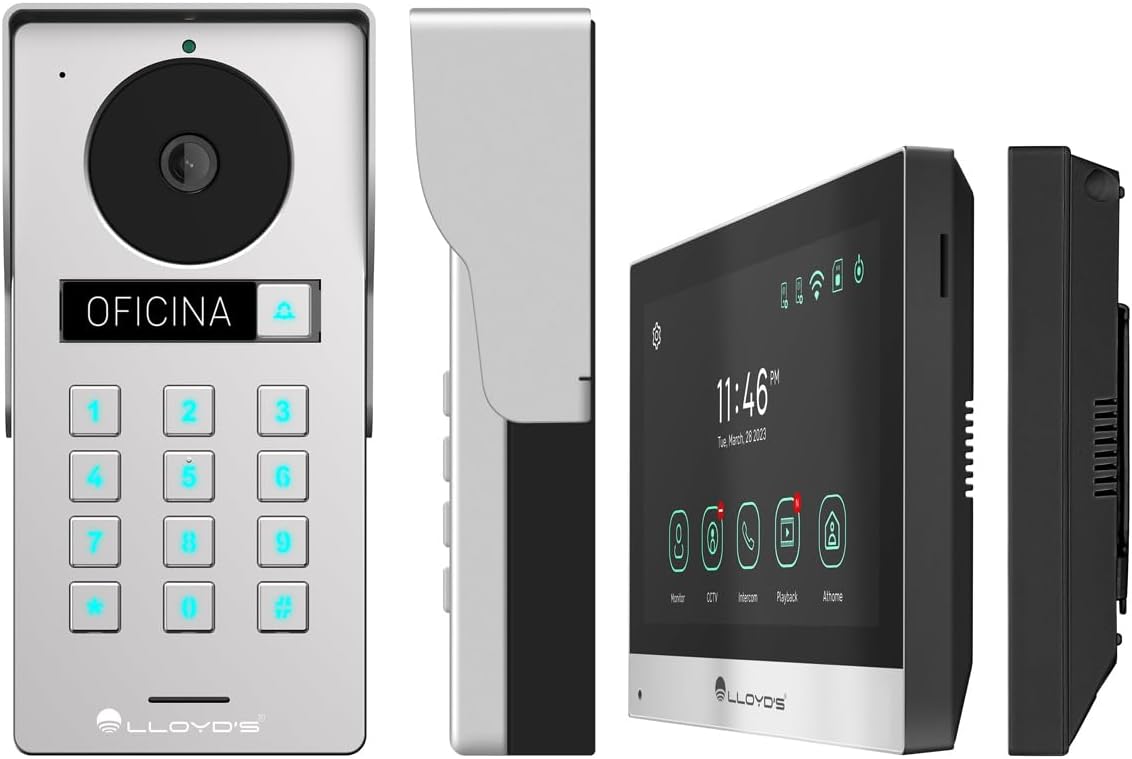
Nọmba 4.1: Alaye views of the outdoor unit and monitor.

Figure 4.2: Key features of the Lloyd's Smart Video Intercom System.
5. Eto ati fifi sori
5.1. Wáyà àti Ìfìsórí
The system requires a wired connection between the monitor and the outdoor unit. The maximum operating distance is 50 meters using a 4-wire cable (0.5 mm² not included). Follow the wiring diagram provided in the quick start guide for correct connections.
- Outdoor Unit Mounting: Choose a suitable location near your entrance, ensuring clear camera view and easy access to the keypad. Use the provided mounting bracket, wall plugs, and screws. The unit is IP65 rated for outdoor use.
- Atẹle iṣagbesori: Install the monitor indoors at a convenient height for viewing and interaction. Use the mounting bracket and screws.
- Asopọ agbara: Connect the AC/DC adapter to the monitor and a power outlet.
- Electric Lock Connection (Optional): If using an electric lock (12 VDC, not included), connect it to the outdoor unit as per the wiring diagram.
5.2. App and Wi-Fi Connection
To utilize smart features, download the Lloyd's smart home application on your smartphone (compatible with Android 5.0+ and iOS 11+).
- Power on the monitor and outdoor unit.
- On the monitor, navigate to the Wi-Fi settings and connect to your 2.4 GHz Wi-Fi network.
- Open the Lloyd's app on your smartphone and create an account or log in.
- Follow the in-app instructions to add your new video intercom system. This typically involves scanning a QR code displayed on the monitor or manually entering device details.
- Once connected, you will receive notifications and can control the system remotely via the app.
6. Awọn ilana Iṣiṣẹ
6.1. Answering Calls and Communication
- When a visitor presses the doorbell button, the monitor will ring, and you will receive a notification on your smartphone.
- On the monitor, tap the "Answer" icon to establish two-way audio and video communication.
- On your smartphone, open the app and tap the incoming call notification to answer.
- The intercom communication time is 60 seconds.

Figure 6.1: Communicate with visitors from anywhere using the app or monitor.

Figure 6.2: Receive instant notifications on your smartphone and monitor.
6.2. Ilẹkun Ṣiṣii
- Lati ohun elo naa: During a call, tap the "Unlock" icon in the app to open the connected electric lock.
- From the Monitor: During a call, tap the "Unlock" icon on the monitor's touchscreen.
- From the Outdoor Unit: Visitors can enter a pre-set 4-6 digit password on the numeric keypad to open the door.
6.3. Motion Detection and Recording
- The system automatically captures photos and videos when motion is detected within 3 meters of the outdoor unit or when someone rings the doorbell.
- You will receive real-time alerts on your smartphone via the app when motion is detected.
- Review recorded events and snapshots through the app or on the monitor.
- The monitoring time for motion detection is 30 seconds.

Figure 6.3: Receive motion detection alerts directly on your smartphone app.

Figure 6.4: Automatic photo and video capture for events.
6.4. Imugboroosi System
The system supports expansion for enhanced security and convenience:
- Up to 2 additional Outdoor Units (Doorbell)
- Up to 3 additional Monitors
- Up to 2 additional Cameras
- Up to 2 additional Sensors
(Additional units and sensors are not included and must be purchased separately.)
You can also integrate the system with other Lloyd's smart home products to create customized routines and share device access with family members.
7. Itọju
- Ninu: Use a soft, dry cloth to clean the monitor screen and outdoor unit. Do not use abrasive cleaners or solvents.
- Awọn imudojuiwọn sọfitiwia: Periodically check the Lloyd's app for firmware updates to ensure optimal performance and security.
- Isakoso Ibi ipamọ: If using a memory card, regularly back up important recordings and delete old files lati laaye aaye.
8. Laasigbotitusita
| Isoro | Owun to le Fa | Ojutu |
|---|---|---|
| No image or sound from outdoor unit. | Loose wiring, power issue, unit malfunction. | Check all cable connections. Ensure power adapter is properly connected. Restart the system. |
| Wi-Fi connection unstable or disconnected. | Weak Wi-Fi signal, incorrect password, router issues. | Ensure the monitor is within Wi-Fi range. Re-enter Wi-Fi password. Restart your router. |
| Cannot open door via app/monitor. | Electric lock not connected, lock malfunction, wiring issue. | Verify electric lock connection and functionality. Check wiring between outdoor unit and lock. |
| Ko si awọn itaniji wiwa išipopada. | Motion detection disabled, incorrect sensitivity, app notification settings. | Enable motion detection in app settings. Adjust sensitivity. Check smartphone notification permissions for the app. |
| Didara fidio ti ko dara. | Dirty camera lens, poor lighting, network bandwidth. | Nu lẹnsi kamẹra naa. Rii daju pe ina to peye. Ṣayẹwo iyara intanẹẹti rẹ. |
9. Awọn pato
| Ẹya ara ẹrọ | Ẹ̀kúnrẹ́rẹ́ |
|---|---|
| Nọmba awoṣe | LC-1373 |
| Ifihan Atẹle | Iboju ifọwọkan LCD awọ 7-inch |
| Ipinnu Atẹle | 1020 x 600 px |
| Outdoor Unit Camera Resolution | 2MP Full HD (1920x1080) |
| Viewigun igun | Awọn iwọn 120 |
| Ibiti Iran Night | Ti o to awọn mita 10 |
| Ibiti Iwari išipopada | ≤ 3 mita |
| Alailowaya Asopọmọra | 2.4 GHz Wi-Fi |
| Ibi ipamọ | Integrated (30 photos), supports up to 128 GB MicroSD (not included) |
| Ibi ti ina elekitiriki ti nwa | 12 VDC (via AC/DC adapter) |
| Lilo Agbara (Iduroṣinṣin) | 4W |
| Lilo Agbara (Ṣiṣe) | 10W |
| Operating Distance (Wired) | Up to 50m (with 0.5 mm² 4-wire cable) |
| Ingress Protection (Outdoor Unit) | IP65 |
| Monitor Dimensions (H x W x D) | 12.4 cm x 18 cm x 2.1 cm |
| Àwọn Ìwọ̀n Ẹ̀yà Ìta gbangba (H x W x D) | 18 cm x 8.7 cm x 3.2 cm |
| Awọn ẹrọ ibaramu | Android 5.0 tabi ga julọ, iOS 11 tabi ga julọ |

Figure 9.1: Dimensions of the Monitor and Outdoor Unit.
10. Atilẹyin ọja ati Support
For warranty information, please refer to the warranty card included with your product or visit the official Lloyd's website. If you encounter any issues or require technical assistance, please contact Lloyd's customer support.
Atilẹyin Onibara: Refer to the contact information provided on the product packaging or the official Lloyd's webojula.
Awọn orisun Ayelujara: Ṣabẹwo Lloyd's Official Store on Amazon fun afikun ọja alaye ati support.
11. Awọn fidio ọja osise
No official seller videos were provided for this product in the available data.