
1. Ifihan
The GPD Win Mini 2025 is a powerful and portable handheld gaming PC designed for gaming, multitasking, and productivity on the go. Featuring an AMD Ryzen 7 8840U processor and Radeon 780M GPU, it delivers high performance in a compact form factor. This manual provides essential information for setting up, operating, and maintaining your device.
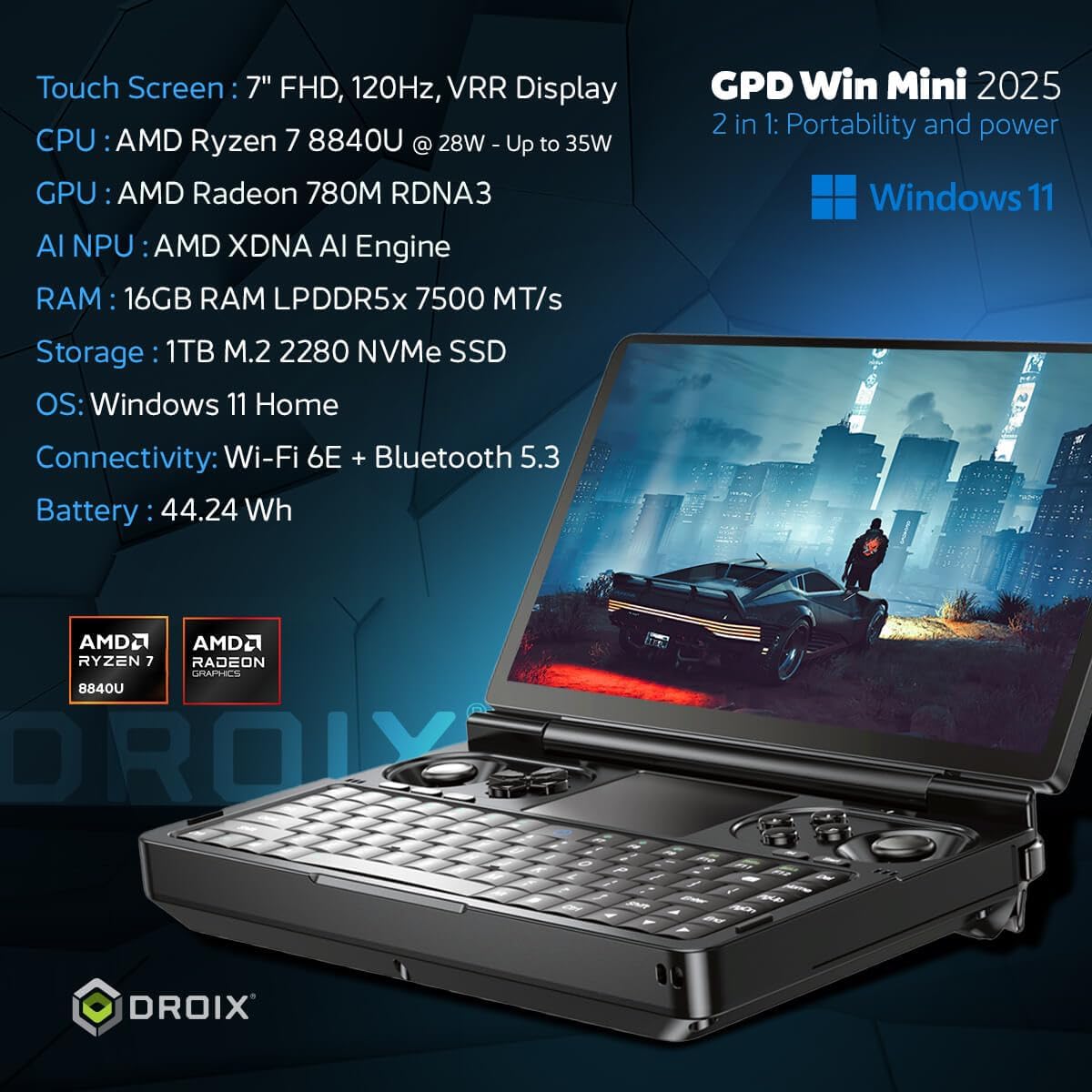
Figure 1: GPD Win Mini 2025 Handheld Gaming PC
2. Ọja Ipariview
2.1 Key Awọn ẹya ara ẹrọ
- Olupilẹṣẹ: AMD Ryzen 7 8840U (8 Cores/16 Threads, up to 5.1GHz)
- Awọn aworan: AMD Radeon 780M GPU (12 Compute Units, up to 2700MHz)
- Ramu: 16GB LPDDR5X Ramu
- Ibi ipamọ: 1TB m.2 PCIe 4.0 NVMe SSD
- Ifihan: 7-inch LTPS Touchscreen, 1920x1080 resolution, 60Hz/120Hz refresh rate, 315 PPI, VRR, AMD FreeSync support
- Asopọmọra: Wi-Fi 6E, Bluetooth 5.3, USB4 Type-C, USB 3.2 Gen 2 Type-C, Micro SD card slot
- Eto isesise: Windows 11 Ile
2.2 Ìṣètò Ti ara

Figure 2: GPD Win Mini 2025 with labeled ports and controls
The device features a clamshell design with a 7-inch touchscreen display. The lower half includes a compact QWERTY keyboard with adjustable backlight, dual analog sticks, a D-pad, and gaming buttons. A non-clickable touchpad is located in the center, supporting finger gestures. A switch on the left side allows toggling between mouse and gamepad modes.
The rear of the device houses shoulder and trigger buttons, a USB4 Type-C port for high-speed peripherals including eGPUs, a standard USB Type-C port for charging, a 3.5mm audio jack, a Micro SD card reader, and a USB-A 3.2 port.
3. Eto
- Idiyele Ibẹrẹ: Before first use, connect the GPD Win Mini 2025 to the included power adapter using the standard USB Type-C port and charge it fully.
- Agbara Tan: Press and hold the power button (usually located on the keyboard area) until the display lights up.
- Eto Windows: Tẹ̀lé àwọn ìlànà tó wà lójú ìbòjú láti parí ìlànà ìṣètò Windows 11 Home, títí kan yíyan èdè, ìsopọ̀ mọ́tò, àti ṣíṣẹ̀dá àkọọ́lẹ̀ olùlò.
- Fifi sori Awakọ: Ensure all necessary drivers are installed. Updates can typically be found on the official GPD support webojula.
4. Ṣiṣẹ ẹrọ naa
4.1 Controls and Input
- Ipò Pádì eré: Use the analog sticks, D-pad, and gaming buttons for precise control in games.
- Ipo Asin: Flip the switch on the left side to activate mouse mode. The touchpad supports tapping and finger gestures. Shoulder buttons can be used for left and right mouse clicks.
- Àtẹ bọ́tìnnì The compact keyboard is suitable for quick replies, web browsing, and in-game chat. It features two levels of adjustable backlight.
4.2 Ifihan Awọn ẹya ara ẹrọ

Figure 3: GPD Win Mini 2025 Display Features
The 7-inch LTPS touchscreen offers a 1920x1080 resolution with a high refresh rate of up to 120Hz, providing crisp visuals and smooth gameplay. It supports Variable Refresh Rate (VRR) and AMD FreeSync for tear-free gaming.
4.3 Asopọmọra
- Ailokun: Connect to networks via Wi-Fi 6E and use Bluetooth 5.3 for wireless peripherals like headphones or controllers.
- Ti fiwe: Utilize the USB4 Type-C port for high-speed data transfer and external GPU connections. The USB 3.2 Gen 2 Type-C and USB-A ports support various accessories.
- Ibi ipamọ ti o gbooro: The Micro SD card slot allows for additional storage capacity.
4.4 batiri Life

Figure 4: GPD Win Mini 2025 Battery Life
The device is powered by a 45Wh rechargeable battery. Battery life varies depending on usage, with approximately 7 hours under light load and up to 2 hours under extreme gaming conditions. For optimal battery longevity, it is recommended to adjust the TDP (Thermal Design Power) settings via the Motion Assistant program.
5. Performance Loriview
The GPD Win Mini 2025, equipped with the AMD Ryzen 7 8840U processor and Radeon 780M GPU, offers robust performance for a wide range of applications, from modern AAA games to emulation of classic consoles.
Video 1: GPD WIN Mini 2025 Review and Performance Benchmarks
5.1 ayo Performance
The device is capable of running many modern games at playable frame rates, especially when optimizing settings. For example, games like Palworld can achieve 60+ FPS at 1080p with low graphics settings and 28W TDP. For more demanding titles, adjusting the resolution to 720p or utilizing AMD FSR (FidelityFX Super Resolution) can significantly improve performance while maintaining visual quality.
5.2 Emulation Performance
The GPD Win Mini 2025 excels in emulation, capable of running a vast library of games from older consoles and handhelds up to the PS3 era. Emulators like DuckStation (PS1) and PCSX2 (PS2) can run games smoothly, often with upscaled internal rendering resolutions and graphic tweaks for enhanced visuals. Even the Vita3K (PS Vita) emulator shows great compatibility and performance.
5.3 External GPU (eGPU) Support

Figure 5: GPD Win Mini 2025 connected to an eGPU for enhanced performance
While the GPD Win Mini 2025 does not feature an Oculink port, its USB4 Type-C port allows connection to external GPUs (eGPUs) such as the GPD G1 or other compatible eGPU docks. This significantly boosts graphical performance, enabling higher frame rates and resolutions for the most demanding games when connected to an external display.
6. Itọju
- Ninu: Use a soft, dry cloth to clean the exterior of the device. For the screen, use a microfiber cloth specifically designed for electronics. Avoid harsh chemicals.
- Ibi ipamọ: Tọju ẹrọ naa ni itura, aye gbigbẹ kuro lati orun taara ati awọn iwọn otutu to gaju.
- Awọn imudojuiwọn sọfitiwia: Regularly check for and install Windows updates and driver updates from the GPD official webaaye lati rii daju iṣẹ ṣiṣe ati aabo to dara julọ.
- Itọju Batiri: Má ṣe jẹ́ kí batiri náà máa gbẹ pátápátá nígbà gbogbo. Fún ìfipamọ́ ìgbà pípẹ́, gba agbára bátìrì náà sí nǹkan bí 50-60%.
7. Laasigbotitusita
- Ẹrọ ti ko ni agbara: Ensure the device is fully charged. If it still doesn't power on, try connecting it to the charger and waiting a few minutes before attempting to power on again.
- Awọn ọran Iṣe: Check for background applications consuming resources. Ensure drivers and Windows are up to date. Adjust in-game graphics settings or TDP via Motion Assistant.
- Awọn iṣoro Asopọmọra: For Wi-Fi or Bluetooth issues, try restarting the device and your router/Bluetooth accessory. Ensure drivers are updated.
- Awọn oran iboju: If the touchscreen is unresponsive, try restarting the device. If the issue persists, check for driver updates.
- Olubasọrọ Support: If you encounter persistent issues that cannot be resolved, please refer to the GPD official support channels for assistance.
8. Awọn pato
| Ẹya ara ẹrọ | Sipesifikesonu |
|---|---|
| Iwọn ifihan iboju duro | 7 inches |
| Ipinnu iboju | 1920 x 1080 |
| Ipinnu Iboju ti o pọju | 1080p Full HD awọn piksẹli |
| isise | 5.1 GHz AMD Ryzen 7 8840U |
| Àgbo | 16 GB LPDDR5X |
| Dirafu lile | 1 TB NVMe SSD |
| Olupilẹṣẹ Graphics | AMD Radeon 780M GPU |
| Ẹya Chipset | AMD |
| Alailowaya Iru | 802.11ax (Wi-Fi 6E) |
| Igbesi aye Batiri Apapọ (ni awọn wakati) | 7 Hours (light use) |
| Eto isesise | Windows 11 Ile |
| Iwọn Nkan | 1.15 iwon |
| Ọja Mefa | 4.29 x 6.61 x 1.02 inches |
| Àwọ̀ | 2025 Ryzen 7 8840U - Black |
| Bluetooth | 5.3 |
9. Atilẹyin ọja & Atilẹyin
For warranty information, technical support, and service inquiries, please refer to the official GPD webojula tabi kan si alagbata rẹ. Jeki ẹri rira rẹ fun awọn iṣeduro atilẹyin ọja.
Ṣabẹwo si GPD Store on Amazon fun afikun ọja alaye ati awọn ẹya ẹrọ.