
TOPTECH STAR-115
STAR-115 15'' Woofer Portable Bluetooth Speaker
Afowoyi Itọsọna olumulo
1. Ifihan
O ṣeun fun riraasing the TOPTECH STAR-115 Portable Bluetooth Speaker. This powerful speaker is designed to deliver blazing sound with a vibrant flame light show, perfect for home use, outdoor gatherings, and parties. Please read this manual carefully before operating the device to ensure proper use and to maximize its performance and lifespan.
2. Alaye Aabo
- Ma ṣe fi agbọrọsọ si omi tabi ọrinrin ti o pọ ju. Ọja yii kii ṣe mabomire.
- Yago fun gbigbe agbọrọsọ si awọn orisun ooru gẹgẹbi awọn imooru, awọn iforukọsilẹ ooru, awọn adiro, tabi awọn ohun elo miiran (pẹlu ampliifiers) ti o gbe ooru jade.
- Lo awọn asomọ/awọn ẹya ara ẹrọ ti a sọ pato nipasẹ olupese.
- Yọọ agbohunsoke nigba iji manamana tabi nigba lilo fun igba pipẹ.
- Ma ṣe dina eyikeyi awọn ṣiṣi atẹgun. Fi sori ẹrọ ni ibamu pẹlu awọn ilana ti olupese.
- Dabobo okun agbara lati ma rin lori tabi pin, ni pataki ni awọn pilogi, awọn ohun elo irọrun, ati aaye nibiti wọn ti jade kuro ninu ohun elo naa.
- Tọkasi gbogbo iṣẹ si awọn oṣiṣẹ iṣẹ ti o peye. Iṣẹ nilo nigbati ohun elo ba ti bajẹ ni ọna eyikeyi, gẹgẹbi okun ipese agbara tabi plug ti bajẹ, omi ti ta silẹ tabi awọn nkan ti ṣubu sinu ẹrọ, ohun elo naa ti farahan si ojo tabi ọrinrin, ko ṣiṣẹ deede. , tabi ti lọ silẹ.
3. Package Awọn akoonu
Jọwọ ṣayẹwo apoti fun awọn nkan wọnyi:
- STAR-115 Portable Bluetooth Speaker
- Isakoṣo latọna jijin
- Gbohungbo onina
- Adapter agbara
- Afowoyi Olumulo (iwe-ipamọ yii)
- Kaadi atilẹyin ọja
4. Ọja Ipariview
Familiarize yourself with the various parts of your STAR-115 speaker.

Iwaju view of the STAR-115 speaker, showcasing its 15-inch woofer and vibrant multi-color flame light display.
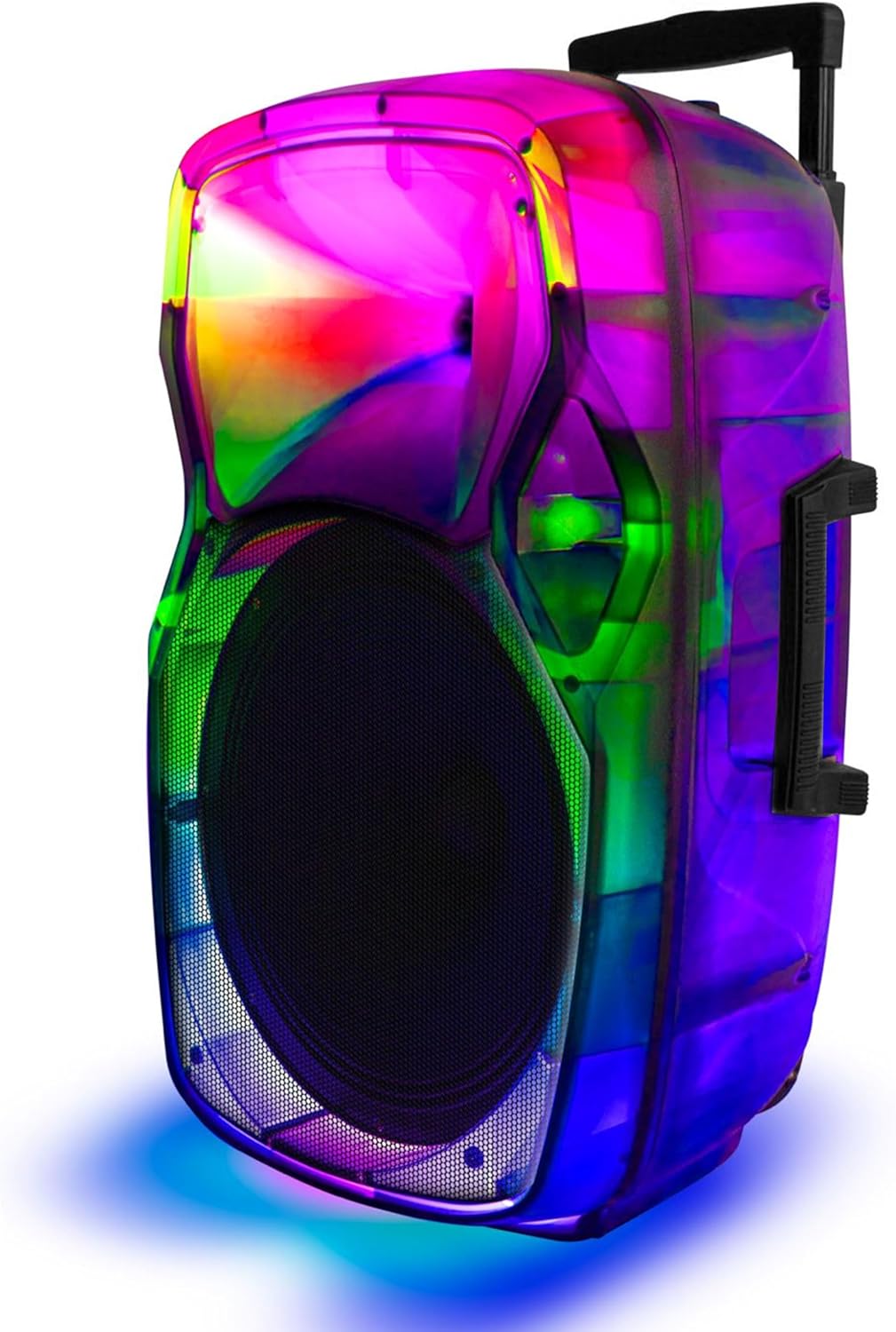
Apa view of the STAR-115 speaker, highlighting its integrated handle and wheels for easy portability.
Control Panel (Top/Rear)
- Bọtini agbara: N tan/pa agbohunsoke.
- Bọtini Ipo: Àwọn ìyípadà láàrín àwọn ipò Bluetooth, FM Radio, AUX, USB, àti TF Card.
- Iṣakoso iwọn didun: Ṣatunṣe iwọn didun oluwa.
- Iṣawọle gbohungbohun: Fún sísopọ̀ gbohungbohun onírin.
- Ibudo USB: Fun awọn awakọ filasi USB.
- Iho Kaadi TF: For TF (MicroSD) cards.
- Iṣawọle AUX: Fun sisopọ awọn ẹrọ ohun afetigbọ ita nipasẹ okun 3.5mm kan.
- Bọtini Ipo Imọlẹ: Controls the flame light effects.
- Ti tẹlẹ/Awọn bọtini orin atẹle: Navigates through tracks in media playback modes.
- Bọ́tìnnì Ṣíṣe/Sánu duro: Awọn iṣakoso ṣiṣiṣẹsẹhin.
5. Eto
5.1 Gbigba agbara si Agbọrọsọ
Before first use, fully charge the speaker. Connect the provided power adapter to the speaker's charging port and plug it into a standard wall outlet. The charging indicator light will show the charging status (e.g., red for charging, off or green for fully charged).

The speaker features a reliable battery for extended playback. Ensure it is fully charged before use.
A full charge provides approximately 6 hours of battery life, depending on usage and volume levels.
5.2 Titan / Pa a
Tẹ mọlẹ Bọtini agbara lórí pánẹ́ẹ̀lì ìṣàkóso láti tan tàbí pa agbọ́hùnsọ̀.
6. Awọn ilana Iṣiṣẹ
6.1 Bluetooth Asopọ
The STAR-115 speaker is compatible with Bluetooth-enabled devices for wireless audio streaming.
- Tan agbohunsoke. Yoo tẹ ipo sisopọ pọ si Bluetooth laifọwọyi, ti a fihan nipasẹ ina LED didan.
- Lori ẹrọ alagbeka rẹ (foonuiyara, tabulẹti, ati bẹbẹ lọ), mu Bluetooth ṣiṣẹ ki o wa awọn ẹrọ to wa.
- Select "STAR-115" from the list of devices.
- Once connected, the speaker will emit a confirmation sound, and the LED light will stop flashing.

Quick and easy connection via Bluetooth, USB, TF card, AUX, or FM Radio.
6.2 USB / TF Kaadi Sisisẹsẹhin
Insert a USB flash drive or TF (MicroSD) card into the respective port. The speaker will automatically switch to USB/TF mode and begin playing audio files (MP3, WAV, ati bẹbẹ lọ) lati inu ẹrọ ibi ipamọ naa.
- Use the Previous/Next Track buttons to navigate.
- Tẹ bọtini Play/Duro lati ṣakoso ṣiṣiṣẹsẹhin.
6.3 Iṣawọle AUX
Connect an external audio device (e.g., MP3 player, laptop) to the speaker's AUX input using a 3.5mm audio cable. The speaker will automatically switch to AUX mode. Control playback from your connected device.
6.4 Redio FM
Tẹ awọn Bọtini Ipo to switch to FM Radio mode. The speaker will automatically scan and save available radio stations. Use the Previous/Next Track buttons to switch between saved stations.
6.5 Gbohungbohun Lilo
Connect the wired microphone to the Microphone Input port. Adjust the microphone volume using the dedicated knob on the control panel (if available) or the master volume.
6.6 Flame Light Operation
The STAR-115 features a multi-color flame light show. Press the Bọtini Ipo Imọlẹ to activate or change the lighting effects. Press again to cycle through different patterns or turn off the lights.

One click activation of multi-color disco lights adds extra excitement to your gathering.
6.7 Otitọ Sitẹrio Alailowaya (TWS) Sisọpọ
For an unparalleled stereo sound experience, you can pair two STAR-115 speakers together.
- Rii daju pe awọn agbohunsoke mejeeji wa ni titan ati pe ko sopọ si eyikeyi ẹrọ Bluetooth.
- On one speaker (this will be the primary speaker), press and hold the TWS button (refer to control panel diagram if available, or try the Mode button for 3 seconds if no dedicated TWS button).
- Agbọrọsọ akọkọ yoo wa agbọrọsọ keji. Ni kete ti a ba ti sopọ mọ wọn, awọn agbọrọsọ mejeeji yoo gbe ohùn idaniloju jade.
- Bayi, so ẹrọ alagbeka rẹ pọ si agbọrọsọ akọkọ nipasẹ Bluetooth gẹgẹbi a ti ṣalaye ni apakan 6.1. Audio yoo ṣiṣẹ nipasẹ awọn agbohunsoke mejeeji ni sitẹrio.

Pair two speakers to get true wireless stereo sound, creating a harmonious and immersive sound environment.
6.8 Latọna Iṣakoso Lilo
The included remote control allows for convenient operation from a distance. Functions include power on/off, mode selection, volume control, track navigation, play/pause, and light control.
7. Itọju
7.1 Ninu
Wipe the speaker's exterior with a soft, dry cloth. Do not use abrasive cleaners, waxes, or solvents as they may damage the finish. Avoid spraying liquids directly onto the speaker.
7.2 Ibi ipamọ
Tí o kò bá lò ó fún ìgbà pípẹ́, tọ́jú agbọ́hùnsọ̀ náà sí ibi tí ó tutù tí ó sì gbẹ, tí kò sí ìmọ́lẹ̀ oòrùn tààrà àti ooru tó le koko. A gbani nímọ̀ràn láti máa gba agbára bátírì náà nígbàkúgbà (fún àpẹẹrẹ, ní gbogbo oṣù mẹ́ta) láti lè máa tọ́jú ìlera rẹ̀.
8. Laasigbotitusita
| Isoro | Owun to le Fa | Ojutu |
|---|---|---|
| Agbọrọsọ ko ni tan. | Batiri ti dinku. | Connect the speaker to the power adapter and charge it. |
| Ko si ohun. | Iwọn didun ti lọ silẹ tabi dakẹ. | Increase the volume on the speaker and your connected device. |
| Asopọ Bluetooth kuna. | Agbọrọsọ ko si ni ipo sisopọ; ẹrọ jẹ ju jina; kikọlu. | Ensure speaker is in pairing mode. Move device closer. Disconnect other Bluetooth devices. Try restarting both speaker and device. |
| Káàdì USB/TF kò ṣiṣẹ́. | Ti ko tọ file ìṣètò; a kò fi káàdì/wakọ̀ sí i dáadáa; ó bàjẹ́ files. | Rii daju files are in supported format (MP3, WAV). Reinsert the card/drive. Try a different card/drive. |
| Gbohungbohun ko ṣiṣẹ. | Microphone not connected properly; microphone volume too low. | Ensure microphone is fully plugged in. Adjust microphone volume. |
| TWS sisopọ kuna. | Àwọn agbọ́hùnsọ̀ tí a ti so pọ̀ mọ́ àwọn ẹ̀rọ mìíràn tẹ́lẹ̀; ó jìnnà jù. | Ensure both speakers are disconnected from other Bluetooth devices. Place them close together during pairing. |
9. Awọn pato
| Ẹya ara ẹrọ | Ẹ̀kúnrẹ́rẹ́ |
|---|---|
| Orukọ awoṣe | irawo-115 |
| Agbọrọsọ Iru | Woofer |
| Iwọn Iwọn Woofer | 15 inches |
| Asopọmọra Technology | Bluetooth |
| Imọ-ẹrọ Ibaraẹnisọrọ Alailowaya | Bluetooth |
| Bluetooth Ibiti | 33 Ẹsẹ (Mita 10) |
| Orisun agbara | Agbara Batiri |
| Igbesi aye batiri | Awọn wakati 6 |
| Agbọrọsọ Agbara Ijade ti o pọju | 150 Wattis |
| Ipo Ijade Ohun | Sitẹrio |
| Awọn irinše to wa | Remote control, wired microphone, adapter, user manual, warranty card |
| Ọja Mefa | 1"D x 1"W x 1"H (Note: This appears to be a placeholder, actual dimensions may vary) |
| Àwọ̀ | Dudu |
| Se mabomire | ERO |
| Olupese | Top Tech Audio |
| UPC | 755824425859 |
10. Atilẹyin ọja ati Support
10.1 atilẹyin ọja Alaye
This product comes with a Limited Warranty. Please refer to the included Warranty Card for detailed terms and conditions, including coverage period and what is covered. Keep your purchase receipt as proof of purchase for warranty claims.
10.2 Onibara Support
If you encounter any issues not covered in this manual or require further assistance, please contact TOPTECH customer support. Contact information can typically be found on the product packaging, warranty card, or the official TOPTECH webojula.
Fun alaye siwaju sii, o le ṣàbẹwò awọn TOPTECH Store on Amazon.
Ask a question about this manual
Ask about setup, troubleshooting, compatibility, parts, safety, or missing instructions. Manuals+ will review the question and use this page’s manual context to help answer it.