
TOPTECH BRAZE-6-BK
BRAZE-6 Portable Bluetooth Speaker User Manual
Model: BRAZE-6-BK | Brand: TOPTECH
1. Ifihan
The TOPTECH BRAZE-6 is a portable wireless Bluetooth speaker system designed to deliver powerful sound with an integrated LED light show. Featuring dual 3-inch woofers, this rechargeable speaker is suitable for various indoor and outdoor settings, including parties, gatherings, and personal listening.
It supports multiple audio input sources, including Bluetooth, USB, TF card, FM radio, and AUX, and offers True Wireless Stereo (TWS) functionality for enhanced audio experience. The built-in rechargeable battery provides extended standby time, ensuring your music accompanies you for longer durations.

Aworan 1.1: Iwaju view of the BRAZE-6 Portable Bluetooth Speaker, showcasing its dual woofers and multi-color LED lighting.
2. Package Awọn akoonu
Jọwọ rii daju pe gbogbo awọn nkan ti a ṣe akojọ rẹ si isalẹ wa ninu package rẹ:
- BRAZE-6 Portable Bluetooth Speaker
- Isakoṣo latọna jijin
- Gbohungbo onina
- Adapter agbara
- Afowoyi Olumulo (iwe-ipamọ yii)
- Kaadi atilẹyin ọja
3. Ọja Ipariview
Familiarize yourself with the main components and controls of your BRAZE-6 speaker.

Aworan 3.1: Apa view of the BRAZE-6 speaker, highlighting the top-mounted control buttons.
Pánẹ́lì Ìṣàkóso (Òkè)
- Bọtini agbara: Yipada agbohunsoke Tan/Pa.
- Bọtini Ipo: Yíyípadà láàárín àwọn ipò káàdì Bluetooth, FM Radio, AUX, USB, àti TF.
- Bọ́tìnnì Ṣíṣe/Sánu duro: Ṣiṣẹ tabi daduro ṣiṣiṣẹsẹhin ohun.
- Ti tẹlẹ/Awọn bọtini orin atẹle: Ó ń lọ kiri nípasẹ̀ àwọn orin tàbí àwọn ibùdó rédíò FM.
- Iṣakoso iwọn didun: Ṣatunṣe iwọn didun oluwa.
- Bọtini Imọlẹ LED: Activates or changes the LED light patterns.
Input Ports (Rear/Side)
- Ibudo USB: Fun awọn awakọ filasi USB.
- Iho Kaadi TF: For TF (MicroSD) cards.
- Iṣawọle AUX: Fun sisopọ awọn ẹrọ ohun afetigbọ ita nipasẹ okun ohun afetigbọ 3.5mm kan.
- Iṣawọle gbohungbohun: Fún sísopọ̀ gbohungbohun onírin.
- Iṣawọle DC 5V: Fun gbigba agbara si agbọrọsọ.
4. Bibẹrẹ
4.1 Gbigba agbara si Agbọrọsọ
Before first use, fully charge the speaker for optimal battery life.
- Connect the provided power adapter to the DC 5V input port on the speaker.
- Pulọọgi ohun ti nmu badọgba sinu iṣan ogiri boṣewa.
- The charging indicator light will illuminate (color may vary) to show charging is in progress.
- Once fully charged, the indicator light will change or turn off. Disconnect the adapter.
Note: The speaker can be used while charging, but it is recommended to fully charge it before initial use.
4.2 Titan / Pa a
- Lati tan -an, tẹ mọlẹ Bọtini agbara until the speaker activates and you hear an audible prompt.
- Lati fi agbara si pipa, tẹ mọlẹ Bọtini agbara lẹẹkansi titi ti agbọrọsọ tiipa.
5. Awọn ilana Iṣiṣẹ
5.1 Bluetooth Asopọmọra
Pair your BRAZE-6 speaker with a Bluetooth-enabled device (e.g., smartphone, tablet, computer).
- Rí i dájú pé a ti tan agbọrọsọ naa ati pe o wa ni ipo Bluetooth. Ti ko ba ri bẹẹ, tẹ bọtini naa. Bọtini Ipo until you hear the "Bluetooth mode" prompt. The LED lights may flash to indicate pairing mode.
- Lori ẹrọ rẹ, mu Bluetooth ṣiṣẹ ki o wa awọn ẹrọ to wa.
- Select "BRAZE-6" from the list of found devices.
- Once paired, you will hear a confirmation sound, and the LED lights may change their pattern.
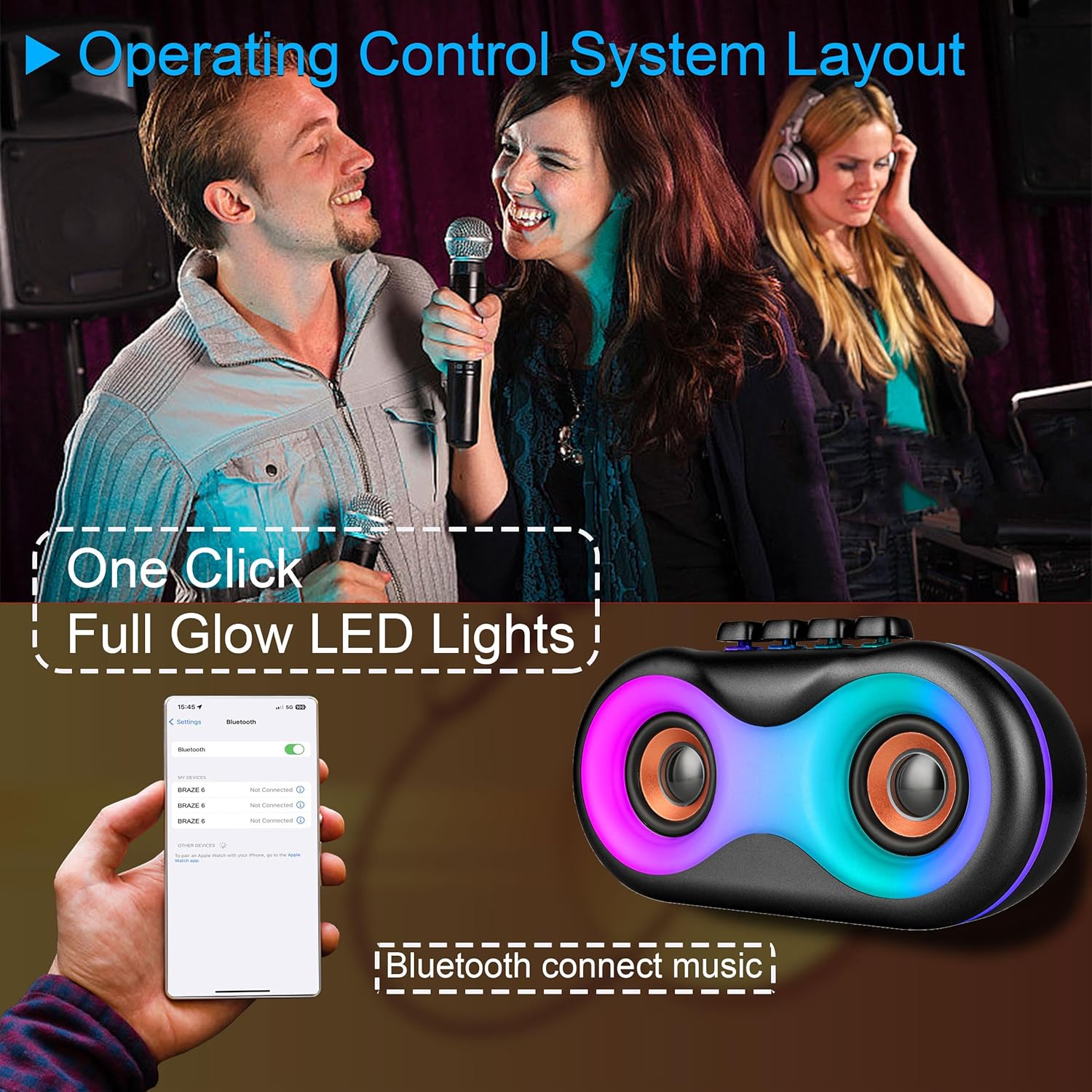
Image 5.1: Illustration of Bluetooth pairing process with a smartphone, showing the speaker's LED lights active.
Note: The speaker supports BLE agreements for stable wireless audio streaming up to 10 meters (33 feet).
5.2 Playing Audio from Various Sources
The BRAZE-6 speaker supports multiple input methods:

Image 5.2: Visual representation of supported input types: USB, Bluetooth, FM Radio, TWS, AUX, and TF Card.
- Káàdì USB/TF: Insert a USB flash drive or TF card into the respective port. The speaker will automatically switch to the correct mode and begin playing audio files.
- Iṣawọle AUX: So ẹ̀rọ ohùn ìta kan (fún àpẹẹrẹ, ẹ̀rọ orin MP3, kọ̀ǹpútà alágbèéká) mọ́ ibudo AUX nípa lílo okùn ohùn 3.5mm. Bọtini Ipo lati yan ipo AUX.
- Redio FM: Tẹ awọn Bọtini Ipo to switch to FM Radio mode. Use the Previous/Next Track buttons to scan for stations.
5.3 LED Light Show
The BRAZE-6 features dynamic multi-color LED lights that enhance your listening experience.
- Tẹ awọn Bọtini Imọlẹ LED on the control panel to activate the light show.
- Press the button again to cycle through different light patterns or turn the lights off.

Image 5.3: The BRAZE-6 speaker with its powerful stereo sound output and integrated lighting effects.
5.4 Wired Microphone Usage
Connect the included wired microphone for karaoke or public address functions.
- Plug the microphone cable into the dedicated Microphone Input port on the speaker.
- Adjust the microphone volume using the speaker's controls or the microphone's built-in controls if available.
5.5 Otitọ Alailowaya Sitẹrio (TWS) iṣẹ
The TWS function allows you to pair two BRAZE-6 speakers together for a true stereo sound experience.
- Ensure both BRAZE-6 speakers are powered on and in Bluetooth pairing mode (not connected to any device).
- Lori ọkan ninu awọn agbohunsoke (eyi yoo jẹ agbọrọsọ akọkọ), tẹ mọlẹ Bọtini TWS (if available, or a combination of buttons as per specific model instructions, typically the Play/Pause button).
- Àwọn agbọ́hùnsọ̀ náà yóò gbìyànjú láti sopọ̀ mọ́ ara wọn. Nígbà tí a bá ti so wọ́n pọ̀, a ó gbọ́ ìró ìjẹ́rìísí.
- Now, connect your Bluetooth device to the primary speaker. Audio will play through both speakers in stereo.
6. Itọju ati Itọju
6.1 Ninu
- Wipe the speaker's exterior with a soft, dry, or slightly damp asọ.
- Do not use abrasive cleaners, alcohol, benzene, or other volatile solvents, as they may damage the surface.
- Ensure no liquid enters the speaker's ports or openings.
6.2 Ibi ipamọ
- Tọju agbohunsoke ni itura, aye gbigbẹ kuro lati orun taara ati awọn iwọn otutu to gaju.
- Yago fun titoju ni eruku tabi agbegbe ọrinrin.
6.3 batiri Itọju
- Lati pẹ aye batiri, yago fun gbigba agbara si batiri ni kikun nigbagbogbo.
- If the speaker will not be used for an extended period, charge it to approximately 50% every 3-6 months.
- Ma ṣe fi batiri han si ooru ti o pọju, gẹgẹbi imọlẹ orun taara tabi ina.
7. Laasigbotitusita
If you encounter issues with your BRAZE-6 speaker, refer to the following common problems and solutions:
| Isoro | Owun to le Fa | Ojutu |
|---|---|---|
| Agbọrọsọ ko ni agbara lori. | Batiri kekere; Bọtini agbara ko tẹ ni deede. | Charge the speaker; Press and hold the Power button for a few seconds. |
| Ko si ohun. | Iwọn ti o kere ju; Ti yan ipo ti ko tọ; Ẹrọ ko ni asopọ daradara. | Increase volume; Press Mode button to select correct input; Reconnect device. |
| Asopọ Bluetooth kuna. | Agbọrọsọ kii ṣe ni ipo sisopọ; Ẹrọ Bluetooth kuro; Ju jina lati agbọrọsọ. | Ensure speaker is in Bluetooth mode; Turn on device Bluetooth; Move device closer (within 10m). |
| Awọn imọlẹ LED ko ṣiṣẹ. | LED light feature turned off. | Press the LED Light Button to activate. |
| Gbigba redio FM ti ko dara. | Ifihan agbara; kikọlu. | Ṣàtúnṣe ipò agbọrọsọ; Fa eriali náà sí i tí ó bá wà. |
8. Imọ ni pato
Detailed specifications for the BRAZE-6 Portable Bluetooth Speaker:

Image 8.1: Product dimensions of the BRAZE-6 speaker.
| Ẹya ara ẹrọ | Sipesifikesonu |
|---|---|
| Orukọ awoṣe | BRAZE-6-BK |
| Brand | TOPTECH |
| Agbọrọsọ Iru | Woofer (Dual 3-inch) |
| Asopọmọra Technology | Bluetooth, Auxiliary, USB, Wireless |
| Ilana Asopọmọra | Bluetooth |
| Pataki Ẹya | Imọlẹ LED |
| Orisun agbara | Agbara Batiri |
| Awọn iwọn Ọja (D x W x H) | 18.9" x 13.2" x 22.83" |
| Àwọ̀ | Dudu |
| Adarí Iru | Bọtini |
| Niyanju Lilo | Fun Foonuiyara tabi Awọn tabulẹti |
| Awọn ẹrọ ibaramu | Foonuiyara |
| Se mabomire | ODODO |
| Nọmba ti Awọn nkan | 1 |
| UPC | 755824425996 |
| Olupese | Top Tech Audio |
9. Atilẹyin ọja ati Support
Your BRAZE-6 Portable Bluetooth Speaker comes with a warranty. Please refer to the included warranty card for specific terms and conditions, including coverage period and claim procedures.
For technical support, troubleshooting assistance beyond this manual, or warranty inquiries, please contact TOPTECH customer service through the following channels:
- Atilẹyin Ayelujara: Visit the official TOPTECH website or Amazon store page for contact information.
- Imeeli Atilẹyin: Tọkasi kaadi atilẹyin ọja rẹ tabi apoti ọja fun adirẹsi imeeli iṣẹ alabara.
For more information about TOPTECH products, you can visit the TOPTECH Store on Amazon.
Ask a question about this manual
Ask about setup, troubleshooting, compatibility, parts, safety, or missing instructions. Manuals+ will review the question and use this page’s manual context to help answer it.