
1. Ifihan ati Loriview
The Ditec RM-L 1370 is a universal replacement remote control designed for a wide range of Sony Bravia televisions. This remote offers direct compatibility with various Sony LCD, LED, UHD, OLED, and QLED 4K Ultra HD Smart Android TV models, eliminating the need for complex programming or pairing. It features dedicated hotkeys for popular streaming services like YouTube and Netflix for convenient access.

Image: The Ditec RM-L 1370 remote control, highlighting its compatibility as a single remote solution for Sony TVs.
2. Eto ati Ibẹrẹ Lilo
This remote control is designed for immediate use without any setup or programming. Simply insert the required batteries, and it will be ready to operate your compatible Sony TV.
2.1 Fifi sori batiri
- Wa yara batiri ni ẹhin isakoṣo latọna jijin.
- Ifaworanhan ṣii ideri kompaktimenti batiri.
- Insert two (2) AAA batteries (not included), ensuring correct polarity (+ and - terminals).
- Pa ideri batiri naa ni aabo.

Aworan: Ẹyin view of the remote control, illustrating the battery compartment location.
2.2 First Lo
Once batteries are installed, point the remote control towards your Sony TV and press the Power button. The remote should operate your TV without any further configuration.
3. Awọn ilana Iṣiṣẹ
The Ditec RM-L 1370 remote control provides all standard functions for your Sony Bravia TV, along with convenient shortcut buttons.
3.1 Ipilẹ Awọn iṣẹ
- Bọtini agbara: Tan TV si tan tabi paa.
- Awọn bọtini nọmba (0-9): Fun yiyan ikanni taara.
- Iwọn didun Soke/Isalẹ: Ṣe atunṣe iwọn didun TV.
- Ikanni Soke/Isalẹ: Ayipada TV awọn ikanni.
- Paadi lilọ kiri (Soke/isalẹ/osi/ọtun/tẹ sii): Fun lilọ kiri akojọ aṣayan ati yiyan.
- Bọtini Ile: Accesses the TV's Smart Home screen or main menu.
- Return/Back Button: Pada si iboju iṣaaju tabi akojọ aṣayan.
- Bọ́tìnì Àwọn Àṣàyàn: Ṣe afihan awọn aṣayan ifaramọ ọrọ-ọrọ.
3.2 Pataki Awọn ẹya ara ẹrọ
- YouTube Hotkey: Directly launches the YouTube application.
- Netflix Hotkey: Directly launches the Netflix application.
The remote features an enhanced infrared sensor for a farther transmitting distance, allowing effective control up to 50 feet.

Image: The remote control demonstrating its farther distance sensor, capable of operating up to 50 feet.
4. Ibamu
The Ditec RM-L 1370 universal remote is compatible with a wide range of Sony Bravia LCD, LED, UHD, OLED, and QLED 4K Ultra HD Smart Android TVs. It is designed to replace many original Sony remote models, including but not limited to:
- RMT-TX100U, RMT-TX102U
- RMF-TX200U, RMF-TX201U, RMF-TX220U
- RMT-TX300U, RMF-TX310U
- RMT-TX500U, RMF-TX520U, RMF-TX600U
- And many other Sony TV remote models.
For a comprehensive list of compatible Sony TV remote models, please refer to the image below:
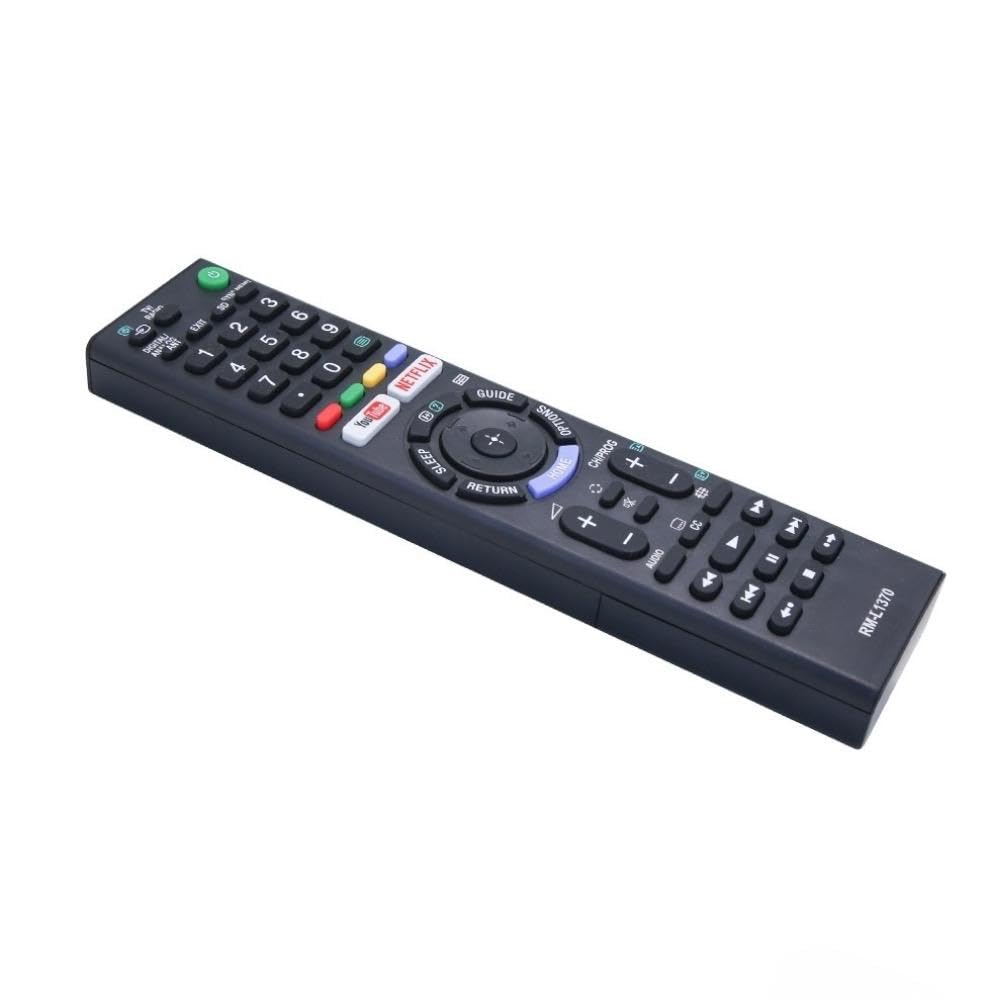
Image: A detailed list of Sony TV remote models that are compatible with the Ditec RM-L 1370.
It is recommended to compare the appearance of this remote with your original remote for visual confirmation of compatibility.
5. Itọju
5.1 Batiri Rirọpo
When the remote control's performance degrades or it stops responding, replace the batteries with two new AAA alkaline batteries. Always replace both batteries at the same time. Do not mix old and new batteries or different types of batteries.
5.2 Ninu
To clean the remote control, use a soft, dry cloth. Do not use liquid cleaners, sprays, or abrasive materials, as these may damage the remote's surface or internal components.
6. Laasigbotitusita
- Latọna jijin ko dahun:
- Ṣayẹwo boya awọn batiri ti wa ni fi sii bi o ti tọ pẹlu polarity to tọ.
- Rọpo awọn batiri atijọ pẹlu awọn tuntun.
- Rii daju pe ko si awọn idena laarin isakoṣo latọna jijin ati olugba infurarẹẹdi ti TV.
- Rii daju pe o wa laarin iwọn iṣẹ ṣiṣe ti o munadoko (to awọn ẹsẹ 50).
- Awọn bọtini kan pato ko ṣiṣẹ:
- Some advanced functions or TV-specific features might not be supported by a universal replacement remote.
- Ensure the TV is powered on and functioning correctly.
7. Awọn pato
| Ẹya ara ẹrọ | Ẹ̀kúnrẹ́rẹ́ |
|---|---|
| Brand | Ditek |
| Awoṣe | RM-L 1370 |
| Awọn ẹrọ ibaramu | Sony Bravia LCD, LED, UHD, OLED, QLED 4K Ultra HD Smart Android TVs |
| Asopọmọra Iru | Infurarẹẹdi (IR) |
| Awọn batiri ti a beere | 2 x AAA (ko si) |
| Pataki Awọn ẹya ara ẹrọ | Ergonomic design, YouTube & Netflix Hotkeys |
| Ọja Mefa | 3 x 3 x 12 cm |
| Iwọn Nkan | 80 g |
| Ilu isenbale | China |
8. Atilẹyin
For assistance with compatibility or any questions regarding your Ditec RM-L 1370 remote control, you may contact support by sending a picture of your old remote or your device's brand name and model number to +91 9924350801. This will help in verifying compatibility or addressing specific queries.

Image: Information on how to contact support for compatibility checks or questions.