
1. Ifihan
Thank you for choosing the Candy Brava CDPN 2D360PWZ-19 Freestanding Dishwasher. This manual provides essential information for the safe and efficient operation, installation, and maintenance of your appliance. Please read it thoroughly before using the dishwasher and keep it for future reference.
2. Alaye Aabo
- Ensure the dishwasher is properly earthed.
- Maṣe fi ọwọ kan ohun elo alapapo lakoko tabi lẹsẹkẹsẹ lẹhin yiyi iwẹ.
- Máa jẹ́ kí àwọn ọmọdé jìnnà sí ohun èlò ìṣiṣẹ́ náà, pàápàá nígbà tí ìlẹ̀kùn bá ṣí sílẹ̀.
- Lo àwọn ohun ìfọṣọ àti àwọn ohun èlò ìfọṣọ tí a ṣe pàtó fún àwọn ẹ̀rọ ìfọṣọ nìkan.
- Má ṣe ṣí ìlẹ̀kùn nígbà tí o bá ń ṣiṣẹ́, nítorí pé omi gbígbóná lè tú jáde.
- Ni ọran ti aiṣedeede, pa ohun elo naa kuro ki o ge asopọ lati ipese agbara ṣaaju igbiyanju eyikeyi ayewo tabi atunṣe.
3. Ọja Ipariview
The Candy Brava CDPN 2D360PWZ-19 is a freestanding dishwasher designed for residential use, offering a capacity of 13 place settings. It features 9 wash programs, Wi-Fi and Bluetooth connectivity for smart control, and an energy efficiency rating of A++.
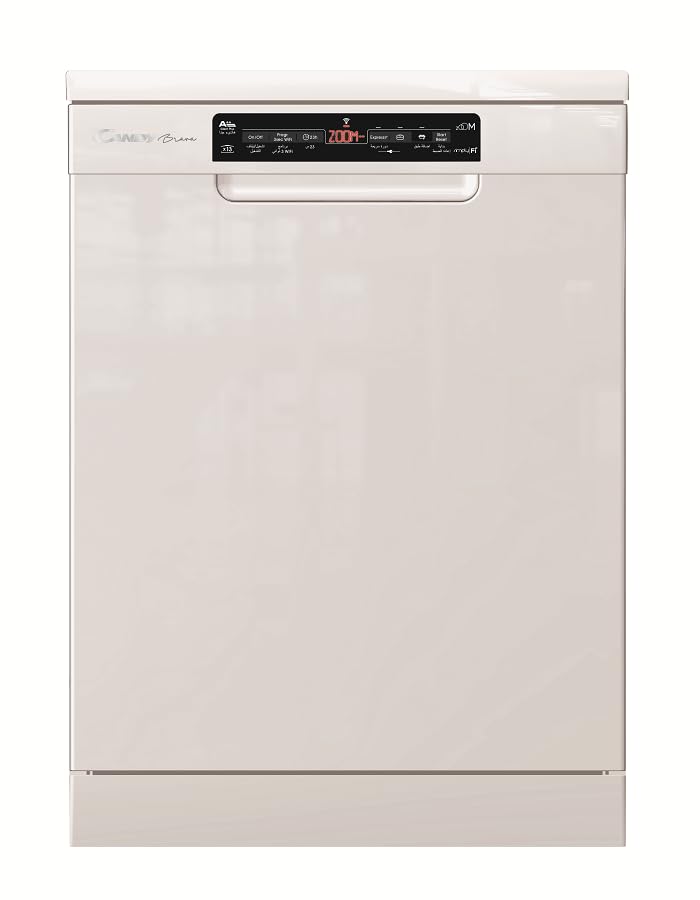
olusin 3.1: Iwaju view of the Candy Brava CDPN 2D360PWZ-19 Dishwasher in white.
Awọn ẹya pataki:
- Agbara: 13 place settings, suitable for families of 4-5 people.
- Awọn eto fifọ: 9 diverse programs, including a fast Class A cycle (Zoom 39') and a Quick 24' cycle.
- Asopọmọra: Wi-Fi and Bluetooth for remote monitoring and control via a smartphone app.
- Lilo Agbara: A++ rating (according to 2010/30/EC standards).
- Isẹ idakẹjẹ: Ìpele ariwo ti 47 dB.
- Irọrun: Adjustable upper basket, "ADDish" function to add forgotten items, 5-digit display with end-of-cycle indicator.
- Omi Omi: Integrated water softener system.
4. Eto ati fifi sori
The Candy Brava CDPN 2D360PWZ-19 is a freestanding unit designed for straightforward installation. Professional installation is recommended for optimal performance and safety.
4.1 Ṣiṣii silẹ
Carefully remove all packaging materials. Inspect the dishwasher for any damage incurred during transit. Report any damage to your retailer immediately.
4.2 Ipo ipo
Place the dishwasher on a level, stable surface. Ensure there is adequate space for the door to open fully and for proper ventilation around the appliance.
4.3 Omi Asopọ
Connect the water inlet hose to a cold water supply tap. Ensure the connection is secure to prevent leaks. Connect the drain hose to a suitable drain point, ensuring it is not kinked or obstructed.
4.4 Itanna Asopọ
Plug the dishwasher into a grounded 220V electrical outlet. Do not use extension cords or adapters. Ensure the power cord is not trapped or damaged.
5. Awọn ilana Iṣiṣẹ
Follow these steps for basic operation of your Candy Brava dishwasher.
5.1 Nkojọpọ ẹrọ ifọṣọ
Scrape off large food particles from dishes. Load dishes securely, ensuring water can reach all surfaces. The upper basket is adjustable for flexible loading of taller items. Place cutlery in the provided cutlery basket.
5.2 Fifi Detergent ati Iranlọwọ Fi omi ṣan
Fill the detergent dispenser with the appropriate amount of dishwasher detergent. Check the rinse aid indicator and refill if necessary. The integrated water softener requires dishwasher salt; monitor the salt light indicator and replenish as needed.
5.3 Yiyan Eto kan
Close the dishwasher door. Use the touch controls and the 5-digit display to select your desired wash program. Refer to Section 6 for program details.
5.4 Bibẹrẹ Ayika
Press the Start button to begin the wash cycle. The display will show the remaining time. The end-of-cycle indicator and buzzer will signal when the program is complete.
5.5 ADDish Function
If you forget to load an item, the "ADDish" function allows you to pause the cycle and add dishes. Consult the full manual for specific instructions on when and how to use this feature safely.
5.6 Smart Connectivity (Wi-Fi & Bluetooth)
Your dishwasher can be connected to your smartphone via Wi-Fi and Bluetooth for remote monitoring and control. Download the Candy Simply-Fi app (or equivalent) from your app store and follow the in-app instructions for pairing and setup.
Video 5.1: This video provides a summary of the Candy Brava CDPN 2D360PWZ-19 dishwasher, highlighting its key functions and design.
6. Àwọn Ètò àti Àwọn Ìyípo
The Candy Brava dishwasher offers 9 wash programs to suit various needs. Below are some of the key programs:
| Orukọ Eto | Apejuwe | Iye Aṣoju |
|---|---|---|
| Zoom 39' | Fastest Class A wash cycle, ideal for lightly soiled dishes that need quick cleaning. | 39 iṣẹju |
| Kíákíá 24' | A very fast wash cycle for minimal soil and quick refreshment. | 24 iṣẹju |
| lekoko | For heavily soiled pots, pans, and dishes with dried-on food. | Varies (longer) |
| Eko | Ètò tó ń lo agbára àti omi láti fi ṣe àwọn oúnjẹ tó ti bàjẹ́. | Varies (longer) |
| (Other 5 programs) | Refer to the full appliance manual for details on the remaining programs. | O yatọ |
7. Itọju ati Cleaning
Itọju deede ṣe idaniloju iṣẹ ṣiṣe to dara julọ ati igbesi aye gigun ti ẹrọ ifoso rẹ.
7.1 Ninu awọn Ajọ
The dishwasher features a self-cleaning triple filtration system. However, it is recommended to periodically check and clean the filters to remove any accumulated food debris. Refer to the detailed manual for instructions on how to access and clean the filter assembly.
7.2 Atunkun Iyọ ati Rinse Aid
Monitor the salt light indicator on the control panel. When illuminated, refill the salt reservoir with dishwasher salt to ensure the water softener functions correctly. Similarly, check the rinse aid indicator and refill the rinse aid dispenser as needed for streak-free drying.
7.3 Ita ati inu ilohunsoke Cleaning
Mu ese ita ti ẹrọ fifọ pẹlu asọ, damp cloth. For the interior, periodically run a dishwasher cleaning cycle or use a specialized dishwasher cleaner to prevent grease and limescale buildup.
8. Laasigbotitusita
Ṣaaju ki o to kan si iṣẹ alabara, jọwọ tọka si awọn ọran ti o wọpọ wọnyi ati awọn ojutu wọn:
| Isoro | Owun to le Fa | Ojutu |
|---|---|---|
| Apoti ko bẹrẹ | Ọrọ ipese agbara, ilẹkun ko tii dada, eto ko yan. | Ṣayẹwo asopọ agbara, rii daju pe ilẹkun ti di, yan eto kan ki o tẹ bẹrẹ. |
| Awọn awopọ ko mọ | Improper loading, insufficient detergent, clogged filters, incorrect program. | Reload dishes correctly, add more detergent, clean filters, select a more intensive program. |
| White marks on dishes | Hard water, insufficient rinse aid or salt. | Refill rinse aid and dishwasher salt. Ensure water softener is set correctly. |
| Ariwo dani nigbati isẹ | Awopọ obstructing sokiri apá, ajeji ohun ni fifa. | Rearrange dishes, inspect for foreign objects and remove if safe to do so. |
For more detailed troubleshooting, please consult the comprehensive manual or contact customer support.
9. Awọn pato
| Ẹya ara ẹrọ | Ẹ̀kúnrẹ́rẹ́ |
|---|---|
| Orukọ awoṣe | CDPN 2D360PWZ-19 |
| Brand | Suwiti |
| Ohun elo Iru | Sisọ-wiwẹ Freestanding |
| Agbara | 13 Awọn eto ibi |
| Nọmba ti Awọn eto | 9 |
| Pataki Awọn ẹya ara ẹrọ | Fastest Class A cycle, Smart connection (Wi-Fi/Bluetooth), Adjustable upper basket, Self-cleaning triple filtration, Add-dish function |
| Agbara Agbara Kilasi | A++ |
| Lododun Lilo Lilo | 262 kWh |
| Agbara Omi Odun | 2720 liters |
| Ariwo Ipele | 47 dB |
| Voltage | 220 Volts |
| Iṣakoso Iru | Fọwọkan |
| Ifihan Iru | 5-nọmba àpapọ |
| Awọn iwọn Ọja (W x D x H) | 60 x 60 x 84.5 cm |
| Apapọ iwuwo | 42 kg |
| Àwọ̀ | Funfun |
| Awọn irinše to wa | Cutlery agbọn |
10. Atilẹyin ọja ati Support
For warranty information, please refer to the warranty card included with your purchase or visit the official Candy website. For technical support, spare parts, or service requests, please contact your local Candy service center or authorized dealer. Ensure you have your model number (CDPN 2D360PWZ-19) and serial number ready when contacting support.
You can find more information and support resources on the official Candy webojula: www.candy-group.com