
1. Ifihan
The Simply Conserve Advanced Power Strip SC73T1 is a 7-outlet surge protector designed to provide both energy savings and protection for your electronic devices. This power strip features a unique control outlet system that helps eliminate phantom power draw, reducing energy waste and lowering electricity costs. It also offers robust surge protection to safeguard your valuable equipment from power fluctuations.

Aworan 1: Pariview of the Simply Conserve Advanced Power Strip SC73T1.
2. Awọn ẹya Ọja
- Energy Saving Design: Features a master control outlet linked to switched outlets to reduce phantom power.
- Idaabobo iṣẹ abẹ: Provides 1,440 joules of surge protection for connected devices.
- Ọpọ iÿë: Includes 7 outlets: 1 Master, 4 Switched, and 2 Always-On.
- Child-Protective Covers: Integrated covers help prevent accidental access to outlets.
- Ikole Eru: Quality-tested and compliant with industry standards (RoHS, cETLus, IP20 rated).
- Apẹrẹ ti a gbe soke: Allows for convenient placement in various environments.
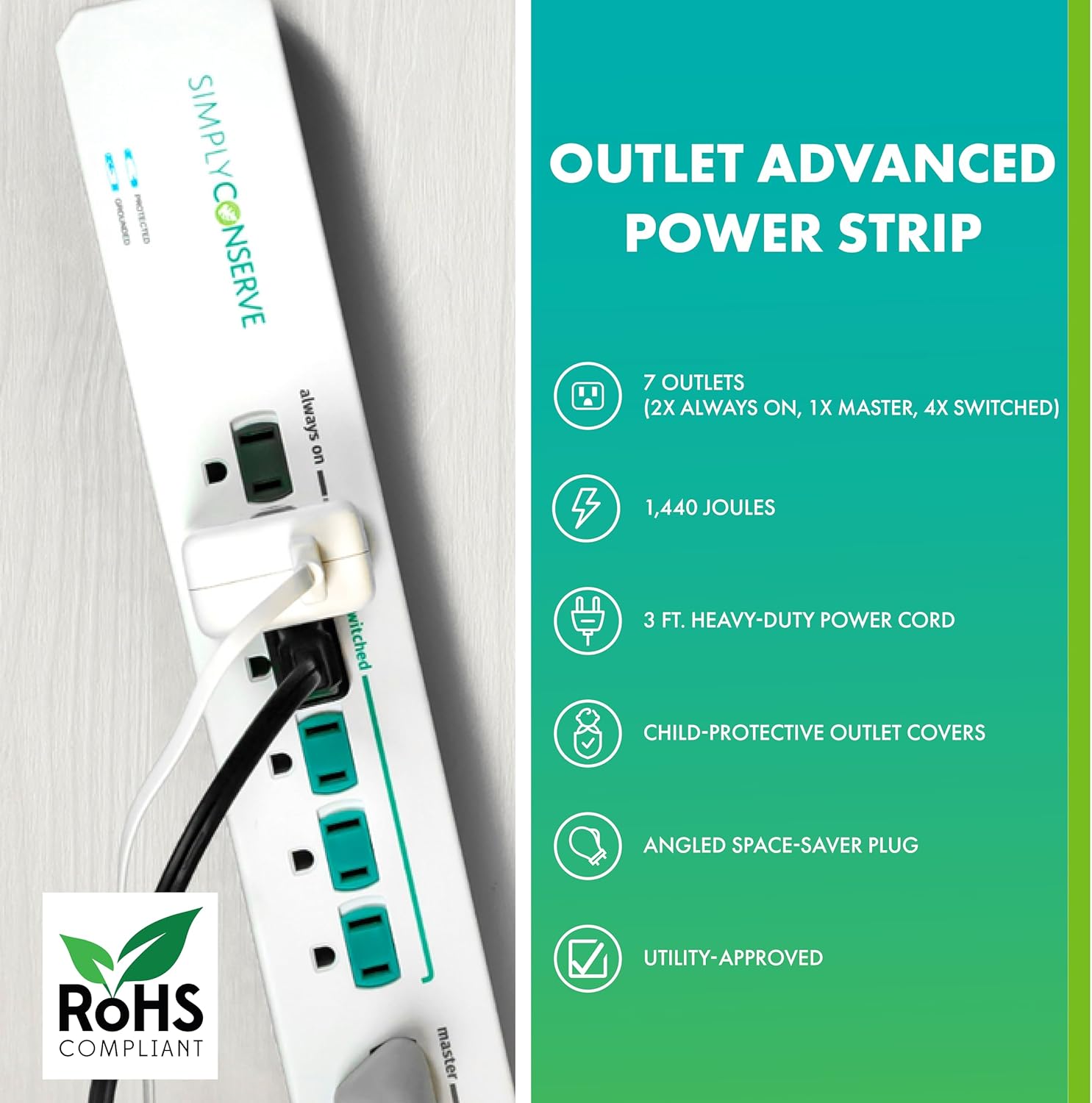
Image 2: Key features of the power strip, including 7 outlets, 1,440 joules surge protection, 3 ft. heavy-duty power cord, child-protective covers, angled space-saver plug, and utility approval.
3. Eto
- Yọ Ẹrọ naa kuro: Farabalẹ yọ okun agbara kuro ninu apoti rẹ.
- Yan Ibi kan: Select an indoor location for the power strip. It is mountable for convenient placement.
- Pulọọgi sinu iṣan odi: Insert the power strip's plug into a grounded wall outlet. Ensure the wall outlet is easily accessible.

Image 3: The Simply Conserve power strip plugged into a wall outlet, demonstrating typical setup.
4. Awọn ilana Iṣiṣẹ
The Simply Conserve Advanced Power Strip is designed with three types of outlets to optimize energy usage:
- Master Outlet: This is the primary control outlet. Plug your main device (e.g., TV, computer) into this outlet.
- Switched Outlets (4x): These outlets are controlled by the Master outlet. Plug accessory devices (e.g., soundbar, DVD player, gaming console) that you want to turn on/off with your main device into these outlets. When the device in the Master outlet is turned off, power to the Switched outlets will automatically be cut, eliminating phantom power.
- Always-On Outlets (2x): These outlets provide continuous power, regardless of the Master outlet's status. Use these for devices that require constant power, such as modems, routers, or cable boxes.
To use, simply plug your devices into the appropriate outlets. When the device in the Master outlet is powered on, the Switched outlets will receive power. When the Master device is powered off, the Switched outlets will lose power, saving energy.

Image 4: Diagram illustrating the Master, Switched, and Always-On outlets on the power strip.
Video: Simply Conserve Power Strip Overview
Fídíò 1: Fídíò yìí fi àwòrán hàn kedereview of the Simply Conserve Power Strip, demonstrating its various outlets and how they function to save energy.
5. Itọju
- Ninu: Ge asopọ agbara kuro lati inu iṣan ogiri ṣaaju ṣiṣe mimọ. Lo asọ ti o gbẹ, asọ lati nu dada. Maṣe lo awọn olutọpa olomi tabi awọn aerosols.
- Opin Iyika monamona: The power strip includes a resettable circuit breaker. If the power strip becomes overloaded, the circuit breaker may trip, cutting power to connected devices. To reset, unplug some devices, then press the reset button on the power strip.
- Child-Protective Covers: The integrated child-protective outlet covers are designed to prevent foreign objects from being inserted into the outlets. Ensure these covers are functioning correctly.
6. Laasigbotitusita
- No Power to Switched Outlets: Ensure the device plugged into the Master outlet is powered on and drawing sufficient current. If the Master device is off or in standby, the Switched outlets will not receive power.
- No Power to Any Outlet: Check if the power strip's circuit breaker has tripped. If so, reset it as described in the Maintenance section. Also, verify that the wall outlet is functioning correctly by plugging in another device.
- Awọn imọlẹ Atọka: The power strip has indicator lights for 'Protected' and 'Grounded'. If the 'Protected' light is off, the surge protection may have been compromised, and the unit should be replaced. If the 'Grounded' light is off, there may be a grounding issue with your wall outlet.
7. Awọn pato
| Sipesifikesonu | Iye |
|---|---|
| Brand | Simply Conserve |
| Awoṣe | SC73T1 |
| Lapapọ Power iÿë | 7 (1 Master, 4 Switched, 2 Always-On) |
| Voltage | 125 VAC, +/-1%, 60 Hz |
| Agbara Rating | 15 Amp |
| Aabo Idaabobo | 1,440 ayokele |
| Àwọ̀ | Funfun |
| Iwọn Nkan | 15.2 iwon |
| Package Mefa | 16.94 x 6.03 x 1.89 inches |
| Pataki Ẹya | Mountable |

Image 5: Detailed electrical specifications for the power strip.

Image 6: Physical dimensions of the Simply Conserve Advanced Power Strip.
8. Atilẹyin ọja ati Support
Specific warranty details are not provided in the available product information. However, the Simply Conserve Advanced Power Strip is quality-tested and meets or exceeds industry standards for power equipment, including RoHS compliance, cETLus listing, and IP20 rating. For further support or warranty inquiries, please refer to the product packaging or contact Simply Conserve customer service.