
Awọn Aabo pataki
Nigbati o ba nlo awọn ohun elo itanna, awọn iṣọra aabo ipilẹ yẹ ki o tẹle nigbagbogbo, pẹlu atẹle naa:
- Ka gbogbo awọn ilana ṣaaju ṣiṣe toaster.
- Maṣe fi ọwọ kan awọn aaye ti o gbona. Lo awọn ọwọ tabi awọn koko.
- Lati daabobo lodi si mọnamọna itanna, maṣe fi okun, plugs, tabi toaster bọ inu omi tabi omi miiran.
- Abojuto sunmọ jẹ pataki nigbati eyikeyi ohun elo ba lo nipasẹ tabi sunmọ awọn ọmọde.
- Yọọ kuro lati inu iṣan nigbati ko si ni lilo ati ṣaaju ṣiṣe mimọ. Gba laaye lati tutu ṣaaju fifi si tabi mu awọn ẹya kuro.
- Ma ṣe ṣiṣẹ ohun elo eyikeyi pẹlu okun tabi pulọọgi ti o bajẹ, tabi lẹhin aiṣe ohun elo tabi ti bajẹ ni eyikeyi ọna. Pada ohun elo pada si ile-iṣẹ iṣẹ ti a fun ni aṣẹ fun idanwo, atunṣe, tabi atunṣe.
- Lilo awọn asomọ ẹya ẹrọ ti a ko ṣeduro nipasẹ olupese ohun elo le fa awọn ipalara.
- Maṣe lo ni ita.
- Ma ṣe jẹ ki okun duro lori eti tabili tabi counter, tabi fi ọwọ kan awọn aaye ti o gbona.
- Ma ṣe gbe sori tabi sunmọ gaasi ti o gbona tabi ina ina, tabi ni adiro ti o gbona.
- Nigbagbogbo so plug to ohun elo akọkọ, ki o si pulọọgi okun sinu ogiri iṣan. Lati ge asopọ, tan eyikeyi iṣakoso si 'pa', lẹhinna yọ plug kuro ni iṣan ogiri.
- Ma ṣe lo ohun elo fun miiran ju lilo ti a pinnu lọ.
- A kò gbọdọ̀ fi oúnjẹ tó pọ̀ jù, àwọn ohun èlò irin, tàbí àwọn ohun èlò tí a fi ń ṣe ohun èlò ìtọ́jú oúnjẹ sínú ẹ̀rọ ìtọ́jú oúnjẹ nítorí wọ́n lè fa iná tàbí ewu ìkọlù iná mànàmáná.
- A ina le waye ti o ba ti toasters ti wa ni bo tabi kàn flammable ohun elo, pẹlu awọn aṣọ-ikele, draperies, Odi, ati bi, nigba ti ni isẹ.
- Ma ṣe gbiyanju lati tu ounjẹ kuro nigbati toaster ti wa ni edidi.
- Maṣe ṣiṣẹ lairi.
Ọja Pariview
The Starfrit 2-Slice Toaster is designed for efficient and convenient toasting. It features two wide slots, adjustable browning levels, and multiple function controls.

Aworan: Iwaju view of the Starfrit 2-Slice Toaster, showcasing its design and controls.
Awọn paati ati Awọn iṣakoso:
- Àwọn ibi ìjẹun sísè: Two extra-wide slots to accommodate various bread types.
- Lílo ìfọ́nká sísun oúnjẹ: Lowers and raises bread into the slots.
- Àdíìsì Ìṣàkóso Browning: Adjusts toast shade from 1 (lightest) to 7 (darkest).
- Bọtini fagilee: Ó máa ń dá ìṣẹ́jú sísun oúnjẹ dúró nígbàkigbà.
- Bọtini DEFROST: Defrosts ati toasts tutunini akara.
- Bọtini Tuntun: Ó ń gbóná àkàrà tí a ti sè tẹ́lẹ̀ láìsí àwọ̀ ojú tí ó rọ̀ mọ́.
- Atẹ Crumb Yiyọ kuro: Be ni isale fun rorun ninu.

Aworan: Isunmọ view of the toaster's control panel, showing the browning dial and function buttons (Cancel, Defrost, Reheat).
Ṣeto
- Yọọ kuro: Fi ìṣọ́ra yọ ohun èlò ìtọ́jú búrẹ́dì àti gbogbo ohun èlò ìtọ́jú kúrò.
- Ibi: Place the toaster on a stable, heat-resistant surface, away from flammable materials.
- Lilo akọkọ: Before first use, operate the toaster without bread for two or three cycles at the highest browning setting to burn off any manufacturing residues. This may produce a slight odor, which is normal. Ensure adequate ventilation.
- Asopọ agbara: Pulọọgi okun agbara sinu kan boṣewa itanna iṣan.
Awọn ilana Iṣiṣẹ
Akara mimu:
- Insert one or two slices of bread into the toasting slots.
- Yan ipele browning ti o fẹ nipa lilo bọtini iṣakoso browning (1 fun ina, 7 fun dudu).
- Press the toasting lever down until it locks into place. The toaster will begin toasting.
- When the toasting cycle is complete, the bread will automatically pop up.
Lilo Awọn bọtini iṣẹ:
- FẸTẸ: To stop the toasting cycle at any time, press the CANCEL button. The bread will immediately pop up.
- JADE: To toast frozen bread, insert the bread, select your desired browning level, press the toasting lever down, then press the DEFROST button. The indicator light will illuminate, and the toaster will adjust the cycle for frozen items.
- TUN: To reheat cold toast, insert the toast, press the toasting lever down, then press the REHEAT button. The indicator light will illuminate, and the toaster will warm the toast without further browning.
Itọju ati Cleaning
Wíwẹ̀ déédéé máa ń mú kí iṣẹ́ rẹ̀ dára jù, ó sì máa ń mú kí iṣẹ́ tó wà nínú ẹ̀rọ ìwẹ̀nùmọ́ rẹ pẹ́ sí i.
- Máa yọ ẹ̀rọ toaster náà kúrò lórí fóònù nígbà gbogbo láti inú ihò agbára kí o sì jẹ́ kí ó tutu pátápátá kí o tó sọ ọ́ di mímọ́.
- Ninu Atẹ Crumb naa: Fa àwo ìyẹ̀fun tí a yọ kúrò láti ìsàlẹ̀ àwo ìyẹ̀fun náà. Da àwọn ìyẹ̀fun náà nù kí o sì nu àwo náà mọ́ pẹ̀lú ìpolówó.amp Gbẹ daradara ki o to tun fi sii.
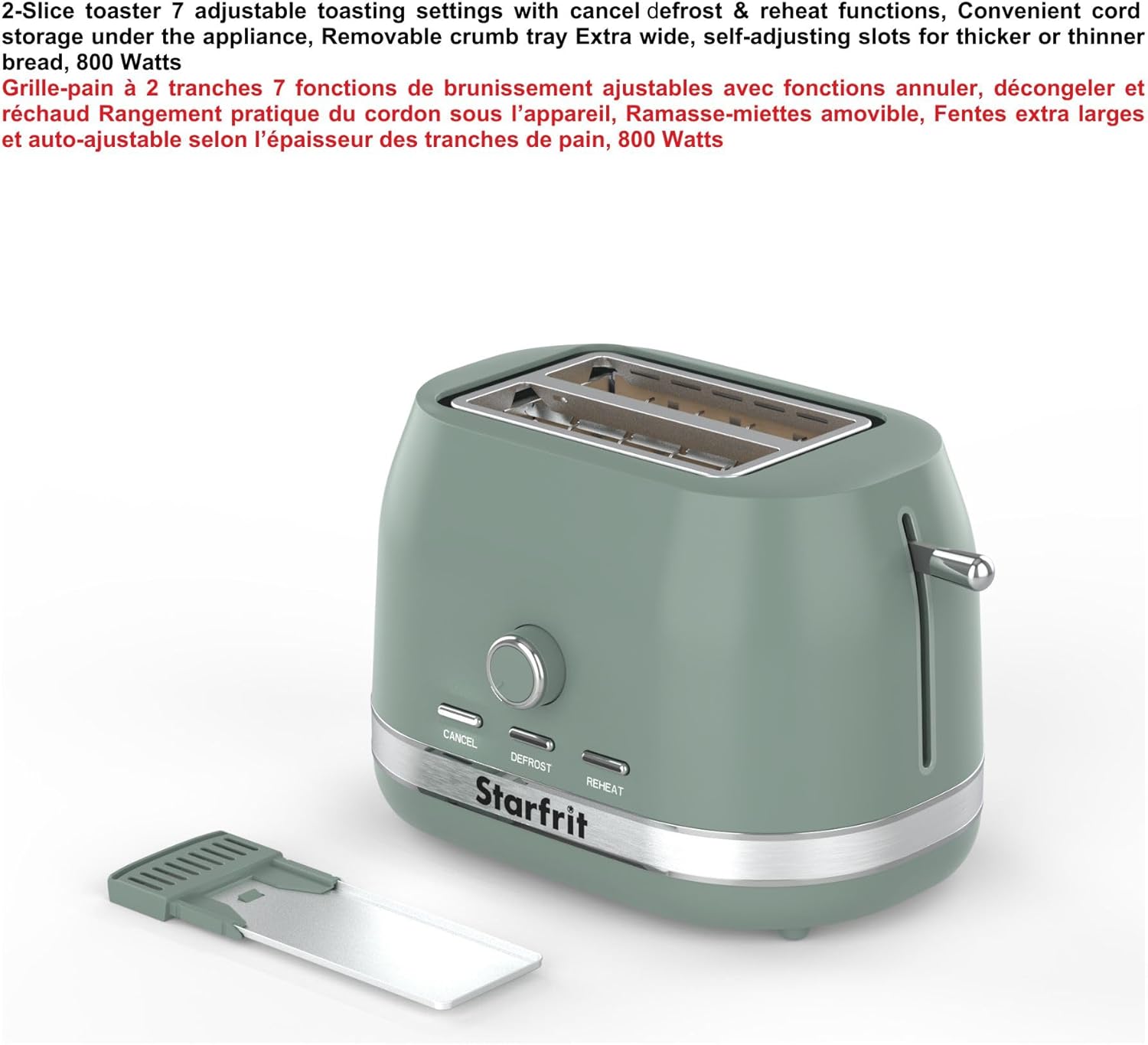
Image: The removable crumb tray being pulled out from the bottom of the toaster for cleaning.
- Ninu Ode: Mu ese ita ti toaster pẹlu asọ, damp Aṣọ. Má ṣe lo àwọn ohun ìfọṣọ tàbí àwọn ohun ìfọṣọ irin, nítorí pé wọ́n lè fa ojú ilẹ̀ náà.
- Ma ṣe ibọmi the toaster body in water or any other liquid.
Laasigbotitusita
| Isoro | Owun to le Fa | Ojutu |
|---|---|---|
| Toaster ko ni tan. | Ko edidi ni; agbara otage; aṣiṣe iṣan. | Rí i dájú pé ẹ̀rọ toaster náà wà ní ìsopọ̀ pẹ̀lú ààbò. Ṣàyẹ̀wò ẹ̀rọ ìdènà. Gbìyànjú ọ̀nà ìdènà mìíràn. |
| Búrẹ́dì kì í yọ sókè. | Toasting cycle incomplete; bread stuck. | Press the CANCEL button. Unplug the toaster and carefully remove bread with non-metallic tongs. |
| Fífi búrẹ́dì tí kò dọ́gba. | Àìsí ìwọ̀n búrẹ́dì; ìkórajọ ìyẹ̀fun. | Rí i dájú pé àwọn ègé búrẹ́dì náà ní ìwọ̀n tó dọ́gba. Máa fọ àwo ìyẹ̀fun náà déédéé. |
| Ẹfin nbo lati toaster. | Food stuck; excessive crumbs; incorrect browning setting. | Immediately press CANCEL and unplug. Allow to cool, then clean crumb tray and remove any stuck food. Adjust browning setting. |
Awọn pato
- Brand: Starfrit
- Nọmba awoṣe: 024064-004-0000
- Nọmba Awọn Ege: 2
- Wattage: 850 watt
- Awọn ipele Browning: 7 adijositabulu eto
- Awọn ẹya pataki: Cancel Function, Defrost Mode, Reheat Mode, Removable Crumb Tray, Variable Browning Control
- Ohun elo: Plastic with metal accent
- Awọn iwọn ọja: 7.6D x 11.4W x 7.6H
- Ìwọ̀n Nkan: 2.5 iwon
- UPC: 069858240648
- Ilu isenbale: China
Atilẹyin ọja ati Support
This Starfrit 2-Slice Toaster comes with a 1-odun lopin atilẹyin ọja lati ọjọ ti o ra. Atilẹyin ọja yi ni wiwa awọn abawọn iṣelọpọ labẹ lilo ile deede.
For warranty claims, technical support, or any questions regarding your product, please refer to the contact information provided in your product packaging or visit the official Starfrit webojú-òpó wẹ́ẹ̀bù fún àwọn àlàyé iṣẹ́ oníbàárà.