
Bobtot K701S
Ìwé Àfọwọ́kọ Olùlò Bobtot K701S 5.1/2.1 Ètò Ohun Àyíká Ikanni
Awoṣe: K701S
1. Ifihan
O ṣeun fun riraasing the Bobtot K701S 5.1/2.1 Channel Surround Sound System. This system is designed to provide a powerful and immersive audio experience for your home entertainment. With 800W peak power and a 6.5-inch subwoofer, it delivers clear, dynamic sound. This manual will guide you through the setup, operation, and maintenance of your new sound system.

Image 1.1: Bobtot K701S 5.1/2.1 Channel Surround Sound System with subwoofer, satellite speakers, and remote control.
2. Awọn Ilana Aabo pataki
Please read and follow these safety instructions carefully before operating the system to prevent electric shock, fire, or damage to the unit.
- Ma ṣe fi ohun elo yii han si ojo tabi ọrinrin.
- Ma ṣe dina eyikeyi awọn ṣiṣi atẹgun. Fi sori ẹrọ ni ibamu pẹlu awọn ilana ti olupese.
- Maṣe fi sori ẹrọ nitosi awọn orisun ooru gẹgẹbi awọn imooru, awọn iforukọsilẹ ooru, awọn adiro, tabi awọn ohun elo miiran (pẹlu ampliifiers) ti o gbe ooru jade.
- Dabobo okun agbara lati ma rin lori tabi pin, ni pataki ni awọn pilogi, awọn ohun elo irọrun, ati aaye nibiti wọn ti jade kuro ninu ohun elo naa.
- Lo awọn asomọ/awọn ẹya ara ẹrọ ti olupese pato.
- Yọọ ohun elo yi nigba iji manamana tabi nigba lilo fun igba pipẹ.
- Tọkasi gbogbo iṣẹ si awọn oṣiṣẹ iṣẹ ti o peye. Iṣẹ iṣẹ nilo nigbati ohun elo ba ti bajẹ ni ọna eyikeyi.
3. Package Awọn akoonu
Ṣọra si apoti naa ki o rii daju pe gbogbo awọn nkan wa ati ni ipo ti o dara. Ti awọn ohun kan ba nsọnu tabi bajẹ, jọwọ kan si atilẹyin alabara.
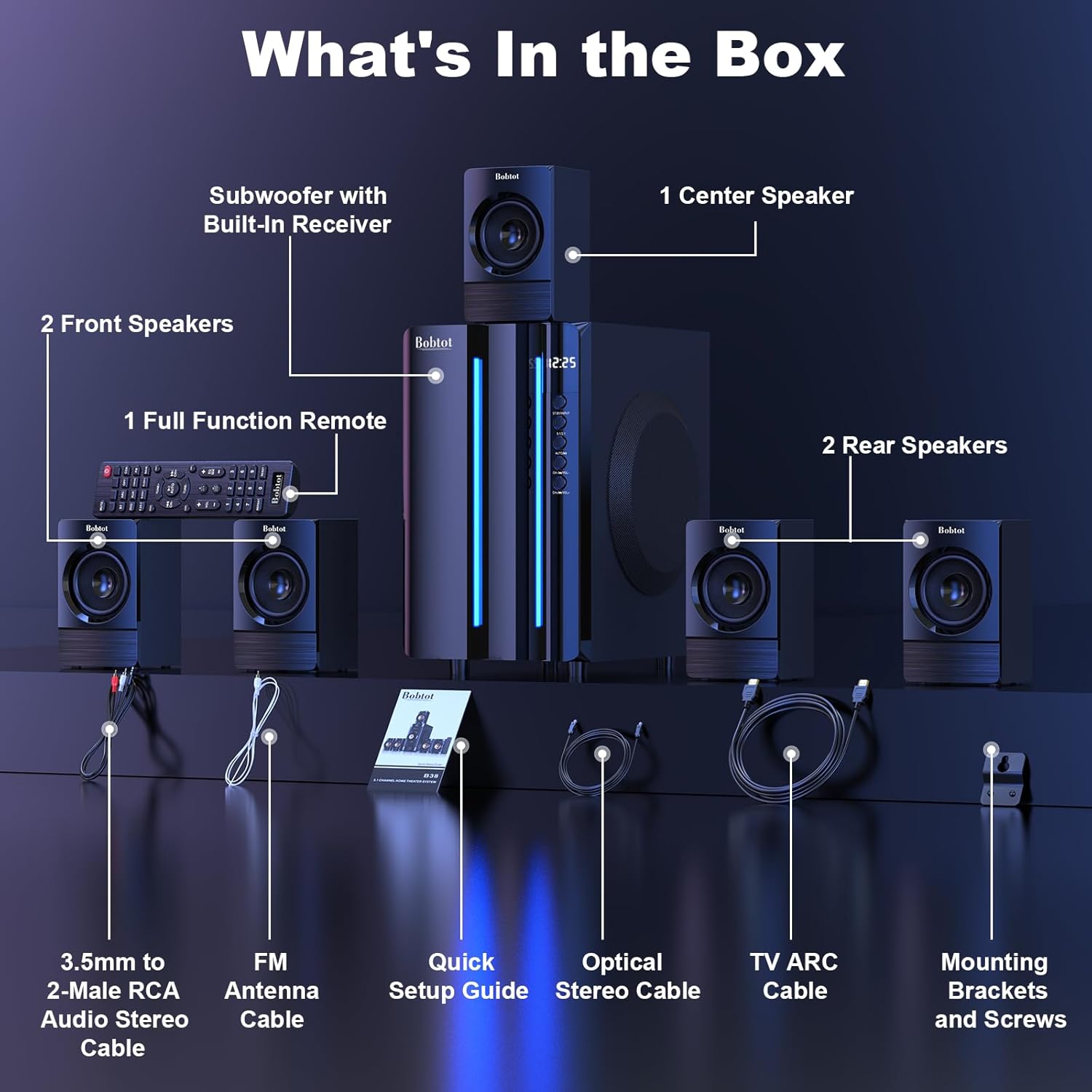
Image 3.1: Visual representation of all items included in the Bobtot K701S package.
- 1 x Subwoofer with Built-in Receiver
- 1 x Center Speaker
- 2 x Front Speakers
- 2 x Rear Speakers
- 1 x Full Function Remote Control
- 1 x 3.5mm to 2-Male RCA Audio Stereo Cable
- Okun eriali FM 1 x
- 1 x Itọsọna Oṣo iyara
- 1 x Optical Stereo Cable
- 1 x TV ARC Cable (HDMI)
- 1 x Coaxial USB
- 1 x Okun AX
- 1 x RCA Okun
- Iṣagbesori biraketi ati skru
- Afowoyi Olumulo (iwe-ipamọ yii)
4. irinše Loriview
4.1 Subwoofer (Main Unit)
The subwoofer houses the main receiver and amplifier for the entire system. It features a 6.5-inch driver for deep bass and includes all input/output ports.

Aworan 4.1: alaye view of the 6.5-inch subwoofer, highlighting its internal components.
4.2 Awọn agbọrọsọ Satẹlaiti
The system includes five satellite speakers: one center, two front (left/right), and two rear (left/right). These speakers are wired and connect directly to the subwoofer unit.
4.3 Iṣakoso latọna jijin
The full-function remote control allows you to manage power, input modes, volume, channel selection, and other settings from a distance.
5. Eto Eto
Follow these steps to set up your Bobtot K701S surround sound system.
5.1 Asopọ Agbọrọsọ
The five satellite speakers come with integrated cables. Connect each speaker to the corresponding "Audio Output" slot on the rear of the subwoofer unit. The cables are color-coded or labeled for easy identification (e.g., FL for Front Left, FR for Front Right, CEN for Center, SL for Surround Left, SR for Surround Right).
- Front Center and L/R speakers: Cables are approximately 13 feet long.
- Rear L/R speakers: Cables are approximately 31 feet long.
Place all speakers in the same room for optimal surround sound performance.

Image 5.1: Recommended speaker placement for a 5.1 channel surround sound experience.
5.2 Power On and Initial Test
- Connect the subwoofer to a power outlet using the provided power cable.
- Tan-an subwoofer nipa lilo agbara yipada.
- Press the power button on the remote control or the front panel.
- Test the remote control functionality.
- Switch to "BT" (Bluetooth) mode and connect your mobile device to "B701D" via Bluetooth to ensure audio playback.
5.3 Nsopọ Awọn ẹrọ ita
Choose the appropriate input mode and connect your external device (e.g., TV, projector, DVD player, game console) to the subwoofer using the corresponding audio cables provided.
- Ensure the cable is securely plugged into the correct input slot on the subwoofer.
- Select the matching input mode on the system (e.g., HDMI ARC, OPT, COA, AUX, USB, DVD).

Aworan 5.2: Pariview of the rear panel connections and supported multimedia inputs.
6. Awọn ilana Iṣiṣẹ
6.1 Latọna Iṣakoso Awọn iṣẹ
The remote control provides full command over your sound system. Always press the power button before selecting an input mode when turning on the unit.

Image 6.1: Detailed diagram of the remote control buttons and their functions.
- Titan/Apapa: Tan-an tabi pa eto naa.
- Input Mode Select: Buttons for BT, ARC, OPT, COA, DVD, AUX, USB/SD, FM to switch between audio sources.
- 5.1/2.1 Channel Select: Toggles between 5.1 surround sound and 2.1 stereo mode (in 2.1 mode, only the two front speakers play).
- Volume Control (VOL +/-): Ṣe atunṣe iwọn didun eto gbogbogbo.
- Mic Volume Adjustment (MIC +/-): Adjusts the volume for connected microphones (supports wireless/wired microphones).
- Echo Control (ECHO +/-): Ó ń ṣe àtúnṣe ipa echo fún àwọn gbohùngbohùn.
- TUNE +/-: For FM radio tuning.
- CH +/-: For FM radio channel selection.
- DÁKÚN: Pa tabi mu ohun ti o jade kuro.
6.2 Àwọn Ìgbékalẹ̀ Ìtẹ̀síwájú
The Bobtot K701S supports various input methods:
- Bluetooth (BT): Fún ìsopọ̀ aláìlókùn sí àwọn fóònù alágbékalẹ̀, àwọn tábìlẹ́ẹ̀tì, àti àwọn ẹ̀rọ míràn tí Bluetooth ń ṣiṣẹ́.
- HDMI ARC: Connects to your TV's HDMI ARC port for high-quality audio transmission and TV remote control integration.
- Opitiki (ṢÀYÀ): Digital audio input for TVs, game consoles, and other devices with an optical output.
- Coaxial (COA): Digital audio input, similar to optical, for compatible devices.
- AUX: Analog audio input using a 3.5mm or RCA cable for a wide range of devices.
- USB/SD: Mu ohun ṣiṣẹ files directly from USB drives or SD cards.
- Redio FM: Built-in FM tuner for listening to radio stations.
- DVD: Dedicated input for DVD players.
6.3 Channel Configuration (5.1 / 2.1)
The system offers two channel modes: 5.1 and 2.1. You can switch between these modes using the remote control or the front panel. In 5.1 mode, all five satellite speakers and the subwoofer are active, providing a full surround sound experience. In 2.1 mode, only the two front speakers and the subwoofer are active, suitable for stereo audio.
7. Connectivity Guide
This section details how to connect various devices to your sound system.
7.1 Bluetooth Asopọ
- Press the "BT" button on the remote control or front panel to select Bluetooth mode. The display will show "BT".
- Lori ẹrọ alagbeka rẹ, mu Bluetooth ṣiṣẹ ki o wa awọn ẹrọ to wa.
- Select "B701D" from the list to pair. Once connected, you will hear a confirmation sound.
7.2 Asopọ HDMI ARC
- Connect one end of the HDMI ARC cable to the "HDMI ARC" port on the subwoofer.
- Connect the other end to the "HDMI ARC" port on your TV.
- Select "ARC" input mode on the sound system.
- Rii daju pe iṣelọpọ ohun ti TV rẹ ti ṣeto si HDMI ARC tabi awọn agbohunsoke ita.
7.3 Optical/Coaxial Connection
- Connect an optical or coaxial cable from your device's digital audio output to the corresponding "OPT" or "COA" input on the subwoofer.
- Select "OPT" or "COA" input mode on the sound system.
- Ensure your device's audio output is set to PCM (Pulse-code modulation) for optical/coaxial connections, as some devices may default to other formats not supported by the system.
7.4 AUX Asopọ
- Use the provided 3.5mm to 2-Male RCA cable or a standard RCA cable.
- Connect the cable from your device's audio output (e.g., headphone jack, RCA L/R output) to the "AUX" input on the subwoofer.
- Select "AUX" input mode on the sound system.
7.5 Sisisẹsẹhin USB/SD
- Fi awakọ filasi USB tabi kaadi SD ti o ni ohun ti o ni ohun sii files into the respective port on the subwoofer.
- Select "USB/SD" input mode. The system will automatically begin playing compatible audio files.
7.6 Redio FM
- Connect the FM antenna cable to the "FM ANTENNA" port on the subwoofer. Extend the antenna for better reception.
- Select "FM" input mode.
- Use the "TUNE +/-" or "CH +/-" buttons on the remote to scan for and select radio stations.
8. Awọn pato
| Ẹya ara ẹrọ | Sipesifikesonu |
|---|---|
| Nọmba awoṣe | K701S |
| Agbọrọsọ Iru | Satẹlaiti |
| Kakiri Ohun ikanni iṣeto ni | 5.1 |
| Peak o wu Power | 800 Wattis |
| Subwoofer Opin | 6.5 inches |
| Idahun Igbohunsafẹfẹ | 20 kHz |
| Imọ-ẹrọ Ibaraẹnisọrọ Alailowaya | Bluetooth 5.0 |
| Asopọmọra Technology | Bluetooth, HDMI ARC, Optical, Coaxial, AUX, USB, DVD, FM |
| Ọna Iṣakoso | Isakoṣo latọna jijin |
| Orisun agbara | Okun Itanna |
| Iṣagbewọle Voltage | 120 Volts |
| Awọn iwọn Ọja (L x W x H) | 31.8 x 19.8 x 33 cm |
| Iwọn Nkan | 6.56 kilo |
| Ohun elo | Wood (MDF), Acrylonitrile Butadiene Styrene (ABS) |
| Pataki Ẹya | Bass Amplification |
9. Laasigbotitusita
If you encounter issues with your Bobtot K701S system, refer to the following common problems and solutions:
9.1 Ko si Ohun
- Ṣayẹwo Agbara: Ensure the system is powered on and the power cable is securely connected.
- Ipele Iwọn: Increase the master volume on the system and your connected device.
- Ipo igbewọle: Verify that the correct input mode is selected on the system (e.g., BT, ARC, OPT).
- Awọn Isopọ USB: Ensure all audio cables are securely connected to both the system and the source device.
- Ìjáde Ẹ̀rọ Orísun: Check the audio output settings on your source device (e.g., TV, DVD player) to ensure it's sending audio to the correct output port and format (e.g., PCM for optical/coaxial).
9.2 Poor Sound Quality / Distortion
- Ipele Iwọn: Reduce the volume if it's too high, causing distortion.
- Iduroṣinṣin USB: Inspect audio cables for damage or loose connections.
- Gbigbe Agbọrọsọ: Ensure speakers are placed correctly and not obstructed.
- Didara Orisun: Ṣe ìdánwò pẹ̀lú orísun ohùn tó yàtọ̀ tàbí file to rule out issues with the original content.
9.3 Isakoṣo latọna jijin Ko Ṣiṣẹ
- Awọn batiri: Rọpo awọn batiri ni isakoṣo latọna jijin.
- Laini Oju: Ensure there is a clear line of sight between the remote and the system's IR receiver.
- Ijinna: Ṣiṣẹ latọna jijin laarin ibiti o ti munadoko.
9.4 Bluetooth Asopọ oran
- Ipo sisopọ: Ensure the system is in Bluetooth pairing mode.
- Device Proximity: Keep your Bluetooth device within a few meters of the system.
- Ìjánu: Lọ kuro ni awọn ẹrọ alailowaya miiran ti o le fa kikọlu.
- Gbagbe Ẹrọ: On your mobile device, "forget" or "unpair" the "B701D" and attempt to reconnect.
10. Itọju ati Itọju
- Ninu: Use a soft, dry cloth to clean the surfaces of the system. Do not use liquid cleaners or aerosols.
- Afẹfẹ: Ensure the subwoofer has adequate ventilation and is not placed in an enclosed space that could restrict airflow.
- Ibi: Yẹra fún gbígbé ètò náà sí ibi tí oòrùn bá tàn tààrà, nítòsí àwọn orísun ooru, tàbí ní àwọn agbègbè tí ọ̀rinrin pọ̀ sí.
- Agbara Pa: Turn off and unplug the system when not in use for extended periods.
11. Atilẹyin ọja ati Onibara Support
Bobtot is committed to providing a positive customer experience. If you encounter any issues with your B701D Home Surround Sound System, please refer to this user manual for initial troubleshooting.
For further assistance, please contact Bobtot customer support through the Amazon buyer-seller messaging service. Our support team is available to help you with any questions or concerns you may have.
Ask a question about this manual
Ask about setup, troubleshooting, compatibility, parts, safety, or missing instructions. Manuals+ will review the question and use this page’s manual context to help answer it.