
1. Ifihan
Thank you for choosing the i-aplus LED Nightstand. This nightstand is designed to provide functional storage and ambient lighting for your bedroom or living space. Featuring two spacious drawers, a convenient charging station, and customizable LED lighting, this unit combines modern design with practical utility. Please read this manual thoroughly before assembly and use to ensure proper installation and safe operation.
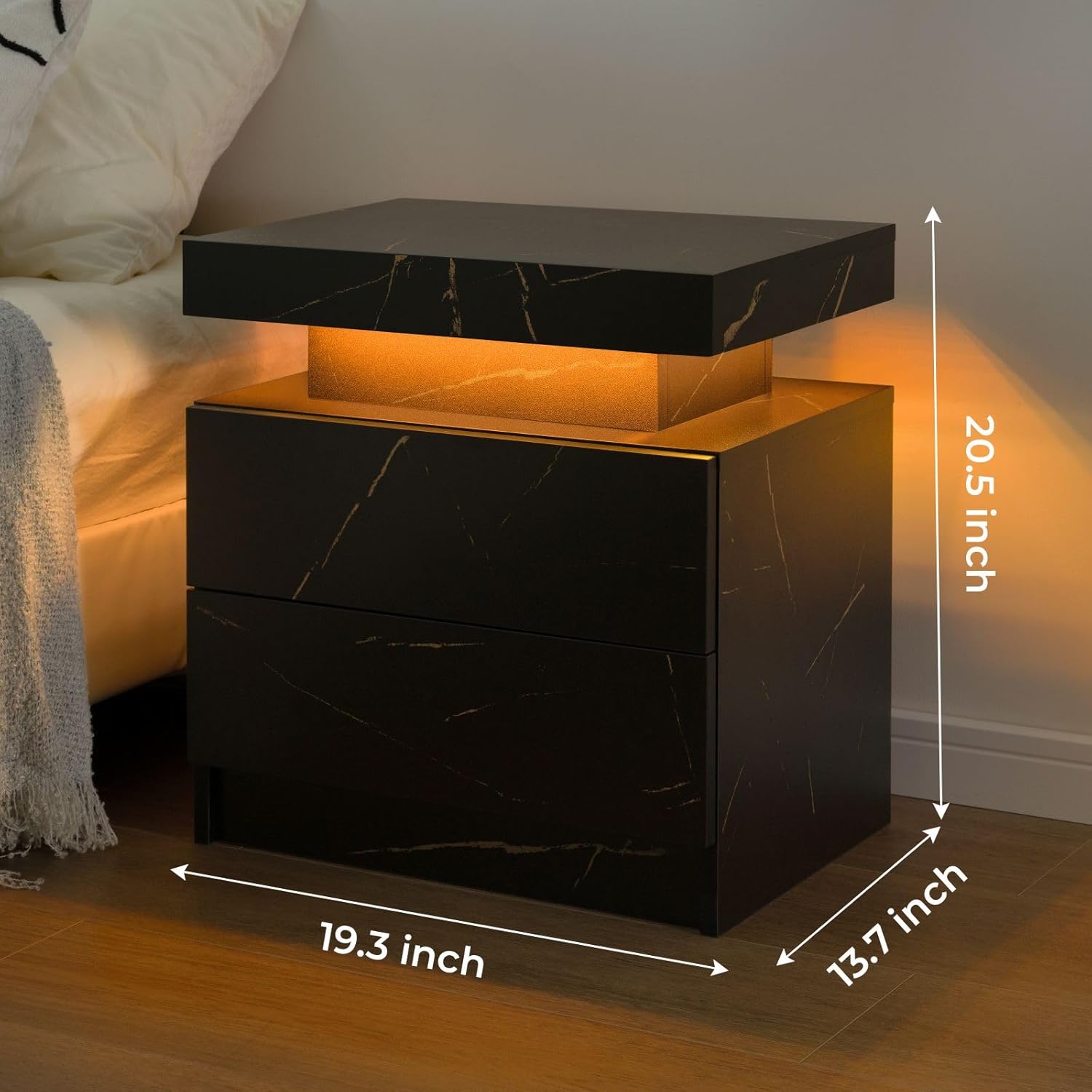
The i-aplus LED Nightstand provides both functional storage and ambient lighting.
2. Alaye Aabo
- Agbara iwuwo: Do not exceed the maximum weight recommendation of 50 pounds on the top surface.
- Iduroṣinṣin: Ensure all fasteners are securely tightened during assembly to prevent wobbling or instability.
- Diduro: For added safety, especially in homes with children or pets, consider anchoring the nightstand to the wall using appropriate hardware (not included).
- Aabo Itanna: Only use the integrated charging station with compatible devices. Do not overload the power sockets. Keep liquids away from electrical components.
- Apejọ: Follow all assembly instructions carefully. It is recommended that two people assemble this unit.
3. Package Awọn akoonu
Before beginning assembly, verify that all parts and hardware listed below are present and undamaged. If any parts are missing or damaged, please contact customer support.
Onigi Panels
- A (Top Panel)
- A2 (Bottom Panel)
- B (Side Panel)
- C (Side Panel)
- D (Back Panel)
- E (Drawer Side)
- F (Drawer Side)
- G (Drawer Front)
- H (Drawer Back)
- I (Drawer Bottom)
- J (Drawer Front)
- K (Drawer Back)
- L (Drawer Bottom)
- L2 (Drawer Side)
- M (Drawer Side)
- N (Drawer Bottom)
Hardware & Awọn ẹya ẹrọ
- Guide Rails (x4)
- Cam Bolts (x64)
- Cam Locks (x64)
- Awọn ile onigi (x18)
- Awọn skru (x20)
- Awọn imudani (x2)
- Plastic Caps (x4)
- Apejọ Itọsọna
- Ohun èlò ìfisẹ́lé (Screwdriver)
4. Eto ati Apejọ
Follow these step-by-step instructions for assembling your i-aplus LED Nightstand. It is recommended to have a second person assist with assembly.
Apejọ Video Itọsọna
Official HNEBC Nightstand Installation Video (Duration: 10:13)
Awọn Itọsọna Igbesẹ-nipasẹ-Igbese
- Múra àwọn Pánẹ́lì sílẹ̀: Carefully remove the protective film from all panels before installation to avoid difficult removal later.
- Attach Cam Bolts: Screw cam bolts (1) into panels A and A2 as indicated in the diagram.
- Install Guide Rails: Pull out the guide rail sections and screw them onto panels A and A2 using screws (4).
- Ṣepọ Awọn Paneli ẹgbẹ: Attach side panels B and C to panel A using cam locks (2) and wooden dowels (3).
- So Awọn Paneli Ẹhin: Secure back panels D to the assembled structure using cam locks (2).
- Complete Main Frame: Attach panel A2 to the structure, securing it with cam locks (2) and cam bolts (1).
- Ṣepọ Awọn apoti: For each drawer, attach the side panels (L, L2, M, N) to the front (G) and back (H) panels using cam bolts (1) and cam locks (2). Slide the drawer bottom (I) into the grooves.
- So awọn ọwọ apoti mọra: Secure the handles (5) to the front of each drawer using the provided screws.
- Fi sori ẹrọ Drawers: Carefully align the drawer rails with the guide rails on the nightstand frame and slide the drawers into place until they click securely.
- Awọn Fifọwọkan Ipari: Insert plastic caps (6) into any visible screw holes for a clean finish.
5. Awọn ilana Iṣiṣẹ
5.1. Imọlẹ LED
The i-aplus LED Nightstand features integrated LED lighting with 16 RGB colors to enhance your room's ambiance.

The LED lighting offers multiple colors and control options.
- Iṣakoso: Use the included remote control or a compatible mobile application to manage the LED lights.
- Aṣayan awọ: Choose from 16 different RGB colors to match your mood or decor.
- Atunse Imọlẹ: Adjust the brightness level of the lights to your preference.
- Awọn ọna: Explore various lighting modes, including static colors, dynamic changes, and music rhythm mode (if supported by the app).
- Aago: Utilize the timer switch feature to set specific operating times for the lights.
5.2. Ibudo gbigba agbara
The nightstand includes a built-in charging station located within the top sliding compartment for convenient access to power.
- Wiwọle: Gently slide the top panel of the nightstand to reveal the charging station.
- Awọn ibudo: The charging station is equipped with 2 USB ports and 2 standard power sockets.
- Lilo: Plug in your electronic devices such as phones, tablets, or laptops for charging.
- Agbara Yi pada: Use the integrated power switch to turn the charging station on or off as needed.
6. Itọju
- Ninu: To clean the nightstand, wipe surfaces with a soft, damp Aṣọ. Yẹra fún lílo àwọn kẹ́míkà líle tàbí àwọn ohun ìfọmọ́ tí ó lè ba ìparí rẹ̀ jẹ́.
- Idasonu: Promptly wipe up any spills to prevent staining, as the material is not stain-resistant.
- Abojuto Drawer: Lokọọkan ṣayẹwo awọn ifaworanhan duroa fun iṣiṣẹ dan. Ti o ba nilo, nu eyikeyi eruku tabi idoti lati awọn orin.

Mu ese awọn aaye kuro pẹlu ipolowoamp asọ fun ninu.
7. Laasigbotitusita
- Awọn imọlẹ LED ko ṣiṣẹ:
- Check if the power cable for the LED lights is securely plugged into a working outlet.
- Rii daju pe batiri isakoṣo latọna jijin ṣiṣẹ.
- If using a mobile app, verify Bluetooth connection and app settings.
- Awọn iyaworan Ko Yiyọ Ni Dẹra:
- Inspect the drawer slides for any obstructions or debris.
- Ensure all screws attaching the slides to the drawer and frame are tight.
- Verify that the drawers are correctly aligned on their tracks.
- Àga ìdúró alẹ́ jẹ́ Wíwú:
- Check and tighten all cam bolts and screws throughout the entire assembly.
- Ensure the nightstand is placed on a flat, even surface.
8. Awọn pato
| Ẹya ara ẹrọ | Ẹ̀kúnrẹ́rẹ́ |
|---|---|
| Brand | i-aplus |
| Orukọ awoṣe | A02 |
| Awọn iwọn Ọja (D x W x H) | 16"D x 19"W x 24"H |
| Iwọn Nkan | 34 iwon |
| Iṣeduro iwuwo ti o pọju | 50 iwon |
| Ohun elo fireemu | Igi |
| Top elo Iru | Onigi Igi |
| Nọmba ti Drawers | 2 |
| Nọmba ti selifu | 1 |
| Àwọ̀ | Gold Dudu |
| Mu Ohun elo | Metal or Alloy Steel |
| Apejọ ti a beere | Bẹẹni |
| Niyanju Nọmba ti Eniyan fun Apejọ | 2 |
| Ọja Itoju Awọn ilana | Pari pẹlu Damp Aṣọ |
9. Atilẹyin ọja ati Support
For warranty information or customer support, please refer to the documentation included with your purchase or contact the retailer directly. Keep your proof of purchase for any warranty claims.