
DOOGEE N55 Pro
DOOGEE N55 Pro Cell Phone User Manual
Itọsọna okeerẹ rẹ si iṣeto, isẹ, ati itọju.
1. Ifihan
Welcome to the DOOGEE N55 Pro user manual. This guide provides detailed instructions to help you get the most out of your new smartphone. The DOOGEE N55 Pro is designed for optimal performance and user experience, featuring the latest Android 14 OS, a powerful octa-core processor, and a large 5150mAh battery.
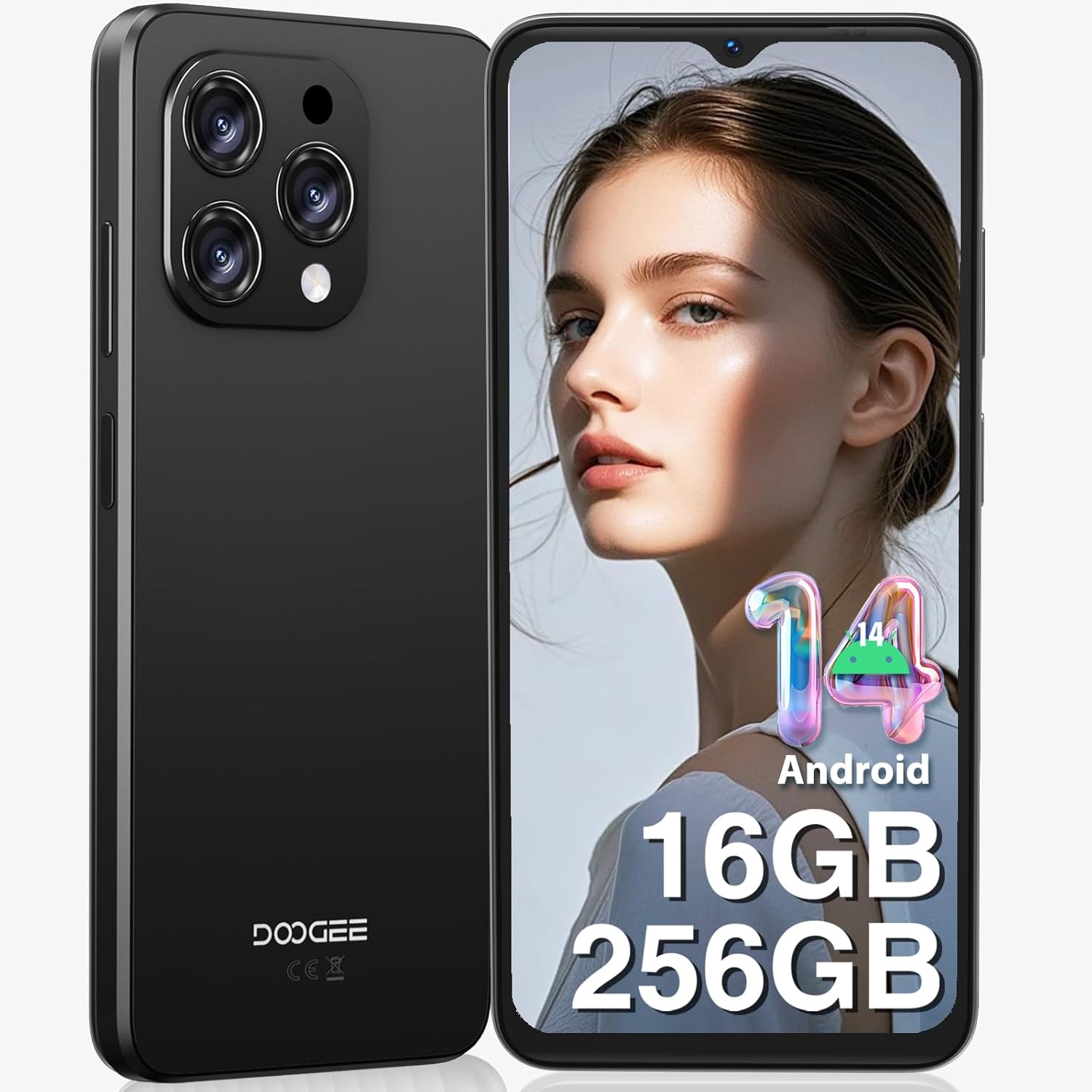
Nọmba 1: Iwaju ati sẹhin view of the DOOGEE N55 Pro Cell Phone, showcasing awọn oniwe-aso oniru ati kamẹra module.
2. Ohun ti o wa ninu Apoti
Upon unboxing your DOOGEE N55 Pro, please verify that all the following items are included:
- 1 x DOOGEE N55 Pro Android 14 Cellphone
- 1 x Type-C Port Cable
- 1 x Ṣaja
- PIN Kaadi SIM 1 x
- 1 x TP Protective film (pre-applied)
- 1 x TPU Protective case
- 1 x Itọsọna olumulo
- 1 x Kaadi atilẹyin ọja

Figure 2: Illustration of the DOOGEE N55 Pro and its included accessories, such as the charger, USB-C cable, and protective case.
3. Ọja Ipariview
3.1 Key Awọn ẹya ara ẹrọ
- Eto isesise: Android 14
- Olupilẹṣẹ: Octa-core processor for smooth performance
- Iranti & Ibi ipamọ: Up to 16GB RAM (6GB physical + 10GB virtual) and 256GB ROM, expandable up to 1TB via TF card
- Ifihan: 6.56-inch HD+ 90Hz IPS Waterdrop Screen (720 x 1612 resolution)
- Batiri: 5150mAh batiri agbara nla
- Awọn kamẹra: 13MP AI Main Camera and 8MP Front Camera
- Aabo: Support for Face Unlock
- Asopọmọra: Dual SIM 4G, Bluetooth, Wi-Fi, GPS, 3.5mm Audio Jack
3.2 Apẹrẹ ati Ifihan
The DOOGEE N55 Pro features a refined and elegant design, with an ultra-lightweight body weighing only 186g and a slim thickness of 8.6mm. The 6.56-inch HD+ IPS Waterdrop Screen offers a 90Hz refresh rate for a smooth and immersive visual experience.

Figure 3: The 6.56-inch HD+ 90Hz IPS Waterdrop Screen, highlighting its resolution, PPI, and aspect ratio for a dynamic display.

Figure 4: The lightweight and elegant design of the DOOGEE N55 Pro, emphasizing its slim profile (8.6mm thickness, 186g weight) and comfortable grip.
Video 1: A visual demonstration of the DOOGEE N55 Pro's 6.56-inch HD+ 90Hz IPS Waterdrop Screen, showcasing its vibrant display and smooth refresh rate.
Video 2: This video highlights the refined and elegant design of the DOOGEE N55 Pro, showcasing its sleek aesthetics and comfortable form factor.
3.3 Performance and Operating System
Equipped with a powerful octa-core processor, the DOOGEE N55 Pro ensures smooth multitasking and efficient handling of demanding applications. It runs on the latest Android 14 operating system, offering enhanced security, improved privacy features, and a more intuitive user interface.

Figure 5: Visual representation of the DOOGEE N55 Pro's memory configuration, including 16GB RAM (6GB physical + 10GB virtual) and 256GB ROM, with expansion capability up to 1TB.

Figure 6: Screenshots demonstrating the upgraded Android 14 interface on the DOOGEE N55 Pro, highlighting its safety and fluency improvements.
Video 3: This video showcases the latest Android 14 system on the DOOGEE N55 Pro, demonstrating its features and smooth operation.
4. Eto
4.1 Inserting SIM Card and TF Card
The DOOGEE N55 Pro supports dual Nano SIM cards or a combination of one Nano SIM and one TF card for expanded storage. Use the provided SIM ejector tool to open the SIM tray located on the side of the device. Carefully place your SIM card(s) and/or TF card into the tray according to the diagram on the tray, then reinsert it into the phone.
Note: This device does not support Verizon, AT&T, and Xfinity networks. Please check compatibility with your local frequency band before purchasing.
4.2 Ni ibẹrẹ Power On ati Oṣo oluṣeto
Press and hold the power button on the side of the phone until the DOOGEE logo appears. Follow the on-screen instructions to complete the initial setup, including language selection, Wi-Fi connection, Google account sign-in, and security settings (Face ID, PIN, pattern, or password).
5. Awọn ilana Iṣiṣẹ
5.1 Lilọ kiri
Navigate through the Android 14 interface using gestures or the traditional navigation bar. Swipe up from the bottom to go home, swipe up and hold for recent apps, and swipe from the left or right edge to go back.
5.2 isọdi
Personalize your phone by changing wallpapers, widgets, and notification settings. Access these options through the Settings app or by long-pressing on the home screen.
6. Lilo kamẹra
The DOOGEE N55 Pro is equipped with a 13MP AI Main Camera and an 8MP Front Camera. The camera system supports various modes including HDR, Water Mark, Video, Picture, Beauty, Pro Mode, Portrait, Gif, Panorama, Filter, QR Code, and Night mode.

Olusin 7: Pariview of the DOOGEE N55 Pro's camera system, detailing the 13MP main camera and 8MP front camera, along with supported features like HDR and Night mode.
6.1 Yíya Àwọn Fọ́tò àti Fídíò
Open the Camera app. Select your desired mode (Photo, Video, Portrait, etc.). Tap the shutter button to capture a photo or start/stop video recording. Adjust settings like flash, timer, and aspect ratio from the camera interface.
7. Iṣakoso batiri
The DOOGEE N55 Pro features a 5150mAh large battery, providing extended usage times. To optimize battery life:
- Din imọlẹ iboju din.
- Mu ipo ipamọ batiri ṣiṣẹ nigbati o nilo.
- Pa awọn ohun elo abẹlẹ ti ko lo.
- Mu Wi-Fi, Bluetooth, ati GPS ṣiṣẹ nigbati o ko ba wa ni lilo.

Figure 8: Visual representation of the 5150mAh large battery, indicating estimated standby time (419 hours), video playback (9.5 hours), calling (36 hours), and music playback (35 hours).
8. Asopọmọra
8.1 Wi-Fi ati Bluetooth
Connect to Wi-Fi networks via Settings > Network & internet > Wi-Fi. Pair Bluetooth devices via Settings > Connected devices > Bluetooth.
8.2 GPS and OTG
The phone supports GPS, Glonass, Galileo, and Beidou for accurate navigation. OTG (On-The-Go) functionality allows you to connect USB devices like flash drives or keyboards using an OTG adapter (not included).
9. Itọju
To ensure the longevity and optimal performance of your DOOGEE N55 Pro:
- Jẹ́ kí ẹ̀rọ náà mọ́ nípa lílo aṣọ rírọ̀ tí ó sì gbẹ.
- Avoid exposing the phone to extreme temperatures or direct sunlight.
- Maṣe gbiyanju titu ẹrọ naa.
- Regularly update the operating system to receive the latest security patches and features.
- Lo awọn ohun elo atilẹba tabi ti a fọwọsi nikan.
10. Laasigbotitusita
| Isoro | Owun to le Solusan |
|---|---|
| Foonu ko tan | Rí i dájú pé batiri náà ti gba agbára. Tẹ bọtini agbara náà kí o sì di i mú fún o kere ju ìṣẹ́jú-àáyá mẹ́wàá láti fi agbára mú kí o bẹ̀rẹ̀ iṣẹ́ náà. |
| Awọn ohun elo kọlu tabi didi | Clear app cache (Settings > Apps > [App Name] > Storage & cache > Clear cache). Restart the phone. |
| Ifihan nẹtiwọki ti ko dara | Check SIM card insertion. Move to an area with better coverage. Verify network compatibility with your carrier. |
| Batiri n ṣan ni kiakia | Din imọlẹ iboju dinku, mu awọn ẹya ti a ko lo (Wi-Fi, Bluetooth, GPS), awọn ohun elo isale isale. |
| Iṣẹ́ ìṣípayá ojú kò ṣiṣẹ́ | Ensure proper lighting and clear camera lens. Re-register your face data in security settings. |
11. Awọn pato
- Orukọ awoṣe: N55 Pro
- Eto isesise: Android 14
- Awoṣe Sipiyu: 1.2GHz Cortex A8 Processor (Octa Core)
- Ramu: 16 GB (6GB ti ara + 10GB foju)
- Agbara Ipamọ Iranti: 256 GB (expandable to 1TB)
- Iwọn iboju: 6.56 inches
- Ipinnu: 720 x 1612
- Oṣuwọn isọdọtun: 90 Hz
- Agbara Batiri: 5150 Milionuamp Awọn wakati
- Kamẹra akọkọ: 13MP AI kamẹra
- Kamẹra iwaju: 8MP
- Asopọmọra: Bluetooth, Wi-Fi, GPS
- Awọn ẹya pataki: Support Face Unlock, Widevine L1
- Awọn iwọn: 7.68 x 4.09 x 2.05 inches
- Ìwọ̀n Nkan: 13.7 iwon
12. Atilẹyin ọja ati Support
DOOGEE offers comprehensive support for your N55 Pro device:
- 30-Day Money Back Guarantee and Free Return: Ti o ko ba ni itẹlọrun pẹlu rira rẹ.
- Atilẹyin ọja Lopin Ọdun 2: Covers manufacturing defects.
- 24/7 Atilẹyin Ayelujara: Dedicated one-on-one assistance for any queries or issues.
For further assistance, please visit the official DOOGEE store or contact their customer service through the provided warranty card information.
Ask a question about this manual
Ask about setup, troubleshooting, compatibility, parts, safety, or missing instructions. Manuals+ will review the question and use this page’s manual context to help answer it.