
1. Alaye Aabo pataki
Please read these instructions carefully before using your VonHaus Pedestal Fan. Keep this manual for future reference.
- Rí i dájú pé a gbé afẹ́fẹ́ náà sí orí ilẹ̀ tí ó dúró ṣinṣin, tí ó tẹ́jú.
- Má ṣe fi ìka tàbí àwọn ohun àjèjì sínú àwo afẹ́fẹ́.
- Jẹ́ kí afẹ́fẹ́ náà jìnnà sí omi tàbí àwọn ohun míràn.
- Yọ afẹ́fẹ́ náà kúrò nínú ihò agbára kí o tó sọ ọ́ di mímọ́ tàbí kí o ṣe àtúnṣe rẹ̀.
- Ohun elo yii kii ṣe ipinnu fun lilo nipasẹ awọn eniyan (pẹlu awọn ọmọde) pẹlu idinku ti ara, imọlara tabi awọn agbara ọpọlọ, tabi aini iriri ati imọ, ayafi ti wọn ba ti fun wọn ni abojuto tabi itọnisọna nipa lilo ohun elo nipasẹ eniyan ti o ni iduro fun aabo wọn.
- Awọn ọmọde yẹ ki o wa ni abojuto lati rii daju pe wọn ko ṣere pẹlu ohun elo naa.
2. Package Awọn akoonu
Rí i dájú pé gbogbo àwọn èròjà wà nílẹ̀ kí ó tó di péjọpọ̀.
- Fan Head Assembly (with 5 blades)
- Front and Rear Grilles
- Pedestal Pole (Adjustable Height)
- Ipilẹ
- Iṣakoso latọna jijin (pẹlu batiri)
- Itọsọna olumulo
3. Eto ati Apejọ
Follow these steps to assemble your VonHaus Pedestal Fan.
- So Ipilẹ: Securely attach the pedestal pole to the base using the provided screws.
- Assemble the Fan Head:
- Place the rear grille onto the motor housing, aligning the notches.
- Attach the fan blades to the motor shaft, ensuring they are firmly in place.
- Secure the front grille to the rear grille using the clips or screws provided, ensuring it is tightly closed.
- Mount Fan Head to Pedestal: Attach the assembled fan head to the top of the pedestal pole. Ensure it clicks into place or is secured with the locking mechanism.
- Ṣatunṣe Giga: Loosen the height adjustment knob on the pedestal pole, extend or retract the pole to your desired height (up to 128 cm), and then tighten the knob securely.

Image: This diagram illustrates the adjustable features of the fan, including its height range of 110-128 cm, a tilting range of +7 to -15 degrees, and an 80-degree left/right oscillation capability. The fan base is 42 cm wide.
4. Awọn ilana Iṣiṣẹ
Your VonHaus Pedestal Fan offers multiple settings for personalized comfort.
Ibi iwaju alabujuto ati isakoṣo latọna jijin
The fan can be operated using the touch-sensitive LED display on the unit or the included remote control.

Image: This image displays the fan's LED touch panel, which includes controls for power, speed, mode, timer, and oscillation. It also shows the remote control, which allows for convenient adjustment of all fan functions from a distance.
Titan / Paa
Tẹ awọn Agbara bọtini lori awọn iṣakoso nronu tabi latọna jijin lati tan tabi pa awọn àìpẹ.
Awọn Eto Iyara
The fan features 24 adijositabulu awọn iyara. Lo awọn + ati - buttons on the control panel or remote to increase or decrease the airflow intensity.

Image: This image highlights the fan's powerful DC motor and its capability to provide 24 different airflow speeds, allowing users to select their desired cooling level. It also references a 15-hour timer function.
Awọn ọna ṣiṣe
Yan lati 3 programmed modes to suit your preference:
- Ipo Itunu: Provides a steady, consistent airflow.
- Ipo Adayeba: Ṣe afarawe afẹfẹ adayeba nipasẹ iyatọ iyara afẹfẹ.
- Ipo Alẹ: Operates at a lower speed with reduced noise (minimum 35 dB) and dims the LED display for undisturbed sleep.

Image: This image depicts the fan in a bedroom, illustrating its three programmed modes: Comfort, Natural, and Night. It emphasizes that the digital display dims in Night mode and the fan operates at a minimum noise level of 35 dB.
oscillation
Tẹ awọn oscillation button to activate or deactivate the 80° left-to-right oscillation feature, distributing air across a wider area.
Aago Išė
The fan includes a 15-wakati aago. Tẹ awọn Aago button repeatedly to set the desired operating duration in 1-hour increments. The fan will automatically turn off after the set time.
Adijositabulu Pulọọgi
Manually adjust the fan head's vertical tilt within a range of +7° to -15° to direct airflow precisely where needed.
5. Itọju
Ìmọ́tótó àti ìtọ́jú déédéé yóò mú kí afẹ́fẹ́ rẹ ṣiṣẹ́ dáadáa àti pé ó pẹ́ títí.
Ninu
- Yọọ igbafẹfẹ nigbagbogbo ṣaaju ṣiṣe mimọ.
- Lo asọ, damp Aṣọ láti nu àwọn ojú ìta. Má ṣe lo àwọn ohun ìfọṣọ tàbí àwọn ohun èlò ìfọṣọ.
- To clean the fan blades, carefully remove the front grille (refer to assembly instructions for reverse steps). Wipe the blades with a damp cloth. Ensure blades are dry before reattaching the grille.
- Ma ṣe fi afẹfẹ bọ inu omi tabi gba omi laaye lati rọ sinu ile moto.
Ibi ipamọ
Nigbati o ko ba wa ni lilo fun awọn akoko ti o gbooro sii, tọju afẹfẹ naa ni itura, aye gbigbẹ, ni pataki ninu apoti atilẹba rẹ, lati daabobo rẹ lati eruku ati ibajẹ.
6. Laasigbotitusita
If you encounter any issues with your fan, refer to the following common problems and solutions.
- Olufẹ ko tan:
- Ṣayẹwo boya okun agbara ti wa ni edidi ni aabo sinu iṣan itanna ti n ṣiṣẹ.
- Ensure the power button has been pressed.
- Verify that the remote control battery is not depleted.
- Ilọ afẹfẹ ti ko lagbara:
- Mu eto iyara pọ si.
- Ensure the fan grilles and blades are clean and free from dust buildup.
- Check for any obstructions blocking the airflow.
- Olufẹ n pariwo:
- Ensure the fan is on a stable, level surface.
- Check if any parts are loose or vibrating. Tighten if necessary.
- Clean the fan blades and grilles to remove any debris that might cause imbalance.
- Iṣakoso latọna jijin ko ṣiṣẹ:
- Rọpo batiri ni isakoṣo latọna jijin.
- Ensure there are no obstructions between the remote and the fan's receiver.
- Point the remote directly at the fan's control panel.
If the problem persists after trying these solutions, please contact VonHaus customer support.
7. Awọn pato
| Ẹya ara ẹrọ | Ẹ̀kúnrẹ́rẹ́ |
|---|---|
| Nọmba awoṣe | 8100085 |
| Brand | VonHaus |
| Awọn iwọn (L x W x H) | 42 x 42 x 128 cm |
| Iwọn | 6.22 kg |
| Agbara | 50 Wattis |
| Nọmba ti Awọn iyara | 24 |
| Awọn ọna ṣiṣe | 3 (Comfort, Natural, Night) |
| oscillation | 80° (Left/Right) |
| Titunse pulọọgi | +7° / -15° |
| Aago | Titi di wakati 15 |
| Ọna Iṣakoso | Isakoṣo latọna jijin, Igbimọ Fọwọkan |
| Nọmba ti Blades | 5 |
| Ohun elo | Irin |
| Àwọ̀ | Funfun |
| inu ile / ita gbangba Lo | Ninu ile |
| Awọn irinše to wa | Isakoṣo latọna jijin |
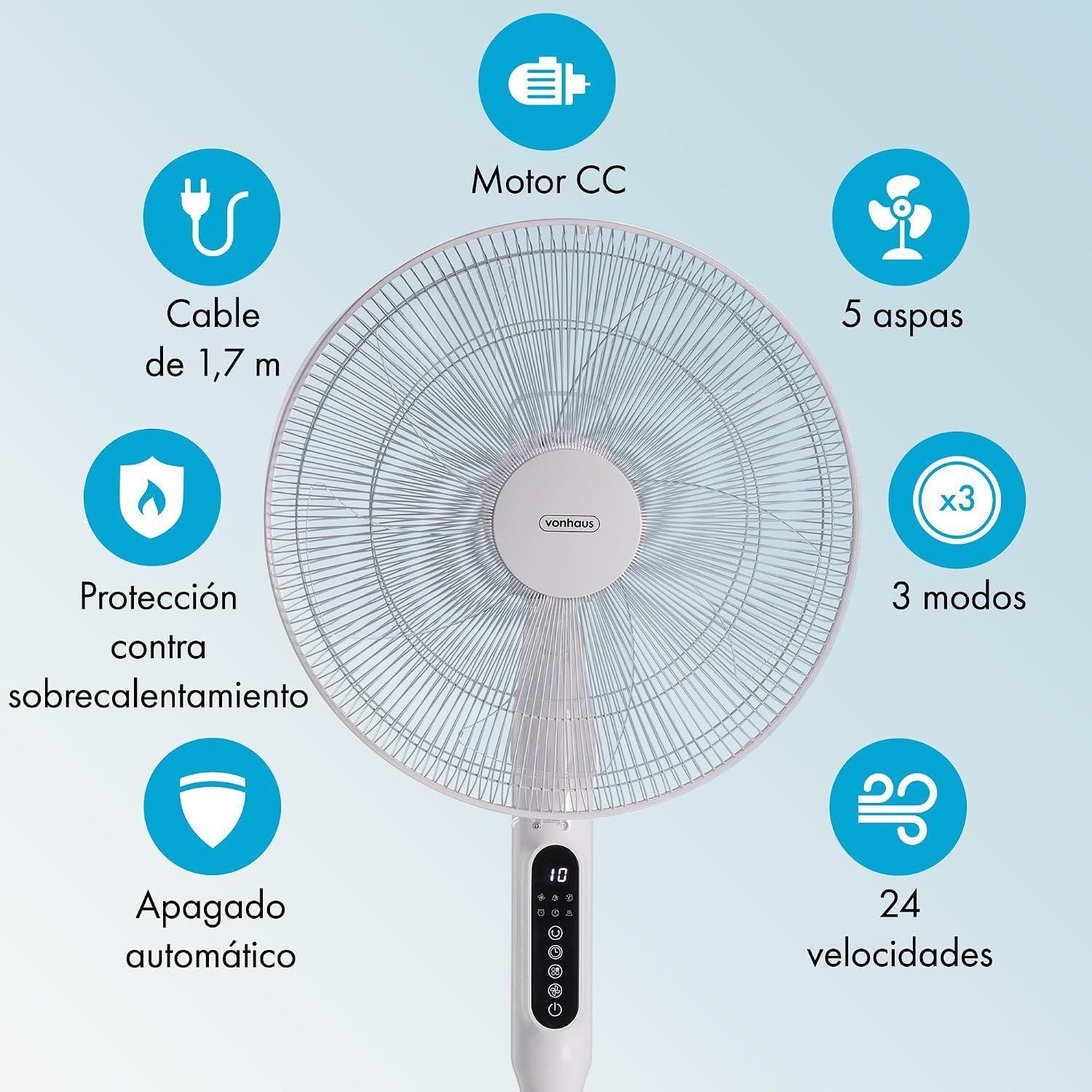
Image: This graphic summarizes the fan's main features, including a DC motor, 5 blades, 3 operating modes, 24 speeds, 1.7m cable, overheat protection, and automatic shut-off.
8. Atilẹyin ọja ati Support
All VonHaus products come with a minimum 2-odun atilẹyin ọja. This warranty covers manufacturing defects and ensures that we are available to assist you if any issues arise with your product.
For technical support, troubleshooting assistance, or warranty claims, please contact VonHaus customer service through the retailer where you purchased the product or visit the official VonHaus webojula fun alaye olubasọrọ.
Jọwọ ṣe idaduro ẹri rira rẹ fun awọn idi atilẹyin ọja.