
1. Ọja Ipariview
The NEWSKILL Chiron Pro is an ambidextrous wireless gaming mouse designed for precision and comfort. It features a high-performance optical sensor, programmable buttons, and customizable RGB lighting.

Aworan: Angled view of the NEWSKILL Chiron Pro Wireless Gaming Mouse, showcasing its ergonomic shape and design.
2. Package Awọn akoonu
- NEWSKILL Chiron Pro Wireless Gaming Mouse
- USB 2.4GHz Alailowaya olugba
- USB-C si USB-A Ngba agbara/Okun data
- Afowoyi Olumulo (iwe-ipamọ yii)
3. Awọn ilana iṣeto
3.1 Gbigba agbara akọkọ
Before first use, it is recommended to fully charge the mouse. Connect the provided USB-C cable to the mouse's front port and the USB-A end to a powered USB port on your computer or a USB wall adapter. A full charge takes approximately 2 hours and provides up to 80 hours of usage.

Aworan: Iwaju view of the mouse, highlighting the USB-C charging port.
3.2 Wireless Connection (2.4GHz)
- Locate the USB 2.4GHz wireless receiver. It is typically stored in a compartment on the underside of the mouse.
- Pulọọgi olugba USB sinu ibudo USB ti o wa lori kọnputa rẹ.
- Tan-an Asin nipa lilo ON/PA yipada ti o wa ni isalẹ ti Asin.
- Your computer should automatically detect and install the necessary drivers. The mouse is ready for use once the RGB lighting activates.
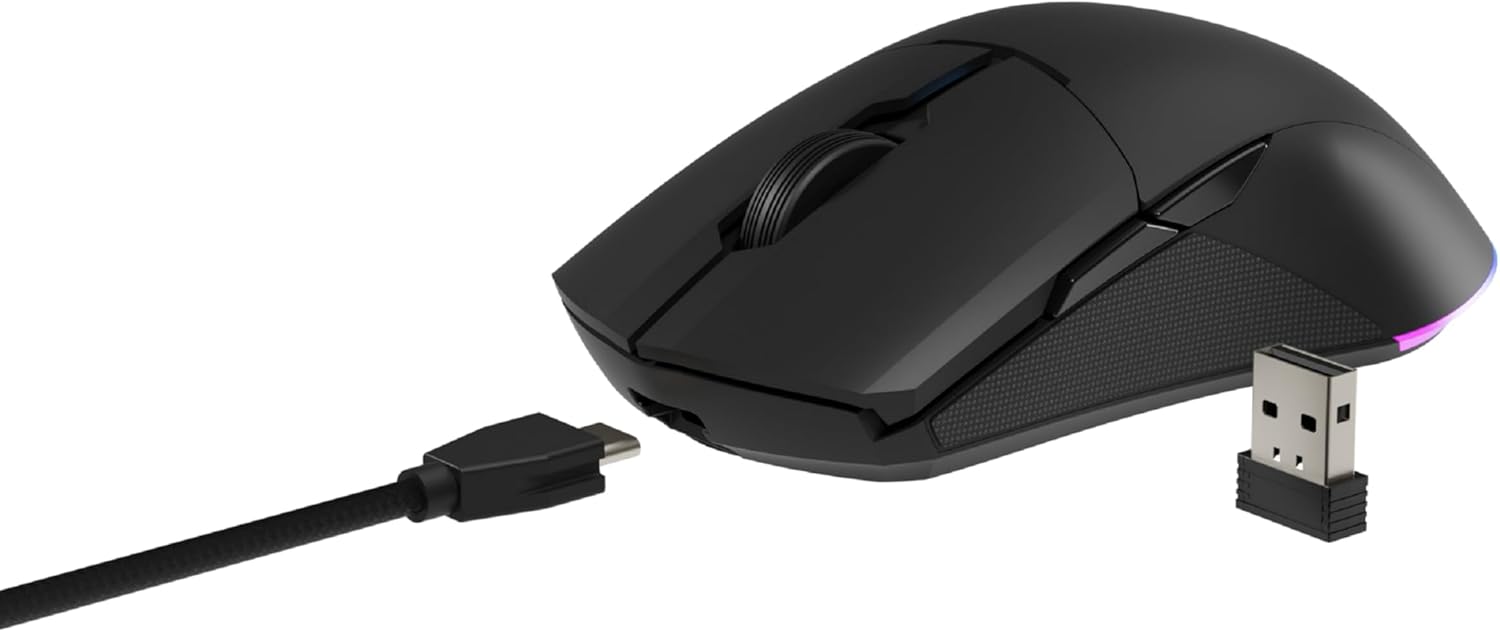
Image: The NEWSKILL Chiron Pro mouse shown with its USB-C cable and the 2.4GHz wireless receiver.
3.3 Asopọ Onirin
The mouse can also be used in wired mode. Simply connect the USB-C cable to the mouse and the USB-A end to your computer. The mouse will function as a wired device and charge simultaneously.
4. Awọn ilana Iṣiṣẹ
4.1 Ipilẹ Awọn iṣẹ
- Bọtini Tẹ osi: Iṣe akọkọ.
- Ọtun Tẹ Bọtini: Atẹle igbese/akojọ ọrọ-ọrọ.
- Yi lọ Kẹkẹ: Yi lọ soke/isalẹ, tẹ aarin.
- Side Buttons (8 programmable): Default functions may vary, but are customizable via software.

Aworan: Apa view of the mouse, showing the textured grip and two side buttons.
4.2 DPI Atunṣe
The mouse features a Pixart PMW3335 optical sensor with up to 16000 configurable DPI. The DPI button on the underside of the mouse allows you to cycle through preset DPI levels. For fine-tuning and custom DPI settings, use the advanced software.

Image: Underside of the mouse, showing the DPI button, optical sensor, and ON/OFF switch.
4.3 RGB Lighting isọdi
The Chiron Pro features customizable RGB lighting. To personalize lighting effects, colors, and brightness, download and install the dedicated NEWSKILL software from the official website. The software also allows for button remapping and macro creation.

Image: The NEWSKILL Chiron Pro mouse displaying its customizable RGB lighting.
5. Itọju
5.1 Ninu
Láti lè máa ṣiṣẹ́ dáadáa, máa fọ àsín rẹ déédéé. Lo aṣọ rírọ̀ tí ó gbẹ láti nu ojú ilẹ̀ náà. Fún ìdọ̀tí líle, fi díẹ̀ sí i.amp A le lo aṣọ pẹlu ọṣẹ kekere, ki o rii daju pe omi ko wọ inu eku naa. Yẹra fun awọn ohun elo fifọ tabi awọn olomi.
5.2 batiri Itọju
To prolong battery life, avoid fully discharging the mouse frequently. Charge the mouse when the battery indicator suggests low power. Store the mouse in a cool, dry place when not in use for extended periods.
6. Laasigbotitusita
- Asin ko dahun:
Ensure the mouse is turned ON. Check if the USB receiver is securely plugged into a working USB port. If using wired mode, ensure the USB-C cable is properly connected. Try a different USB port. - Awọn iṣoro asopọ alailowaya:
Ensure the mouse is within range of the USB receiver (typically up to 10 meters). Avoid placing the receiver near other wireless devices that might cause interference. Re-pair the mouse if necessary (refer to software instructions). - DPI or button issues:
Ensure the NEWSKILL software is installed and up-to-date. Check your settings within the software. Reset to default settings if custom configurations are causing issues. - Awọn iṣoro gbigba agbara:
Verify the USB-C cable is not damaged and is properly connected. Try a different USB port or charging adapter. Ensure the mouse is not in an extremely hot or cold environment during charging. - Olùgbà USB tí ó sọnù:
The USB receiver is typically stored in a compartment on the underside of the mouse for safekeeping. Please check this compartment thoroughly. If it is genuinely missing, contact customer support.
7. Awọn pato
| Ẹya ara ẹrọ | Sipesifikesonu |
|---|---|
| Brand | IWE IROYIN |
| Orukọ awoṣe | CHIRON PRO |
| Nọmba awoṣe | 10831240 |
| Àwọ̀ | Dudu |
| Asopọmọra Technology | Wireless (2.4GHz), USB (Wired) |
| Sensọ Iru | Optical (Pixart PMW3335) |
| DPI | Titi di 16000 DPI |
| Nọmba ti Awọn bọtini | 8 (Ṣiṣe eto) |
| Yipada s'aiye | Huano switches (up to 20 million clicks) |
| Ọwọ Iṣalaye | Ambidextrous |
| Igbesi aye batiri | Titi di wakati 80 |
| Akoko gbigba agbara | Isunmọ. wakati meji 2 |
| Ọja Mefa | 12.4 x 6.75 x 0.1 cm |
| Iwọn Ọja | 500 g |
| Ibamu Awọn ọna ṣiṣe | Windows 10, Windows 7, Windows Vista, Windows XP, Linux |
8. Atilẹyin ọja ati Support
8.1 atilẹyin ọja Alaye
NEWSKILL products are covered by a manufacturer's warranty. For specific warranty terms and conditions, please refer to the warranty card included with your product or visit the official NEWSKILL webojula. Jeki ẹri rira rẹ fun awọn iṣeduro atilẹyin ọja.
8.2 Onibara Support
If you encounter any issues or have questions regarding your NEWSKILL Chiron Pro Wireless Gaming Mouse, please visit the official NEWSKILL support website or contact their customer service team. You can find contact information on the NEWSKILL webojula: www.newskillgaming.com