
1. Ifihan
This manual provides detailed instructions for the installation, operation, and maintenance of your Alarm.com ADC-VC728PF Pro Series 4MP Bullet PoE Camera. This camera is designed for both indoor and outdoor surveillance, offering advanced features such as a motorized varifocal lens, 4MP video resolution, and intelligent analytics for enhanced security monitoring.
Jọ̀wọ́ ka ìwé ìtọ́ni yìí dáadáa kí o tó gbìyànjú láti fi ẹ̀rọ náà sí i tàbí láti ṣiṣẹ́ láti rí i dájú pé ó ṣiṣẹ́ dáadáa àti ààbò.
2. Package Awọn akoonu
Daju pe gbogbo awọn nkan wa ninu apo rẹ:
- Alarm.com ADC-VC728PF Camera
- Iṣagbesori Hardware
- Weather Resistant RJ45 Cap
- Fifi sori Itọsọna
- Torx Wrench
3. Ọja Ipariview
The Alarm.com ADC-VC728PF is a robust Power over Ethernet (PoE) bullet camera featuring a 4MP sensor and a motorized varifocal lens. This design allows for flexible installation and remote adjustment of the camera's field of view without compromising image quality. It supports 24/7 recording to an optional onboard microSD card or a Commercial-Grade Stream Video Recorder (CSVR126), and integrates advanced analytics for object detection and business activity tracking.
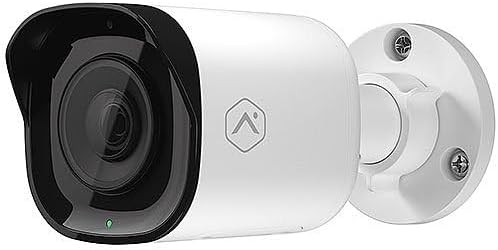
Iwaju view of the Alarm.com ADC-VC728PF Pro Series 4MP Bullet PoE Camera, showing the lens, LED indicator, and the adjustable mounting base.
Awọn ẹya pataki:
- 4MP WDR and HDR Video: Delivers high-resolution video with Wide Dynamic Range and High Dynamic Range capabilities (4MP recording supported on Commercial SVR).
- Motorized Varifocal Lens: Allows remote adjustment of the camera's field of view (3.2-9.8mm).
- Agbara lori Ethernet (PoE): Ó rọrùn láti fi sori ẹrọ nípa pípèsè agbára àti dátà lórí okùn Ethernet kan ṣoṣo.
- SD Card Local Storage: Supports optional onboard microSD card for 24/7 continuous recording.
- Iran Iran Night Provides clear video surveillance in low-light or no-light conditions.
- Perimeter Guard: Supports LED and Audio Alert features (requires firmware version 0.6.3.601+).
- Business Activity Analytics: Enables intelligent object detection and tracking for commercial applications.
- Lilo inu ile/ita gbangba: Designed for versatile deployment in various environments.
4. Eto ati fifi sori
Follow these steps for proper installation of your camera.
4.1 Iṣagbesori Kamẹra
- Yan Ibi kan: Choose a suitable indoor or outdoor location for wall mounting. Ensure the area provides a clear field of view and is within reach of your network infrastructure.
- Ṣetan Ilẹ: Use the included mounting hardware to secure the camera base to the chosen surface. Drill pilot holes if necessary.
- So Kamẹra naa: Securely attach the camera to the mounting base. The adjustable ball joint allows for flexible positioning.
4.2 Wáyà àti Ìsopọ̀mọ́ra
- So okun Ethernet pọ: Connect a standard Ethernet cable from your PoE-enabled network switch or injector to the camera's RJ45 port.
- Apply Weather Resistant Cap: For outdoor installations, use the included weather-resistant RJ45 cap to protect the Ethernet connection from environmental elements.
- Agbara Tan: Once connected to a PoE source, the camera will power on automatically. The status LED on the camera will indicate its operational status.
- Iṣeto Nẹtiwọọki: Access the Alarm.com platform or your network management interface to discover and configure the camera. Refer to the Alarm.com documentation for specific network setup procedures.
5. Isẹ
After successful installation and network configuration, you can begin operating your ADC-VC728PF camera.
5.1 Varifocal Lens Adjustment
- The motorized varifocal lens can be adjusted remotely through the Alarm.com app or web ni wiwo.
- Navigate to the camera settings to widen or narrow the field of view to optimize surveillance coverage.
5.2 SD Card Recording
- If an optional microSD card is installed, the camera supports 24/7 continuous recording.
- Wiwọle gba silẹ footage via the Alarm.com platform. Ensure the microSD card is properly formatted as per Alarm.com guidelines.
5.3 oye atupale
- Configure object detection and business activity tracking settings within the Alarm.com platform.
- Utilize the Perimeter Guard feature for LED and audio alerts, if supported by your camera's firmware version.
6. Itọju
Itọju deede ṣe idaniloju iṣẹ ṣiṣe to dara julọ ati igbesi aye gigun ti kamẹra rẹ.
- Ninu: Lokọọkan nu awọn lẹnsi kamẹra ati ile pẹlu asọ, damp asọ. Yago fun abrasive ose.
- Awọn imudojuiwọn famuwia: Ensure your camera's firmware is up to date. Firmware updates are typically managed through the Alarm.com platform and provide performance enhancements and new features.
- Ayẹwo USB: Regularly inspect all cables and connections for wear or damage, especially in outdoor environments.
7. Laasigbotitusita
Tọkasi tabili ni isalẹ fun awọn ọran ti o wọpọ ati awọn ojutu wọn.
| Oro | Owun to le Fa | Ojutu |
|---|---|---|
| Ko si Agbara / Kamẹra Ko Tan | No PoE connection; Faulty Ethernet cable; PoE switch issue. | Verify Ethernet cable connection; Ensure PoE source is active; Try a different cable or PoE port. |
| Ko si Fidio kikọ sii | Network connectivity issue; Incorrect camera configuration; Firewall blocking. | Check network connection; Verify camera settings in Alarm.com; Ensure network allows camera traffic. |
| Didara Aworan Ko dara | Dirty lens; Incorrect focus (varifocal); Low light conditions; Network bandwidth. | Clean the lens; Adjust varifocal lens remotely; Ensure adequate lighting or check IR functionality; Verify network bandwidth. |
| SD Card Recording Not Working | SD card not installed; SD card full or corrupted; Incorrect recording settings. | Install a compatible microSD card; Format or replace SD card; Check recording settings in Alarm.com. |
8. Awọn pato
Detailed technical specifications for the Alarm.com ADC-VC728PF camera.
| Ẹya ara ẹrọ | Sipesifikesonu |
|---|---|
| Orukọ awoṣe | Alarm.com VC728PF |
| Ipinnu Iduro ti o munadoko | 4 MP |
| Ipinnu Yaworan fidio | 1080p, 1920p |
| Lẹnsi Iru | Motorized Varifocal (3.2-9.8mm) |
| Asopọmọra Technology | Ti firanṣẹ (Eternet) |
| Orisun agbara | PoE (Agbara lori Ethernet) |
| inu ile / ita gbangba Lilo | Ninu ile, ita gbangba |
| Iṣagbesori Iru | Ògiri Ògiri |
| Fọọmù ifosiwewe | Ọta ibọn |
| Awọn iwọn (L x W x H) | 6.8 x 3 x 3 inches |
| Iwọn Nkan | 1.86 iwon |
| UPC | 850010773322 |
| Pataki Awọn ẹya ara ẹrọ | PoE, 4MP, WDR, HDR, IR Night Vision, Business Activity Analytics, Perimeter Guard |
9. Atilẹyin ọja ati Support
For warranty information, technical support, or service inquiries, please contact Alarm.com directly or refer to their official webojula. Tọju iwe-ẹri rira rẹ fun ijẹrisi atilẹyin ọja.
- Atilẹyin Ayelujara: Visit the official Alarm.com support portal for FAQs, troubleshooting guides, and software downloads.
- Kan si Iṣẹ Onibara: Refer to your Alarm.com service provider for direct customer support.