
Ọrọ Iṣaaju
This manual provides essential information for the safe and efficient use of your Candy RapidÓ Inverter Washer Dryer Combo. Please read these instructions carefully before installing and operating the appliance. Keep this manual for future reference.

Nọmba 1: Iwaju view of the Candy RapidÓ Inverter Washer Dryer Combo. This image shows the appliance with its dark grey finish, large circular door, and control panel located at the top front.
Alaye Aabo
Nigbagbogbo tẹle awọn iṣọra aabo ipilẹ nigba lilo awọn ohun elo itanna lati dinku eewu ina, mọnamọna, ati ipalara si eniyan.
- Rii daju pe ohun elo ti wa ni ilẹ daradara.
- Ma ṣe gba awọn ọmọde laaye lati ṣere lori tabi ninu ohun elo naa.
- Jeki awọn ohun elo apoti kuro ni arọwọto awọn ọmọde.
- Maṣe fi sori ẹrọ tabi tọju ohun elo naa nibiti yoo ti farahan si oju ojo.
- Ma ṣe ṣiṣẹ ohun elo eyikeyi pẹlu okun ti o bajẹ tabi plug.
- Yọọ ohun elo nigbagbogbo ṣaaju ṣiṣe mimọ tabi ṣiṣe itọju.
- Do not attempt to repair or replace any part of the appliance unless specifically recommended in this manual.
Eto ati fifi sori
1. Unpacking
- Remove all packaging materials, including the polystyrene base and any inserts inside the drum.
- Remove the transport bolts located at the rear of the appliance. Keep these bolts for future transport.
- Cover the holes left by the transport bolts with the plastic caps provided.
2. Ipo ati Ipele
- Place the appliance on a firm, flat floor.
- Adjust the feet to ensure the appliance is perfectly level. A level appliance reduces vibration and noise during operation.
3. Omi Asopọ
- So okun iwọle omi pọ si titẹ omi tutu pẹlu okun 3/4" kan.
- Ensure the hose is securely tightened to prevent leaks.
- Má ṣe tún lo àwọn páìpù ìfàwọlé àtijọ́. Máa lo àwọn páìpù tuntun tí a fi fún ẹ̀rọ náà nígbà gbogbo.
4. Ìsopọ̀ Ìṣàn omi
- Position the drain hose at a height between 60 cm and 100 cm from the floor.
- Rii daju pe okun ṣiṣan ko ni kiki tabi dina.
5. Asopọ Itanna
- Connect the power plug to a properly grounded electrical outlet.
- Rii daju voltage ati igbohunsafẹfẹ baramu awọn pato lori awọn ohun elo ká Rating awo.
- Ma ṣe lo awọn okun itẹsiwaju tabi awọn oluyipada pupọ.
6. First Lo
- Before the first wash, run a short cycle without laundry and detergent to clean the drum.
Awọn ilana Iṣiṣẹ
1. Iṣakoso igbimo Loriview

Nọmba 2: Alaye view of the control panel. This image highlights the digital display showing temperature, spin speed, and program selection, along with various function buttons.
The control panel features a program selector dial, a digital display, and various function buttons for temperature, spin speed, delay start, and special options. Refer to the detailed diagram in your printed manual for specific button functions.
2. ikojọpọ ifọṣọ
- Ṣii ilẹkun ki o si gbe ifọṣọ sinu ilu naa. Ma ṣe apọju ẹrọ naa; rii daju pe aaye to wa fun awọn aṣọ lati ṣubu larọwọto.
- For washing, the maximum capacity is 9kg. For drying, the maximum capacity is 6kg.
- Tii ilẹkun ṣinṣin.
3. Fifi Detergent
- Fa idalẹnu dispenser jade.
- Add detergent to the main wash compartment and fabric softener to the designated compartment.
- Refer to detergent packaging for recommended dosages.
- Titari apoti apanirun pada sinu patapata.
4. Yiyan Eto kan

Nọmba 3: Program selector dial with various cycle options. This image shows the dial with icons for different fabric types and rapid wash times, indicating the machine's versatility.
Turn the program selector dial to choose the desired wash or wash & dry program. The machine offers 16 standard programs, including 9 rapid programs that complete in less than 1 hour. Additional programs are available via the Simply-Fi App.
- Awọn Eto Kiakia: Utilize the 9 rapid programs for quick washing needs.
- Iwọn otutu ati Iyara Yiyi: Adjust these settings using the dedicated buttons if desired.
- Ibẹrẹ Idaduro: Use the delay start function to postpone the cycle start by up to 24 hours.
5. Bibẹrẹ Acycle
- Press the Start/Pause button to begin the selected program.
- Ifihan naa yoo fihan akoko to ku.
6. Using Drying Functions
- After a wash cycle, you can select a drying program.
- Ensure the load size is appropriate for drying (max 6kg).
- Choose the desired drying level (e.g., iron dry, cupboard dry) or time.
- Tẹ bọtini Bẹrẹ/Daduro lati bẹrẹ gbigbe.
7. Pataki Awọn ẹya ara ẹrọ
Nya Išė
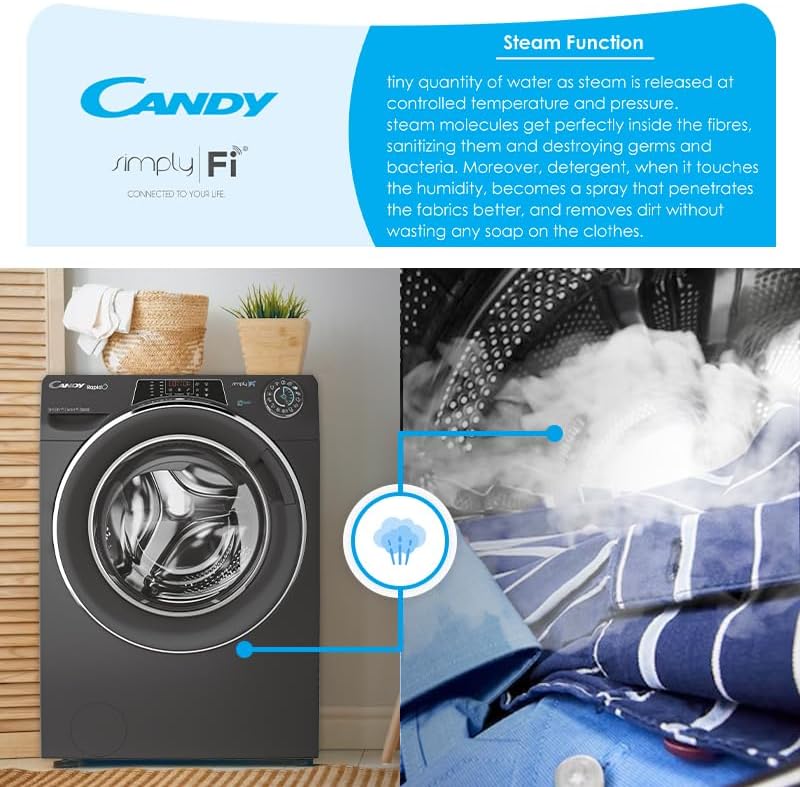
Nọmba 4: Visual representation of the steam function in action. This image shows steam being released into the drum, illustrating its sanitizing and wrinkle-reducing benefits.
The steam function helps to sanitize clothes, reduce wrinkles, and refresh garments. Select programs with steam options for enhanced fabric care.
Simply-Fi App (WiFi & Bluetooth Connectivity)
Connect your appliance to the Candy Simply-Fi App via WiFi or Bluetooth for advanced remote control and additional features:
- Snap & Wash: Take a photo of your laundry, and the app will suggest the best program, temperature, and spin speed.
- Access over 40 additional programs.
- Receive washing tips and support.
- Monitor cycle status and energy consumption.
Itoju
Regular maintenance ensures optimal performance and extends the lifespan of your appliance. Always unplug the machine before performing any maintenance.
1. Ninu Dispenser Detergent
- Yọ apẹja apanirun kuro nipa titẹ lefa itusilẹ.
- Fi omi ṣan labẹ omi ṣiṣan lati yọkuro eyikeyi iyokù ohun elo.
- Nu ile ti duroa dispenser pẹlu fẹlẹ kan.
- Tun atẹwọ sii.
2. Ninu Ajọ
- Wa àlẹmọ ni isalẹ iwaju ohun elo naa.
- Fi apoti aijinile si isalẹ lati mu omi eyikeyi.
- Carefully unscrew the filter cover and remove the filter.
- Clean the filter under running water and remove any lint or debris.
- Reinsert the filter and screw the cover back on securely.
3. Ninu ilu
- Run a maintenance wash cycle (e.g., a hot wash with no laundry and a descaling agent) periodically to prevent odors and limescale buildup.
- Wipe the inside of the drum and the door seal after each use to prevent mold growth.
4. Ita Cleaning
- Mu ese ita gbangba pẹlu asọ, damp asọ.
- Ma ṣe lo abrasive ose tabi epo.
Laasigbotitusita
Ṣaaju ki o to kan si iṣẹ alabara, jọwọ ṣayẹwo awọn ọran ti o wọpọ ati awọn ojutu wọnyi:
| Isoro | Owun to le Fa | Ojutu |
|---|---|---|
| Ohun elo ko bẹrẹ | Power plug not inserted; door not closed; program not selected; Start/Pause button not pressed. | Ṣàyẹ̀wò ìsopọ̀ agbára; rí i dájú pé ìlẹ̀kùn ti sé dáadáa; yan ètò kan; tẹ Bẹ̀rẹ̀/Dákẹ́. |
| Omi ko kun | Water tap closed; inlet hose kinked; water supply cut off. | Ṣí omi ìfọ́ omi; tọ́ páìpù náà; ṣàyẹ̀wò omi ilé. |
| Omi ti ko ṣan | Pọ́ọ̀pù ìfà omi ti fọ́ tàbí dí; àlẹ̀mọ́ ti dí. | Straighten drain hose; clean the filter (refer to Maintenance section). |
| Gbigbọn pupọ/ariwo | Transport bolts not removed; appliance not level; load unbalanced. | Yọ awọn boluti gbigbe kuro; ṣatunṣe awọn ẹsẹ ti o ni ipele; tun pin awọn ifọṣọ sinu ilu naa. |
| Awọn abajade fifọ ti ko dara | Iwọn idọti ti ko tọ; ti yan eto ti ko tọ; apọju. | Adjust detergent amount; select appropriate program; reduce load size. |
Awọn pato
- Nọmba awoṣe: 31010249
- Agbara fifọ: 9 kg
- Agbara gbigbe: 6 kg
- Agbara Rating: B
- Iru mọto: Inverter BPM motor
- Iyara Iyipo: 1400 RPM
- Asopọmọra: WiFi + Bluetooth (Simply-Fi App compatible)
- Awọn eto: 16 standard programs, 9 rapid programs, 40+ additional via app
- Awọn ẹya pataki: Steam function, Snap & Wash, 6D LED Display
- Ohun elo ilu: Irin ti ko njepata
- Ipele Ariwo: 80 dBA
- Ìwọ̀n Nkan: 70 kg
Atilẹyin ọja ati Support
Alaye atilẹyin ọja
This Candy RapidÓ Inverter Washer Dryer Combo comes with a 3 Odun atilẹyin ọja. Please retain your proof of purchase for warranty claims. The warranty covers manufacturing defects under normal household use. For full terms and conditions, refer to the warranty card included with your appliance or contact Candy customer service.
Onibara Support
If you encounter issues that cannot be resolved using the troubleshooting guide, or for any service inquiries, please contact Candy customer support. Contact details can typically be found on the manufacturer's webaaye tabi ni iwe ti a pese pẹlu ohun elo rẹ.