
1. Ọja Ipariview
The WOOPKER AK35 is a compact 2.0 channel stereo audio amplifier designed for home use. It features Bluetooth 5.0 connectivity, USB and SD card inputs, AUX input, and controls for bass, treble, and master volume. This amplifier delivers clear and powerful sound for various audio setups.
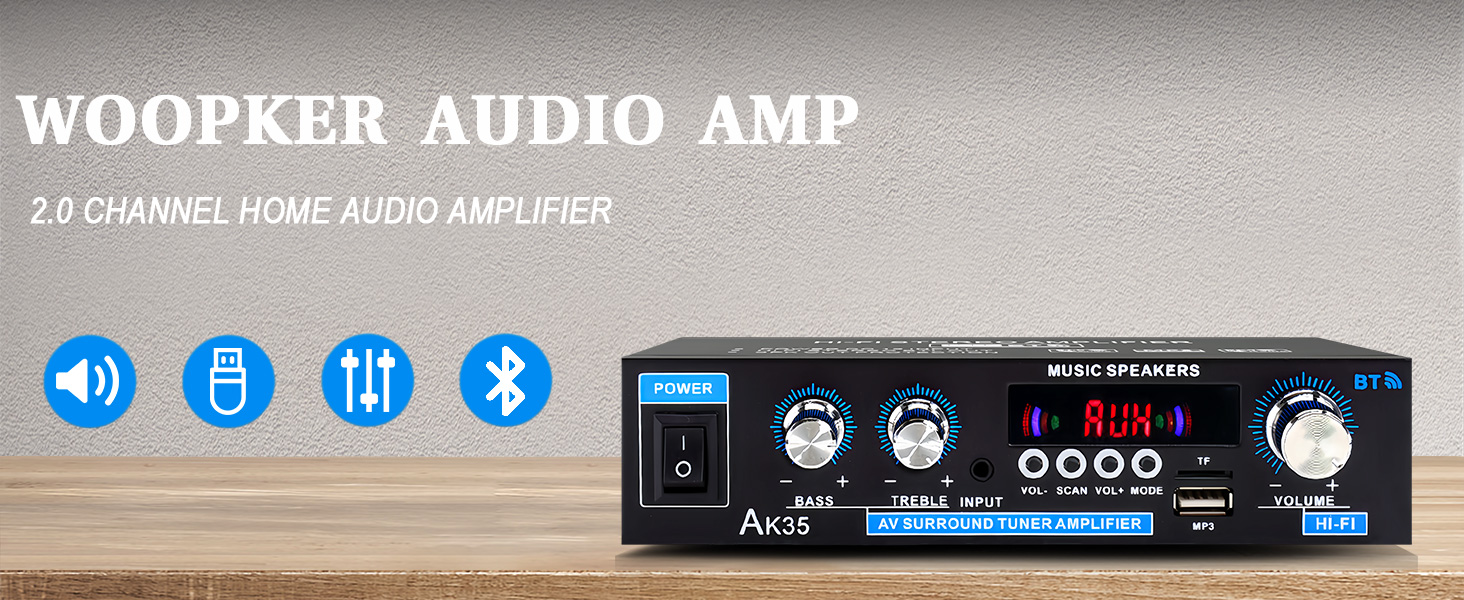
Aworan 1.1: Iwaju view of the AK35 Stereo Audio Amplifier.
2. Package Awọn akoonu
Jẹrisi pe gbogbo awọn ohun kan wa ninu package:
- 1x AK35 Audio Ampitanna
- 1x Okun Agbara
- 1x Itọsọna olumulo (iwe yii)
- 1x Isakoṣo latọna jijin
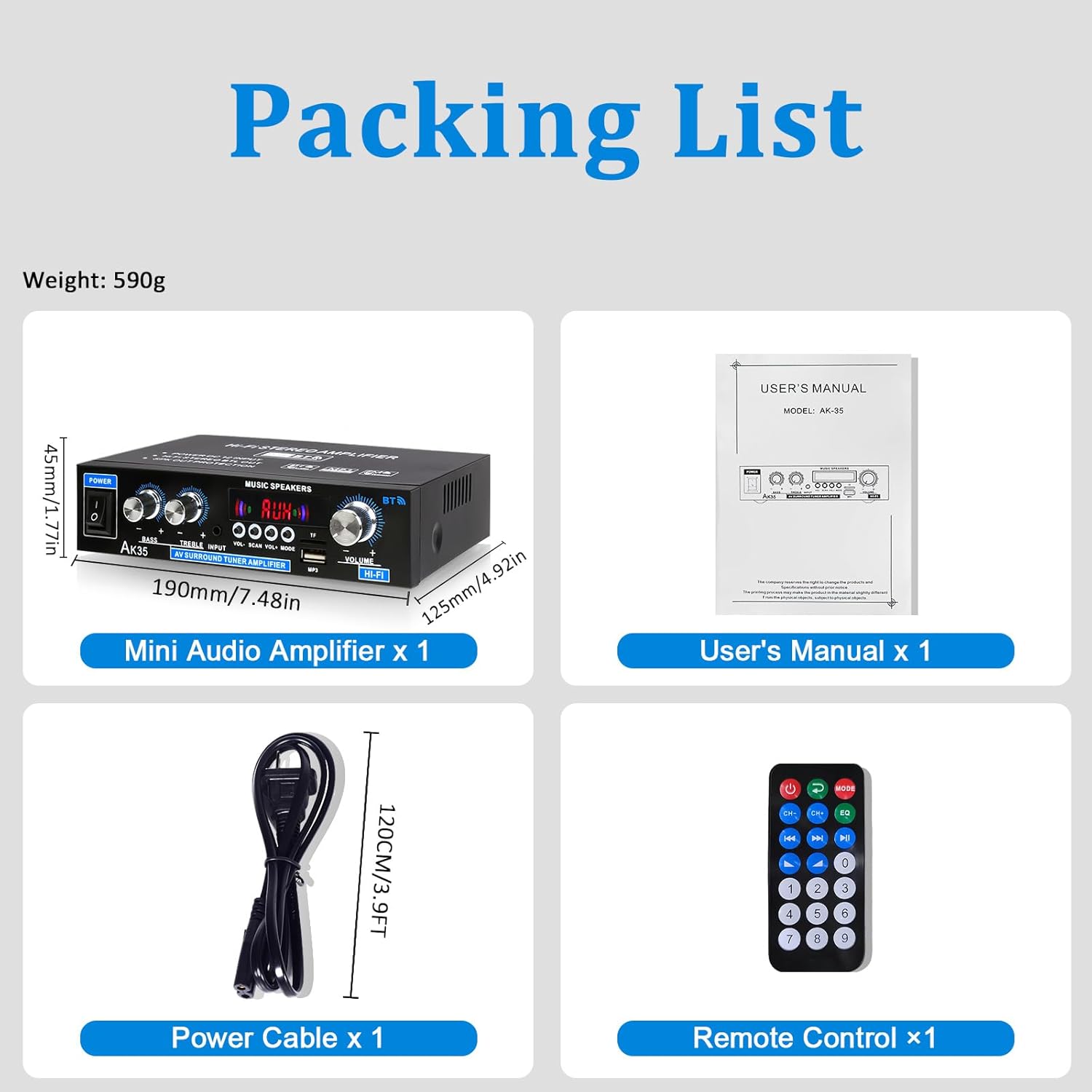
Image 2.1: Contents of the AK35 amplifier package.
3. Awọn ilana iṣeto
3.1 Iwaju Panel idari
Familiarize yourself with the front panel controls and indicators:

Image 3.1: Front Panel Layout of the AK35 Amplifier.
- Agbara Yi pada: Yipada awọn amplifier ON / PA.
- Knob Bass: Ṣe atunṣe iṣelọpọ ohun-igbohunsafẹfẹ kekere.
- Knob Treble: Ṣe atunṣe iṣẹjade ohun igbohunsafẹfẹ giga-giga.
- Iṣawọle Olohun: Selects the audio source (AUX, USB, SD, Bluetooth, FM).
- Ifihan LED: Shows current mode, track information, or frequency.
- Iwọn Titunto: Ṣe iṣakoso iwọn didun iṣelọpọ gbogbogbo.
- Awọn bọtini iṣẹ: Includes VOL-, SCAN, VOL+, MODE for navigation and control.
- TF/USB Port: For connecting USB flash drives or SD cards (via adapter).
3.2 Ru Panel Awọn isopọ
Understand the rear panel for proper connectivity:

Image 3.2: Rear Panel Layout of the AK35 Amplifier.
- Audio Input Jack (RCA): Connect external audio sources via RCA cables.
- Speaker Output Jack (L/R): Connect passive speakers.
- Ìtẹ̀wọlé Agbára DC 12V/5A: Fun DC ipese agbara.
- AC 110-240V Power Input: For AC power supply.
- Eriali Redio FM: So eriali FM ti o wa ninu rẹ pọ fun gbigba redio.
3.3 Asopọ Agbọrọsọ
Follow these steps to connect your speakers:

Image 3.3: Speaker Connection Diagram.
- Before connecting speakers, distinguish the positive (+) and negative (-) terminals. The positive terminal is usually red, and the negative terminal is black.
- Press the clasp on the back of the AK35 amplifier and insert bare speaker wires into the speaker clasp corresponding to the positive and negative terminals.
- Ensure proper polarity (+ to + and - to -) for both left and right channels.
- Avoid plugging and unplugging USB drives, SD cards, RCA audio cables, or speaker cables while the amplifier ti wa ni titan.
3.4 Asopọ agbara
Connect the power cable to the AC power input on the rear panel and then to a suitable power outlet.
Video 3.4: Demonstrates connecting speaker wires and powering on the AK35 amplifier.
4. Awọn ilana Iṣiṣẹ
4.1 Agbara Tan / Pa
Flip the Power Switch on the front panel to turn the amplifier ON tabi PA.
4.2 Aṣayan Ipo igbewọle
Press the 'MODE' button on the front panel or remote control to cycle through available input sources: Bluetooth (BT), AUX, USB, SD, and FM Radio.
4.3 Sisopọ Bluetooth
Lati so ẹrọ Bluetooth kan pọ:
- Yipada awọn amplifier to Bluetooth mode (the LED display will show "BLUE").
- Mu Bluetooth ṣiṣẹ lori ẹrọ alagbeka tabi kọmputa rẹ.
- Wa fun "AK35" in the list of available devices and select it to pair.
- Lọgan ti so pọ, awọn amplifier will confirm the connection, and you can stream audio wirelessly.

Image 4.3: Bluetooth 5.0 connectivity for wireless music streaming.
Video 4.3: Demonstrates Bluetooth pairing and music playback with the AK35 amplifier.
4.4 USB / SD Kaadi Sisisẹsẹhin
Insert a USB flash drive or an SD card (with an adapter) into the TF/USB port. The amplifier will automatically switch to USB/SD mode and begin playing audio files. Use the Function Buttons (VOL-, SCAN, VOL+) to control playback.
4.5 AUX Input Lilo
Connect an external audio source (e.g., CD player, DVD player, computer) to the RCA Audio Input Jacks on the rear panel using an RCA cable. Switch the amplifier to AUX mode to play audio from the connected device.
4.6 Redio FM
Ensure the FM antenna is connected to the rear panel. Switch the amplifier to FM mode. Use the 'SCAN' button to auto-scan and save available radio stations. Use VOL- and VOL+ to navigate through saved stations.
4.7 Volume, Bass, and Treble Adjustment
Adjust the Master Volume knob for overall sound level. Use the Bass and Treble knobs to fine-tune the low and high frequencies according to your preference.

Image 4.7: Remote control for easy adjustment of amplifier eto.
5. Itọju
5.1 Ninu
Mu ese naa nu amplifier's exterior with a soft, dry cloth. Do not use liquid cleaners or solvents, as they may damage the finish or internal components.
5.2 Ibi ipamọ
Nigbati o ko ba wa ni lilo fun awọn akoko ti o gbooro sii, tọju awọn amplifier ni itura, aye gbigbẹ kuro lati orun taara ati awọn iwọn otutu to gaju.
6. Laasigbotitusita
| Isoro | Owun to le Fa | Ojutu |
|---|---|---|
| Ko si agbara | Kò sí okùn agbára tí a so pọ̀; A ti pa iná; ibi tí a ti ń ta iná mànàmáná kò ní àbùkù. | Ensure power cable is securely connected. Turn the power switch ON. Test the power outlet with another device. |
| Ko si ohun jade | Incorrect input mode; Speaker wires loose; Volume too low; Audio source issue. | Select the correct input mode. Check speaker wire connections. Increase master volume. Verify audio source is playing and connected correctly. |
| Bluetooth ko sopọ | Amplifier not in BT mode; Device not in pairing mode; Interference. | Yipada amplifier to BT mode. Ensure your device's Bluetooth is on and searching. Move closer to the amplifier. |
| USB/SD kaadi ko dun | Ti ko tọ file ọna kika; Kaadi / wakọ ko fi sii daradara; Ti bajẹ files. | Ṣe idaniloju ohun afetigbọ files are in supported formats (e.g., MP3). Reinsert the USB drive/SD card. Try a different USB drive/SD card. |
7. Awọn pato
- Awoṣe: AK35
- Ipilẹ Agbara Titaju: 100W + 100W
- Agbara Ti won won (RMS): 30W x 2
- Awọn ikanni: 2.0
- Ẹya Bluetooth: 5.0
- Awọn igbewọle: AUX (RCA), USB, SD Card, Bluetooth, FM Radio
- Awọn iṣakoso: Bass, Treble, Master Volume
- Iṣagbewọle agbara: DC 12V/5A, AC 110-240V
- Ìwọ̀n Nkan: 1.28 poun (isunmọ 580g)
- Awọn iwọn idii: 8.03 x 6.93 x 2.13 inches (iwọn 20.4 x 17.6 x 5.4 cm)
8. Atilẹyin ọja ati Support
WOOPKER products are designed for reliability and performance. For warranty information or technical support, please refer to the contact details provided with your purchase or visit the official WOOPKER webojula. Tọju iwe-ẹri rira rẹ fun awọn ẹtọ atilẹyin ọja.