
Ọrọ Iṣaaju
The Gustard N18 PRO is a high-fidelity audio network switch designed to optimize audio streaming performance. It features multiple Ethernet ports, an SFP optical fiber input, and support for an external 10MHz clock, all integrated with advanced power supply and isolation technologies to ensure a clean audio signal. This manual provides essential information for the proper setup, operation, and maintenance of your N18 PRO.
Alaye Aabo
- Ensure the device is connected to a power source with the correct voltage bi itọkasi lori kuro.
- Do not expose the device to moisture, rain, or extreme temperatures.
- Yago fun gbigbe ẹrọ naa si nitosi awọn orisun ooru tabi ni imọlẹ orun taara.
- Maṣe ṣii casing; tọka gbogbo iṣẹ si oṣiṣẹ ti o peye.
- Disconnect power before cleaning or making any connections.
Ṣeto
Package Awọn akoonu
Jẹrisi pe gbogbo awọn ohun kan wa ninu package:
- Gustard N18 PRO Network Switch
- Okun agbara
Ti ara Awọn isopọ
Tọkasi aworan atọka ni isalẹ fun ipariview ti awọn ru nronu awọn isopọ.
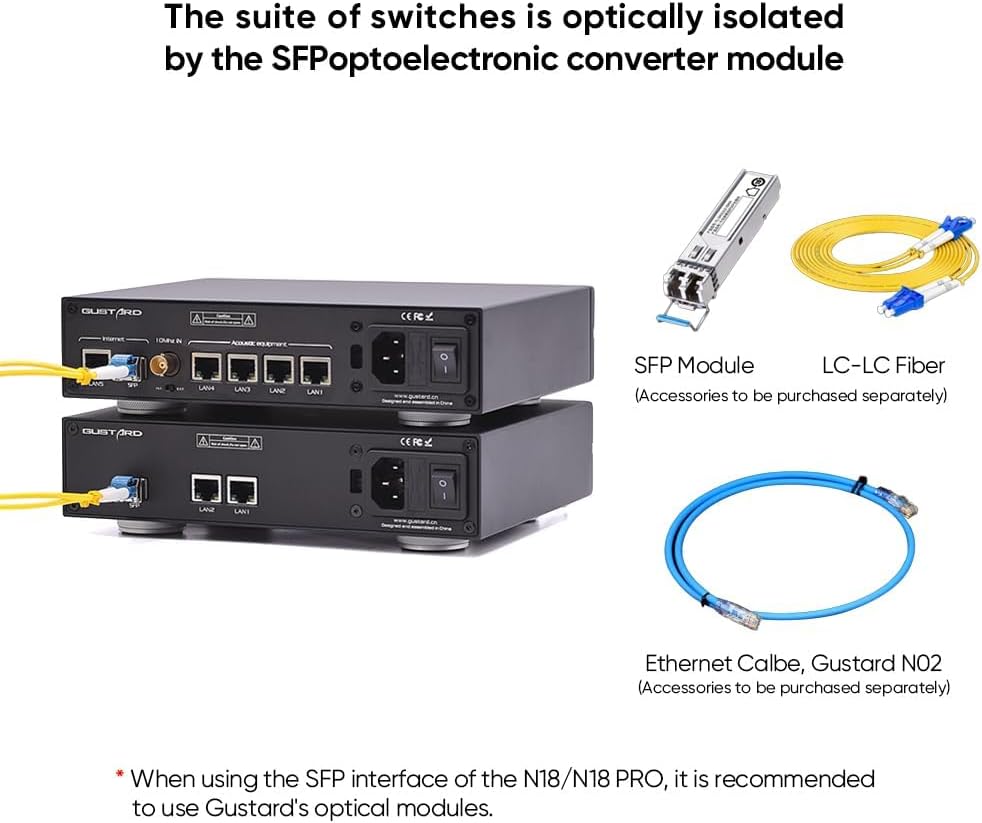
Figure 1: Rear panel of the Gustard N18 PRO, showing Ethernet ports, SFP port, Clock In, Clock selection, Voltage selection, AC power input, and Fuse.
- Asopọ agbara: Connect the provided power cable to the AC power input on the rear panel and then to a suitable wall outlet. Ensure the voltage selection switch is set correctly for your region (115V/230V).
- Awọn isopọ Ethernet: The N18 PRO features 5 Gigabit Ethernet ports (LAN1-LAN5) and 1 SFP port. Connect your network devices (e.g., router, NAS, PC, audio streamers) to these ports using standard Ethernet cables.
- Ibudo SFP: For enhanced optical isolation, insert a compatible SFP fiber module into the SFP port. It is recommended to use Gustard's optical modules for optimal performance. Connect an LC-LC fiber cable from the SFP module to your network.
- Ìbáwọlé Aago 10MHz: For improved audio clarity and analog warmth, connect an external 10MHz clock source to the BNC 10MHz Clock In port. Use the adjacent switch to select between internal (INT) and external (EXT) clock sources.
Awọn aṣayan Asopọmọra
The N18 PRO offers flexible integration into your audio network. Below are examples of typical setups.

Olusin 2: Example connectivity diagram for N18 PRO, showing connections to a router, NAS, PC, and various audio devices.

Figure 3: Illustration of optical isolation using an SFP module and LC-LC fiber cable with the N18 PRO.
Awọn ilana Iṣiṣẹ
Titan / Paa
After all connections are made, flip the power switch on the rear panel to the 'ON' position. The device will power on and begin network operations.
Isẹ Nẹtiwọọki
The N18 PRO functions as a network switch, facilitating data transfer between connected devices. Its primary role is to provide a clean and stable network environment for audio streaming by minimizing interference and noise.
- Awọn ibudo Ethernet: The 10/100/1000M adaptive Ethernet interfaces automatically detect and adjust to the speed of the connected device.
- Optoelectronic Isolation: When using the SFP fiber module, the network ripple is effectively isolated, contributing to a cleaner audio signal.
- Aago ita: If an external 10MHz clock is connected and selected, it will synchronize the device, enhancing audio clarity and reducing jitter.
Itoju
Ninu
To clean the exterior of the device, use a soft, dry cloth. Do not use liquid cleaners or abrasive materials, as they may damage the finish or internal components.
Famuwia Awọn imudojuiwọn
Periodically check the official Gustard website for any available firmware updates. Follow the instructions provided with the update package carefully to ensure proper installation.
Laasigbotitusita
| Isoro | Owun to le Fa | Ojutu |
|---|---|---|
| Ko si agbara | Power cable not connected; Power switch off; Blown fuse; Incorrect voltage yiyan. | Ensure power cable is securely connected. Turn power switch ON. Check and replace fuse if necessary. Verify voltage selection switch is set correctly. |
| Ko si iṣẹ nẹtiwọki | Ethernet cables loose or faulty; Connected device is off or misconfigured. | Check all Ethernet cable connections. Ensure connected devices are powered on and configured correctly. Try different Ethernet cables. |
| Didara ohun afetigbọ | Network interference; External clock not properly connected or selected. | Ensure SFP module is used for optical isolation if possible. Verify external 10MHz clock is connected and the 'EXT' option is selected. Check for other sources of electrical interference. |
Awọn pato
Figure 4: Gustard N18 PRO specifications and dimensions.
- Àwòrán Ayélujára: 1*SFP, 5*10/100/1000M adaptive Ethernet interfaces
- SFP: Supports GPON/EPON fiber modem, SFP RJ45 extension port, SFP fiber module
- Ilana Ethernet: 10Base-T, 100Base-T, 1000Base-T, 100Base-X, 1000Base-X
- 10M BNC Input: Input impedance 50 Ohm, 0dBm - 20dBm
- Agbara AC: 115V / 230V 50/60Hz
- Lilo Agbara: <10W
- Dimensions (excluding protruding parts): W220mm*H50mm*D170mm
- Iwọn idii: W285mm*H85mm*D270mm
- Weight with Package: 2.5KG
Alaye atilẹyin ọja
The Gustard N18 PRO comes with a warranty period of 1 year or more from the date of purchase, depending on the specific product and regional regulations. Please retain your proof of purchase for warranty claims. The warranty covers manufacturing defects and malfunctions under normal use. It does not cover damage caused by misuse, accidents, unauthorized modifications, or improper installation.
Atilẹyin
For technical assistance, troubleshooting, or any inquiries regarding your Gustard N18 PRO, please contact our customer support. We offer 24-hour online service to assist you. Refer to the official Gustard webaaye fun awọn alaye olubasọrọ ati awọn orisun afikun.