
Ọrọ Iṣaaju
O ṣeun fun riraasing the KOKKO KMF-1 Multi-Effects Guitar Pedal. This versatile pedal combines 18 speaker models, a drum machine, and a looper, offering a comprehensive solution for guitarists. Please read this manual carefully to ensure proper operation and to fully utilize all features.
Key Awọn ẹya ara ẹrọ
- 18 Speaker Models: Features 18 high-fidelity speaker models, developed with advanced DSP algorithms and IR technology for world-renowned speaker simulations.
- IR Cabinet Simulation: Ensures superior sound quality with high-fidelity cabinet modeling.
- Drum Machine & Looper: Includes a drum machine with 6 styles and over 40 rhythms, and a looper with 30 seconds of non-overdub recording capability, enabling one-man band performances.
- Awọn aṣayan Agbara Rọ: Can be powered by AA batteries or an adapter.
- Awọn atọkun Ọpọ: Equipped with external signal input, USB output, and headphone output for easy plug-and-play use.
Package Awọn akoonu
Lẹhin ṣiṣi silẹ, jọwọ rii daju pe gbogbo awọn nkan ti o wa ni isalẹ wa ati ni ipo to dara:
- 1 x KOKKO KMF-1 Multi-Effects Pedal
- (Note: Power adapter and AA batteries are typically sold separately and not included in the standard package.)
Ọja Pariview
Familiarize yourself with the various parts and controls of your KMF-1 pedal.

Nọmba 1: Oke-isalẹ view of the KOKKO KMF-1 Multi-Effects Pedal, showing the expression pedal on the left and the control panel with display, knobs, and footswitches on the right.
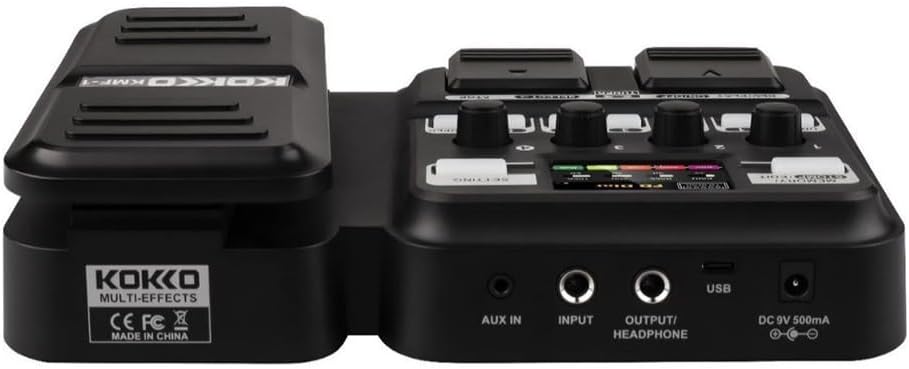
Nọmba 2: Ẹyìn view of the KOKKO KMF-1 Multi-Effects Pedal, highlighting the AUX IN, INPUT, OUTPUT/HEADPHONE, USB, and DC 9V power input ports.
Awọn iṣakoso ati awọn isopọ:
- Efatelese Ikosile: Used for volume control or wah effects.
- Iboju ifihan: Shows current settings, effects, and modes.
- Knobs (1-4): Control various parameters depending on the selected effect or mode.
- Footswitches (DRUM, REC/PLAY ON/OFF, TUNER, SELECT, STOP, LOOPER): For activating/deactivating functions and navigating presets.
- MEMORY/STOMP EDIT Button: Toggles between memory and stompbox modes, or enters edit mode.
- SETTING Button: Ó ń wọlé sí àwọn ètò ètò.
- AX IN: 3.5mm input for connecting external audio sources (e.g., MP3 player).
- Fi sii: 1/4" input for connecting your guitar.
- OUTPUT/HEADPHONE: 1/4" output for connecting to an amplifier tabi olokun.
- Ibudo USB: For connecting to a computer for recording or software updates.
- Input agbara DC 9V: For connecting a 9V DC power adapter (center negative).
Ṣeto
Ngba agbara:
- Agbara Batiri: Open the battery compartment on the underside of the pedal and insert 4 x AA batteries (not included), ensuring correct polarity.
- Agbara Adapter AC: Connect a 9V DC (center negative) power adapter (not included) to the DC 9V input jack.
Connecting Your Gear:
- So rẹ gita si awọn ÀWỌN Ọ̀RỌ̀ jack using a 1/4" instrument cable.
- Sopọ awọn OUTPUT/HEADPHONE jack to your guitar amplifier's input or to headphones using a 1/4" cable.
- (Optional) Connect an external audio source (e.g., smartphone, MP3 player) to the AX IN jack using a 3.5mm stereo cable.
- (Eyi je eyi ko je) So awọn USB port to your computer for direct recording or firmware updates.
Awọn ilana Iṣiṣẹ
Isẹ ipilẹ:
- Titan/Apapa: The unit powers on automatically when connected to power. Disconnect power to turn off.
- Iṣakoso iwọn didun: Use the expression pedal to control the overall output volume.
- Navigating Presets: Use the SELECT footswitch to cycle through different presets or effects.
Using Speaker Models:
The KMF-1 features 18 high-quality speaker models. These models simulate the sound characteristics of various guitar cabinets.
- Enter the speaker model selection mode (refer to display).
- Use the SELECT footswitch or corresponding knobs to browse and choose your desired speaker model.
- Adjust parameters like gain, tone, and volume using the numbered knobs (1-4) as indicated on the display.
Ẹrọ ilu:
The built-in drum machine offers 6 styles and over 40 rhythms to practice or jam along with.
- Tẹ awọn ÌLU footswitch to activate the drum machine.
- Use the SELECT footswitch or knobs to choose a drum style and rhythm.
- Adjust the drum volume using the appropriate knob.
- Tẹ ÌLU again to stop the drum machine.
Looper Function:
The looper allows you to record up to 30 seconds of audio without overdubbing, perfect for creating backing tracks.
- Tẹ awọn REC/PLAY ON/OFF footswitch once to start recording. The display will indicate recording status.
- Play your guitar part.
- Tẹ REC/PLAY ON/OFF again to stop recording and immediately start playback of the recorded loop.
- Lati da ṣiṣiṣẹsẹhin duro, tẹ awọn DURO afẹsẹsẹ.
- To clear the loop, press and hold the DURO afẹsẹsẹ.
Tuner Function:
The integrated tuner allows for accurate guitar tuning.
- Tẹ awọn OWO footswitch to activate the tuner. The output signal will be muted.
- Play a single note on your guitar. The display will show the note and indicate if it is sharp, flat, or in tune.
- Ṣatunṣe atunṣe gita rẹ titi ti ifihan yoo fihan pe akọsilẹ wa ni orin.
- Tẹ awọn OWO footswitch again to exit the tuner and unmute the output.
Memory/Stomp Edit Mode:
This mode allows you to switch between saved presets (Memory mode) and individual stompbox effects (Stomp mode), as well as edit parameters.
- Tẹ awọn MEMORY/STOMP EDIT button to toggle between Memory and Stomp modes.
- In Stomp mode, individual effects can be turned on/off using their dedicated footswitches or by selecting them.
- To edit parameters, press and hold the MEMORY/STOMP EDIT button to enter edit mode. Use the knobs and footswitches to adjust settings as displayed.
- Save your changes by following the on-screen prompts (usually by pressing a specific footswitch or button).
Eto Eto:
Access system settings to configure global parameters.
- Tẹ awọn Eto button to enter the system settings menu.
- Use the footswitches or knobs to navigate through the menu options.
- Adjust settings such as display brightness, factory reset, etc.
- Tẹ awọn Eto bọtini lẹẹkansi lati jade kuro ni akojọ aṣayan.
Itoju
- Ninu: Lo aṣọ rírọrùn tí ó gbẹ láti nu pedal náà. Má ṣe lo àwọn ohun ìfọṣọ tàbí àwọn ohun èlò ìfọṣọ.
- Ibi ipamọ: Tọ́jú pedal náà sí ibi tí ó tutù tí ó sì gbẹ, tí kò sí ibi tí oòrùn lè tàn dé àti ibi tí ó gbóná janjan.
- Rirọpo Batiri: If using batteries, replace them when the low battery indicator appears or when the pedal's performance degrades. Remove batteries if the pedal will not be used for an extended period.
- Yago fun Ọrinrin: Keep the pedal away from water and other liquids.
- Mu pẹlu Itọju: Yago fun sisọ tabi tẹri ẹsẹ si awọn ipa ti o lagbara.
Laasigbotitusita
| Isoro | Owun to le Fa | Ojutu |
|---|---|---|
| Ko si ohun jade. | Incorrect cable connections; Low battery; Tuner is active; Amplifier wa ni pipa. | Check all cables are securely connected. Replace batteries or use AC adapter. Deactivate tuner. Ensure amplifia naa wa ni titan ati iwọn didun naa ga. |
| Daru tabi ko dara ohun didara. | Input level too high; Incorrect effect settings; Damaged cable. | Adjust guitar volume or pedal input level. Check and adjust effect parameters. Try a different cable. |
| Pẹdali ko ni agbara. | No power source; Dead batteries; Faulty adapter. | Ensure power adapter is connected or batteries are inserted correctly. Replace batteries. Try a different compatible power adapter. |
| Looper not recording. | Incorrect looper mode; Memory full. | Ensure you are in the correct looper recording mode. Clear previous loops if memory is full. |
Awọn pato
| Ẹya ara ẹrọ | Ẹ̀kúnrẹ́rẹ́ |
|---|---|
| Orukọ awoṣe | KMF-1 |
| Awọn iwọn Ọja (L x W x H) | 31 x 20 x 7 cm (12.2 x 7.9 x 2.8 inches) |
| Iwọn Nkan | 900 g (1.98 lbs) |
| Ibi ti ina elekitiriki ti nwa | 9V DC (center negative) adapter or 4 x AA batteries |
| Ni wiwo Hardware | USB |
| Awọn awoṣe Agbọrọsọ | 18 (IR technology) |
| Looper Recording Time | 30 seconds (non-overdub) |
| Awọn orin ilu | Over 40 rhythms across 6 styles |
| Nọmba awoṣe olupese | 43ST9NRST131F1P8K5GRJ7 |
Atilẹyin ọja ati Support
KOKKO products are designed and manufactured to the highest quality standards. For information regarding warranty coverage, technical support, or service, please refer to the warranty card included with your product or visit the official KOKKO webojula. Jọwọ ṣe idaduro ẹri rira rẹ fun eyikeyi awọn ibeere atilẹyin ọja.
For further assistance, please contact our customer support team.