
Revolution R180 Connect
Revolution R180 Connect Smart Toaster User Manual
Model: R180 Connect (R180C-01)
1. Ifihan
This manual provides essential information for the safe and efficient operation of your Revolution R180 Connect Smart Toaster. Please read all instructions carefully before use and retain this manual for future reference.

Image 1.1: The Revolution R180 Connect Smart Toaster, featuring a touchscreen display and two toasting slots.
2. Alaye Aabo pataki
Nigbati o ba nlo awọn ohun elo itanna, awọn iṣọra aabo ipilẹ yẹ ki o tẹle nigbagbogbo, pẹlu atẹle naa:
- Ka gbogbo ilana.
- Maṣe fi ọwọ kan awọn aaye ti o gbona. Lo awọn ọwọ tabi awọn koko.
- Lati daabobo lodi si mọnamọna itanna, maṣe fi okun, plugs, tabi toaster bọ inu omi tabi omi miiran.
- Abojuto sunmọ jẹ pataki nigbati eyikeyi ohun elo ba lo nipasẹ tabi sunmọ awọn ọmọde.
- Yọọ kuro lati inu iṣan nigbati ko si ni lilo ati ṣaaju ṣiṣe mimọ. Gba laaye lati tutu ṣaaju fifi si tabi mu awọn ẹya kuro.
- Má ṣe lo ẹ̀rọ èyíkéyìí pẹ̀lú okùn tàbí plug tó ti bàjẹ́ tàbí lẹ́yìn tí ẹ̀rọ náà bá ti bàjẹ́ tàbí tí ó ti bàjẹ́ lọ́nàkọnà. Pe olùtọ́jú oníbàárà fún àyẹ̀wò, àtúnṣe, tàbí àtúnṣe.
- Lilo awọn asomọ ẹya ẹrọ ti a ko ṣeduro nipasẹ olupese ohun elo le fa awọn ipalara.
- Maṣe lo ni ita.
- Ma ṣe jẹ ki okun duro lori eti tabili tabi counter, tabi fi ọwọ kan awọn aaye ti o gbona.
- Ma ṣe gbe sori tabi sunmọ gaasi ti o gbona tabi ina ina, tabi ni adiro ti o gbona.
- Išọra to gaju gbọdọ ṣee lo nigba gbigbe ohun elo ti o ni epo gbona tabi awọn olomi gbona miiran.
- Ma ṣe lo ohun elo fun miiran ju lilo ti a pinnu lọ.
- Awọn ounjẹ ti o tobi ju, awọn idii bankanje irin, tabi awọn ohun elo ko yẹ ki o fi sii sinu toaster nitori wọn le kan eewu ina tabi mọnamọna.
- A ina le waye ti o ba ti toasters ti wa ni bo tabi kàn flammable ohun elo, pẹlu awọn aṣọ-ikele, draperies, Odi, ati bi, nigba ti ni isẹ.
- Ma ṣe gbiyanju lati tu ounjẹ kuro nigbati toaster ti wa ni edidi.
- Maṣe ṣiṣẹ lairi.
- The Toastie Press accessory (sold separately) is designed for use with this toaster. Ensure proper installation and removal as per its instructions.
3. Package Awọn akoonu
Jẹrisi pe gbogbo awọn nkan wa ati ni ipo ti o dara nigbati ṣiṣi silẹ:
- Revolution R180 Connect Smart Toaster
- Yiyọ Crumb Atẹ
- Afowoyi Olumulo (iwe-ipamọ yii)
Note: The Toastie Press and Warming Rack are sold separately and are not included in the standard package.
4. Eto
4.1 Ibẹrẹ Ibẹrẹ
- Place the toaster on a stable, flat, heat-resistant surface.
- Ensure adequate clearance (at least 6 inches) from walls, cabinets, and other objects to allow for proper ventilation.
- Do not place the toaster directly under cabinets or near flammable materials.
4.2 Asopọ agbara
- Yọ okun agbara patapata.
- So toaster naa sinu ihò ina AC 120V boṣewa kan.
- The touchscreen will illuminate, indicating the toaster is powered on.
4.3 Asopọmọra Wi-Fi (Aṣayan)
The R180 Connect features Wi-Fi connectivity for automatic clock setting, weather display, and over-the-air updates.
- On the touchscreen, navigate to the settings menu (gear icon).
- Select "Wi-Fi Setup" and follow the on-screen prompts to connect to your home network.
- Once connected, the toaster will automatically set the time and display local weather information.
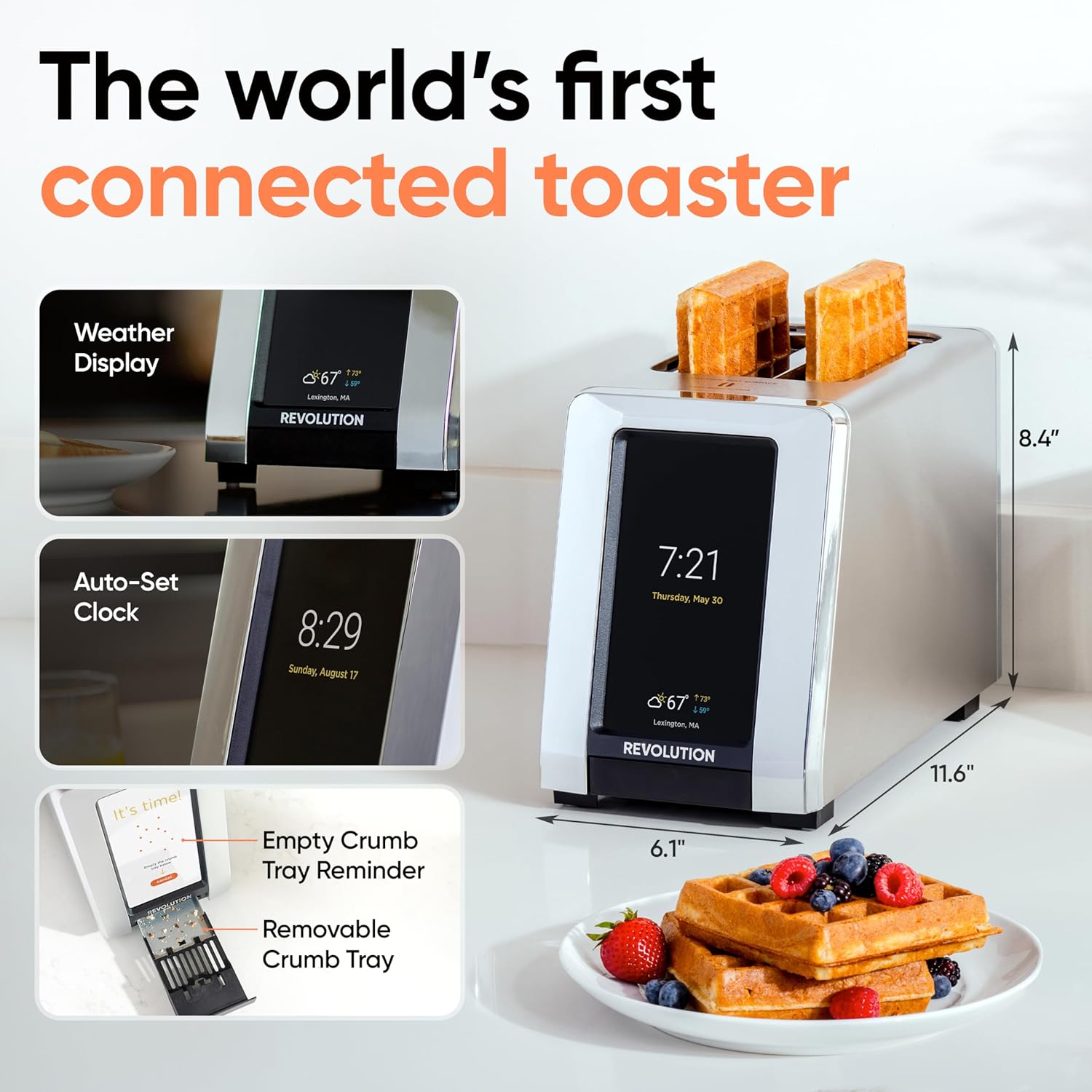
Image 4.1: The R180 Connect displaying weather and time, highlighting its smart features and dimensions.
5. Awọn ilana Iṣiṣẹ
5.1 Fífi oúnjẹ hómbà kékeré ṣe oúnjẹ
The R180 Connect simplifies toasting with a 3-tap process:
- Select Bread Type: On the touchscreen, choose the icon corresponding to your food item (e.g., bread, bagel, waffle).
- Choose State: Select whether the item is Titun, Didi, tabi fun Tun gbona.
- Adjust Browning Level: Use the slider or tap the desired browning level (1-7). The toaster remembers your last setting.
- Bẹ̀rẹ̀ sí í tò sísè: Fọwọ ba Bẹrẹ button. The toaster will automatically lower the food and begin the toasting cycle.

Image 5.1: The toaster's touchscreen interface, demonstrating the selection of bread type and browning preferences.
5.2 InstaGLO Technology
Awọn InstaGLO 2.0 heating technology rapidly reaches full heat in approximately 2 seconds. This process sears the outside of the food, locking in moisture and flavor, resulting in a crispy exterior and soft interior.

Image 5.2: Visual comparison illustrating the faster and tastier results achieved with InstaGLO technology.
5.3 Using the Toastie Press (Sold Separately)
The Revolution Toastie Press allows you to prepare grilled cheese, paninis, and quesadillas directly in your toaster without butter or oil. Refer to the Toastie Press instruction manual for detailed usage.
- Insert the Toastie Press into the toaster slots.
- Place your sandwich or food item inside the press.
- On the toaster's touchscreen, select "Toastie Mode" and choose your desired browning level.
- Fọwọ ba Bẹrẹ.
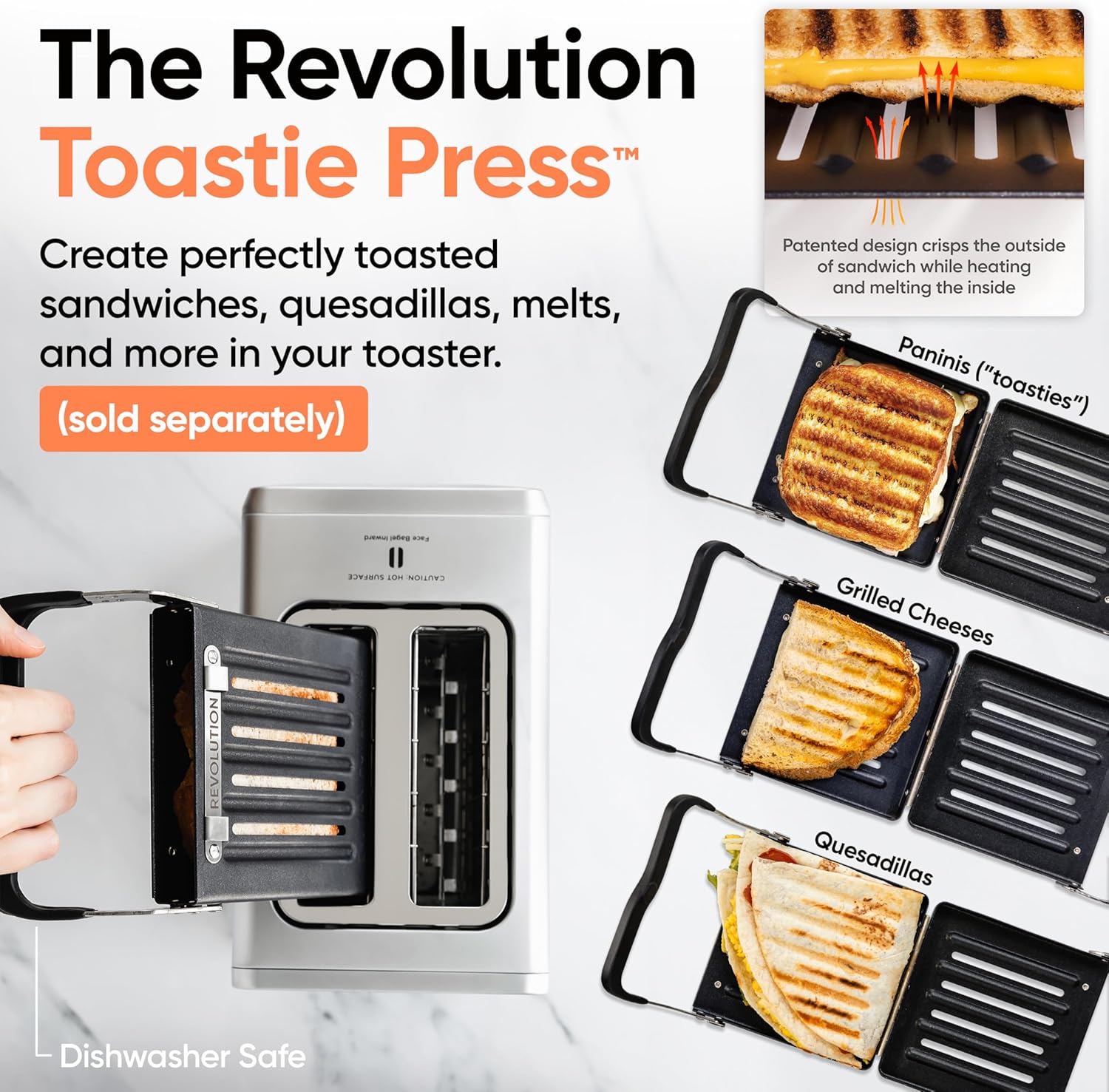
Image 5.3: The Revolution Toastie Press, an optional accessory for making toasted sandwiches.
6. Itọju ati Cleaning
6.1 Crumb Tray Cleaning
The toaster will periodically remind you to clean the crumb tray. Regular cleaning prevents crumb buildup and reduces fire risk.
- Yọọ toaster kuro ninu iṣan agbara ki o jẹ ki o tutu patapata.
- Locate the removable crumb tray at the bottom front of the toaster.
- Pull the tray out to remove it.
- Da awọn eruku nu ki o si nu atẹ naa mọ pẹlu ipolowoamp asọ.
- Ensure the tray is completely dry before reinserting it into the toaster.
Image 6.1: The removable crumb tray, shown being accessed for cleaning.
6.2 Ode Ninu
- Rí i dájú pé ẹ̀rọ toaster náà ti yọ pọ́ọ̀gù kúrò, kí ó sì tutù.
- Mu ese ita gbangba pẹlu asọ, damp asọ. Ma ṣe lo awọn afọmọ abrasive tabi awọn paadi iyẹfun.
- For stainless steel models, use a stainless steel cleaner if necessary, following the product's instructions.
- Do not spray cleaning solutions directly onto the toaster.
7. Laasigbotitusita
| Isoro | Owun to le Fa | Ojutu |
|---|---|---|
| Toaster does not power on. | Ko edidi ni; aiṣedeede agbara iṣan. | Ensure the toaster is securely plugged into a working outlet. Test the outlet with another appliance. |
| Food is not toasting evenly. | Incorrect bread type or browning level selected; crumb tray full. | Verify the correct bread type and browning level are selected. Clean the crumb tray. |
| Wi-Fi asopọ kuna. | Ọ̀rọ̀ ìpamọ́ tí kò tọ́; kò sí ní ìpele; ìṣòro nẹ́tíwọ́ọ̀kì. | Re-enter Wi-Fi password carefully. Move toaster closer to router. Restart router. |
| Toaster emits smoke. | Food lodged inside; crumb tray full; foreign object. | Immediately unplug the toaster. Allow to cool. Carefully remove any lodged food or foreign objects. Clean crumb tray. If smoke persists, discontinue use and contact customer support. |
8. Awọn pato
- Awoṣe: R180 Connect (R180C-01)
- Brand: Iyika
- Nọmba Awọn Ege: 2
- Wattage: 1500 watt
- Voltage: 120 Volt (AC)
- Ohun elo: Irin ti ko njepata
- Awọn iwọn ọja: 11.65"D x 6.13"W x 8.4"H
- Ìwọ̀n Nkan: 7.17 iwon
- Ẹya Pataki: Touchscreen, Wi-Fi Connectivity, InstaGLO Technology
- UPC: 810034150882
9. Atilẹyin ọja ati Support
For warranty information, product registration, or technical support, please visit the official Revolution Cooking webojula tabi kan si wọn onibara iṣẹ Eka.
Revolution Cooking, LLC
Visit the Revolution Store on Amazon
Note: Specific warranty terms may vary by region and purchase date. Please refer to the documentation provided with your purchase for precise details.
Ask a question about this manual
Ask about setup, troubleshooting, compatibility, parts, safety, or missing instructions. Manuals+ will review the question and use this page’s manual context to help answer it.