
1. Ifihan
This manual provides detailed instructions for the installation, operation, maintenance, and troubleshooting of your Stiflix Single Din 10.1-inch CarPlay Touchscreen Car Stereo. Please read this manual thoroughly before using the product to ensure proper function and safety.
2. Package Awọn akoonu
Jẹrisi pe gbogbo awọn ohun kan wa ninu package:
- Single Din Android Radio Unit
- Ijanu onirin ati Cables
- Okun USB
- Eriali GPS
- Awọn ohun elo iṣagbesori
- Afowoyi Olumulo (iwe-ipamọ yii)
3. Eto ati fifi sori
The Stiflix 10.1-inch car stereo is designed for single DIN and most double DIN dash openings. Professional installation is recommended.
3.1 Pre-Fifi sọwedowo
- Ensure your vehicle's electrical system is compatible with the stereo's power requirements.
- Disconnect the vehicle's battery before beginning installation.
- Identify the correct wiring for power, ground, speakers, and accessories in your vehicle.
3.2 Wiring aworan atọka
Refer to the included wiring diagram for specific connections. Match the color-coded wires from the stereo's harness to your vehicle's wiring harness. Secure all connections properly.
3.3 Iṣagbesori Unit
- Install the single DIN chassis into your vehicle's dash opening using the provided mounting kits.
- Attach the 10.1-inch display to the chassis. The display is detachable and can be adjusted for optimal viewing.
- So eriali GPS pọ ki o si darí rẹ̀ lọ si ipo kan pẹlu view ti ọrun.
- Connect any optional accessories such as a backup camera or external amplifier.

Image: The Stiflix 10.1-inch Single Din Car Stereo, showcasing its rotatable and adjustable screen. This image provides an overview of the product's design and key features.

Image: An illustration of the 10.1-inch Single Din Android Car Stereo with icons representing its features like CarPlay, Android Auto, Bluetooth, Mirrorlink, Voice Control, Offline Maps, WiFi Hotspot, Touchscreen, Backup Camera Input, and 2GB RAM + 64GB ROM.
4. Awọn ilana Iṣiṣẹ
4.1 Títan/Pápá àti Àwọn Ìṣàkóso Àkọ́kọ́
- Tẹ bọtini agbara lati tan-an tabi paa kuro.
- Adjust volume using the dedicated controls or touchscreen interface.
- Navigate through menus and applications using the 10.1-inch capacitive IPS touchscreen.
4.2 Alailowaya CarPlay ati Android Auto
Connect your smartphone wirelessly via Bluetooth and Wi-Fi to access CarPlay or Android Auto features. This allows for safe access to navigation, calls, messages, music, and voice commands while driving.

Image: The car stereo display showing the Wireless CarPlay and Android Auto interface with various app icons like Maps, Spotify, YouTube Music, and Phone, demonstrating voice command integration.

Image: A woman driving, interacting with the car stereo using Wireless Apple CarPlay and Siri voice commands for navigation and communication.

Image: A woman driving, interacting with the car stereo using Wireless Android Auto and Google Assistant voice commands for navigation and music playback.
4.3 High Definition IPS Display
The unit features a 1280*720 HD capacitive IPS touchscreen with a 178° full-viewing angle. This provides a clear display and responsive touch controls.

Image: A graphic highlighting the features of the 10.1-inch IPS display, including HD 1280x720 resolution, capacitive screen, touchable hot buttons, and 178-degree viewigun igun.
4.4 Adjustable and Rotatable Floating Screen
The 10.1-inch display is detachable and can be adjusted in three directions and rotated 360° to achieve comfortable viewing angles, whether horizontal or vertical.

Image: Demonstrates the 360-degree rotation and 30-degree tilt adjustments of the floating screen, allowing for flexible positioning in the vehicle.

Image: A visual representation of the rotatable floating touchscreen, illustrating its 360-degree rotation and 30-degree adjustment capabilities for optimal viewing.
4.5 Bluetooth Asopọmọra
Built-in Bluetooth technology enables hands-free calling, phonebook access, and music streaming for safe and convenient driving.

Image: A graphic emphasizing seamless Bluetooth connectivity, featuring a Bluetooth 5.3 chip and icons for calls, music, and Wi-Fi.
Rédíò 4.6 AM/FM
Tune into AM/FM radio with 30 station presets for news, music, and weather forecasts.

Image: A visual representation of FM AM Radio functionality, displaying frequency ranges (AM: 530-1710KHz, FM: 87.5-107.9MHz) with sound wave graphics.
4.7 GPS Navigation & Offline Maps
The unit includes built-in GPS engines and an antenna for stable satellite signals, providing real-time navigation. Offline maps can be downloaded for use in areas without internet access.
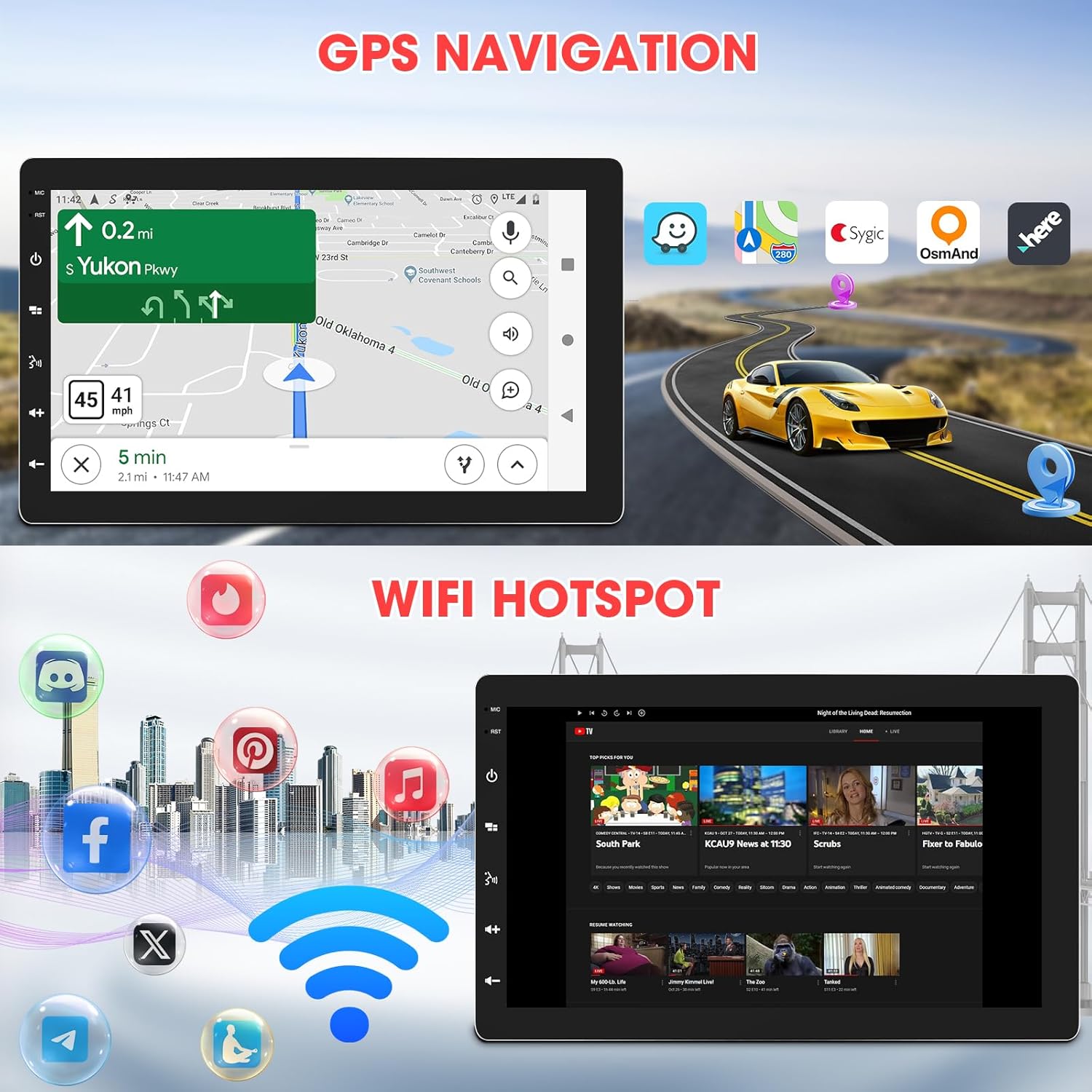
Image: The car stereo displaying GPS navigation, alongside an illustration of WiFi hotspot connectivity with various social media and streaming app icons.

Image: A split image showing the WiFi Hotspot feature on the left, with various app icons, and GPS Navigation on the right, displaying a map with a car icon.
4.8 WiFi Hotspot
The stereo supports 2.4 GHz & 5 GHz Wi-Fi for a smooth internet connection, enabling streaming and map downloads.
4.9 Mirrorlink & Fast Charge
Mirrorlink allows casting unsupported apps and content from your phone to the stereo. USB inputs provide 2.1A charging for devices.

Image: Illustrates the Mirrorlink function, showing a smartphone screen mirrored onto the car stereo, and a phone charging via USB, highlighting the fast charge capability.
4.10 Audio Awọn ẹya ara ẹrọ
- Eto EQ: Enhance your music with dynamic customized equalizer settings.
- Ṣaaju-amp and Subwoofer Output: Features 2-volt 4-channel pre-amp and subwoofer audio output with peak power 50W*4.
- Mechless Audio: Mu ohun ṣiṣẹ filenipasẹ USB.

Image: A graphic detailing the Mechless HIFI Sound Quality, highlighting 2V Preamp Output, Preset EQ, Subwoofer Output, and Built-in DSP for enhanced audio.
4.11 Video wu
Video output is available to connect to headrest monitors for additional video playback.

Image: Illustrates the car stereo's ability to deliver high-quality sound and output video to rear headrest monitors, enhancing entertainment for passengers.
4.12 Ẹyìn View Iṣagbewọle kamẹra
The unit is capable of connecting to a rear view camera for easier reversing and parking.
5. Itọju
Itọju deede ṣe idaniloju igbesi aye gigun ati iṣẹ ti o dara julọ ti sitẹrio ọkọ ayọkẹlẹ rẹ.
- Isọsọ iboju: Lo asọ rirọ, ti ko ni lint lati mu rọra nu iboju ifọwọkan. Ma ṣe lo abrasive ose tabi epo.
- Awọn imudojuiwọn sọfitiwia: Lorekore ṣayẹwo olupese ká website for available software updates to ensure the best performance and access to new features.
- Awọn ayẹwo Asopọmọra: Rí i dájú pé gbogbo àwọn ìsopọ̀ wáyà wà ní ààbò àti láìsí ìbàjẹ́.
6. Laasigbotitusita
Ti o ba pade awọn ọran, tọka si awọn iṣoro ti o wọpọ ati awọn ojutu wọnyi:
| Isoro | Owun to le Fa | Ojutu |
|---|---|---|
| Ko si Agbara | Wáyà tí kò tọ́; Fúúsì tí ó fẹ́; Bátìrì ọkọ̀ ti gé kúrò. | Check power and ground connections; Inspect vehicle fuses; Reconnect battery. |
| Ko si Ohun | A ti ge awọn okun agbọrọsọ kuro; Iwọn didun kere ju; Iṣẹ odi ṣiṣẹ. | Verify speaker connections; Increase volume; Deactivate mute. |
| Awọn oran Asopọ Bluetooth | Device not paired; Bluetooth off on phone/stereo; Interference. | Ensure Bluetooth is enabled on both devices; Re-pair the device; Move closer to the stereo; Restart both devices. |
| CarPlay/Android Auto kò sopọ̀ mọ́ ara wọn | Incorrect Wi-Fi/Bluetooth settings; Software glitch; Phone compatibility. | Verify Wi-Fi and Bluetooth are active and connected; Restart phone and stereo; Check for software updates; Ensure phone is compatible. |
| Ifihan GPS ti sọnu | Eriali GPS ti dí tàbí ti ge asopọ; Agbára satẹlaiti ti ko dara. | Rii daju pe eriali GPS ni gbangba view ti oju ọrun; Ṣayẹwo asopọ eriali; Gbe lọ si agbegbe ti o ṣii. |
| Iboju ko dahun | Ọrọ sọfitiwia igba diẹ; Isọdiwọn iboju nilo. | Restart the unit; Perform a factory reset (refer to advanced settings); Contact support if issue persists. |
If the problem persists after attempting these solutions, please contact Stiflix customer support.
7. Awọn pato
| Ẹya ara ẹrọ | Sipesifikesonu |
|---|---|
| Ọja Mefa | 6.8 x 10 x 5.9 inches |
| Iwọn Nkan | 2.8 iwon |
| Nọmba Awoṣe Nkan | SF20250929B0D5QMLXYL |
| Brand | Stiflix |
| Asopọmọra Technology | Bluetooth, USB, Wi-Fi |
| Adarí Iru | Android |
| Ifihan | 10.1-inch IPS Touchscreen, 1280*720 HD, 178° Viewigun igun |
| Pataki Awọn ẹya ara ẹrọ | 360° Rotatable Adjustable Detachable Touchscreen, Wireless Apple CarPlay, Wireless Android Auto, Voice Control, Mirrorlink, Online GPS Navigation, Offline Map, WIFI Hotspot, 2GB RAM, 64GB ROM, Bluetooth Calling, Wireless Audio Streaming, AV Input, Backup Camera Input, USB Charging, FM AM Tuner, Preset EQ, Video Output, Amplifier Subwoofer Output |
| Awọn ẹrọ ibaramu | Amplifier, Smartphone, Speaker, Subwoofer |
| Lapapọ HDMI Ports | 2 |
| Asopọmọra Iru | RCA |
| Ipo Ijade Ohun | Sitẹrio |
| Kakiri Ohun ikanni iṣeto ni | 5.1 |
| Fidio fifi koodu | H.264, H.265/HEVC, MPEG-4, ati be be lo. |
8. atilẹyin ọja Information
For warranty details, please refer to the warranty card included with your product or visit the official Stiflix webojula. Tọju iwe-ẹri rira rẹ bi ẹri rira fun eyikeyi awọn ibeere atilẹyin ọja.
9. Onibara Support
If you require further assistance, technical support, or have questions not covered in this manual, please contact Stiflix customer service through their official webaaye tabi alaye olubasọrọ ti a pese pẹlu rira rẹ.

Image: A customer service representative smiling, symbolizing available support for product inquiries.