
1. Ifihan
Thank you for choosing the ALONEFIRE X66 LED Mini Flashlight. This compact and powerful flashlight is designed for everyday carry (EDC) and various utility purposes, featuring multiple light modes, USB-C recharging, and a magnetic base. Please read this manual carefully to ensure proper use and maintenance of your device.
2. Alaye Aabo
- Aabo Batiri: Use only the specified rechargeable battery. Do not attempt to disassemble, puncture, or expose the battery to extreme temperatures or fire.
- Idaabobo Oju: Do not shine the flashlight directly into eyes, as the high lumen output can cause temporary vision impairment.
- Omi Resistance: The flashlight is water-resistant, not waterproof. Avoid submerging it in water. Ensure the USB-C port cover is securely closed to prevent water ingress.
- Ooru: The flashlight may become warm during prolonged use, especially on higher brightness settings. This is normal.
- Awọn ọmọde: Jeki kuro ni arọwọto awọn ọmọde.
3. Package Awọn akoonu
Daju pe gbogbo awọn nkan wa ninu apo rẹ:
- ALONEFIRE X66 LED Mini Flashlight
- Batiri gbigba agbara (ti a fi sii tẹlẹ tabi lọtọ)
- USB-A si okun gbigba agbara USB-C
4. Ọja Ipariview
The ALONEFIRE X66 is a compact and versatile flashlight designed for portability and functionality.
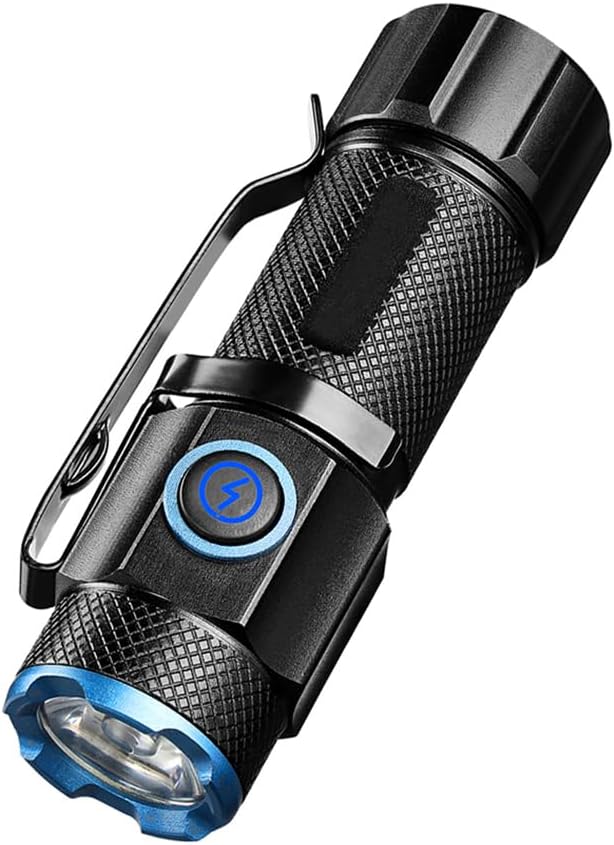
Nọmba 4.1: The ALONEFIRE X66 LED Mini Flashlight, showcasing its compact design, textured body for grip, integrated pocket clip, and blue accent ring around the lens and power button.

Nọmba 4.2: A alaye view of the P50 LED emitter, highlighting the powerful light source responsible for the flashlight's bright output.

Nọmba 4.3: The flashlight emitting a bright beam, demonstrating its capability to cycle through 5 distinct light modes: High, Medium, Low, Strobe, and Super Bright.

Nọmba 4.4: The flashlight connected to a laptop via its USB-C charging port, illustrating convenient and fast recharging from various power sources.

Nọmba 4.5: The flashlight securely attached to a metallic surface by its strong magnetic tail cap, demonstrating its hands-free utility.
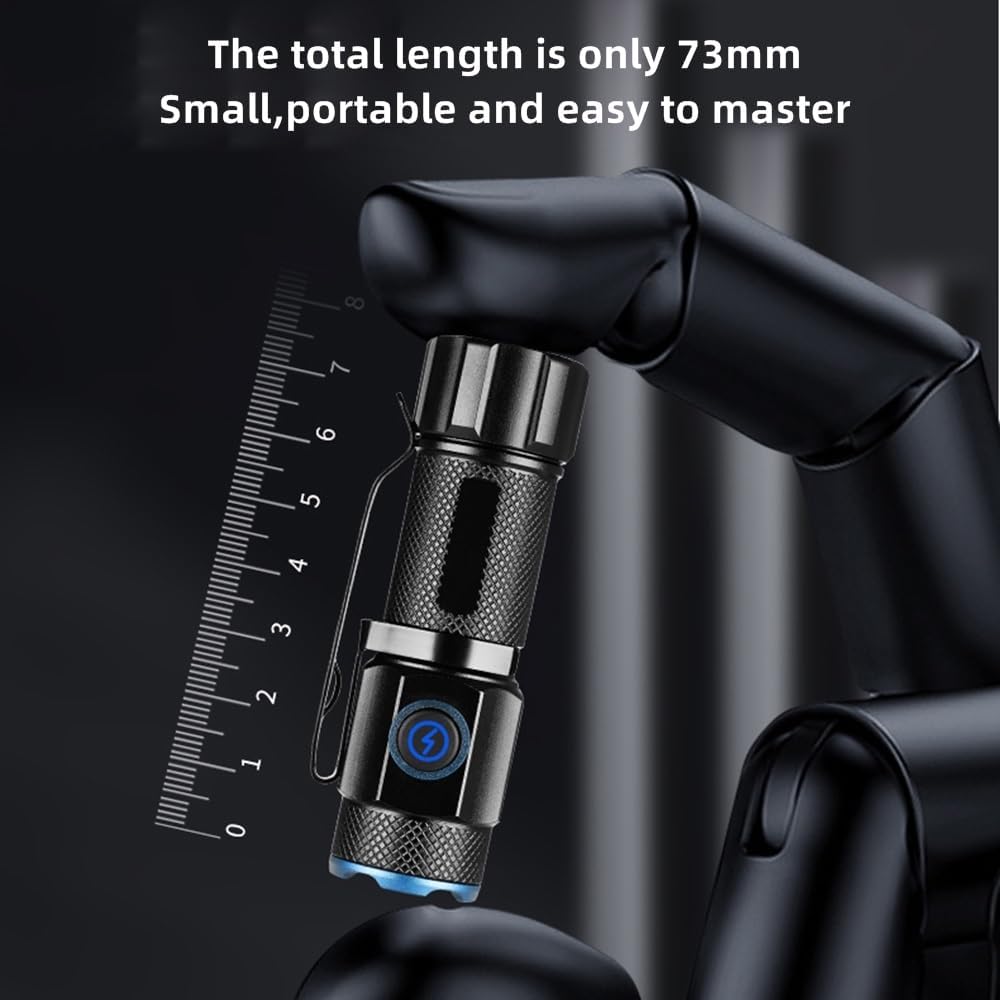
Nọmba 4.6: The compact size of the flashlight, measuring only 73mm in length, making it highly portable and easy to carry.

Nọmba 4.7: The flashlight resting on a wet, rocky surface, illustrating its water-resistant design suitable for various outdoor conditions.

Nọmba 4.8: The ALONEFIRE X66 Flashlight displayed alongside its included USB-A to USB-C charging cable.
5. Setup (Charging)
Before first use, or when the battery is low, charge the flashlight using the provided USB-C cable.
- Locate the USB-C charging port on the flashlight body. It is typically covered by a rubber flap.
- Gently open the rubber flap to expose the USB-C port.
- Connect the small end of the USB-C cable to the flashlight's port.
- Connect the larger USB-A end of the cable to a compatible USB power source (e.g., computer, wall adapter, power bank).
- The charging indicator light around the power button will illuminate pupa nigba gbigba agbara ati ki o tan alawọ ewe nigba ti gba agbara ni kikun.
- Once charging is complete, disconnect the cable and securely close the rubber flap to maintain water resistance.
6. Awọn ilana Iṣiṣẹ
6.1 Agbara Tan / Pa
- Lati Tan: Press the power button once. The flashlight will turn on in the last used mode (excluding Strobe and Super Bright).
- Lati Pa: Press the power button once while the flashlight is on.
6.2 Iyipada Awọn ọna Imọlẹ
The ALONEFIRE X66 features 5 distinct lighting modes:
- High-Medium-Low: With the flashlight on, single-press the power button repeatedly to cycle through High, Medium, and Low brightness modes.
- Ipo Strobe: Press and hold the power button for approximately 2-3 seconds from any mode (on or off) to activate Strobe mode. Release the button to return to the previous mode or turn off.
- Super Bright Mode: Double-click the power button quickly from any mode (on or off) to activate Super Bright mode. Double-click again to return to the previous mode or turn off.
6.3 Magnetic Base Function
The flashlight is equipped with a strong magnet in its tail cap. This allows it to be securely attached to any ferrous metal surface, providing hands-free illumination for tasks such as vehicle maintenance, working in workshops, or during power outages.
6.4 Pocket Clip Usage
The integrated pocket clip allows for convenient carrying and versatile attachment. You can clip it to your pocket, belt, backpack strap, or even the brim of a hat for use as a makeshift headlamp.
7. Itọju
- Ninu: Nu ara filaṣi nu pẹlu asọ, damp asọ. Ma ṣe lo abrasive ose tabi epo.
- Ibi ipamọ: Store the flashlight in a cool, dry place away from direct sunlight and extreme temperatures. If storing for extended periods, charge the battery every 3-6 months to prolong its lifespan.
- Rirọpo Batiri: If the rechargeable battery needs replacement, ensure you use a compatible battery type. Refer to the specifications section for details.
- O-oruka: Periodically inspect the O-rings for wear and tear. Lubricate them with silicone grease if necessary to maintain water resistance.
8. Laasigbotitusita
If you encounter issues with your ALONEFIRE X66 flashlight, refer to the table below:
| Isoro | Owun to le Fa | Ojutu |
|---|---|---|
| Ina filaṣi ko tan. | Batiri kekere. Ko fi batiri sii daradara. Loose awọn isopọ. | Gba agbara si batiri. Ensure battery is inserted with correct polarity. Tighten all parts of the flashlight body. |
| Flashlight not charging. | Charging cable faulty. Power source faulty. USB-C port obstructed. | Gbiyanju okun USB-C ti o yatọ. Gbiyanju orisun agbara USB ti o yatọ. Check USB-C port for debris. |
| Ijade ina jẹ baibai. | Batiri kekere. Awọn lẹnsi ni idọti. | Gba agbara si batiri. Mọ lẹnsi pẹlu asọ asọ. |
| Magnetic base is weak. | Dada kii ṣe irin irin. Magnet is dirty. | Ensure attachment to a suitable metal surface. Clean the magnet surface. |
9. Awọn pato
| Ẹya ara ẹrọ | Ẹ̀kúnrẹ́rẹ́ |
|---|---|
| Brand | INA NIKAN |
| Nọmba awoṣe | X66 |
| Imọlẹ Orisun Orisun | LED |
| Orisun agbara | Agbara Batiri |
| Batiri Iru | Atunṣe Lithium Ion |
| Gbigba agbara Port | USB-C |
| Ohun elo | Aluminiomu |
| Iwọn Nkan | 35 giramu |
| Omi Resistance Ipele | Omi sooro |
| Pataki Awọn ẹya ara ẹrọ | Rechargeable, Magnetic Base, Pocket Clip, 5 Light Modes |
10. Atilẹyin ọja ati Support
For warranty information or technical support, please refer to the product packaging or contact the ALONEFIRE customer service directly through the retailer's platform where the product was purchased. Keep your purchase receipt as proof of purchase.