
groov e GVEB16
Digital Buds - Wired in-Ear Earphones User Manual
Model: GVEB16
Àmì ìtajà: groov e
Ọrọ Iṣaaju
Thank you for choosing the groov e Digital Buds. These USB-C earphones are designed to provide a high-quality audio experience for music playback and hands-free calls. This manual will guide you through the setup, operation, and maintenance of your new earphones to ensure optimal performance and longevity.
Package Awọn akoonu
- Digital Buds USB-C Earphones
- Earbuds (3X Sizes) - Note: The product description mentions "Includes Earbuds (3X Sizes)", but "whats_in_the_box" only lists "Earphones". Assuming the different sizes are pre-attached or included as accessories with the main earphones.
Ọja Pariview
Familiarize yourself with the components of your Digital Buds.
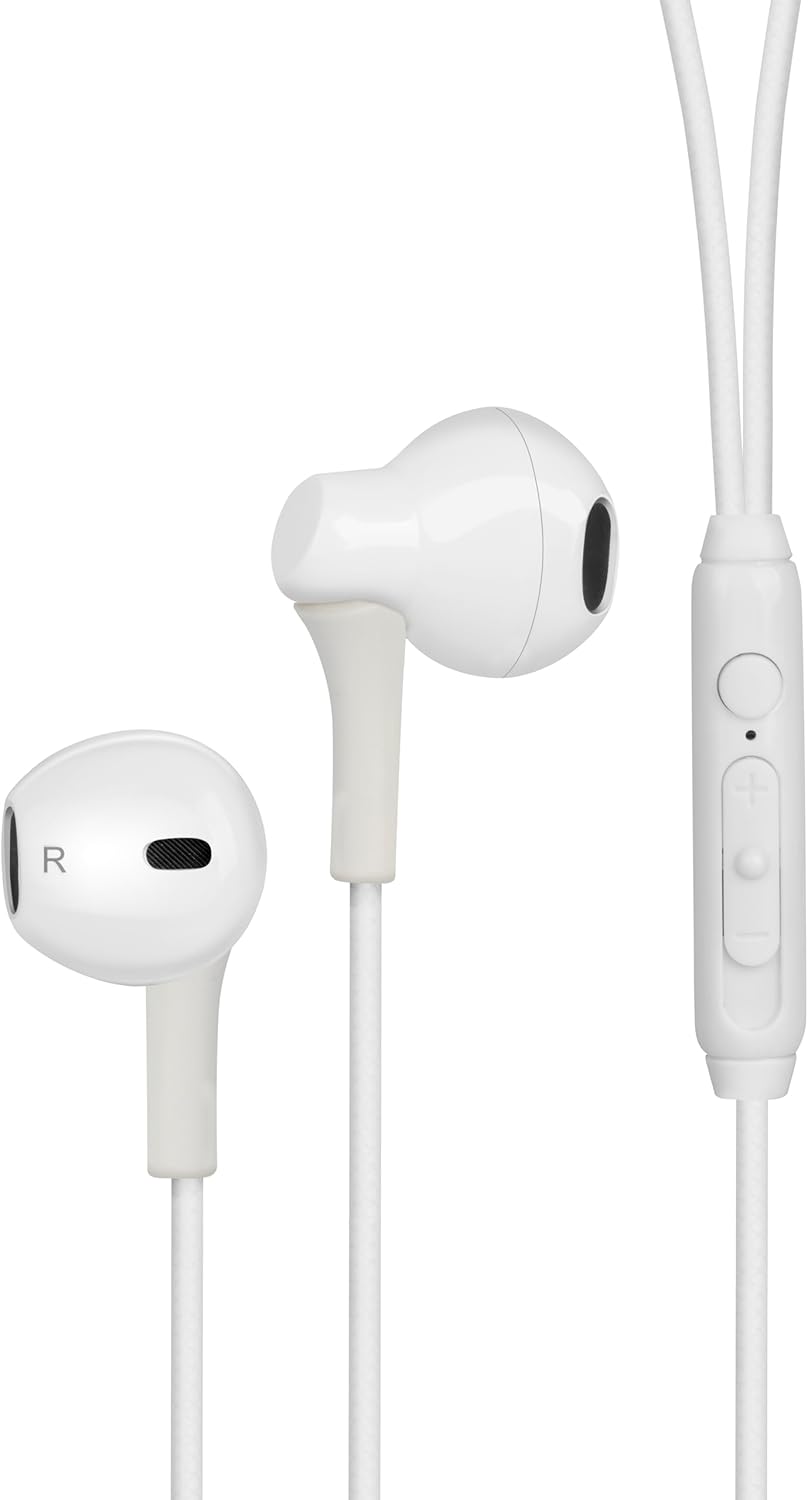
Figure 1: Digital Buds Earphones. This image shows both the left and right earbuds connected by their cable.

Figure 2: In-Line Remote and Microphone. The remote features volume up (+), volume down (-), and a multi-function button for calls and music control. The microphone is integrated into this unit.

Figure 3: USB-C Connector. This connector is used to plug the earphones into compatible devices such as smartphones, tablets, and laptops.
Ṣeto
- Sopọ si Ẹrọ: Locate the USB-C port on your smartphone, tablet, or laptop. Insert the USB-C connector of the Digital Buds firmly into the device's USB-C port.
- Ibi tí etí ń gbé sí: Gently insert the earbuds into your ears. The earbud marked 'L' is for the left ear, and 'R' is for the right ear. Adjust them for a comfortable and secure fit. If necessary, try the different sized ear tips included to find the best fit for optimal sound quality and comfort.
- Ìmọ̀ Àkọ́kọ́: Your device should automatically recognize the earphones. You may need to select them as the audio output device in your device's sound settings.
Awọn ilana Iṣiṣẹ
The in-line remote provides convenient control over your audio and calls.
Sisisẹsẹhin Orin
- Ṣiṣẹ/Daduro: Tẹ bọtini iṣẹ-ọpọlọpọ lẹẹkan.
- Orin t’okan: Tẹ bọtini iṣẹ-ọpọlọpọ lẹmeji ni kiakia.
- Tẹlẹ Orin: Tẹ bọtini iṣẹ-ọpọlọpọ ni igba mẹta ni kiakia.
- Iwọn didun Up: Tẹ bọtini '+'.
- Iwọn didun isalẹ: Tẹ bọtini '-'.
Isakoso Ipe
- Idahun/Ipe Ipari: Press the multi-function button once during an incoming call or an active call.
- Kọ Ipe: Tẹ mọlẹ bọtini iṣẹ-ọpọlọpọ fun isunmọ awọn aaya 2 nigba ipe ti nwọle.
Oluranlọwọ ohun
- Mu Oluranlọwọ Ohun ṣiṣẹ: Press and hold the multi-function button for approximately 2 seconds when not on a call or playing music. This will activate your device's default voice assistant (e.g., Google Assistant, Siri).
Itoju
Proper care will extend the life of your Digital Buds.
- Ninu: Use a soft, dry, lint-free cloth to wipe the earbuds and cable. For stubborn dirt, slightly dampen aṣọ pẹlu omi. Maṣe lo awọn kẹmika ti o lewu tabi awọn afọmọ abrasive.
- Ibi ipamọ: When not in use, store the earphones in a clean, dry place, preferably in a small pouch or case to prevent tangling and damage.
- Yago fun Ọrinrin: Do not expose the earphones to excessive moisture, rain, or liquids.
- Mu pẹlu Itọju: Avoid pulling on the cable excessively or bending the USB-C connector at sharp angles.
Laasigbotitusita
Ti o ba pade awọn ọran, tọka si awọn iṣoro ti o wọpọ ati awọn ojutu wọnyi.
| Isoro | Ojutu |
|---|---|
| Ko si ohun lati earphones. |
|
| Gbohungbohun ko ṣiṣẹ lakoko awọn ipe. |
|
| Awọn bọtini isakoṣo latọna jijin ko dahun. |
|
Awọn pato
| Ẹya ara ẹrọ | Ẹ̀kúnrẹ́rẹ́ |
|---|---|
| Brand | groov e |
| Orukọ awoṣe | Groove Digital Buds - White |
| Nọmba Awoṣe Nkan | GVEB16 |
| Asopọmọra Technology | Ti firanṣẹ (USB-C) |
| Gbigbe Eti | Ninu Eti |
| Fọọmù ifosiwewe | Ninu Eti |
| Ọna Iṣakoso | Remote (In-line) |
| Awọn irinše to wa | Awọn agbekọri |
| Ohun elo | Silikoni, Ṣiṣu |
| Iwọn Nkan | 1.06 iwon |
| Package Mefa | 6.61 x 2.36 x 1.26 inches |
| Awọn ẹrọ ibaramu | Tablets, Mobile phones, Laptops, Desktops |
| Awọn Lilo Ni pato Fun Ọja | Idanilaraya |
Atilẹyin ọja ati Support
groov e products are manufactured to high standards and undergo rigorous quality checks. For information regarding warranty coverage, technical support, or customer service, please refer to the warranty card included with your purchase or visit the official groov e webojula.
Jọwọ ṣe idaduro ẹri rira rẹ fun eyikeyi awọn ibeere atilẹyin ọja.
Ask a question about this manual
Ask about setup, troubleshooting, compatibility, parts, safety, or missing instructions. Manuals+ will review the question and use this page’s manual context to help answer it.