
Ọrọ Iṣaaju
Thank you for choosing the Calypso K5855 X-Trem Analog-Digital Watch. This watch combines the classic appeal of analog timekeeping with the versatility of digital functions, making it suitable for daily wear, sports, and various activities. This manual provides detailed instructions to help you set up, operate, and maintain your watch for optimal performance.
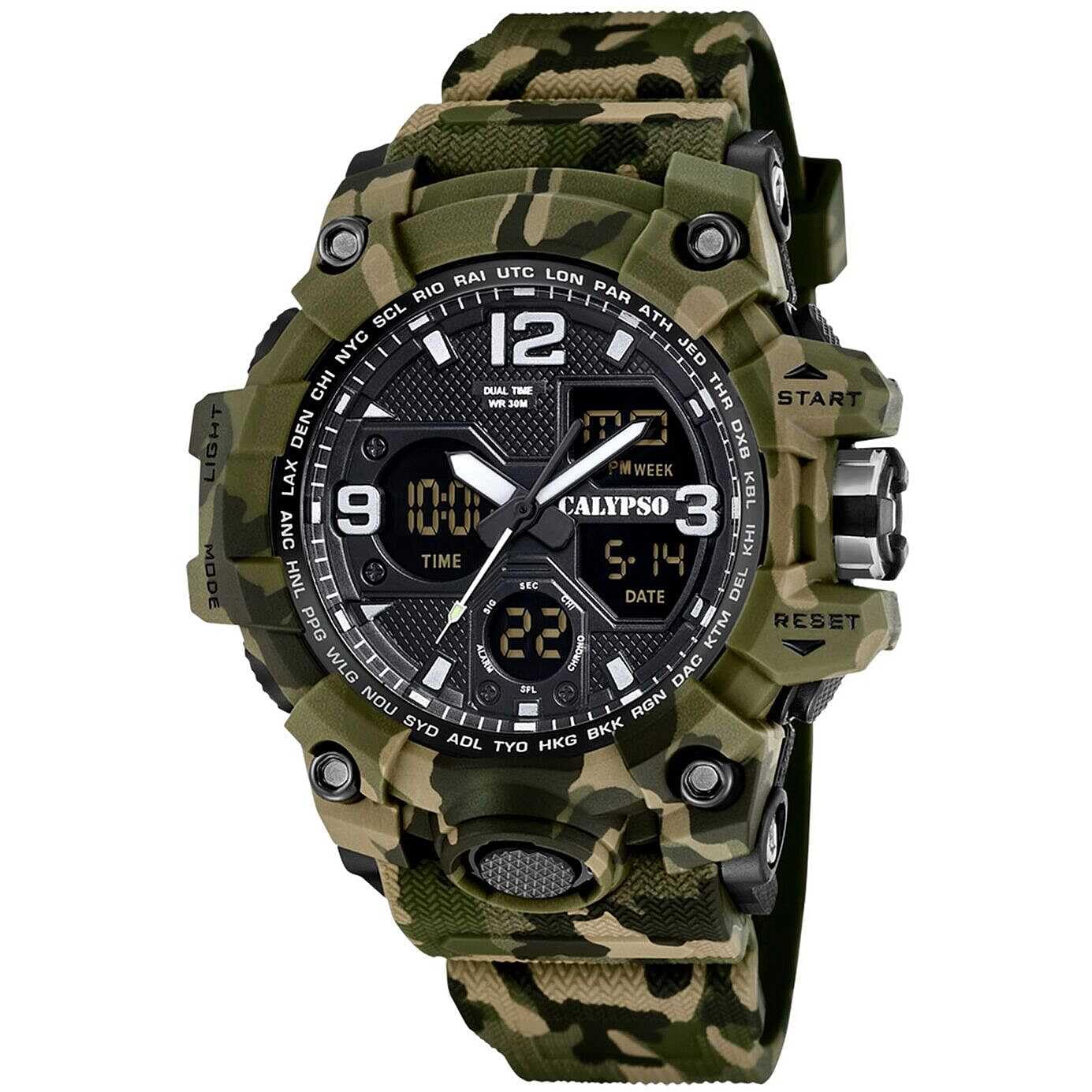
Image: Calypso K5855 X-Trem Analog-Digital Watch (Green Variant).
Ṣeto
Ayẹwo akọkọ
Upon unboxing, inspect your watch for any visible damage. Ensure all buttons are functional and the display is clear.

Image: Calypso watch packaging box.
Ṣiṣeto Aago oni-nọmba ati Ọjọ
- Bọtini Ipo: Press the MODE button repeatedly until you reach the Time Setting mode (usually indicated by flashing digits).
- Bọtini Ṣatunṣe: Use the ADJUST button to select the digit you wish to change (e.g., seconds, hours, minutes, year, month, day).
- Ṣeto Bọtini: Use the SET button to increase the selected value. Hold it down for faster adjustment.
- Jẹrisi: Once all settings are correct, press the MODE button again to exit the setting mode.
Ṣiṣeto Aago Analog
The analog hands are typically set independently.
- Fa ade: Gently pull the crown (the knob on the side of the watch) out to the first or second click position (refer to specific model instructions if available, as some watches have multiple crown positions).
- Yi Adé: Turn the crown to move the analog hands to the correct time.
- Titari Crown: Once set, push the crown back in to its original position to start the analog movement.
Awọn ilana Iṣiṣẹ
Awọn iṣẹ Ipo
Your Calypso K5855 X-Trem watch features multiple digital modes. Press the MODE button to cycle through them:
- Ifihan akoko: Ó fi àkókò, ọjọ́, àti ọjọ́ ọ̀sẹ̀ hàn.
- Chronograph (Aago iṣẹju-aaya): Fun wiwọn akoko ti o ti kọja.
- Itaniji: To set daily alarms.
- Aago Meji: Láti fi àkókò kejì hàn.
Chronograph (Aago iṣẹju-aaya)
- Tẹ Ipo Chronograph: Press the MODE button until "CHRONO" or "STW" appears.
- Bẹrẹ/Duro: Press the START/STOP button (often labeled "ST/SP" or "ADJ") to begin timing. Press again to stop.
- Àkókò ẹsẹ̀/Pípín: While timing, press the LAP/RESET button (often labeled "RESET" or "LIGHT") to record a lap time without stopping the main timer.
- Tun: With the stopwatch stopped, press the LAP/RESET button to reset the time to zero.
Iṣẹ-ṣiṣe itaniji
- Tẹ Ipo Itaniji sii: Press the MODE button until "ALARM" or "AL" appears.
- Ṣeto Itaniji: Use the ADJUST button to select hours or minutes, and the SET button to change the values.
- Mu ṣiṣẹ/muṣiṣẹ: In Alarm Mode, press the START/STOP button to toggle the alarm ON/OFF. An alarm icon will typically appear when active.
- Duro Itaniji: Nigbati itaniji ba dun, tẹ bọtini eyikeyi lati da duro.
Meji Aago
- Tẹ Ipo Aago Meji sii: Press the MODE button until "DUAL TIME" or "DT" appears.
- Set Second Time: Use the ADJUST button to select hours or minutes, and the SET button to change the values for the second time zone.
Backlight (Light Function)
Tẹ awọn Imọlẹ button (usually located on the top left or bottom right) to illuminate the digital display for a few seconds, allowing visibility in low-light conditions.
12/24 Wakati kika
In the Time Setting mode, you can usually toggle between 12-hour (with AM/PM indicator) and 24-hour formats using the SET or ADJUST button when the hour digits are flashing.

Image: Calypso K5855 X-Trem watch (Orange Variant) displaying digital time.

Image: Calypso K5855 X-Trem watch (Green-Yellow Variant) displaying digital time, day, and date.
Itoju
Agbara omi (5 ATM)
Your watch is water-resistant up to 5 ATM (50 meters). This means it is suitable for everyday use and can withstand splashes, rain, and brief immersion in water, such as showering. It is kii ṣe o dara fun odo, iluwẹ, tabi awọn iṣẹ omi gigun. Ma ṣe ṣiṣẹ awọn bọtini lakoko aago naa jẹ tutu tabi wọ inu omi.
Ninu
Mu ese aago ati okun nigbagbogbo pẹlu asọ ti o gbẹ. Fun idoti alagidi, die-die damp cloth can be used, followed by drying. Avoid using chemical cleaners, as they may damage the watch materials.
Batiri Rirọpo
The watch is powered by a quartz movement and requires a battery (1 C battery is listed in specifications). When the display dims or the watch stops functioning, it's time for a battery replacement. It is recommended to have the battery replaced by a qualified watch technician to ensure proper sealing and maintain water resistance.
Laasigbotitusita
- Watch Not Running / Display Blank:
Check if the battery needs replacement. Ensure the crown is pushed in completely for analog movement.
- Àkókò/Ọjọ́ tí kò tọ́:
Refer to the "Setting the Digital Time and Date" and "Setting the Analog Time" sections to re-adjust the time and date.
- Awọn bọtini Ko Dahun:
Ensure the watch is not in a locked mode (if applicable, though this model typically does not have one). If the watch is wet, dry it thoroughly before attempting to press buttons. If issues persist, a battery replacement might be necessary, or contact support.
Awọn pato
| Brand | Calypso |
| Nọmba awoṣe | K5855/3 |
| Ifihan Iru | Analog-Digital |
| Iṣipopada Iru | Kuotisi |
| Omi Resistance Rating | 5 ATM (50 Meters) |
| Ohun elo ọran | Polycarbonate |
| Ohun elo okun | Polycarbonate (Rubber band) |
| Ohun elo Crystal | Ṣiṣu |
| Case Opin | 56 millimeters |
| Ọran Sisanra | 18.3 millimeters |
| Iwọn Iwọn | 28 millimeters |
| Band Gigun | 21 centimita |
| Iwọn Nkan | 65 giramu |
| Pataki Awọn ẹya ara ẹrọ | 24-hour Display, Chronograph, Dual Time, Light, Alarm, Date, 12/24h format |
| Orisun agbara | Batiri (Batiri 1C wa ninu rẹ) |
Alaye atilẹyin ọja
Your Calypso K5855 X-Trem watch comes with a 2-odun olupese ká atilẹyin ọja. This warranty covers manufacturing defects under normal use. It does not cover damage resulting from improper use, accidents, unauthorized repairs, or normal wear and tear.
For specific details regarding returns or warranty claims, please refer to the retailer's return policy or contact Calypso customer service.
Atilẹyin
Should you encounter any issues not covered in this manual or require further assistance, please contact Calypso customer support or the authorized retailer where you purchased the watch.
You can also visit the official Calypso webaaye fun awọn orisun afikun ati alaye olubasọrọ.