
Ọrọ Iṣaaju
This manual provides essential instructions for the safe and efficient use of your Aiwa AW-KF4 Portable Bluetooth Speaker. Please read this manual thoroughly before using the product and retain it for future reference.
The Aiwa AW-KF4 is a portable Bluetooth speaker designed for robust audio performance with dynamic LED lighting, a rechargeable battery, and resistance to water and dust (IPX6). It offers versatile connectivity options including Bluetooth, USB, and AUX input.
Package Awọn akoonu
Carefully unpack your speaker and ensure all items are present and in good condition. If any items are missing or damaged, please contact your retailer.
- Aiwa AW-KF4 Portable Bluetooth Speaker
- USB-C Ngba agbara Cable
- Ilana itọnisọna

Image: The Aiwa AW-KF4 speaker in its retail packaging, showing the speaker and branding.
Ọja Pariview
The Aiwa AW-KF4 speaker features a compact, cylindrical design with integrated controls and dynamic LED lighting. It is built for portability and durability.
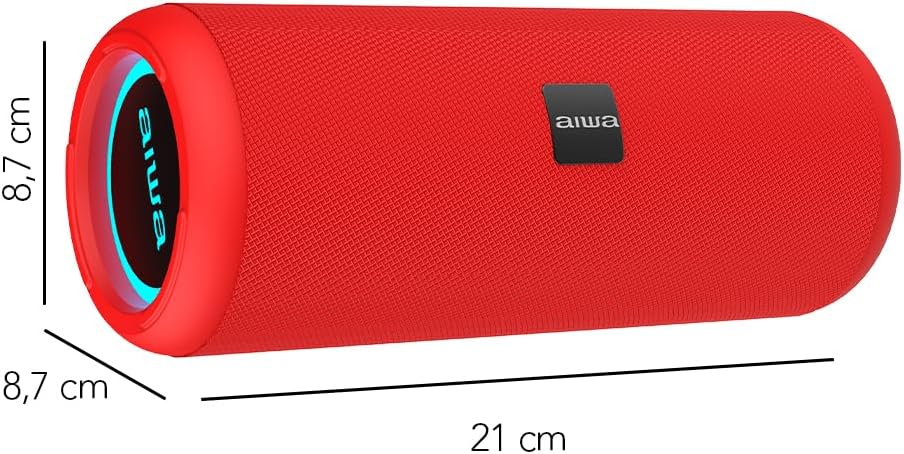
Image: A red Aiwa AW-KF4 speaker showing its approximate dimensions: 21 cm in length and 8.7 cm in diameter.

Image: Two Aiwa AW-KF4 speakers (red and black) illustrating key features: 20W output, LED lighting, TWS function, IPX6 water resistance, Bluetooth, USB, and SD card compatibility.

Image: A collage showing the Aiwa AW-KF4 speaker in various outdoor settings, emphasizing its IPX6 water resistance, up to 10 hours of battery life, and hands-free calling capability with an integrated microphone.
Ṣeto
1. Gbigba agbara Agbọrọsọ
Before first use, fully charge the speaker. Use the provided USB-C cable to connect the speaker to a compatible USB power adapter (not included) or a computer's USB port.
- Ìmọ́lẹ̀ àmì ìgbóná yóò máa tàn nígbà tí a bá ń gba agbára.
- Gbigba agbara ni kikun gba to wakati mẹta.
- Once fully charged, the indicator light may change or turn off.
A fully charged battery provides up to 10 hours of playback, depending on volume level and usage.
2. Agbara Tan / Paa
- To power on: Press and hold the Power button for a few seconds until you hear an audible prompt and the LED lights activate.
- To power off: Press and hold the Power button for a few seconds until you hear an audible prompt and the LED lights turn off.
Awọn ilana Iṣiṣẹ
1. Sisopọ Bluetooth
The speaker will automatically enter Bluetooth pairing mode when powered on for the first time or if no device is connected. The LED indicator will flash, indicating it's ready to pair.
- Rí i dájú pé a ti tan agbọrọsọ naa ati pe o wa ni ipo asopọ.
- Mu Bluetooth ṣiṣẹ lori foonu alagbeka rẹ, tabulẹti, tabi ẹrọ ohun afetigbọ miiran.
- Wa fun "AW-KF4" in the list of available Bluetooth devices.
- Select "AW-KF4" to connect. You will hear a confirmation sound once paired.
- The LED indicator will stop flashing and remain solid.
Agbọrọsọ naa ni iwọn Bluetooth ti o to awọn mita 10 (ẹsẹ 33).
2. Iṣẹ Sitẹrio Alailowaya otitọ (TWS).
The TWS function allows you to pair two Aiwa AW-KF4 speakers together for a stereo sound experience.

Image: A visual representation of the TWS (True Wireless Stereo) function, showing two Aiwa AW-KF4 speakers being used together for synchronized sound.
- Ensure both AW-KF4 speakers are powered on and not connected to any Bluetooth device.
- On one speaker (this will be the primary speaker), press and hold the TWS button (if available, or a designated button as per specific model instructions) until you hear a pairing tone.
- Awọn agbohunsoke meji yoo sopọ laifọwọyi si ara wọn. Ohun orin ìmúdájú yoo dun ni kete ti a ti sopọ.
- Now, connect your Bluetooth device to the primary speaker as described in the "Bluetooth Pairing" section.
Note: Refer to the specific button layout on your speaker for the exact TWS pairing button.
3. Sisisẹsẹhin USB ati AUX
- Sisisẹsẹhin USB: Fi kọnputa USB ti o ni ohun ti o ni ohun sii sii files into the USB port. The speaker will automatically detect and begin playing music from the drive.
- Sisisẹsẹhin AUX: Connect an audio device using a 3.5mm AUX cable (not included) to the AUX input port. The speaker will switch to AUX mode.
4. Awọn Imọlẹ LED
The speaker features dynamic LED lights. These lights typically activate automatically when the speaker is powered on. Specific controls for changing light modes or turning them off may be available via a dedicated button on the speaker (refer to your speaker's button layout).
5. Awọn iṣakoso
The speaker features tactile controls for various functions:
- Bọtini agbara: Tẹ mọlẹ lati fi agbara tan/pa a.
- Bọ́tìnnì Ṣíṣe/Sánu duro: Tẹ lati mu ṣiṣẹ tabi daduro orin duro.
- Iwọn didun Up/Orin atẹle: Tẹ lati mu iwọn didun pọ si. Tẹ mọlẹ fun orin atẹle.
- Iwọn didun isalẹ/Orin ti tẹlẹ: Tẹ lati dinku iwọn didun. Tẹ mọlẹ fun orin iṣaaju.
- Bọtini Ipo: Press to switch between Bluetooth, USB, and AUX modes.
- Call Button (if applicable): Press to answer/end calls. Press and hold to reject calls.
Note: Button functions may vary slightly. Consult the diagrams in your physical manual for precise button identification.
Itoju
To ensure the longevity and optimal performance of your Aiwa AW-KF4 speaker, follow these maintenance guidelines:
- Ninu: Lo aṣọ rírọrùn tí ó gbẹ láti nu ìta agbọrọsọ naa. Má ṣe lo àwọn ohun ìfọṣọ, àwọn ohun èlò ìfọṣọ, tàbí àwọn kẹ́míkà líle.
- Omi Resistance (IPX6): The speaker is resistant to strong water jets. It is not designed for submersion. Ensure all port covers are securely closed before exposing the speaker to water or dust. After exposure to water, wipe the speaker dry before charging.
- Ibi ipamọ: Tọju agbohunsoke ni itura, aye gbigbẹ kuro lati orun taara ati awọn iwọn otutu to gaju.
- Itọju Batiri: Láti pa agbára batiri mọ́, gba agbára sí agbọ́hùnsọ̀pọ̀ déédéé, kódà bí a kò bá tiẹ̀ ń lò ó déédéé. Má ṣe jẹ́ kí agbára bátírì náà máa jáde fún ìgbà pípẹ́.

Image: The Aiwa AW-KF4 speaker positioned near a pool, illustrating its IPX6 water resistance feature, suitable for outdoor and poolside use.
Laasigbotitusita
Ti o ba pade awọn ọran pẹlu agbọrọsọ rẹ, tọka si awọn iṣoro ti o wọpọ ati awọn ojutu wọnyi:
| Isoro | Owun to le Fa / Solusan |
|---|---|
| Agbọrọsọ ko ni agbara lori. |
|
| Ko le so pọ nipasẹ Bluetooth. |
|
| Ko si ohun. |
|
| Iparun ohun. |
|
| TWS sisopọ kuna. |
|
Awọn pato
| Orukọ awoṣe | AW-KF4 (AWKF4B) |
| Brand | Aiwa |
| Agbọrọsọ o wu Power | 20 Wattis RMS |
| Idahun Igbohunsafẹfẹ | 80 Hz (minimum specified) |
| Asopọmọra Technology | Bluetooth 5.0, USB, AUX |
| Ipo Ijade Ohun | Sitẹrio |
| Ohun elo Ile | Ṣiṣu |
| Agbọrọsọ Iru | Woofer |
| Omi Resistance Ipele | IPX6 (Resistant to strong water jets) |
| Bluetooth Ibiti | Titi de awọn mita 10 (33 ẹsẹ) |
| Awọn gbohungbohun | 1 (for hands-free calling) |
| Agbara Batiri | 2000 mAh litiumu Iwon |
| Igbesi aye batiri | Up to 10 hours (varies with volume and usage) |
| Akoko gbigba agbara | O fẹrẹ to awọn wakati 3 |
| Iṣagbewọle Voltage | 5 Volts |
| Ipalara | 4 ohms |
| Ọna Iṣakoso | Àwọn bọ́tìnì tí a lè fọwọ́ kàn |
| Awọn iwọn (L x D) | Approx. 21 cm x 8.7 cm |
| Awọn ẹrọ ibaramu | Foonuiyara, Awọn tabulẹti |
| Ipilẹṣẹ | China |
Atilẹyin ọja ati Support
Your Aiwa AW-KF4 Portable Bluetooth Speaker comes with a 1-odun olupese ká atilẹyin ọja lati ọjọ ti o ra. Atilẹyin ọja yi ni wiwa awọn abawọn iṣelọpọ labẹ lilo deede.
Atilẹyin ọja naa ko ni aabo:
- Damage caused by misuse, abuse, negligence, or accident.
- Bibajẹ lati awọn atunṣe tabi awọn atunṣe laigba aṣẹ.
- Deede yiya ati aiṣiṣẹ.
For warranty claims or technical support, please contact your retailer or the official Aiwa customer service in your region. Please have your proof of purchase and product model number (AW-KF4) ready when contacting support.