
1. Ifihan
Thank you for choosing the MECHEN H1-Pro Bluetooth MP3 Player with WiFi. This device is designed to provide a versatile and enjoyable audio and video experience. Featuring a 4-inch touchscreen and running on Android 9.0, it supports various applications and connectivity options. This manual provides essential information for setting up, operating, and maintaining your device.
2. Package Awọn akoonu
Daju pe gbogbo awọn ohun ti a ṣe akojọ rẹ si isalẹ wa ninu package rẹ. Ti awọn ohun kan ba nsọnu tabi bajẹ, jọwọ kan si atilẹyin alabara.
- MECHEN H1-Pro MP3 Player
- Okun USB
- Awọn agbekọri
- Fiimu aabo
- Ọran Idaabobo
- Itọsọna olumulo

Image: The MECHEN H1-Pro MP3 Player displayed with its accessories, including a USB cable, headphones, protective film, and a clear protective case.
3. Ẹrọ Loriview
Familiarize yourself with the physical components and controls of your MECHEN H1-Pro MP3 Player.
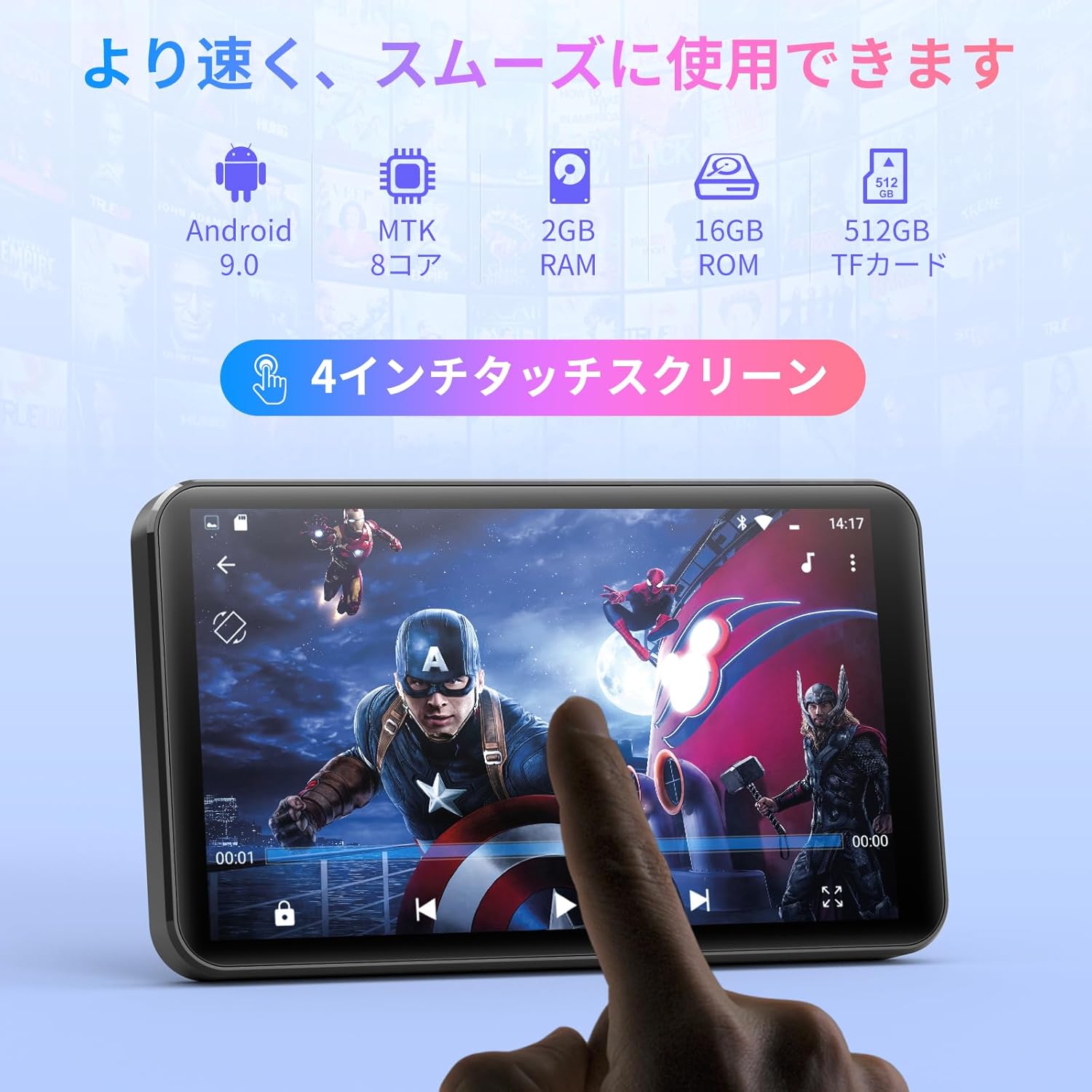
Aworan: Iwaju view of the MECHEN H1-Pro MP3 Player, showcasing its 4-inch touchscreen display.

Aworan: Apa view of the MECHEN H1-Pro MP3 Player, highlighting the power button and volume controls.

Aworan: Oke ati isalẹ views of the MECHEN H1-Pro MP3 Player, illustrating the USB-C charging port, headphone jack, and Micro SD card slot.
4. Eto
4.1 Gbigba agbara akọkọ
Before first use, fully charge the device. Connect the provided USB cable to the player's USB-C port and the other end to a USB power adapter (not included) or a computer's USB port. The charging indicator will show the charging status.
4.2 Agbara Tan / Pa
- Lati Fi agbara: Press and hold the Power button on the side of the device until the screen lights up.
- Lati Paarẹ: Press and hold the Power button until a power-off menu appears on the screen. Select 'Power Off' to shut down the device.
4.3 Nsopọ si Wi-Fi
To access online features and download apps, connect your device to a Wi-Fi network.
- Lọ si Eto > Nẹtiwọọki & Intanẹẹti > Wi-Fi.
- Yipada Wi-Fi On.
- Yan nẹtiwọki Wi-Fi ti o fẹ lati inu atokọ naa.
- Tẹ ọrọ igbaniwọle sii ti o ba ṣetan ki o tẹ ni kia kia Sopọ.

Image: The MECHEN H1-Pro MP3 Player screen showing Wi-Fi settings and available networks.
4.4 Fifi Micro SD Kaadi
The device supports Micro SD cards for expanded storage. Locate the Micro SD card slot on the side of the device. Gently insert the card with the gold contacts facing down until it clicks into place.
5. Awọn ilana Iṣiṣẹ
5.1 Basic Navigation (Touchscreen)
The MECHEN H1-Pro features a responsive 4-inch touchscreen. Use standard touch gestures:
- Fọwọ ba: Lati yan ohun kan tabi ṣii ohun elo kan.
- Ra: Lati yi lọ nipasẹ awọn akojọ tabi yipada laarin awọn iboju.
- Fun pọ: To zoom in or out (in supported applications).
5.2 Sisisẹsẹhin Orin
The device supports various audio formats including MP3, WAV, WMA, APE, OGG, and FLAC for high-fidelity music playback.
- Ṣii awọn Orin ohun elo.
- Browse your music library by artist, album, song, or playlist.
- Tẹ orin kan lati bẹrẹ si iṣiṣẹ.
- Use the on-screen controls for play/pause, skip tracks, and volume adjustment.

Image: The MECHEN H1-Pro MP3 Player screen showing a music playback interface with album art and controls.
5.3 Sisisẹsẹhin fidio
Enjoy 720P/1080P full-format HD video playback without conversion. Supported formats include RM, RMVB, FLV, MP4, DAT, MKV, MPG, MOV, TS, etc.
- Ṣii awọn Ẹrọ orin fidio ohun elo.
- Yan fidio kan file from your storage.
- Tap to play. Use on-screen controls for playback options.

Image: The MECHEN H1-Pro MP3 Player screen showing a video playing in full-screen mode.
5.4 Bluetooth Asopọmọra
Connect to Bluetooth headphones, speakers, or other compatible devices.
- Lọ si Eto > Awọn ẹrọ ti a ti sopọ > Bluetooth.
- Yi Bluetooth pada On.
- Ensure your Bluetooth accessory is in pairing mode.
- Select the accessory from the list of available devices to pair.

Image: The MECHEN H1-Pro MP3 Player shown alongside a pair of wireless headphones, indicating Bluetooth connectivity.
5.5 Wi-Fi Connectivity & App Downloads
With Android 9.0 and Wi-Fi, you can download and install various applications from the Google Play Store.
- Ensure the device is connected to Wi-Fi (see Section 4.3).
- Ṣii awọn Play itaja ohun elo.
- Wọle pẹlu akọọlẹ Google rẹ.
- Wa fun and download desired applications (e.g., Spotify, Amazon Music, Audible).

Image: The MECHEN H1-Pro MP3 Player screen showing a variety of installed applications, including music streaming services and web aṣàwákiri.
5.6 Redio FM
Tẹ́tí sí àwọn ibùdó rédíò FM ayanfẹ́ rẹ.
- Connect wired headphones to the 3.5mm audio jack; they act as the antenna.
- Ṣii awọn Redio FM ohun elo.
- Use the on-screen controls to scan for stations or tune manually.
5.7 File Isakoso
Lo awọn itumọ-ni file alakoso lati ṣeto rẹ files on internal storage and the Micro SD card.
- Ṣii awọn File Alakoso ohun elo.
- Navigate through folders to view, copy, move, or delete files.
6. Itọju
6.1 Ninu
Wipe the device with a soft, dry, lint-free cloth. Do not use liquid cleaners or abrasive materials.
6.2 Ibi ipamọ
Store the device in a cool, dry place away from direct sunlight and extreme temperatures. If storing for an extended period, ensure the battery is partially charged (around 50%) to prolong its lifespan.
6.3 batiri Itọju
To maximize battery life, avoid fully discharging the battery frequently. Use the original charging cable for optimal performance.
7. Laasigbotitusita
| Isoro | Owun to le Solusan |
|---|---|
| Ẹrọ naa ko ṣiṣẹ. | Ensure the battery is charged. Connect to a charger for at least 30 minutes. If unresponsive, perform a hard reset by holding the power button for 10-15 seconds. |
| Ko le sopọ si Wi-Fi. | Check if Wi-Fi is enabled. Verify the Wi-Fi password. Restart your router and the MP3 player. |
| Ẹrọ Bluetooth ko so pọ. | Ensure Bluetooth is enabled on both devices and the accessory is in pairing mode. Move devices closer together. |
| Awọn ohun elo lọra tabi kọlu. | Close unnecessary background apps. Clear app cache (Settings > Apps > [App Name] > Storage > Clear Cache). Restart the device. Too many apps can lead to slowdowns. |
| Ko si ohun lati olokun. | Check headphone connection. Ensure volume is not muted or too low. Test with different headphones. |
8. Awọn pato
| Ẹya ara ẹrọ | Ẹ̀kúnrẹ́rẹ́ |
|---|---|
| Brand | MECHEN |
| Orukọ awoṣe | H1-Pro (EU-H11) |
| Eto isesise | Android 9.0 |
| isise | MTK 8-mojuto |
| Àgbo | 2 GB |
| Ibi ipamọ inu | 16 GB |
| Expandable Ibi ipamọ | Micro SD (to 512GB) |
| Iwon iboju | 4 inches |
| Imọ-ẹrọ Iboju | LCD |
| Asopọmọra | Bluetooth, USB, Wi-Fi |
| Pataki Awọn ẹya ara ẹrọ | FM Radio, Equalizer, Video Playback |
| Awọn ọna kika Audio atilẹyin | MP3, WAV, WMA, APE, OGG, FLAC |
| Awọn ọna kika fidio atilẹyin | RM, RMVB, FLV, MP4, DAT, MKV, MPG, MOV, TS, etc. |
| Agbara Batiri | 2000 mAh |
| Ìgbésí Ayé Bátìrì (Orin) | Titi di wakati 50 |
| Battery Life (Video) | Titi di wakati 8 |
| Iwọn (D x W x H) | 10.5 x 6.2 x 1.2 cm (4.14 x 2.44 x 0.46 inches) |
| Iwọn Nkan | 97.5 giramu (3.45 iwon) |

Image: The MECHEN H1-Pro MP3 Player shown with its physical dimensions and weight specifications.
9. Atilẹyin ọja ati Support
For warranty information and technical support, please refer to the warranty card included in your package or visit the official MECHEN webojula. Tọju iwe-ẹri rira rẹ bi ẹri rira fun awọn iṣeduro atilẹyin ọja.