
1. Ifihan
This manual provides essential instructions for the safe and efficient use of your GT POWER 200W AC/DC Adapter, Model 475. This adapter is designed to provide power to compatible portable power stations, such as the Anker Powerhouse II 400 and Anker 533. Please read this manual thoroughly before using the product and retain it for future reference.
2. Awọn ilana aabo
IKILO: Ikuna lati tele awọn ilana aabo wọnyi le ja si ina, mọnamọna, tabi ipalara miiran.
- Lilo inu ile Nikan: This adapter is designed for indoor use in dry locations. Do not expose it to rain, moisture, or extreme temperatures.
- Voltage: Rii daju igbewọle voltage (AC 100-240V) matches your local power supply.
- Afẹfẹ: Do not cover the adapter or place it in an enclosed space during operation. Ensure adequate ventilation to prevent overheating.
- Iduroṣinṣin USB: Regularly inspect the power cord and adapter for any damage. Do not use if the cord is frayed or the adapter casing ti fọ́.
- Ge Agbara: Always unplug the adapter from the power outlet before cleaning or when not in use for extended periods.
- Ko si Itupalẹ: Do not attempt to open or repair the adapter. It contains no user-serviceable parts. Unauthorized disassembly voids the warranty and poses a safety risk.
- Awọn ọmọde ati awọn ohun ọsin: Keep the adapter and its cables out of reach of children and pets.
- Ibamu: Use this adapter only with compatible devices as specified. Using it with incompatible devices may cause damage or malfunction.
- Awọn ẹya Idaabobo: This adapter includes Over VoltagIdaabobo e (OVP), Idaabobo Lori Lọwọlọwọ (OCP), ati Idaabobo Kukuru Circuit (SCP) lati daabobo awọn ẹrọ rẹ.
Išọra: Ewu ti mọnamọna. MAA ṢE ŠI.
3. Package Awọn akoonu
Daju pe gbogbo awọn nkan wa ninu apo rẹ:
- GT POWER 200W AC/DC Adapter (Model 475)
- AC Input Power Okun
4. Ọja Ipariview
The GT POWER 200W AC/DC Adapter is a robust power supply designed for efficient charging of your portable power station.

Nọmba 4.1: Iwaju view of the GT POWER 200W AC/DC Adapter, showing the model number (H-200-24), input (AC 100-240V, 1.8A, 50-60Hz), and output (DC 24V, 8A) specifications, along with safety certifications and a "Risk of Electric Shock" warning.

Nọmba 4.2: Oke view of the GT POWER 200W AC/DC Adapter, highlighting the LED indicator light which shows the operational status of the adapter.

Nọmba 4.3: Close-up of the DC output barrel connector, which connects to the portable power station.
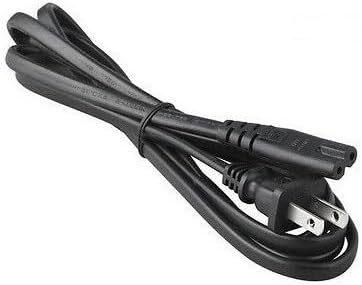
Nọmba 4.4: The AC input power cord, featuring a standard US plug for connecting the adapter to a wall outlet.
Awọn eroja pataki:
- Adapter Unit: The main body containing the power conversion circuitry.
- Ibudo Iwọle AC: Where the AC power cord connects to the adapter.
- DC Output Cable with Barrel Connector: Permanently attached cable that delivers power to your device.
- Atọka LED: Illuminates when the adapter is receiving power and operating correctly.
- Okun Agbara AC: Connects the adapter to a wall outlet.
5. Awọn ilana iṣeto
Follow these steps to set up your GT POWER AC/DC Adapter:
- Yọọ kuro: Carefully remove the adapter and AC power cord from the packaging.
- Connect AC Cord: Insert the female end of the AC power cord firmly into the AC input port on the adapter unit.
- Sopọ si Ibusọ Agbara: Plug the DC barrel connector from the adapter's output cable into the DC input port of your compatible portable power station (e.g., Anker Powerhouse II 400/533). Ensure a secure connection.
- Sopọ si Odi Odi: Plug the male end of the AC power cord into a standard wall outlet (AC 100-240V).
- Jẹrisi Agbara: The LED indicator on the adapter should illuminate, indicating that it is receiving power and ready to charge.
Akiyesi: Always connect the adapter to the device first, then to the wall outlet, and disconnect from the wall outlet first, then from the device.
6. Awọn ilana Iṣiṣẹ
Once set up, the adapter operates automatically:
- When connected to a power outlet and a compatible power station, the adapter will begin supplying power for charging.
- The LED indicator will remain lit during operation.
- The adapter features an "Automatic Off" special feature, which implies it will cease charging or power delivery once the connected device is fully charged or if an overload/fault condition is detected. Refer to your power station's manual for specific charging indicators.
- To stop operation, first unplug the AC power cord from the wall outlet, then disconnect the DC barrel connector from your power station.
7. Itọju
Itọju to peye ṣe idaniloju pe ohun ti nmu badọgba rẹ yoo pẹ to ati pe o le ṣiṣẹ lailewu:
- Ninu: Ge asopọ ohun ti nmu badọgba lati gbogbo awọn orisun agbara ṣaaju ṣiṣe mimọ. Lo asọ asọ ti o gbẹ lati nu ita. Ma ṣe lo awọn olutọpa olomi tabi awọn olomi.
- Ibi ipamọ: When not in use, store the adapter in a cool, dry place, away from direct sunlight and moisture. Coil the cables loosely to prevent damage.
- Ayewo: Periodically inspect the adapter casing, cables, and connectors for any signs of wear, cuts, or damage. If damage is found, discontinue use immediately and replace the adapter.
8. Laasigbotitusita
Ti o ba pade awọn iṣoro pẹlu adapter rẹ, tọka si awọn iṣoro ati awọn solusan ti o wọpọ wọnyi:
| Isoro | Owun to le Fa | Ojutu |
|---|---|---|
| Adapter LED is off, no power output. |
|
|
| Power station not charging. |
|
|
| Adapter naa gbona pupọju. |
|
|
Ti iṣoro naa ba wa lẹhin igbiyanju awọn solusan wọnyi, jọwọ kan si atilẹyin alabara.
9. Awọn pato
| Nọmba awoṣe | 475 (H-200-24) |
| Iṣagbewọle Voltage | AC 100-240V, 1.8A, 50-60Hz |
| O wujade Voltage | DC 24V |
| Ijade lọwọlọwọ | 8A |
| Wattage | 200W |
| Asopọmọra Iru | Barrel Asopọ |
| Idaabobo Awọn ẹya ara ẹrọ | OVP (Lori VoltagIdaabobo e), OCP (Aabo Lori Lọwọlọwọ), SCP (Aabo Kukuru Circuit) |
| Pataki Ẹya | Laifọwọyi |
| Awọn ẹrọ ibaramu | Anker Powerhouse II 400, Anker 533 Portable Power Stations (and other devices requiring 24V, 8A DC input with compatible barrel connector) |
| Awọn iwọn (Itosi.) | 7 x 5 x 3 inches (Awọn iwọn idii) |
| Ìwọ̀n (Fún.) | 14 iwon |
10. Atilẹyin ati Atilẹyin fun Awọn Onibara
For technical assistance, warranty information, or to report any issues with your GT POWER 200W AC/DC Adapter, please contact your retailer or the manufacturer directly.
Jọwọ ni nọmba awoṣe ọja rẹ (475) ati ra alaye ṣetan nigbati o ba kan si atilẹyin.
Warranty details are typically provided at the point of purchase or on the manufacturer's official webojula.


