

1. Ọja Ipariview
The STRICH M2 is a UHF wireless microphone system designed for professional audio applications. It includes a transmitter and a receiver, offering 16 selectable channels for stable and clear audio transmission. This system supports both dynamic microphones and condenser microphones requiring 48V phantom power, making it versatile for various setups including audio mixers, PA systems, and speakers.

Image: The STRICH M2 wireless microphone system, showing the transmitter, receiver, and included XLR to 1/4 inch adapters.
2. Package Awọn akoonu
- 1 x STRICH M2 Wireless Transmitter
- 1 x STRICH M2 Wireless Receiver
- 1 x XLR to 1/4 inch Adapter
- 1 x Okun Ngba agbara USB
- 1 x Itọsọna olumulo (iwe yii)
3. Key Awọn ẹya ara ẹrọ
- 48V Phantom Power Support: Connects to condenser microphones. For dynamic microphones, ensure phantom power is off.
- Gbigbe Ijinna Gigun Gigun: Reliable UHF signal over 164-262 feet (50-80 meters) range.
- Low Latency & High Fidelity: Less than 6ms latency with 24-bit/48kbps audio and 40Hz-20KHz frequency response.
- 16 Selectable UHF Channels: Allows simultaneous use of up to 16 M2 systems without interference.
- Anti-interference Technology: Ensures stable and clear audio transmission.
- Metal XLR Interface: Provides secure and stable connections to various audio equipment.
- Igbesi aye batiri gigun: Operates continuously for 6-8 hours on a full charge.
4. Ifilelẹ ẹrọ ati Awọn iṣakoso

Aworan: Alaye view of the STRICH M2 unit, highlighting key components.
- Iboju ifihan: Shows battery status, signal strength, frequency, and mode (Mic 48V, Mic 5V, Line 5V).
- Bọtini agbara: Short press to switch frequency points; long press to power on/off.
- Mode Selection Buttons (Mic 48V / Line 5V): Selects the appropriate input mode.
- Ibudo Ngba agbara USB-C: Fun gbigba agbara ti abẹnu batiri.

Image: Close-up of the M2 display, showing battery, signal, frequency, and mode indicators.
5. Awọn ilana iṣeto
5.1 Ngba agbara si Awọn ẹrọ
Before first use, fully charge both the transmitter and receiver using the provided USB charging cable. Connect the cable to the USB-C port on each unit and a standard 5V USB power source. The display will indicate charging status.

Image: Both the transmitter and receiver units connected to USB charging cables.
5.2 Sísopọ̀ mọ́ Gbohungbohun
- Gbohungbohun Yiyipo: Plug your dynamic microphone directly into the XLR input of the M2 transmitter. Ensure the 'Mic 48V' phantom power switch is PAA.
- Gbohungbohun Condenser: Plug your condenser microphone into the XLR input of the M2 transmitter. Turn the 'Mic 48V' phantom power switch ON.
5.3 Sopọ̀ mọ́ Ẹ̀rọ Ohùn kan
Plug the M2 receiver into the XLR input of your audio mixer, PA system, or speaker. If your audio device uses a 1/4 inch input, use the included XLR to 1/4 inch adapter.
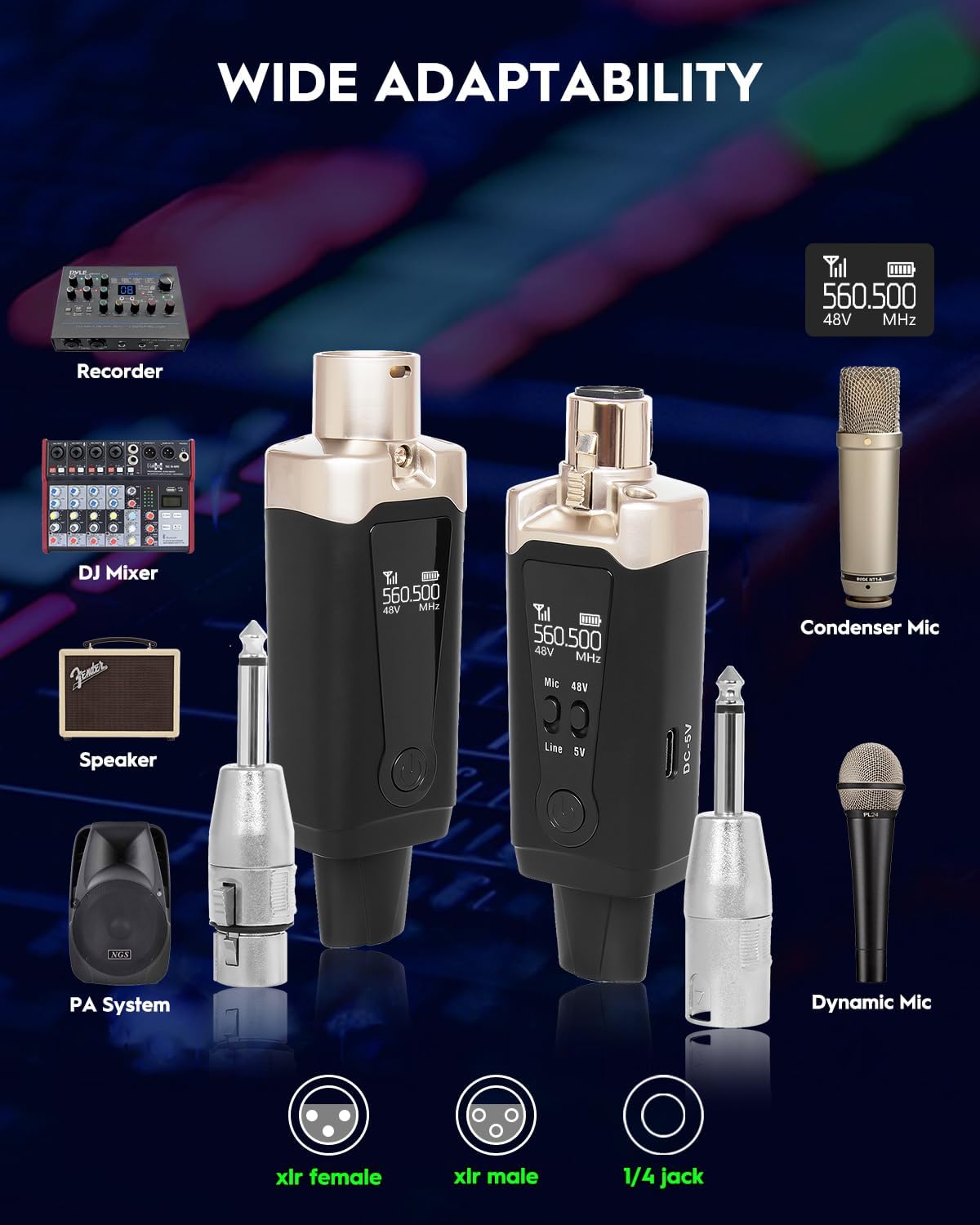
Image: Diagram illustrating the M2 system's compatibility with recorders, DJ mixers, speakers, PA systems, condenser mics, and dynamic mics.
6. Awọn ilana Iṣiṣẹ
6.1 Titan / Pa a
Long press the power button on both the transmitter and receiver to turn them on or off. The display screen will illuminate upon power-on.
6.2 ikanni Yiyan
The M2 system offers 16 UHF frequency points. Short press the power button on the transmitter to cycle through available frequencies. The receiver will automatically sync to the transmitter's frequency. Ensure both units are on the same channel for proper operation. If using multiple M2 systems simultaneously, select different channels for each pair to avoid interference.
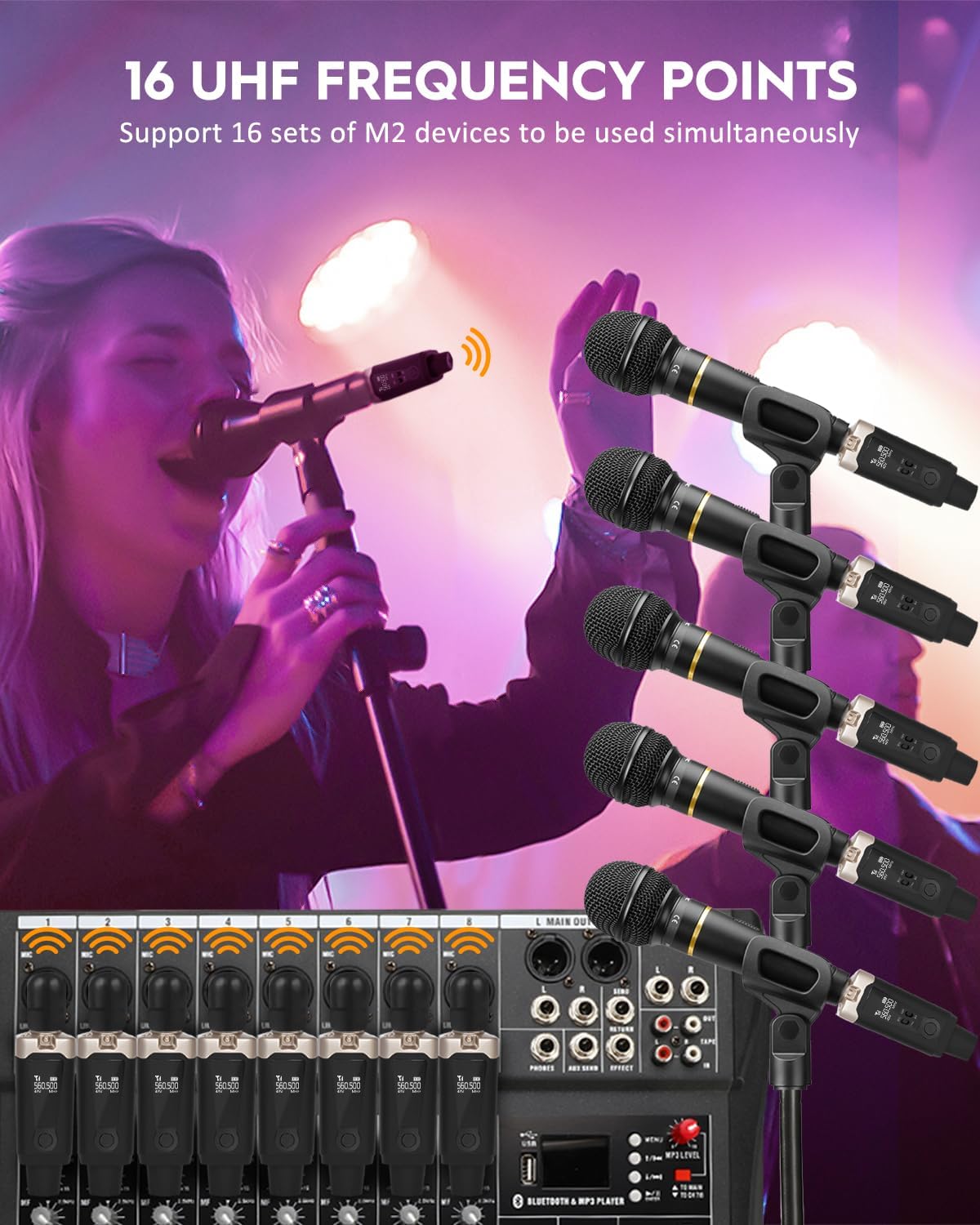
Image: An illustration showing multiple M2 wireless systems connected to a multi-channel mixer, highlighting the 16 UHF frequency points feature.
6.3 Mode Selection (Mic 48V / Line 5V)
Use the dedicated buttons on the transmitter to select the appropriate input mode:
- Mic 48V: Mu agbara Phantom 48V ṣiṣẹ fun awọn microphones condenser.
- Mic 5V: Standard mode for dynamic microphones.
- Line 5V: Suitable for line-level audio input scenarios, such as musical instruments.

Image: The M2 unit's display illustrating different battery statuses, signal stability, and the Mic 5V, Line 5V, and Mic 48V modes.
7. Itọju
7.1 batiri Itọju
The M2 system provides 6-8 hours of continuous operation. To prolong battery life, fully charge the units when the battery indicator is low. Avoid completely draining the battery frequently. If storing for extended periods, charge the units to approximately 50% every few months.
7.2 Ninu ati Ibi ipamọ
Wipe the units with a soft, dry cloth. Avoid using harsh chemicals or abrasive materials. Store the system in a cool, dry place away from direct sunlight and extreme temperatures.
8. Laasigbotitusita
- Ko si Ijade ohun:
- Rii daju pe o ti tan agbara mejeeji fun transmitter ati olugba.
- Verify that both units are synced to the same frequency channel.
- Check microphone connection to the transmitter.
- Confirm receiver is properly connected to the audio input of your mixer/speaker.
- Adjust volume levels on your audio device.
- If using a condenser mic, ensure 48V phantom power is enabled on the transmitter.
- Interference or Poor Audio Quality:
- Change the operating frequency channel on the transmitter.
- Ensure there are no obstructions between the transmitter and receiver.
- Pa eto naa mọ kuro lọdọ awọn ẹrọ alailowaya miiran tabi awọn aaye itanna ti o lagbara.
- Check battery levels; low battery can affect signal strength.
- Igbesi aye batiri kukuru:
- Rí i dájú pé àwọn ẹ̀rọ náà ti gba agbára ní kíkún kí o tó lò ó.
- Battery performance may vary with usage conditions and age.
9. Awọn pato
| Ẹya ara ẹrọ | Sipesifikesonu |
|---|---|
| Orukọ awoṣe | M2 |
| Asopọmọra Technology | UHF |
| Nọmba ti awọn ikanni | 16 |
| Idahun Igbohunsafẹfẹ | 40Hz - 20KHz |
| Ifihan Ibuwọlu-si-Noise | 110 dB |
| Ifamọ Audio | 110 Decibels |
| Gbigbe Range | 164 - 262 feet (50-80 meters) |
| Lairi | Kere ju 6 ms |
| Orisun agbara | Agbara Batiri |
| Igbesi aye batiri | 6-8 hours (normal working hours) |
| Asopọmọra Iru | XLR, 1/4 inch |
| Ohun elo | Acrylonitrile Butadiene Styrene, Aluminiomu |
| Iwọn Nkan | 14.1 iwon (0.88 iwon) |
| Awọn iwọn Ọja (L x W x H) | 7.28 x 6.3 x 1.57 inches |
10. Atilẹyin ọja ati Support
STRICH products are designed for quality and reliability. This product typically comes with a 12-month warranty from the date of purchase. For any questions, technical assistance, or warranty claims, please contact the seller directly through your order options. We aim to provide prompt responses within 24 hours.


Image: Icons representing customer care, warranty services, and return policy.