
Ọrọ Iṣaaju
This manual provides comprehensive instructions for the OneBom Replacement Remote Control for Roku TVs. It covers product features, setup, operation, maintenance, and troubleshooting to ensure optimal performance and longevity of your remote controls.
The package includes two replacement Roku remotes and two silicone covers, designed for convenience and durability. These remotes are compatible with a wide range of Roku series TVs from various brands.
Ọja Pariview
The OneBom Replacement Remote Control is designed to be a direct replacement for your original Roku TV remote, offering immediate functionality without complex setup. The included silicone covers provide protection and enhance visibility in low light conditions.
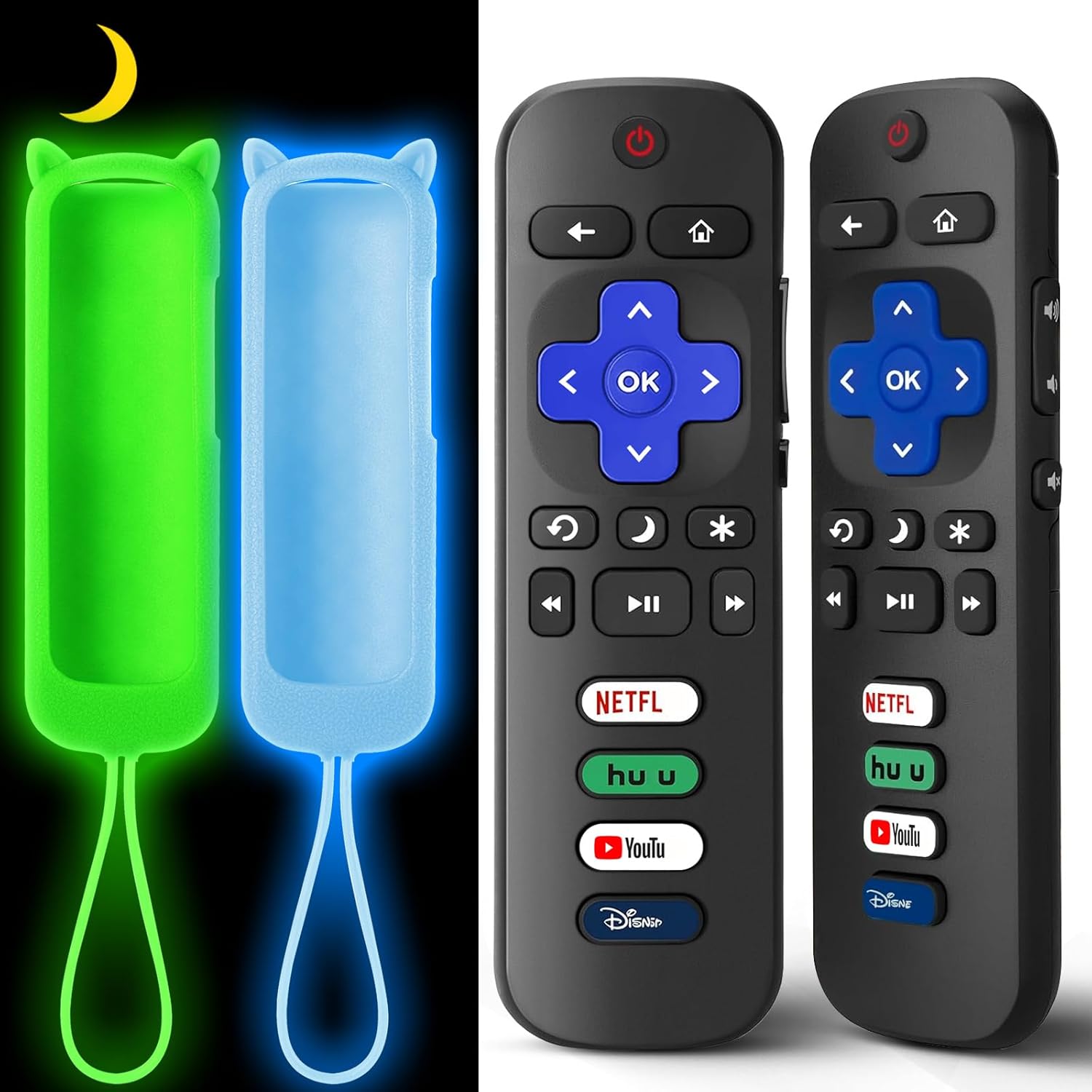
Image: Two OneBom Roku TV replacement remotes with their respective glow-in-the-dark silicone covers. The remotes are black with standard Roku button layouts, and the covers are bright green and light blue, designed to glow in the dark.
Awọn ẹya pataki:
- 2 Remotes + 2 Covers: Provides a convenient backup or replacement set.
- Ibamu gbooro: Works with all Roku series TVs from brands like TCL, Hisense, Onn, Sharp, Element, Westinghouse, Philips, Insignia, JVC, RCA, and Sanyo.
- No Pairing/Setup Required: Ready to use immediately after battery insertion.
- Glow-in-the-Dark Covers: Silicone covers (Glow Green & Glow Blue) make remotes easy to locate in the dark and include wrist straps for added security.
- Kọ ti o tọ: Constructed from sturdy ABS+plastic, tested for over 160,000 clicks.
- Iṣe Idahun: Features a responsive chip for fast action (under 0.3 seconds) with a range of up to 25 feet.
- Convenient Shortcut Keys: Includes 4 dedicated shortcut keys for quick access to popular streaming channels.

Image: Illustration of compatible Roku TV models. The remote is compatible with TCL, Hisense, Onn, Sharp, Element, Westinghouse, Philips, Insignia, JVC, RCA, and Sanyo Roku TVs.

Image: Visual representation of compatibility. The remote is compatible with Roku TVs and does not require pairing or setup. It is explicitly stated that it is not compatible with Roku Stick or Roku Box models.
Ṣeto
Setting up your OneBom Replacement Remote Control is a straightforward process, requiring no complex pairing or programming.
Fifi sori batiri:
- Wa yara batiri ni ẹhin isakoṣo latọna jijin.
- Ifaworanhan ṣii ideri batiri.
- Insert two (2) AAA batteries (not included), ensuring correct polarity (+ and - ends match the indicators inside the compartment).
- Pa ideri batiri naa ni aabo.
Once batteries are installed, the remote is ready for immediate use with your compatible Roku TV.

Image: Diagram illustrating the battery compartment of the remote control, showing where to insert two AAA batteries. Batteries are not included with the product.
Applying the Silicone Cover:
- Gently slide the remote control into the silicone cover, starting from the top (power button end).
- Ensure the remote fits snugly and all buttons align with the cover's cutouts.
- The cover features a cat ear design at the top and an anti-slip texture for improved grip.
- Attach the wrist strap to the designated loop on the cover to prevent accidental drops.
Video: This video demonstrates the ease of battery installation and how to properly place the remote control into its protective silicone cover. It also highlights the various color options for the covers and the anti-slip texture.
Awọn ilana Iṣiṣẹ
The OneBom Replacement Remote Control functions identically to your original Roku TV remote. Point the remote directly at your Roku TV for optimal signal transmission.
Awọn iṣẹ bọtini:

Image: Detailed diagram of the remote control buttons and their corresponding functions, including power, navigation, volume, and dedicated channel shortcuts.
- Bọtini agbara: Tan TV si tan tabi paa.
- Paadi lilọ kiri (Soke, Isalẹ, Osi, Ọtun, O DARA): Lo lati lilö kiri ni awọn akojọ aṣayan ko si yan awọn aṣayan.
- Bọtini Pada: Pada si iboju iṣaaju tabi akojọ aṣayan.
- Bọtini Ile: Returns to the Roku TV home screen.
- Iṣakoso Iwọn didun (+/-): Ṣe atunṣe iwọn didun TV.
- Bọtini Mute: Pa ohun TV kuro tabi mu ohun foonu kuro.
- Sisisẹsẹhin lesekese: Ó fò sẹ́yìn ní ìṣẹ́jú díẹ̀ nígbà tí a ń ṣe fídíò.
- Ipo oorun (aami oṣupa): Puts the TV into sleep mode.
- Options (Asterisk icon): Accesses additional options within an app or menu.
- Rewind (RWD Scan), Play/Pause, Fast Forward (FWD Scan): Àwọn ìṣàkóso ìṣiṣẹ́ orin media.
- Channel Shortcuts (Netflix, Hulu, YouTube, Disney+): Direct access buttons to popular streaming services.
Ẹya Glow-in-the-Dudu:
The silicone covers are designed to glow in the dark, making your remote easy to find in dimly lit rooms. To activate or recharge the glow effect:
- Expose the cover to direct light for an extended period. This can be natural sunlight, incandescent lamps, Fuluorisenti lamps, or blue light.
- The phosphorescent elements in the cover absorb light energy and then emit it as a glow in the dark.
- If the glow intensity decreases over time, simply re-expose the cover to light.
- Note that excessive ambient light can diminish the perceived intensity of the glow.

Image: Visual guide on how to activate the glow-in-the-dark feature by exposing the silicone cover to light sources like a desk lamp or sunlight. The image also shows the remote glowing in a dark room.
Itoju
Proper maintenance will extend the life of your OneBom Replacement Remote Control and its silicone cover.
Ninu:
- To clean the remote, gently wipe it with a soft, dry cloth.
- For the silicone cover, you can remove it from the remote and wash it with mild soap and water. Ensure it is completely dry before placing the remote back inside.
- Avoid using harsh chemicals or abrasive cleaners, as these can damage the remote or cover.
Rirọpo Batiri:
Replace batteries when the remote's responsiveness decreases or it stops functioning. Always use new AAA batteries and dispose of old batteries responsibly according to local regulations.
Laasigbotitusita
If you encounter issues with your OneBom Replacement Remote Control, try the following troubleshooting steps:
| Isoro | Owun to le Fa | Ojutu |
|---|---|---|
| Latọna jijin ko dahun. | Awọn batiri ti o ku tabi ti ko tọ ti fi sori ẹrọ. | Ropo awọn batiri pẹlu titun AAA batiri, aridaju ti o tọ polarity. |
| Latọna jijin ko dahun. | Obstruction between remote and TV's infrared sensor. | Ensure a clear line of sight between the remote and the TV. Remove any objects blocking the signal. |
| Latọna jijin ko dahun. | Latọna jijin ko si ni ibiti. | Move closer to the TV. The remote has a range of up to 25 feet. |
| Specific buttons not working. | Ẹ̀gbin tàbí ìdọ̀tí lábẹ́ bọ́tìnì náà. | Clean the remote. If the issue persists, the button may be worn out. |
| Glow-in-the-dark cover not glowing. | Àìsí ìfarahàn ìmọ́lẹ̀ tó. | Expose the cover to direct light (sunlight, lamp) for a period to recharge its luminescence. |
Tí àwọn ìgbésẹ̀ wọ̀nyí kò bá yanjú ìṣòro náà, jọ̀wọ́ wo abala "Àtìlẹ́yìn àti Àtìlẹ́yìn" fún ìrànlọ́wọ́ síwájú sí i.
Awọn pato
- Nọmba awoṣe: Roku TV Remote
- ASIN: B0D926TJB4
- Awọn iwọn idii: 7.52 x 7.52 x 0.94 inches
- Ìwọ̀n Nkan: 5.6 iwon
- Awọn batiri ti a beere: 2 x AAA (ko si)
- Awọn ẹrọ ibaramu: Roku TV, TCL/Hisense/Onn/Westinghouse/Philips Roku Smart TVs
- Awọn ẹya pataki: Ergonomic, Glow In The Dark Cover, Lightweight, Universal
- Nọmba ti o pọju ti Awọn ẹrọ Atilẹyin: 10
- Olupese: ỌkanBom
- Ọjọ akọkọ ti o wa: Oṣu Keje 8, Ọdun 2024
Atilẹyin ọja ati Support
OneBom stands behind its products with reliable after-sales service. Your purchase includes a 60-day trial period.
If you have any questions, issues, or require further assistance with your OneBom Replacement Remote Control, please reach out to our customer support team. Contact information can typically be found on the product packaging or through the retailer's webaaye ti o ti ra ọja naa.