
Ọrọ Iṣaaju
O ṣeun fun riraasing the MECHEN H16 Portable CD Player. This device offers versatile audio playback options including CD, Bluetooth, TF card, and AUX input, all controlled with ease via the device or its remote. Please read this manual carefully to ensure proper use and optimal performance of your new CD player.
Package Awọn akoonu
Rii daju pe gbogbo awọn nkan wa ninu package:
- 1 x MECHEN H16 Portable CD Player
- 1 x Isakoṣo latọna jijin
- 1 x Okun Ngba agbara USB
- 1 x Okun AX
- 1 x Itọsọna olumulo
Ọja Pariview
Familiarize yourself with the components and controls of your MECHEN H16 CD Player.

olusin 1: Iwaju View ati Key Awọn ẹya ara ẹrọ
This image displays the front of the MECHEN H16 Portable CD Player, highlighting its various modes and features including CD playback, Bluetooth 5.3 connectivity, TF card support, AUX input, HiFi audio, LED display, Type-C charging port, and remote control capability.

Figure 2: Ports and Controls
This image shows the top and side views of the MECHEN H16 Portable CD Player, indicating the locations of the AUX port, USB port, TF card slot, power indicator, Play/Pause button, Mode button, Previous/Rewind button, Next/Fast forward button, LED display, and Volume wheel. The speaker is also visible at the bottom front.
Ṣeto
1. Ngba agbara ẹrọ
The MECHEN H16 is equipped with a 2500mAh rechargeable battery, providing up to 10 hours of continuous playback. Before first use, fully charge the device.
- Connect the provided USB charging cable to the Type-C port on the player.
- Connect the other end of the USB cable to a power source such as a wall charger, power bank, car charger, or computer USB port.
- The LED display will indicate charging status. A full charge typically takes a few hours.

Àwòrán 3: Àwọn Àṣàyàn Gbígbà Owó
This image illustrates the four different ways to charge the MECHEN H16 Portable CD Player: using a wall charger, a power bank, a car charger, or a computer's USB port. The image also highlights the 2500mAh battery capacity.
2. Inserting a CD
- Gently open the CD compartment cover.
- Place the CD with the label side facing up onto the spindle.
- Press the CD gently until it clicks into place.
- Ti ideri apoti CD naa lailewu.
Awọn ilana Iṣiṣẹ
1. Agbara Tan / Paa
Press and hold the Power button to turn the device on or off.
2. CD Sisisẹsẹhin
- Fi CD kan sii bi a ti ṣalaye ninu apakan Eto.
- The player will automatically detect the CD and begin playback. If not, press the Play/Pause button.
- Use the Previous/Rewind and Next/Fast forward buttons to navigate tracks.
- Adjust volume using the Volume wheel or remote control.
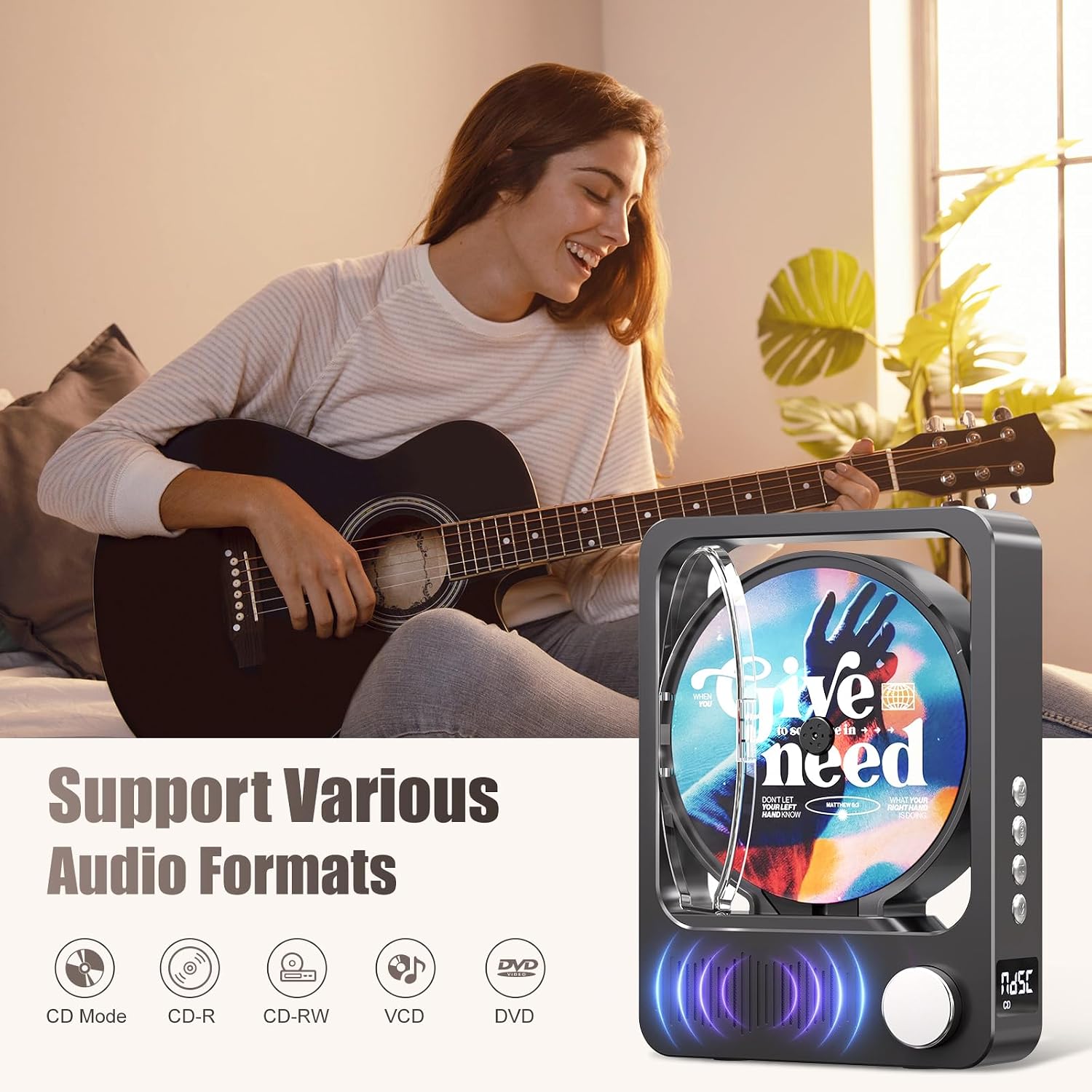
Figure 4: Supported Audio Formats
This image highlights the MECHEN H16's compatibility with various audio formats. The MECHEN H16 supports playback of standard audio CDs, CD-R, CD-RW, MP3, and WMA formats. (Note: Discs are not included).
3. Bluetooth Connectivity (Speaker Mode)
The MECHEN H16 can act as a Bluetooth speaker to play audio from your smartphone, tablet, or computer. Note: This device cannot connect to Bluetooth headphones.
- Press the Mode button until "BLUE" appears on the LED display, indicating Bluetooth mode.
- On your external device (smartphone, tablet, etc.), enable Bluetooth and search for "MECHEN H16".
- Select "MECHEN H16" to pair. Once connected, you can stream audio from your device to the CD player.

Àwòrán 5: Iṣẹ́ Agbọrọsọ Bluetooth
This image demonstrates the MECHEN H16 Portable CD Player functioning as a Bluetooth speaker, wirelessly playing music from a connected mobile phone. It also shows compatibility with MP3/MP4 players, tablets, and computers.
4. TF Kaadi Sisisẹsẹhin
- Insert a TF card (containing MP3/WMA files) sinu TF kaadi Iho.
- Press the Mode button until "TF" appears on the LED display.
- The player will automatically begin playing audio files lati TF kaadi.
5. Apọju AX
- Connect an external audio device (e.g., MP3 player, smartphone) to the AUX port using the provided 3.5mm AUX cable.
- Press the Mode button until "LINE" appears on the LED display.
- Audio from the connected device will now play through the CD player's speakers.
6. Lilo isakoṣo latọna jijin
Isakoṣo latọna jijin ti o wa pẹlu ngbanilaaye fun iṣẹ irọrun lati ọna jijin.

olusin 6: Latọna Iṣakoso Awọn iṣẹ
This image displays the remote control for the MECHEN H16 Portable CD Player, showing buttons for track navigation (Previous, Next), volume adjustment (Volume+, Volume-), Mode selection, and Play/Pause. It allows effortless control of playback functions.
- Bọtini agbara: Yipada ẹrọ si tan/pa.
- Ṣiṣẹ/Daduro: Bẹrẹ tabi da duro sẹhin duro.
- Ti tẹlẹ/pada sẹhin: Skips to the previous track or rewinds the current track.
- Itele/Siwaju Sare: Skips to the next track or fast forwards the current track.
- VOL+/VOL-: Ṣe atunṣe ipele iwọn didun.
- Ipo: Switches between CD, Bluetooth, TF, and AUX modes.
Itoju
- Ninu: Use a soft, dry cloth to clean the exterior of the player. Do not use liquid cleaners or aerosols. For the CD lens, use a specialized CD lens cleaner.
- Ibi ipamọ: Tọju ẹrọ orin ni itura, aye gbigbẹ kuro lati orun taara ati awọn iwọn otutu to gaju.
- Itọju Batiri: Lati pẹ aye batiri, yago fun gbigba agbara si batiri ni kikun nigbagbogbo. Gba agbara si ẹrọ nigbagbogbo, paapaa ti ko ba wa ni lilo fun awọn akoko ti o gbooro sii.
Laasigbotitusita
| Isoro | Ojutu |
|---|---|
| Ẹrọ orin ko tan-an. | Ensure the battery is charged. Connect the player to a power source using the USB cable. |
| CD ko ṣiṣẹ tabi fo. | Check if the CD is clean and free of scratches. Ensure the CD is inserted correctly. The player supports CD, CD-R, CD-RW, MP3, and WMA formats. |
| Ko si ohun lati awọn agbohunsoke. | Increase the volume. Ensure the correct mode (CD, Bluetooth, TF, AUX) is selected. If using AUX, check the cable connection. |
| Ẹrọ Bluetooth ko le sopọ. | Ensure the player is in Bluetooth mode ("BLUE" on display). Make sure your external device's Bluetooth is enabled and within range. Remember, the player acts as a speaker and cannot connect to Bluetooth headphones. |
| Isakoṣo latọna jijin ko ṣiṣẹ. | Check the remote control battery. Ensure there are no obstructions between the remote and the player. |
Awọn pato
| Orukọ awoṣe | H16 |
| Brand | MECHEN |
| Asopọmọra Technology | Bluetooth 5.3, Auxiliary (3.5mm Jack), USB (for charging) |
| Pataki Awọn ẹya ara ẹrọ | Bluetooth, CD-R/RW Compatible, Portable, Rechargeable |
| Awọn ọna kika Audio atilẹyin | CD, CD-R, CD-RW, MP3, WMA |
| Batiri | 2500mAh Lithium-ion (pẹlu) |
| Apapọ batiri Life | Títí dé wákàtí 10 (síṣeré) |
| Awọn iwọn (L x W x H) | 21.5 x 16 x 4.3 cm |
| Nọmba ti Disiki | 1 |
| Awọn ẹrọ ibaramu | Headphones (wired), Speakers (wired/Bluetooth) |
Atilẹyin ọja ati Support
Alaye atilẹyin ọja
The MECHEN H16 Portable CD Player comes with a 1-odun atilẹyin ọja Láti ọjọ́ tí a rà á. Àtìlẹ́yìn yìí bo àwọn àbùkù iṣẹ́-ọnà àti iṣẹ́-ọnà lábẹ́ lílo déédéé. Kò bo ìbàjẹ́ tí ó wáyé nípasẹ̀ ìlòkulò, jàǹbá, àtúnṣe tí a kò fún ní àṣẹ, tàbí ìbàjẹ́ déédé.
Onibara Support
For technical assistance, troubleshooting, or warranty claims, please contact MECHEN customer support. Refer to the contact information provided on the product packaging or the official MECHEN webojula.
Jọwọ ṣe idaduro ẹri rira rẹ fun iṣẹ atilẹyin ọja.