
1. Ifihan
Thank you for choosing the Bobtot B38 5.1 Channel Home Theater System. This system is designed to provide an immersive audio experience for your entertainment needs. Featuring a 4-inch subwoofer with a built-in receiver and five wired satellite speakers, it delivers clear highs, rich mid-range, and deep bass. Its compact design makes it suitable for small to medium-sized rooms, allowing for flexible placement to optimize sound quality.
This manual provides detailed instructions for setting up, operating, and maintaining your home theater system. Please read it thoroughly before use to ensure proper functionality and to maximize your audio experience.

Image: The Bobtot B38 5.1 Channel Home Theater System, showcasing the central subwoofer unit and five wired satellite speakers.
2. Ohun ti o wa ninu Apoti
Upon unpacking your Bobtot B38 Home Theater System, please ensure all the following items are present:
- 1 x Subwoofer with Built-in Receiver
- 1 x Center Speaker
- 2 x Front Speakers
- 2 x Rear Speakers
- 1 x Full Function Remote Control
- 1 x Quick Start Guide (User Manual)
- 3 x RCA Video Audio Cables
- 1 x 3.5mm to 2-Male RCA Audio Stereo Cable
- 1 x Coaxial USB
- Okun eriali FM 1 x
- 1 x Optical Stereo Cable
- 1 x TV ARC Cable (HDMI)

Image: All components included in the Bobtot B38 package, laid out on a table.
3. Ọja Ipariview
The Bobtot B38 system comprises a central subwoofer unit and five satellite speakers, designed for a 5.1 channel surround sound experience. The subwoofer houses the main amplifier and various input/output ports.
3.1 Subwoofer and Satellite Speakers
The main unit features a 4-inch subwoofer for powerful bass and a built-in receiver. The five wired satellite speakers (center, two front, two rear) work in conjunction to create an immersive soundstage.

Aworan: Alaye view of the 4-inch subwoofer, illustrating its internal structure.
The compact size of the satellite speakers allows for versatile placement in your room.

Image: A satellite speaker and the subwoofer, with their dimensions indicated.
3.2 Ru Panel Awọn isopọ
The rear panel of the subwoofer features various input and output ports for connecting to your audio sources and the satellite speakers.

Image: The rear panel of the subwoofer, detailing the ARC Input, Optical Input, Coaxial Input, AUX Audio Input (RCA), FM Antenna, DVD Audio Input, and speaker Audio Output ports.
- Iṣawọle ARC: For connecting to TVs with HDMI ARC support.
- Iṣawọle Opitika: Fun asopọ ohun oni nọmba lati awọn ẹrọ ibaramu.
- Iṣawọle Coaxial: Fun asopọ ohun oni nọmba lati awọn ẹrọ ibaramu.
- Ìtẹ̀wọlé ohùn AUX (RCA): For analog audio connection from various devices.
- Eriali FM: Fun gbigba redio FM.
- DVD Audio Input: Specific RCA inputs for DVD players.
- Ijade ohun: RCA jacks for connecting the five wired satellite speakers.
- Orisun Agbara: AC 120V 60Hz 0.5A.
- Agbara Yi pada: Láti tan ẹ̀rọ náà sí TÁN/PÁ.
3.3 Iwaju Panel idari
The front panel of the subwoofer includes essential controls and indicators.

Image: The front panel of the subwoofer with buttons for ST.BY, INPUT, 5.1/2.1, AUTO/M, and ON/OFF Timer.
- ST.BY: Standby button. Press this before selecting the mode every time you turn on the unit.
- Fi sii: Cycles through available input sources (BT/ARC/OPT/COA/DV/AUX/FM/USB).
- 5.1/2.1: Toggles between 5.1 channel surround sound and 2.1 channel stereo mode (only front speakers play).
- AUTO/M: Auto/Manual tuning for FM radio.
- TAN/PA Aago: For setting sleep timer.
- Bọtini Iwọn didun: Ṣatunṣe iwọn didun oluwa.
- Awọn Iho kaadi USB/SD: For direct media playback.
3.4 Iṣakoso latọna jijin
The included full-function remote control allows for convenient operation of your home theater system from a distance.

Image: The remote control for the Bobtot B38 system, showing buttons for power, input selection, 5.1/2.1 channel mode, individual speaker volume control, and other settings.
- Titan/Apapa: Tan-an tabi pa eto naa.
- Input Mode Select: Buttons for BT, ARC, OPT, COA, AUX, USB, FM, DVD.
- 5.1/2.1 Channel Select: Toggles between surround sound and stereo.
- Iṣakoso iwọn didun: Ṣe atunṣe iwọn didun eto gbogbogbo.
- Individual Speaker Volume: The remote control allows independent volume adjustment for each speaker and the subwoofer. Refer to the remote control diagram in Section 3.4 for specific buttons.
- Pa ẹnu mọ́: Dẹkun ohun afetigbọ ohun.
- EQ: Eto oluṣeto.
- TUNE+/-: For FM radio tuning.
- CH +/-: For changing FM radio channels.
- Nọmba bọtini foonu: Fun titẹ sii taara tabi yiyan ikanni.
4. Eto
Follow these steps to set up your Bobtot B38 Home Theater System.
4.1 Asopọ Agbọrọsọ
- Ibi: Position your subwoofer and satellite speakers for optimal performance. Ensure the center speaker is placed centrally, front speakers to the left and right of your viewing area, and rear speakers behind you.
- So Awọn Agbọrọsọ Satẹlaiti pọ: Connect the five small wired speakers to the "AUDIO OUTPUT" slots on the rear of the subwoofer. Ensure each speaker is connected to its corresponding output (FL, FR, CEN, SL, SR).
- Agbara Tan: Turn on the subwoofer using the power switch on the rear panel.
- Select 5.1 Mode: Tẹ awọn ST.BY button on the front panel or remote. Then, press the 5.1/2.1 button to switch to 5.1 channel mode.

Image: A visual guide demonstrating the four steps of setting up the 5.1 surround sound system, including speaker placement, wired connections, device connections, and sound testing.
Video: A detailed guide on setting up the Bobtot B38 5.1 Home Theater System, covering speaker connections and initial power-on.
4.2 Nsopọ mọ Awọn Ẹrọ Ita
The Bobtot B38 system supports various connection methods for different audio sources. Ensure your external device has the appropriate output port to match the subwoofer's input.
4.2.1 HDMI ARC Connection (for TVs)
- Verify TV ARC Output: Check if your TV has an HDMI port labeled "ARC" or "HDMI ARC".
- Okun So pọ: Use the provided HDMI ARC cable to connect the TV's ARC port to the "ARC INPUT" port on the subwoofer.
- Yan Igbewọle: Tẹ awọn ÀWỌN Ọ̀RỌ̀ button on the subwoofer or remote until "ARC" is displayed on the LED screen.
- Ètò Ohùn TV: On your TV, navigate to the audio settings and select "HDMI ARC" or "Receiver (HDMI)" as the sound output. Some TVs may automatically detect this. If not, manually select it.
- Akiyesi pataki: The B38 ARC output only supports LPCM 2.0 audio format. Ensure your TV's digital audio output format is set to LPCM 2.0 if you encounter issues.
Video: Demonstrates how to connect the Bobtot B38 to a TV using an HDMI ARC cable and adjust TV audio settings.
4.2.2 Optical Connection (for TVs/Devices)
- Verify Optical Output: Check if your TV or audio device has an optical audio output port.
- Okun So pọ: Remove the transparent cap from the optical cable. Connect one end to your device's optical output and the other end to the "OPTICAL INPUT" port on the subwoofer.
- Yan Igbewọle: Tẹ awọn ÀWỌN Ọ̀RỌ̀ button on the subwoofer or remote until "OPT" is displayed on the LED screen.
- Device Audio Settings: On your TV or audio device, navigate to the audio settings and select "PCM" (Pulse-code modulation) as the digital audio output format. Do not select "Automatic" or "Bitstream".
4.2.3 Coaxial Connection (for TVs/Devices)
- Verify Coaxial Output: Check if your TV or audio device has a coaxial audio output port.
- Okun So pọ: Use the provided coaxial cable to connect your device's coaxial output to the "COAXIAL INPUT" port on the subwoofer.
- Yan Igbewọle: Tẹ awọn ÀWỌN Ọ̀RỌ̀ button on the subwoofer or remote until "COA" is displayed on the LED screen.
- Device Audio Settings: On your TV or audio device, navigate to the audio settings and select "PCM" as the digital audio output format. Do not select "Automatic" or "Bitstream".
4.2.4 AUX Input (RCA to RCA Connection)
For devices with RCA stereo audio outputs (e.g., older DVD players, some TVs).
- Okun So pọ: Use the provided RCA audio cables (red and white) to connect your device's audio output to the "AUX AUDIO INPUT" (L/R) ports on the subwoofer. Match colors (red to red, white to white).
- Yan Igbewọle: Tẹ awọn ÀWỌN Ọ̀RỌ̀ button on the subwoofer or remote until "AUX" is displayed on the LED screen.
4.2.5 AUX Input (RCA to 3.5mm Aux Connection)
For devices with a 3.5mm auxiliary output (e.g., smartphones, laptops, some projectors).
- Okun So pọ: Use the provided 3.5mm to 2-Male RCA audio stereo cable. Connect the RCA ends to the "AUX AUDIO INPUT" (L/R) ports on the subwoofer and the 3.5mm end to your device's auxiliary output.
- Yan Igbewọle: Tẹ awọn ÀWỌN Ọ̀RỌ̀ button on the subwoofer or remote until "AUX" is displayed on the LED screen.
4.2.6 DVD Input (3-piece RCA to RCA Connection)
For some older DVD players with multi-channel RCA outputs.
- Awọn okun Sopọ: Use three RCA to RCA cables. Connect the corresponding outputs from your DVD player (Front L/R, Center/Subwoofer, Rear L/R) to the "DVD AUDIO INPUT" ports on the subwoofer. Match colors.
- Yan Igbewọle: Tẹ awọn ÀWỌN Ọ̀RỌ̀ button on the subwoofer or remote until "DVD" is displayed on the LED screen.
4.3 Bluetooth Asopọ
Connect your smartphone, tablet, or other Bluetooth-enabled devices wirelessly.
- Yan Ipo Bluetooth: Tẹ awọn ÀWỌN Ọ̀RỌ̀ button on the subwoofer or remote until "BT" is displayed on the LED screen. The system will enter pairing mode.
- Mu Bluetooth ṣiṣẹ lori Ẹrọ: On your smartphone or tablet, go to Bluetooth settings and enable Bluetooth.
- Ohun elo Pàpọ: Wa fun "Bobtot B38" in the list of available devices and tap to connect.
- Password (if required): Tí a bá béèrè fún ọ̀rọ̀ìpamọ́, tẹ "0000" (odò mẹ́rin).
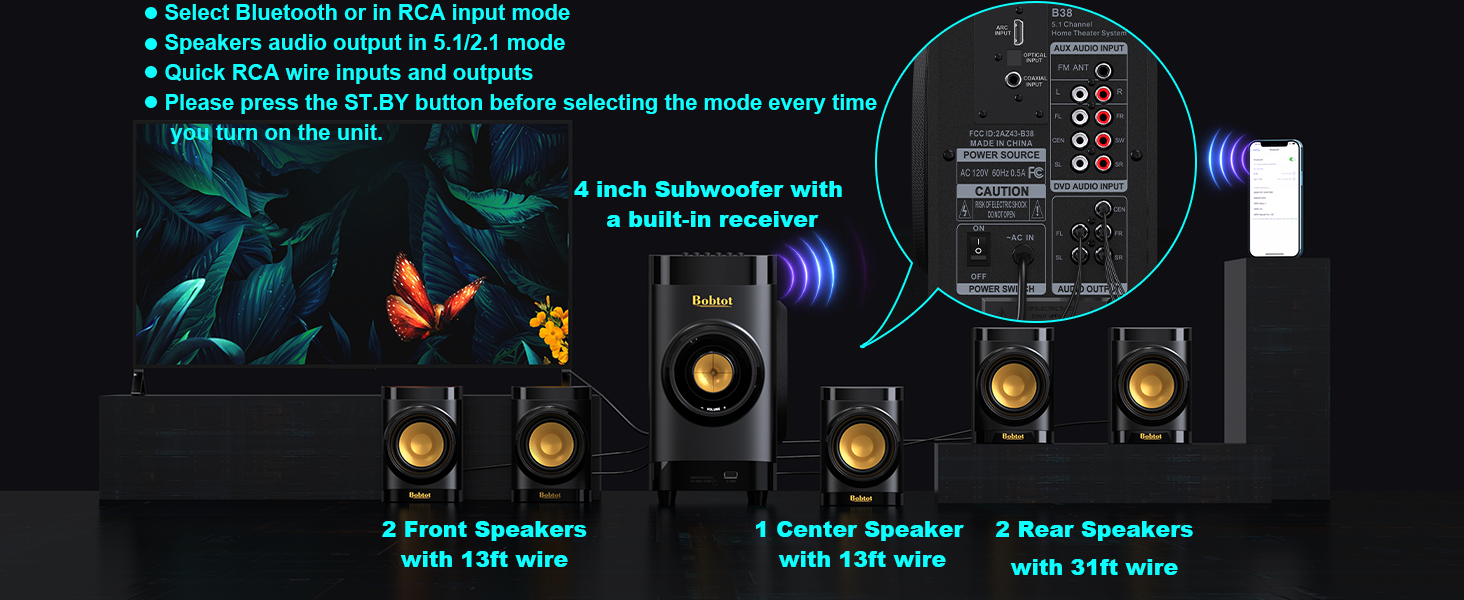
Image: A smartphone displaying Bluetooth settings, showing "Bobtot B38" as an available device for connection.
4.4 USB / SD Kaadi Sisisẹsẹhin
For direct music playback without an external device.
- Fi Media sii: Insert a USB disk or SD card (with music files) into the corresponding slot on the front panel of the subwoofer.
- Yan Igbewọle: Tẹ awọn ÀWỌN Ọ̀RỌ̀ button on the subwoofer or remote until "USB" or "SD" is displayed on the LED screen.
- Sisisẹsẹhin: The system will automatically begin playing music from the inserted media.
5. Awọn ilana Iṣiṣẹ
Once your system is set up, use the remote control or front panel buttons to manage playback and settings.
- Atunse iwọn didun: Lo awọn VOL +/- buttons on the remote or the volume knob on the subwoofer to adjust the master volume.
- Individual Speaker Volume: The remote control allows independent volume adjustment for each of the five satellite speakers and the subwoofer. Refer to the remote control diagram in Section 3.4 for specific buttons.
- Pa ẹnu mọ́: Tẹ awọn IKU bọtini lori latọna jijin lati fi si ipalọlọ fun igba diẹ ohun ohun. Tẹ lẹẹkansi lati mu dakẹ.
- Eto EQ: Lo awọn EQ button on the remote to cycle through different equalizer presets.
- Redio FM: In FM mode, use TUNE+/- for manual tuning or AUTO/M for automatic station search. Use CH +/- to navigate saved channels.
- Akoko oorun: Lo awọn ORUN+/- buttons on the remote to set a sleep timer.
6. Agbọrọsọ Placement
Proper speaker placement is crucial for achieving the best surround sound experience. Consider the following guidelines:
- Subwoofers: Place the subwoofer on the floor, ideally in a corner or near a wall, to enhance bass response. Experiment with placement to find the best sound for your room.
- Agbọrọsọ aarin: Position the center speaker directly above or below your TV/projector screen, facing the listening area. This speaker handles dialogue.
- Àwọn Agbọrọsọ Iwaju Apa osi ati otun: Place these speakers to the left and right of your TV, at roughly ear level when seated. They should be equidistant from your main listening position.
- Rear Left & Right Speakers: Place these speakers behind your main listening position, slightly to the sides or directly behind, also at ear level. These provide the surround effects.

Image: An illustration of a living room with the Bobtot B38 5.1 system correctly positioned for optimal surround sound.
The satellite speakers are mountable, allowing for wall installation to save space and optimize sound dispersion.
Video: Shows a person installing a satellite speaker on a wall using a screwdriver, demonstrating the mountable feature.
7. Awọn pato
| Brand | Bobtot |
| Orukọ awoṣe | B38 |
| Agbọrọsọ Iru | Agbegbe Ohun |
| Kakiri Ohun ikanni iṣeto ni | 5.1 |
| Agbọrọsọ Agbara Ijade ti o pọju | 200 Wattis |
| Subwoofer Opin | 4 inches |
| Speaker Size (Satellite) | 2.75 inches |
| Asopọmọra Technology | Auxiliary, Bluetooth, Coaxial, Optical, ARC |
| Ẹya Bluetooth | 5.0 |
| Bluetooth Ibiti | 33 Ẹsẹ |
| Awọn ẹrọ ibaramu | Desktop, Gaming Console, Projector, Smartphone, Television |
| Ọja Mefa | 17"D x 13"W x 14"H |
| Iwọn Nkan | 14.34 iwon (6.52 kilo) |
| Ohun elo | Acrylonitrile Butadiene Styrene (ABS), Igi |
| Iṣagbewọle Voltage | 120 Volts |
| Ifihan Ibuwọlu-si-Noise | 70 dB |
| Idahun Igbohunsafẹfẹ | 20 kHz |
| inu ile / ita gbangba Lilo | Ninu ile |
8. Laasigbotitusita
If you encounter any issues with your Bobtot B38 Home Theater System, please refer to the following common troubleshooting steps:
- Ko si Ohun:
- Ensure all speakers are correctly connected to the subwoofer's audio output ports.
- Verify the power is ON for both the subwoofer and your audio source (TV, DVD player, etc.).
- Check that the correct input mode is selected on the subwoofer (e.g., ARC, OPT, COA, AUX, BT, USB/SD).
- Adjust the master volume and individual speaker volumes.
- For digital inputs (ARC, Optical, Coaxial), ensure your TV/device audio output is set to "PCM" and not "Automatic" or "Bitstream".
- If using ARC, ensure your TV's HDMI ARC output is selected and the B38 supports LPCM 2.0.
- Awọn oran Isopọpọ Bluetooth:
- Ensure the subwoofer is in "BT" input mode.
- Make sure Bluetooth is enabled on your device and it's within range (33 feet).
- Forget "Bobtot B38" from your device's Bluetooth list and try pairing again.
- Tí o bá nílò ọ̀rọ̀ìpamọ́, tẹ "0000".
- Ohun Yiyi:
- Reduce the volume on both the system and your audio source.
- Ṣayẹwo gbogbo awọn asopọ okun fun alaimuṣinṣin tabi ibajẹ.
- Ensure the audio source is not sending an over-amplified ifihan agbara.
- Iṣakoso latọna jijin Ko Ṣiṣẹ:
- Ṣayẹwo ki o rọpo awọn batiri ni isakoṣo latọna jijin.
- Ensure there are no obstructions between the remote and the subwoofer's sensor.
- Point the remote directly at the subwoofer.
Tí àwọn ìgbésẹ̀ wọ̀nyí kò bá yanjú ìṣòro náà, jọ̀wọ́ kan sí ìrànlọ́wọ́ oníbàárà.
9. Itọju
To ensure the longevity and optimal performance of your Bobtot B38 Home Theater System, follow these maintenance guidelines:
- Ninu: Use a soft, dry cloth to clean the surfaces of the subwoofer and speakers. Do not use liquid cleaners or abrasive materials, as they may damage the finish.
- Afẹfẹ: Ensure adequate ventilation around the subwoofer to prevent overheating. Do not block any ventilation openings.
- Ibi: Yago fun gbigbe eto naa sinu ina taara, nitosi awọn orisun ooru, tabi ni awọn agbegbe pẹlu ọriniinitutu giga tabi eruku.
- Awọn kebulu: Periodically check all cables for any signs of wear or damage. Replace damaged cables immediately to prevent performance issues or safety hazards.
- Agbara Pa: When not in use for extended periods, it is recommended to turn off the system and unplug it from the power outlet.
10. Atilẹyin ọja ati Support
The Bobtot B38 Home Theater System comes with a Atilẹyin ọja to lopinJọ̀wọ́ tọ́ka sí káàdì ìdánilójú tí ó wà nínú àpò rẹ fún àwọn òfin àti àdéhùn pàtó kan.
For technical support, troubleshooting assistance, or warranty claims, please contact Bobtot customer service through the following channels:
- Amazon atilẹyin: Ṣabẹwo oju-iwe ọja lori Amazon.com and look for customer support options.
- Olupese Webojula: Refer to the official Bobtot webaaye fun alaye olubasọrọ ati awọn orisun atilẹyin.
- Atilẹyin foonu: Check your Quick Start Guide for any provided phone numbers for direct support.
Please have your product model number (B38) and purchase details ready when contacting support.


