
Ọrọ Iṣaaju
This manual provides instructions for the installation, operation, and maintenance of your Mcezdy P5C-6-Pin Ebike LCD Display. This display is designed to enhance your electric bike experience by providing real-time data and control over various functions.
Akiyesi Ibamu Pataki: This P5C ebike display operates using the UART No. 2 protocol. Ensure your ebike controller is compatible with this protocol and features a 6-pin asopo fun to dara iṣẹ-.
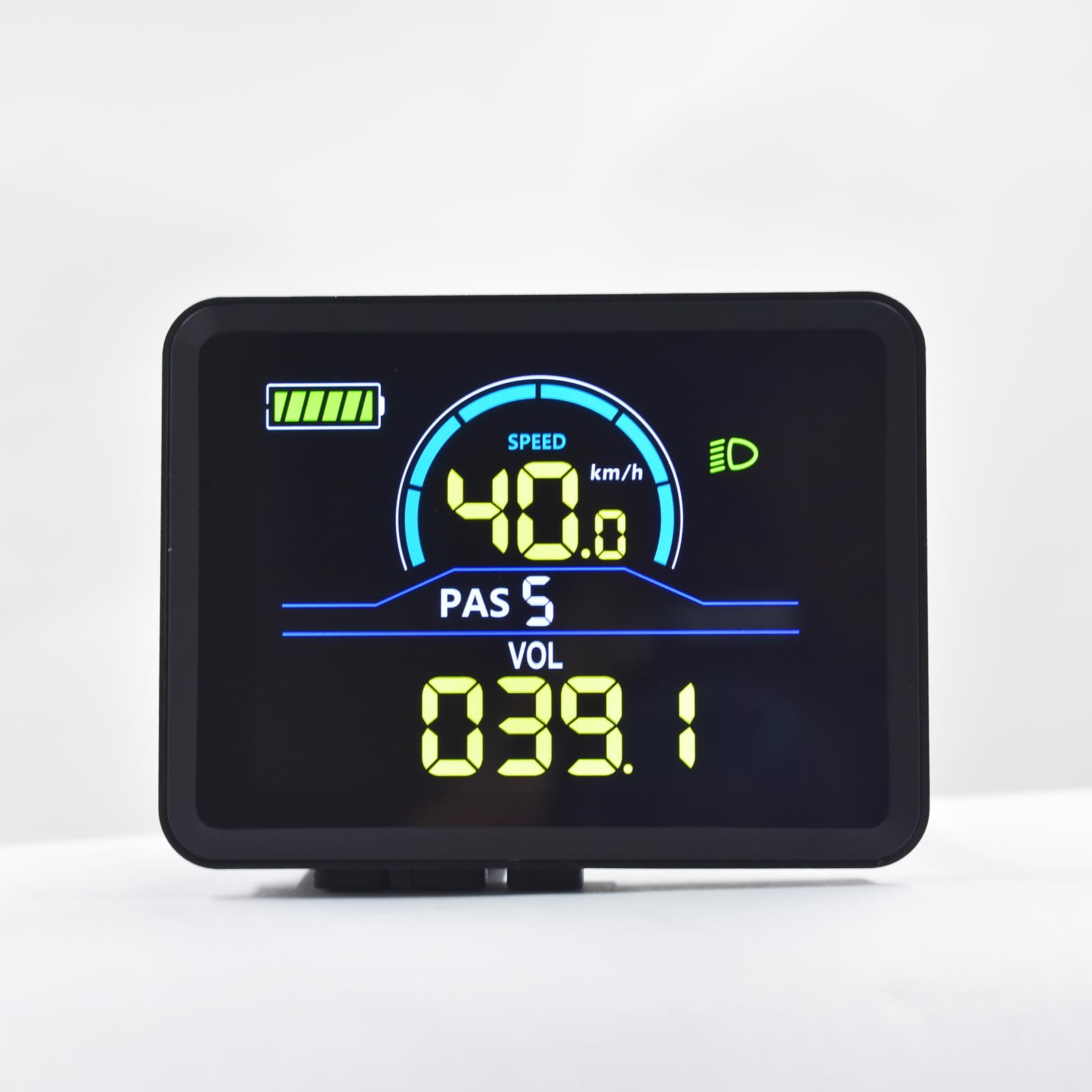
Image: Mcezdy P5C Ebike LCD Display. This image highlights the critical requirement for UART No. 2 protocol compatibility.
The display features a durable ABS+PC housing, a tempered glass screen for clarity and scratch resistance, and an IPX65 waterproof rating for protection against water splashes and rain.
Eto ati fifi sori
- Jẹrisi Ibamu: Before installation, confirm that your ebike controller uses the UART No. 2 protocol and has a compatible 6-pin connector. Incompatible systems will not function correctly.
- Gbigbe Ifihan naa:
The display comes with an adjustable mount designed to fit handlebars with a diameter of 22.2mm. Position the display on the left side of your handlebar for optimal viewing and access to controls. Secure the mount firmly using the provided hardware.

Image: The Mcezdy P5C Ebike LCD Display mounted on a handlebar, demonstrating the adjustable mount for 22.2mm handlebars.
- Nsopọ USB:
Locate the 6-pin waterproof cable (model JL-F-Z609AG) on your display. The exposed cable length is 150mm. Carefully connect this cable to the corresponding 6-pin connector on your ebike controller. Ensure the connection is secure and fully seated to prevent water ingress and ensure reliable communication.

Image: A selection of ebike display connector types, including the 6-pin connector relevant to this model. Ensure you use the correct connector for your system.
- Ngba agbara: Once securely mounted and connected, power on your ebike. The display should illuminate, indicating a successful connection.
Awọn ilana Iṣiṣẹ
The P5C-6-Pin display provides comprehensive information and control features for your ebike. Familiarize yourself with the display layout and button functions.

Image: The Mcezdy P5C Ebike LCD Display illustrating key metrics such as speed, battery level, Pedal Assist System (PAS) level, and voltage.
Àwọn Ìwọ̀n Ìfihàn:
- Iyara: Current riding speed (km/h or mph).
- Ipele Batiri: Real-time battery charge indicator.
- PAS (Pedal Assist System): Current assist level.
- Voltage (VOL): Real-akoko batiri voltage.
- Atọka Imọlẹ iwaju: Shows if the ebike's headlight is active.
- Irin-ajo Irin-ajo: Ijinna ti a bo lakoko gigun lọwọlọwọ.
- Àpapọ̀ Maili (ODO): Total distance covered by the ebike.
Awọn iṣẹ ati awọn iṣakoso:
- Titan/Apapa: Typically controlled by a dedicated button on the display or ebike system. Refer to your ebike's main manual for specific power procedures.
- Àtúnṣe Ìpele PAS: Use the '+' and '-' buttons (or similar controls) to increase or decrease the pedal assist level.
- Walk-Assist Mode: Activates a low-speed assist for walking the ebike. Consult your ebike's manual for activation method, usually by holding a specific button.
- Iṣakoso oko oju omi: Allows the ebike to maintain a set speed without continuous throttle input. Activation varies by ebike model; refer to your ebike's manual.
- Parameter Modification: The display allows customization of certain parameters such as wheel diameter and speed limit. Accessing these settings typically involves a sequence of button presses. Exercise caution when modifying parameters, as incorrect settings can affect performance and safety.
Itoju
Proper maintenance ensures the longevity and optimal performance of your Mcezdy P5C-6-Pin Ebike LCD Display.
- Ninu: Lo asọ, damp cloth to clean the display screen and housing. Avoid abrasive cleaners, solvents, or harsh chemicals that could damage the tempered glass or plastic components.
- Omi Resistance: The display has an IPX65 waterproof rating, meaning it is protected against low-pressure water jets from any direction. While it can withstand rain and splashes, avoid submerging the display in water or exposing it to high-pressure water streams.
- Ayẹwo USB: Periodically check the connection cable for any signs of wear, damage, or loose connections. Ensure the waterproof connector remains clean and free of debris.
- Ibi ipamọ: When not in use for extended periods, store the ebike and display in a dry, temperate environment, away from direct sunlight and extreme temperatures.
Laasigbotitusita
If you encounter issues with your Mcezdy P5C-6-Pin Ebike LCD Display, refer to the following common problems and solutions:
| Isoro | Owun to le Fa | Ojutu |
|---|---|---|
| Ifihan ko tan ina. |
|
|
| Incorrect speed or mileage readings. |
|
|
| Ifihan fihan awọn koodu aṣiṣe. |
| Refer to the "Fault Code Description" document included with your display or ebike for specific error code meanings and troubleshooting steps. |
| Ifihan ti wa ni baibai tabi unreadable. |
|
|
If problems persist, contact customer support or a qualified ebike technician.
Awọn pato

Image: Detailed specifications of the Mcezdy P5C Ebike LCD Display, including dimensions, cable length, model numbers, and work voltage.
- Awoṣe: P5C-6-Pin
- Brand: Mcezdy
- Iru ifihan: LCD, Color
- Ilana Asopọmọra: UART No. 2 (Wired)
- Ibamu Voltage: DC 24V, 36V, 48V, 60V
- Ohun elo Ile: ABS + PC
- Ohun elo iboju: Gilasi ibinu
- Ohun elo akọmọ: Ọra
- Ibamu Iwọn Iwọn Handlebar: 22.2mm
- Iru USB: 6-pin waterproof cable (JL-F-Z609AG)
- Exposed Cable Length: 150mm
- Iwọn Idaabobo Kariaye: IPX65 (Protected against dust and low-pressure water jets)
- Iṣagbewọle Oju-ara eniyan: Awọn bọtini
- Orisi sensọ: Sensọ iyara
- Awọn iwọn (isunmọ): 2.7" (width) x 2.1" (height) - Refer to image for detailed measurements.
- Ìwúwo: O fẹrẹ to 91 g
Alaye atilẹyin ọja
Specific warranty terms and conditions for the Mcezdy P5C-6-Pin Ebike LCD Display may vary. Please retain your proof of purchase and refer to the retailer or manufacturer's official webAaye fun alaye atilẹyin ọja alaye ati awọn ilana iforukọsilẹ.
Onibara Support
For technical assistance, troubleshooting beyond this manual, or inquiries regarding your Mcezdy P5C-6-Pin Ebike LCD Display, please contact your point of purchase or the manufacturer, Mcezdy, through their official support channels.