Ọrọ Iṣaaju
The Bloomfold Weather Station is designed to provide accurate and reliable information about the weather conditions in your home. This powerful weather station offers a wide range of functions and high accuracy, ensuring you always have the most up-to-date environmental data.
It measures both temperature and humidity, provides weather forecasts, and atmospheric pressure readings. Its user-friendly design, clear display, and additional features like a perpetual calendar, alarm, and timer make it a versatile and practical tool for any household.

Figure 1: Bloomfold Weather Station main unit and outdoor sensor. The main unit features a large, clear display showing various weather parameters, while the compact outdoor sensor wirelessly transmits data.
Ṣeto
1. Unpacking ati batiri sori
Carefully remove all components from the packaging. The package includes the main weather station unit, an outdoor sensor, and 2 product-specific batteries.
- Locate the battery compartments on both the main unit and the outdoor sensor.
- Insert the included batteries into both devices, ensuring correct polarity (+/-).
- Pa awọn yara batiri naa ni aabo.
2. Ifiweranṣẹ
For optimal performance, consider the following placement guidelines:
- Ẹka akọkọ: Place the main unit indoors in a central location, away from direct sunlight, heat sources, or drafts that could affect temperature and humidity readings. It can be placed on a flat surface using its integrated stand or mounted on a wall using the hanging loop.
- Sensọ ita gbangba: Place the outdoor sensor in a shaded, dry location outdoors, protected from direct rain and sunlight. Ensure it is within the wireless transmission range of up to 60 meters from the main unit.

Figure 2: The Bloomfold Weather Station main unit can be placed on a desk using its stand or mounted on a wall using the integrated hanging loop for flexible placement.
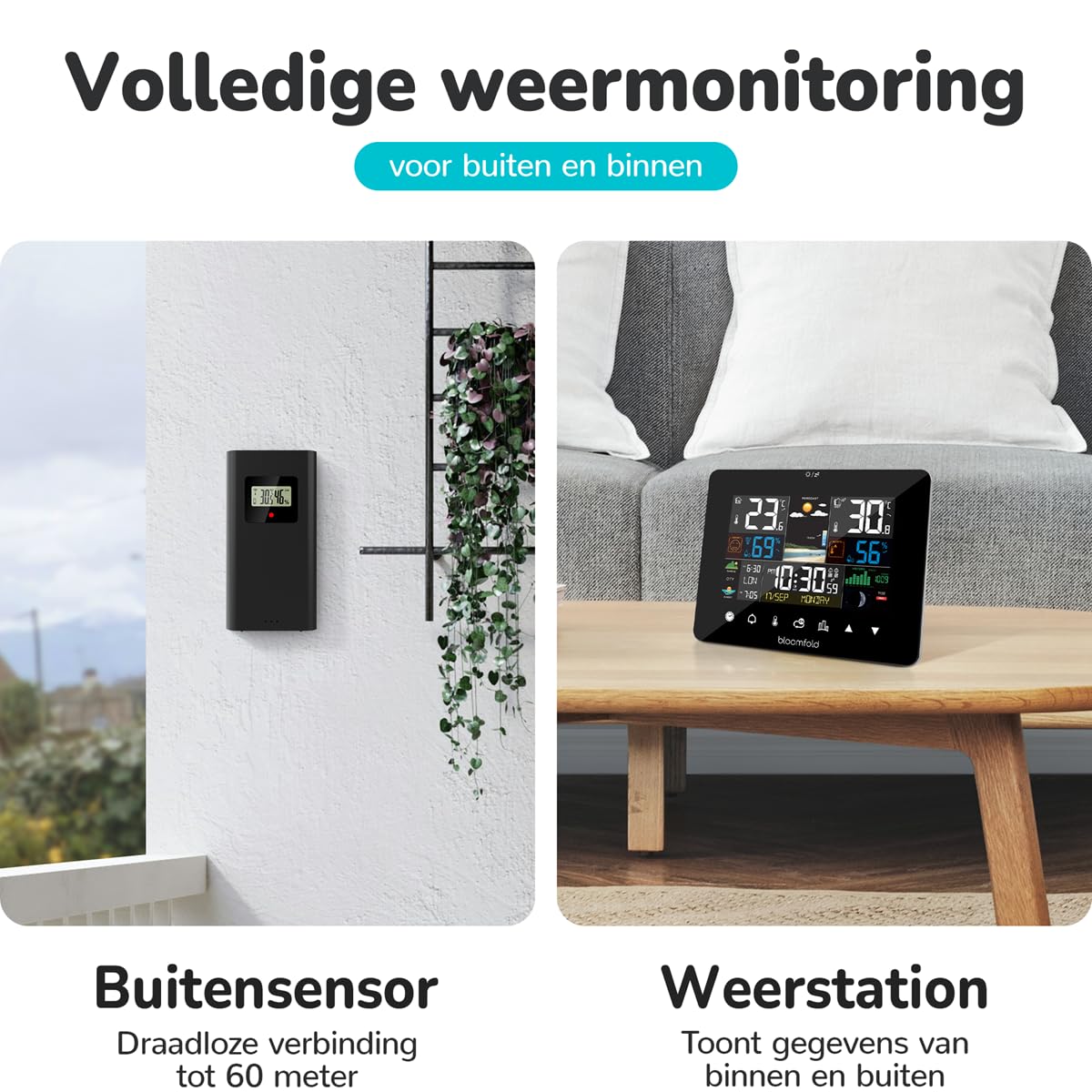
Figure 3: The outdoor sensor should be placed in a sheltered outdoor location, such as under an awning or porch, to protect it from direct weather elements while maintaining wireless connectivity with the main unit.
Awọn ilana Iṣiṣẹ
Ifihan Loriview àti Àwọn Iṣẹ́ Àkọ́kọ́
The Bloomfold Weather Station features a clear and user-friendly display that presents various environmental data and time information. The device is equipped with touch controls for easy navigation and setting adjustments.

Figure 4: The weather station's display is designed for easy readability, showing indoor/outdoor temperature, humidity, weather forecast, and time at a glance.

Figure 5: The weather station features a bright screen for clear visibility and intuitive touch controls for simple operation and setting adjustments.
Key Features and Their Use:
- Iwọn otutu ati ọriniinitutu: The station displays indoor and outdoor temperature (range: -20°C to 50°C, accuracy: ±1°C) and humidity (range: 20% to 95%, accuracy: ±4-5%). These readings are continuously updated.
- Àfojúsùn ojú ọjọ: Based on atmospheric pressure changes, the station provides a reliable weather forecast for the next 12-24 hours.
- Atẹgun Ayika: Displays current atmospheric pressure, which is crucial for weather prediction.
- Kalẹnda Alailowaya: Automatically displays the correct date, day of the week, and month.
- Alarm and Timer Function: Set alarms for daily reminders or use the timer for specific durations. Refer to the on-screen menu for setting these functions.
- Ọjọ ati Aago: The station displays the current date and time. Adjust time settings via the touch controls if necessary.
- Alakoso Oṣupa: The display includes an indicator for the current moon phase.
For detailed instructions on setting specific functions (e.g., time, alarm, units of measurement), please refer to the on-screen prompts and the intuitive touch interface.
Itoju
Ninu
To maintain the appearance and functionality of your Bloomfold Weather Station:
- Nu ẹ̀rọ akọkọ ati sensọ ita gbangba pẹlu asọ, damp asọ.
- Do not use abrasive cleaners, solvents, or chemical agents, as these may damage the surfaces or electronic components.
- Rii daju pe ko si omi ti o wọ inu awọn ṣiṣi ẹrọ naa.
Batiri Rirọpo
When the battery indicator appears on the display, it is time to replace the batteries in both the main unit and the outdoor sensor. Use 2 product-specific batteries (same type as included). Ensure correct polarity during installation.
Laasigbotitusita
If you encounter issues with your Bloomfold Weather Station, please refer to the following common problems and solutions:
| Isoro | Owun to le Fa | Ojutu |
|---|---|---|
| Ko si ifihan tabi iboju ofo. | Awọn batiri ti ku tabi fi sii lọna ti ko tọ. | Ṣayẹwo polarity batiri ki o rọpo awọn batiri ti o ba jẹ dandan. |
| A kò fi iwọn otutu/ọrinrin ita gbangba han tabi pe ko peye. | Outdoor sensor out of range, low battery, or interference. | Move sensor closer to the main unit. Replace sensor batteries. Reduce sources of interference (e.g., large metal objects, other wireless devices). |
| Inaccurate indoor readings. | Main unit placed near heat sources, direct sunlight, or drafts. | Relocate the main unit to a more stable environment. |
| Asọtẹlẹ oju-ọjọ dabi pe ko tọ. | The station needs time to calibrate atmospheric pressure changes. | Allow 24-48 hours for the station to learn local atmospheric pressure patterns. Ensure the unit is not exposed to rapid temperature changes. |
Ti iṣoro naa ba wa lẹhin igbiyanju awọn solusan wọnyi, jọwọ kan si atilẹyin alabara.
Awọn pato
| Ẹya ara ẹrọ | Ẹ̀kúnrẹ́rẹ́ |
|---|---|
| Nọmba awoṣe | BF100 |
| Brand | Bloomfold |
| Iwọn Iwọn Iwọn otutu | -20°C si 50°C |
| Yiye iwọn otutu | ±1°C |
| Iwọn Iwọn Ọriniinitutu | 20% si 95% |
| Yiye Ọriniinitutu | ±4-5% |
| Orisun agbara | Battery (2 product-specific batteries required, included) |
| Awọn iwọn Ọja (Ẹka akọkọ) | 12.8 x 16.7 x 3 cm (H x W x D) |
| Iwọn Ọja | 420 g |
| Àwọ̀ | Dudu |
| Ohun elo | Gilasi |
| Pataki Awọn ẹya ara ẹrọ | Portable, Large screen, Adjustable brightness, Clock, Pre-calibrated |
| Lilo Ọja Kan pato | Date, Air pressure, Humidity, Moon phase, Temperature |
| Awọn irinše to wa | Weather Station Main Unit, Outdoor Sensor, Batteries, Instruction Manual |
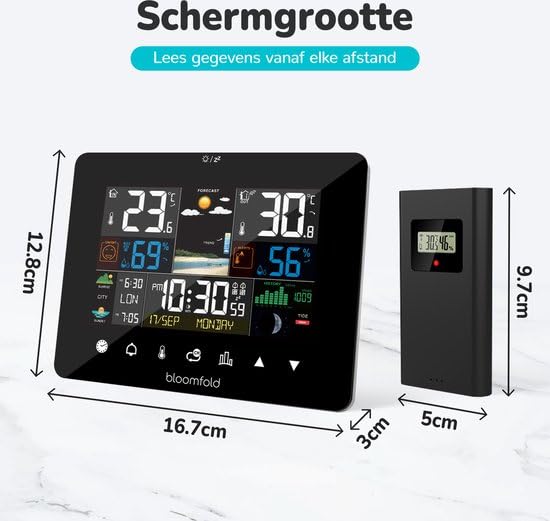
Figure 6: Detailed dimensions of the Bloomfold Weather Station main unit and its outdoor sensor, illustrating their compact size.
Atilẹyin ọja ati Support
Alaye atilẹyin ọja
Specific warranty details for the Bloomfold Weather Station may vary by region and retailer. Please retain your proof of purchase. For comprehensive warranty information, refer to the documentation provided with your product or contact the retailer from whom you purchased the device.
Onibara Support
Should you require further assistance, have questions not covered in this manual, or experience issues with your Bloomfold Weather Station, please contact the retailer or the manufacturer's customer support. Contact details are typically available on the product packaging or the manufacturer's official webojula.