
1. Ifihan
This manual provides essential information for the proper installation, operation, and maintenance of your BOOBRIE 4G LTE/5G Omni-Directional Outdoor Antenna. Please read these instructions carefully before use to ensure optimal performance and longevity of the product.
The BOOBRIE 4G LTE/5G Omni-Directional Outdoor Antenna is designed to enhance signal strength for various cellular devices. It features a rugged ABS and aluminum housing with pure copper internal components and an RG58 cable, supporting a wide frequency range of 698-2700 MHz and 3300-3800 MHz with a 10 dBi omnidirectional gain. It boasts low VSWR and robust materials that comply with RoHS standards, includes mounting hardware for easy installation, and offers vertical polarization for versatile applications.
Fidio: Pariview of the BOOBRIE 4G 5G LTE Omni-Directional Antenna, highlighting its high gain and features.
2. Ọja Ipariview
The BOOBRIE 4G LTE/5G Omni-Directional Outdoor Antenna is engineered for superior signal reception across a broad spectrum of frequencies. Its omni-directional design ensures 360-degree signal reception, making it ideal for improving connectivity in various environments.

Aworan: The BOOBRIE 4G LTE/5G Omni-Directional Outdoor Antenna, showcasing the main unit, mounting bracket, cable, and SMA/TS9 adapters.
This antenna is built with a rugged, waterproof structure designed to withstand various outdoor elements, ensuring reliable performance in diverse weather conditions.

Aworan: Visual representation of the antenna's robust and weatherproof construction, highlighting its durability against environmental factors.
3. Package Awọn akoonu
Jọwọ rii daju pe gbogbo awọn ohun ti a ṣe akojọ rẹ si isalẹ wa ninu package rẹ. Ti awọn ohun kan ba nsọnu tabi bajẹ, jọwọ kan si atilẹyin alabara.
- 1x BOOBRIE 4G LTE/5G Omni-Directional Outdoor Antenna with 16.4ft (5M) RG58 Cable
- 1x SMA Male Connector
- 1x TS9 Male Connector Adapter
- 2x Mounting Bracket U-bolt washers and screws

Aworan: A clear depiction of all components included in the antenna package, ensuring users can easily identify each part.
4. Eto ati fifi sori
Proper installation is crucial for optimal antenna performance. Follow these steps carefully:
- Yan Ibi fifi sori ẹrọ: Choose a location that is as open as possible, ideally facing the direction of the signal source (e.g., cellular tower). Avoid low positions, areas with significant obstacles (buildings, dense trees), and ensure the antenna is not the highest protrusion on your roof to prevent lightning strikes. If it is the highest protrusion, place a lightning rod nearby.
- Oke Antenna: Securely mount the antenna using the provided mounting bracket, U-bolt washers, and screws. Ensure it is mounted vertically for best omni-directional reception.
- Asopọmọra Antenna: Before connecting, turn off the power to your device (router, modem, etc.). The antenna features SMA Male connectors and includes TS9 Male Connector Adapters. Confirm your device's port type (SMA or TS9) and use the appropriate connector or adapter. If your device has only one TS9 interface, you may need a Y-type 2-to-1 adapter (not included).
- Minimize Cable Loss: Keep the coaxial cable as short as possible and use high-quality cable to minimize signal loss.
- Configure Your Device: Switch your router or CPE device to external antenna mode. This can often be done via a mechanical switch or through the device's network settings interface.
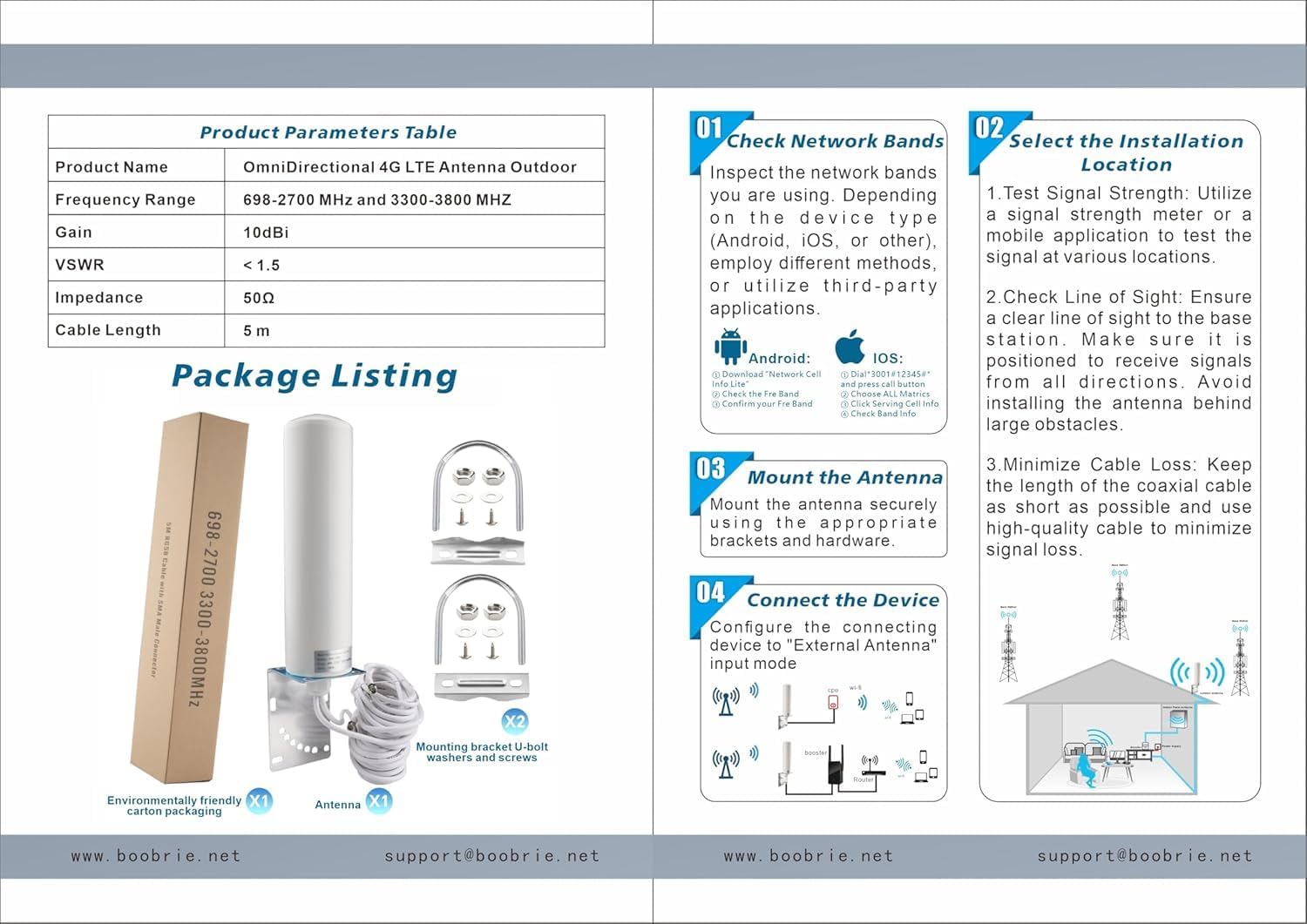
Aworan: A visual guide illustrating the four key steps for installing the antenna, from network band checking to device connection.

Aworan: An illustration demonstrating the best antenna mounting location on a house, emphasizing height and clear line of sight, while showing incorrect placements.

Aworan: Instructions on how to switch a router or CPE device to external antenna mode, either via a physical switch or through network settings, and connecting the SMA connectors.

Aworan: A guide to identifying TS9 and SMA connector types on both the antenna and the compatible device, ensuring correct connection.
5. Awọn ilana Iṣiṣẹ
Once the antenna is correctly installed and connected to your compatible device (4G LTE/5G router, CPE, modem, gateway, cellular trail camera, etc.), power on your device. The antenna will automatically begin receiving signals within its supported frequency ranges (698-2700 MHz and 3300-3800 MHz). No further configuration is typically required for the antenna itself, as its omni-directional design ensures broad signal capture.
Ensure your connected device is configured to use the external antenna ports. Refer to your device's manual for specific settings if needed.
6. Itọju
The BOOBRIE 4G LTE/5G Omni-Directional Outdoor Antenna is designed for minimal maintenance due to its rugged and weatherproof construction. However, periodic checks can help ensure continued optimal performance:
- Ṣayẹwo awọn isopọ: Lokọọkan ṣayẹwo gbogbo awọn asopọ okun lati rii daju pe wọn wa ni aabo ati ominira lati ipata.
- Clean the Antenna: If the antenna accumulates excessive dirt or debris, gently clean it with a soft, damp asọ. Yago fun lilo awọn kẹmika lile tabi awọn ohun elo abrasive.
- Ṣayẹwo Igbesoke: Ensure the mounting hardware remains tight and the antenna is still securely positioned, especially after severe weather conditions.
- Iduroṣinṣin USB: Inspect the cable for any signs of wear, cuts, or damage. Replace damaged cables to prevent signal degradation.
7. Laasigbotitusita
If you experience issues with signal reception, consider the following troubleshooting steps:
- Ko si ifihan agbara tabi ifihan agbara:
- Ṣayẹwo Ibi ti a fi sori ẹrọ: Ensure the antenna is mounted in an optimal location with a clear line of sight to the nearest cellular tower. Relocate if necessary.
- Jẹrisi Awọn isopọ: Confirm that all cables are securely connected to both the antenna and your device.
- Iṣeto Ẹrọ: Make sure your router/modem is set to use the external antenna.
- Yiyipo Agbara: Turn off your device, wait a few seconds, and then turn it back on.
- Ifiranṣẹ Alailowaya:
- Awọn Okunfa Ayika: Heavy rain, snow, or strong winds can temporarily affect signal.
- Ìjánu: Ensure the antenna is not too close to other electronic devices that might cause interference.
- Check Network Band: It can be helpful to identify the network band your device is currently using.

Aworan: A guide detailing how to check your current network band on both Android and iOS devices, which can be useful for diagnosing signal issues.

Aworan: Illustrates common signal problems like dropped calls and offline devices, and how installing the antenna can lead to stable signals and full bars.
8. Awọn pato
| Ẹya ara ẹrọ | Ẹ̀kúnrẹ́rẹ́ |
|---|---|
| Iwọn Igbohunsafẹfẹ | 698-2700 MHz, 3300-3800 MHz |
| jèrè | 10dBi - 12dBi |
| Ipalara | 50 ohms |
| Itọsọna | Omni-itọsọna |
| VSWR | < 1.5 |
| USB Ipari | 5 mita (16.4 ẹsẹ) |
| USB Iru | RG58 |
| Asopọ Eriali | SMA Male (with TS9 Male Connector Adapter) |
| Silẹ gbigbe | Inaro |
| Ohun elo | Rugged ABS and Aluminum Housing |
| Ibamu | 4G LTE/5G Routers, CPE, Modems, Gateways, Cellular Trail Cameras (e.g., Huawei B525/B315, ZTE MF28 series, SPYPOINT, TACTACAM Reveal, Stealth CAM, Reolink GO). Supports AT&T, Verizon, T-Mobile networks. |

Aworan: Detailed diagram outlining the physical dimensions and technical specifications of the antenna, including frequency range, gain, and impedance.
9. Atilẹyin ọja
This BOOBRIE 4G LTE/5G Omni-Directional Outdoor Antenna comes with a 1-odun atilẹyin ọja Láti ọjọ́ tí a rà á. Àtìlẹ́yìn yìí bo àwọn àbùkù iṣẹ́-ọnà àti àbùkù ohun èlò lábẹ́ lílò déédéé. Kò bo ìbàjẹ́ tí ó wáyé nípasẹ̀ ìlòkulò, ìjàǹbá, àtúnṣe tí a kò fún ní àṣẹ, tàbí fífi sori ẹrọ tí kò tọ́.
For warranty claims or further details, please retain your proof of purchase and contact our customer support.
10. Atilẹyin
If you have any questions, require technical assistance, or need further support regarding your BOOBRIE 4G LTE/5G Omni-Directional Outdoor Antenna, please do not hesitate to contact our customer service team.
Imeeli: support@boobrie.net
Our team is dedicated to providing you with considerate and helpful service.