
1. Ifihan
The Triplett WS230 Wall Scanner is a versatile and compact tool designed for accurately detecting hidden objects behind walls. It features advanced capabilities to locate wood studs, metal objects (ferrous and non-ferrous), and live AC wiring, providing essential information for construction, home improvement, and maintenance tasks. This manual provides detailed instructions for safe and effective use of your WS230 Wall Scanner.
2. Alaye Aabo
Jọwọ ka gbogbo awọn ikilọ ailewu ati awọn itọnisọna ni pẹkipẹki ṣaaju lilo ẹrọ naa. Ikuna lati tẹle awọn ilana wọnyi le ja si mọnamọna, ina, tabi ipalara nla.
- Always assume that live electrical wires are present behind walls. Exercise extreme caution.
- Do not rely solely on the detection results. Always verify findings through other means if possible.
- Jẹ́ kí ẹ̀rọ náà gbẹ kí ó sì mọ́. Má ṣe fi í sí ojú ọrinrin tàbí ooru tó le koko.
- Má ṣe gbìyànjú láti ṣí tàbí ṣe àtúnṣe sí ẹ̀rọ náà. Tọ́ka gbogbo iṣẹ́ ìtọ́jú náà sí àwọn òṣìṣẹ́ tó mọ̀ nípa rẹ̀.
3. Package Awọn akoonu
Daju pe gbogbo awọn nkan wa ninu apo rẹ:
- Triplett WS230 Wall Scanner
- 3.7V/300mAh Lithium Ion Battery (pre-installed)
- Soft Protective Pouch Case
- Afowoyi Olumulo (iwe-ipamọ yii)
- USB Iru C Ngba agbara Cable

Figure 3.1: WS230 Wall Scanner with Pouch and USB-C Cable
4. Ọja Ipariview
Familiarize yourself with the components of your Triplett WS230 Wall Scanner.

olusin 4.1: Iwaju View of WS230 Wall Scanner

olusin 4.2: Pada View of WS230 Wall Scanner (QR Code: C242594011)
4.1 Awọn paati bọtini
- Iboju LCD awọ: Displays detection mode, depth, battery status, and object location.
- Bọtini agbara: Yipada ẹrọ si tan/pa.
- Awọn bọtini Aṣayan Ipo: Allows switching between Stud, Metal, and AC Voltage detection modes.
- Agbègbè Sensọ: Located on the back of the device, this area must be in contact with the wall for accurate scanning.
- Ibudo Ngba agbara USB-C: For recharging the internal Lithium-ion battery.
5. Eto ati gbigba agbara
5.1 Ngba agbara si Batiri naa
The WS230 is equipped with a rechargeable 3.7V/300mAh Lithium-ion battery. Before first use, ensure the device is fully charged.
- Connect the provided USB Type C charging cable to the charging port on the device.
- So opin keji okun USB pọ mọ adapter agbara USB deede (ko si ninu rẹ) tabi ibudo USB kọmputa kan.
- Àmì bátìrì tó wà lórí ìbòjú LCD yóò fi ipò agbára hàn. Ìgbà agbára tó péye máa ń gba wákàtí díẹ̀.
5.2 Titan / Pa a
- Lati tan -an, tẹ mọlẹ Bọtini agbara (red button) until the screen illuminates.
- Lati fi agbara si pipa, tẹ mọlẹ Bọtini agbara lẹẹkansi titi iboju yoo wa ni pipa.
6. Isẹ
6.1 Gbogbogbo Awọn Itọsọna Lilo
- Rii daju pe oju ogiri jẹ mimọ ati ki o gbẹ.
- Avoid scanning over freshly painted or wallpapered surfaces until they are completely dry, as moisture can affect accuracy.
- Hold the scanner flat against the wall, ensuring the sensor area is in full contact.
- Move the scanner slowly and steadily across the surface.
6.2 Aifọwọyi odiwọn
The WS230 features automatic calibration for accurate results. Calibration occurs automatically upon power-on or when switching detection modes.
- Place the scanner flat against the wall in an area where you are certain there are no studs, metal, or live wires.
- Tẹ awọn Bọtini agbara or select your desired mode. The screen will display "Calibrating, please wait."
- Keep the device still against the wall until calibration is complete.

Figure 6.1: Calibration in Progress
6.3 Awọn ọna wiwa
The WS230 offers three primary detection modes:

Figure 6.2: Multiple Detection Mode Displays
6.3.1 Stud Detection
This mode locates the center and edges of wood or metal studs behind walls.
- Select the Stud Detection mode using the appropriate button.
- Place the scanner flat against the wall and slowly move it horizontally.
- The display will indicate the presence of a stud, its center, and depth (up to 1.5 inches / 38mm). Audio alerts will also sound.

Figure 6.3: Wood Stud Detection
6.3.2 Metal Detection
This mode identifies ferrous and non-ferrous metals, such as pipes and electrical wiring (even if not live).
- Select the Metal Detection mode.
- Scan the wall slowly. The display will show "Detect metal" and indicate the object's location and type (magnetic/non-magnetic).
- Maximum detection depth is 4.0 inches (100mm).

Figure 6.4: Metal Detection

Figure 6.5: Non-Magnetic Metal Detection
6.3.3 AC Voltage Iwari
This mode specifically detects live AC wires behind walls, providing an essential safety feature.
- Select the AC Voltage Detection mode.
- Scan the wall slowly. The display will show a lightning bolt icon and indicate the presence of live AC wiring.
- Maximum detection depth is 2 inches (50mm).
7. Itọju
- Nu ẹrọ naa pẹlu asọ ti o tutu, ti o gbẹ. Ma ṣe lo abrasive ose tabi epo.
- Store the device in its protective pouch in a cool, dry place when not in use.
- Regularly charge the battery to maintain its health, even if the device is not used frequently.
8. Laasigbotitusita
If you encounter issues with your WS230 Wall Scanner, try the following:
- Awọn kika ti ko pe: Ensure the device is properly calibrated on a clear section of the wall. Check for moisture on the wall surface.
- Ko si Agbara: Verify the battery is charged. Connect the USB-C cable and allow it to charge for at least 30 minutes before attempting to power on again.
- Intermittent Detection: Ensure the sensor area is in full contact with the wall and you are moving the device slowly and steadily.
If problems persist, contact Triplett customer support.
9. Awọn pato
| Ẹya ara ẹrọ | Sipesifikesonu |
|---|---|
| Ọja Mefa | 4.8 x 1 x 2.4 inches |
| Iwọn Nkan | 4 iwon |
| Nọmba awoṣe | WS230 |
| Awọn batiri | 1 batiri litiumu ion (pẹlu) |
| Orisun agbara | Agbara Batiri |
| Stud Detection Depth | Títí dé 1.5 inches (38mm) |
| Metal Detection Depth | Títí dé 4.0 inches (100mm) |
| AC Voltage Detection Depth | Títí dé 2 inches (50mm) |
| Iwọn otutu Iṣiṣẹ ti o dara julọ | 0 si 40 ° C |
| Ibi ipamọ otutu | -20 si 60 °C |
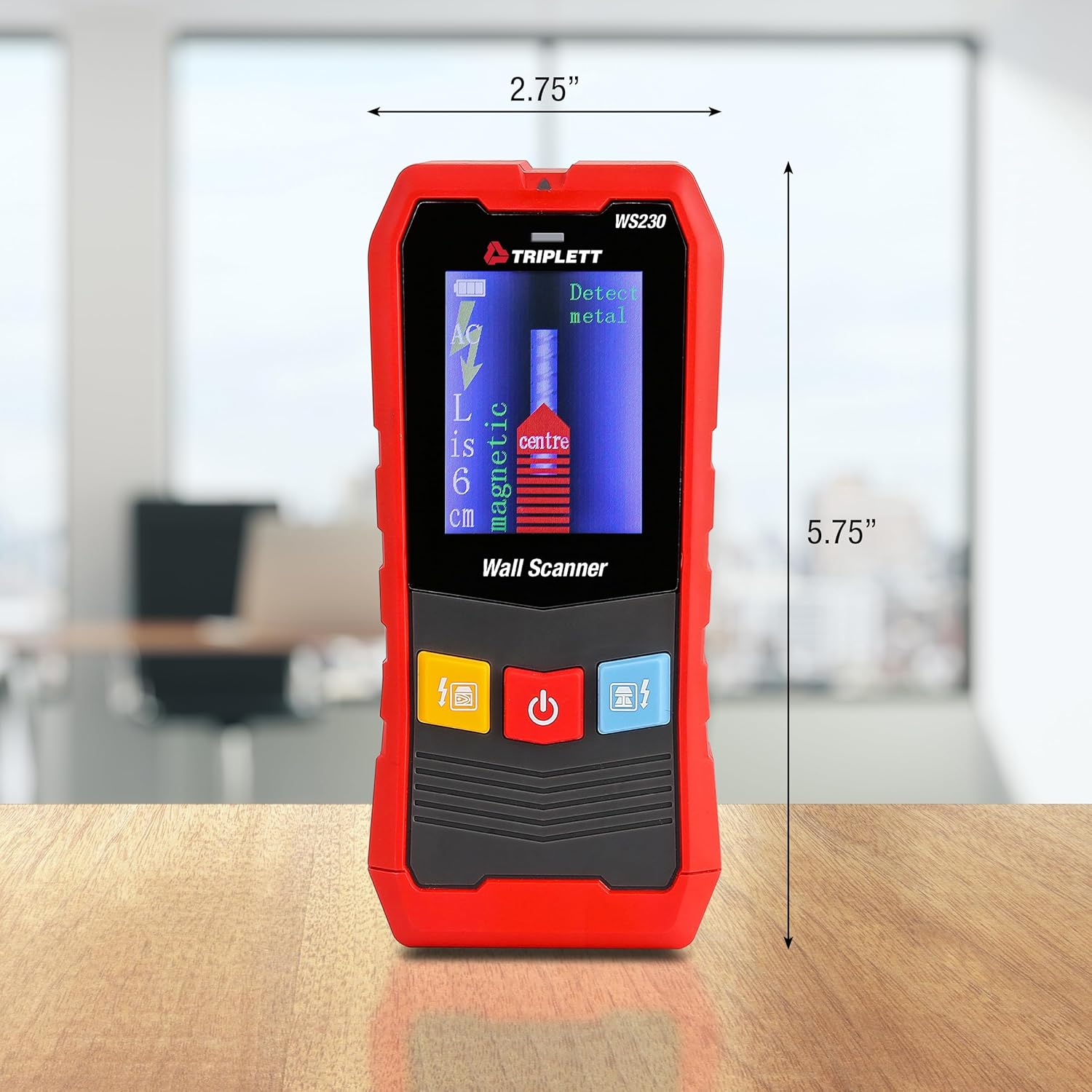
Figure 9.1: WS230 Dimensions
10. Atilẹyin ọja ati Support
For warranty information or technical support, please refer to the official Triplett webojula tabi kan si wọn onibara iṣẹ Eka. Tọju iwe-ẹri rira rẹ bi ẹri rira.
Visit the official Triplett Store: Triplett Store on Amazon