
Ọrọ Iṣaaju
Thank you for choosing the Devoko L-Shaped Gaming Desk. This manual provides essential information for the safe assembly, operation, and maintenance of your new desk. Please read these instructions carefully before beginning assembly and retain them for future reference.

Image: The Devoko L-shaped gaming desk, showcasing its design with multiple monitors, LED lighting, and a gaming setup.
Awọn ẹya pataki:
- Imudara Asopọmọra: Equipped with 2 cable holes, 2 AC outlets, and 2 USB charging ports for convenient device connectivity and a clutter-free setup.
- Imọlẹ LED isọdi: Wireless LED light strips with remote control offer personalized ambiance.
- Ergonomic L-Shaped Design: Maximizes space and accommodates multiple monitors or a monitor and tablet for a comfortable gaming experience.
- Ilẹ̀ tí ó tọ́jú: High-quality carbon fiber laminate is waterproof, scratch-resistant, and heat-resistant.
- Awọn ẹya ara ẹrọ ti a dapọ: Includes headphone hooks and side fabric storage pockets.
- Eto Iduroṣinṣin: Features right-angled table legs and adjustable feet for stability on uneven surfaces.
Alaye Aabo
Jọwọ ṣe akiyesi awọn iṣọra ailewu wọnyi lati yago fun ipalara tabi ibajẹ ọja naa:
- Always assemble this desk with eniyan meji to ensure safety and ease of installation.
- Exercise caution when handling electrical components (LED lights, power outlets, USB ports). Ensure the desk is unplugged during assembly or maintenance.
- Do not overload the desk. The maximum recommended weight capacity is 20 kg (44 lbs).
- Pa gbogbo awọn ẹya kekere ati awọn ohun elo apoti kuro lọdọ awọn ọmọde.
- Rí i dájú pé gbogbo àwọn skru àti àwọn ohun tí a fi so mọ́ ara wọn ti di mọ́lẹ̀ dáadáa kí o tó lò ó. Máa ṣàyẹ̀wò lẹ́ẹ̀kọ̀ọ̀kan kí o sì tún fún un ní okun tí ó bá yẹ.
Eto ati Apejọ
Assembly of this desk requires patience due to numerous parts and fasteners. Follow the instructions provided in the packaging carefully. Two people are recommended for efficient and safe assembly.
Awọn Igbesẹ Apejọ Gbogbogbo:
- Yọ awọn ohun elo kuro: Carefully remove all parts from the packaging. Verify that all components listed in the included parts list are present and undamaged.
- Ṣe akojọpọ fireemu naa: Begin by assembling the metal frame structure according to the diagrams in your separate assembly guide. Ensure all connections are firm.
- So Awọn Paneli Ojú-iṣẹ: Secure the L-shaped desktop panels to the assembled frame. Pay attention to alignment for a seamless surface.
- Fi Iduro Atẹle sori ẹrọ: Attach the elevated monitor stand sections to the desktop.
- Install Power Hub: Integrate the power strip with AC outlets and USB ports into the designated slot on the desk. Ensure it is securely fastened.
- So Awọn ẹya ara ẹrọ: Install the headphone hooks and fabric storage bag in their respective positions.
- Ṣatunṣe Ẹsẹ: Once assembled, adjust the desk's feet to ensure it is level and stable on your floor.
- Fifi sori ẹrọ okun LED: Carefully attach the LED light strips to the underside of the desk or designated areas. Connect them to the power source as instructed.

Image: Structural diagram highlighting the stable design with right-angled table legs.
Awọn ilana Iṣiṣẹ
Power Hub (AC Outlets & USB Ports):
The desk features an integrated power hub with 2 standard AC outlets and 2 USB charging ports. To use, plug the desk's main power cord into a wall outlet. You can then plug in your devices directly to the desk for convenient power access.
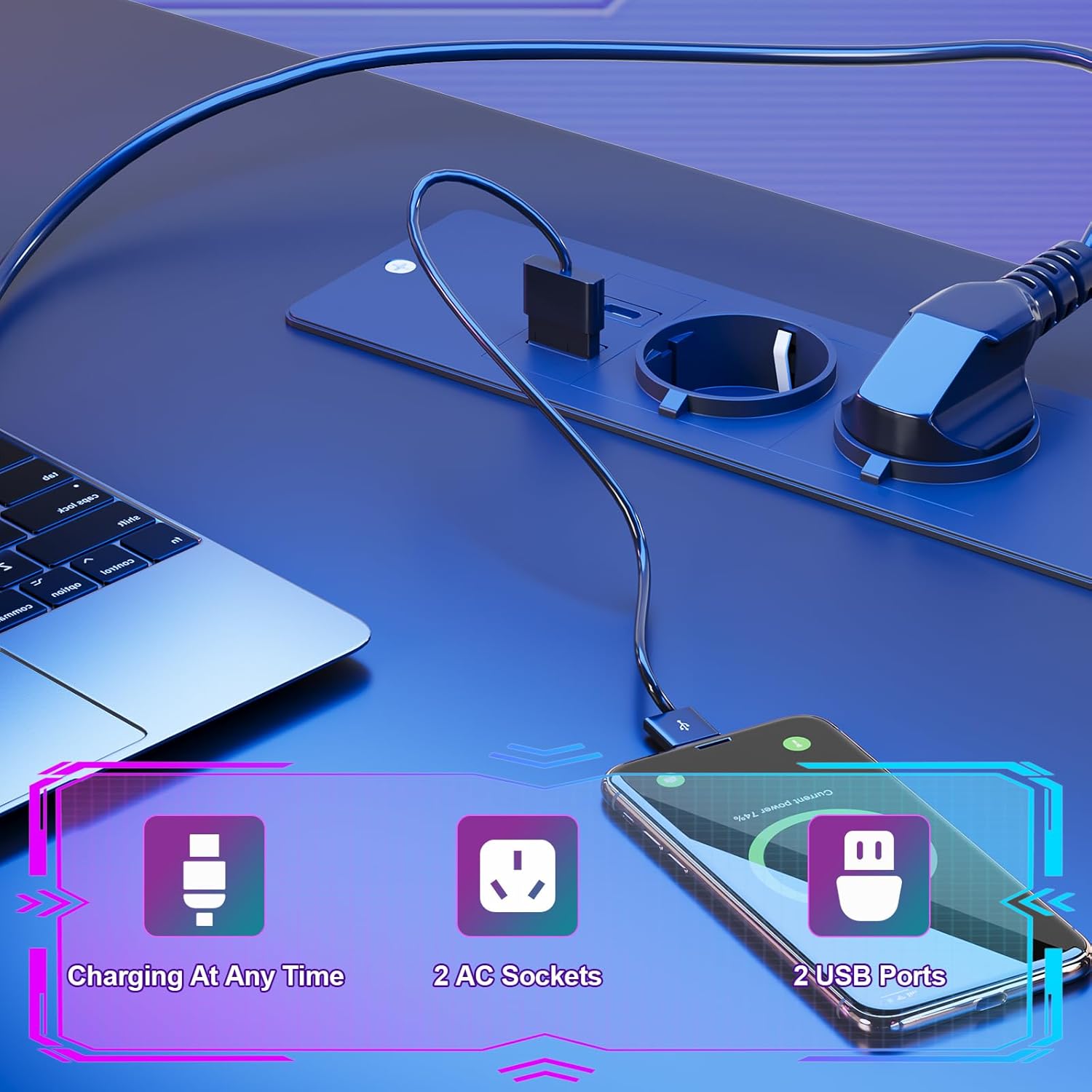
Image: Detail of the integrated power hub, demonstrating charging capabilities for electronic devices.
Eto Imọlẹ LED:
The LED light strips are controlled by a wireless remote. Ensure the LED strips are properly connected to their power source and the remote has working batteries.
- Titan/Apapa: Lo bọtini ti a yan lori isakoṣo latọna jijin lati tan tabi pa awọn ina LED.
- Awọn iyatọ awọ: Select from multiple individual color variations to customize your lighting ambiance.
- Atunse Imọlẹ: Pọ tabi dikun kikankikan ina si ayanfẹ rẹ.
- Titunṣe Iyara: For dynamic lighting modes, adjust the speed of color transitions.

Image: The RGB LED system in operation, highlighting remote control functions for color, brightness, and speed.
Using Desk Accessories:
- Iduro Iduro: Utilize the elevated monitor stand to position your screens at an ergonomic height, promoting a correct sitting posture and reducing neck strain.
- Àwọn ìkọ́kọ́ orí agbọ́rọ̀: Hang your gaming headset or headphones on the integrated hooks for easy access and to keep your desk tidy.
- Apo Ibi ipamọ: Use the side fabric pocket for storing magazines, controllers, or other small items.

Aworan: Alaye views of the headphone hook, monitor stand, storage bag, and adjustable feet.
Itoju
Proper care will extend the life and appearance of your Devoko gaming desk.
Isọ Oju Ilẹ mọ:
- The carbon fiber laminate surface is waterproof, scratch-resistant, and heat-resistant.
- Fún ìwẹ̀nùmọ́ gbogbogbò, nu ojú náà pẹ̀lú ohun rírọ̀, damp asọ.
- Yẹra fún lílo àwọn ohun ìfọṣọ, àwọn kẹ́míkà líle, tàbí àwọn ohun olómi, nítorí pé wọ́n lè ba ìparí rẹ̀ jẹ́.
- Promptly wipe up any spills to prevent watermarks or stains.
Ìtọ́jú ilé:
- Lokọọkan ṣayẹwo gbogbo awọn skru ati awọn fasteners lati rii daju pe wọn wa ni wiwọ. Tun-mu ti o ba ti ri looseness eyikeyi.
- Ensure the adjustable feet are properly set to maintain desk stability.

Image: The carbon fiber surface, illustrating its durability and suitability for gaming setups.
Laasigbotitusita
If you encounter any issues with your Devoko gaming desk, please refer to the following common solutions:
Awọn imọlẹ LED ko ṣiṣẹ:
- Ṣayẹwo Asopọ agbara: Ensure the LED light strips are securely plugged into their power source and that the power source is connected to a working outlet.
- Batiri Iṣakoso Latọna jijin: Replace the battery in the wireless remote control if the lights are unresponsive.
- Remote Signal: Ensure there are no obstructions between the remote and the LED receiver.
Awọn ọna agbara/Awọn ibudo USB Ko Ṣiṣẹ:
- Check Main Power: Verify that the desk's main power cord is securely plugged into a functional wall outlet.
- Opin Iyika monamona: If the outlets are part of a surge protector or power strip, check its circuit breaker.
- Apọju: Ensure you are not exceeding the maximum power draw for the integrated outlets.
Tabili naa ko duro ṣinṣin/Yíyípo:
- Ṣatunṣe Ẹsẹ: Use the adjustable feet at the bottom of the desk legs to level the desk on uneven floors.
- Mu Awọn ohun elo Mu: Re-check and tighten all assembly screws and bolts.
Awọn pato

Image: Detailed product dimensions of the Devoko L-shaped gaming desk.
| Iwa | Ẹ̀kúnrẹ́rẹ́ |
|---|---|
| Brand | Devoko |
| Awoṣe | L-apẹrẹ Awọn ere Awọn Iduro |
| Àwọ̀ | Dudu |
| Apapọ Awọn iwọn (L x D x H) | 153 x 153 x 90 cm (isunmọ. 60.2 x 60.2 x 35.4 inches) |
| Ijinle tabili | 50 cm (isunmọ 19.7 inches) |
| Ohun elo | Carbon Fiber Laminate, Metal Frame |
| Pataki Awọn ẹya ara ẹrọ | LED Lights, 2 AC Outlets, 2 USB Ports, Monitor Stand, Headphone Hooks, Storage Bag, Adjustable Feet |
| Iwọn Ọja | Kg 29.3 (isunmọ 64.6 lbs) |
| Agbara iwuwo | Max. 20 kg (approx. 44 lbs) |
Alaye atilẹyin ọja
Devoko products are manufactured to high-quality standards. For specific warranty details regarding your L-Shaped Gaming Desk, please refer to the warranty card included in your product packaging or contact Devoko customer support. This warranty typically covers manufacturing defects under normal use.
Onibara Support
If you have any questions, require assistance with assembly, or need to report a missing or damaged part, please contact Devoko customer support. Have your product model number and purchase date ready when contacting support.
Ibi iwifunni:
- Webojula: Visit the official Devoko webaaye fun awọn orisun atilẹyin ati awọn fọọmu olubasọrọ.
- Imeeli: Refer to your product packaging or the Devoko webojula fun onibara iṣẹ adirẹsi imeeli.