
Ọrọ Iṣaaju
This manual provides detailed instructions for the installation, operation, and maintenance of your darkFlash DB330M Micro-ATX PC Case. Please read this manual thoroughly before beginning assembly to ensure proper setup and safe usage. The DB330M case features a 270° panoramic tempered glass panel, pre-installed PWM ARGB fans, and a high-speed I/O panel.
Alaye Aabo
- Always disconnect the power supply from the wall outlet before installing or servicing any components inside the PC case.
- Handle tempered glass panels with care to prevent breakage. Avoid impacts or sharp objects.
- Wear anti-static gloves or use an anti-static wrist strap to prevent electrostatic discharge (ESD) damage to sensitive components.
- Pa awọn ẹya kekere ati awọn skru kuro lati ọdọ awọn ọmọde.
- Rii daju pe fentilesonu to dara ni ayika ọran PC lati ṣe idiwọ igbona.
Package Awọn akoonu
Jẹrisi pe gbogbo awọn ohun kan wa ninu package:
- darkFlash DB330M Micro-ATX PC Case
- 3 x Pre-installed PWM ARGB Fans
- Accessory Box (screws, cable ties, etc.)
- Afowoyi Olumulo (iwe-ipamọ yii)
Awọn ẹya Loriview
- 270° Panoramic Tempered Glass: Ó fúnni ní ìdàgbàsókè view of internal components and RGB lighting.
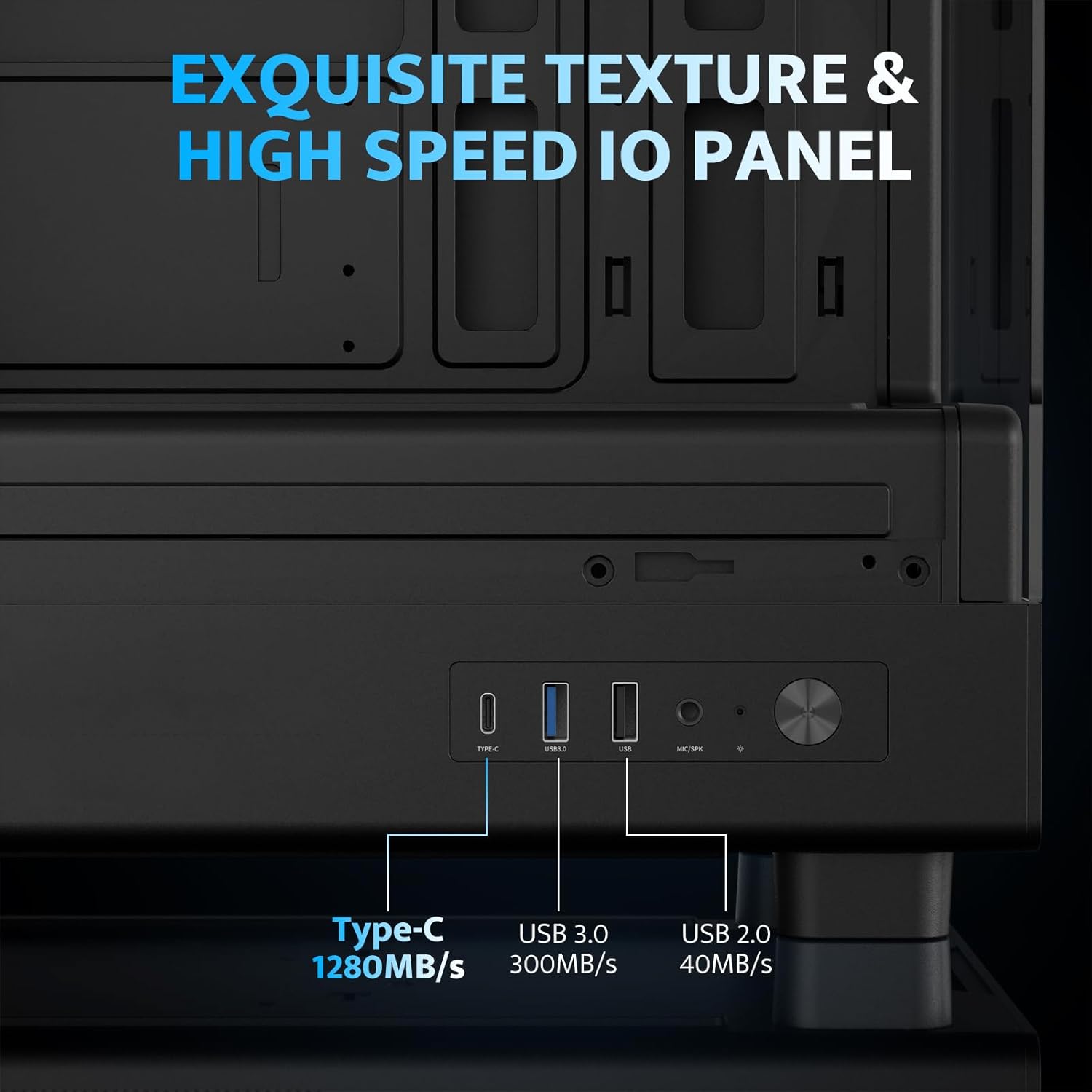
- High-Speed I/O Panel: Includes USB 3.0 and Type-C ports for fast data transfer.
- Vertical Airflow Cooling: Optimized design with pre-installed fans for efficient heat dissipation.
- Awọn Ajọ Eruku Oofa: Located on top and bottom to keep components clean.
- Fifi sori Rọrun: User-friendly design for hassle-free assembly and maintenance.
Awọn pato
| Ẹya ara ẹrọ | Sipesifikesonu |
|---|---|
| Orukọ awoṣe | DB330M PC CASE |
| Awọn iwọn (LxWxH) | 8.58"D x 13.11"W x 15.75"H (218mm x 333mm x 400mm) |
| Modaboudu Ibamu | Micro ATX, ITX |
| Iru Irú | Ile-iṣọ Midi |
| Ohun elo | Ṣiṣu, Gilasi Oníwọ̀n |
| Awọn onijakidijagan ti a ti fi sii tẹlẹ | 3 x 120mm PWM ARGB Fans |
| Max Sipiyu kula Iga | 180mm |
| Imukuro GPU ti o pọju | 305mm |
| Atilẹyin Radiator (Oke) | Ti o de 240mm |
| Agbara Ipese Iṣagbesori Iru | Bottom Mount (Max 140mm PSU length) |
| I/O Ports | 1 x USB 3.0, 1 x Type-C, Audio In/Out |
Eto ati fifi sori
1. Accessing the Interior (Quick Release Design)
The darkFlash DB330M features a quick-release design for easy access to internal components. The tempered glass panels can be removed by gently pulling them away from the chassis. The top panel also detaches for fan/radiator installation.

2. Modaboudu fifi sori
Install your Micro-ATX or ITX motherboard into the designated area. Ensure standoffs are correctly aligned and secured. The case supports CPU coolers up to 180mm in height and GPUs up to 305mm in length.

3. Fifi sori ẹrọ afẹ́fẹ́ ati eto itutu
The case comes with three pre-installed 120mm PWM ARGB fans. Two fans are located at the top, and one at the rear. Additional fan mounts are available at the bottom (up to 2 x 120mm) for enhanced airflow. The case supports a 240mm AIO radiator on the top panel.
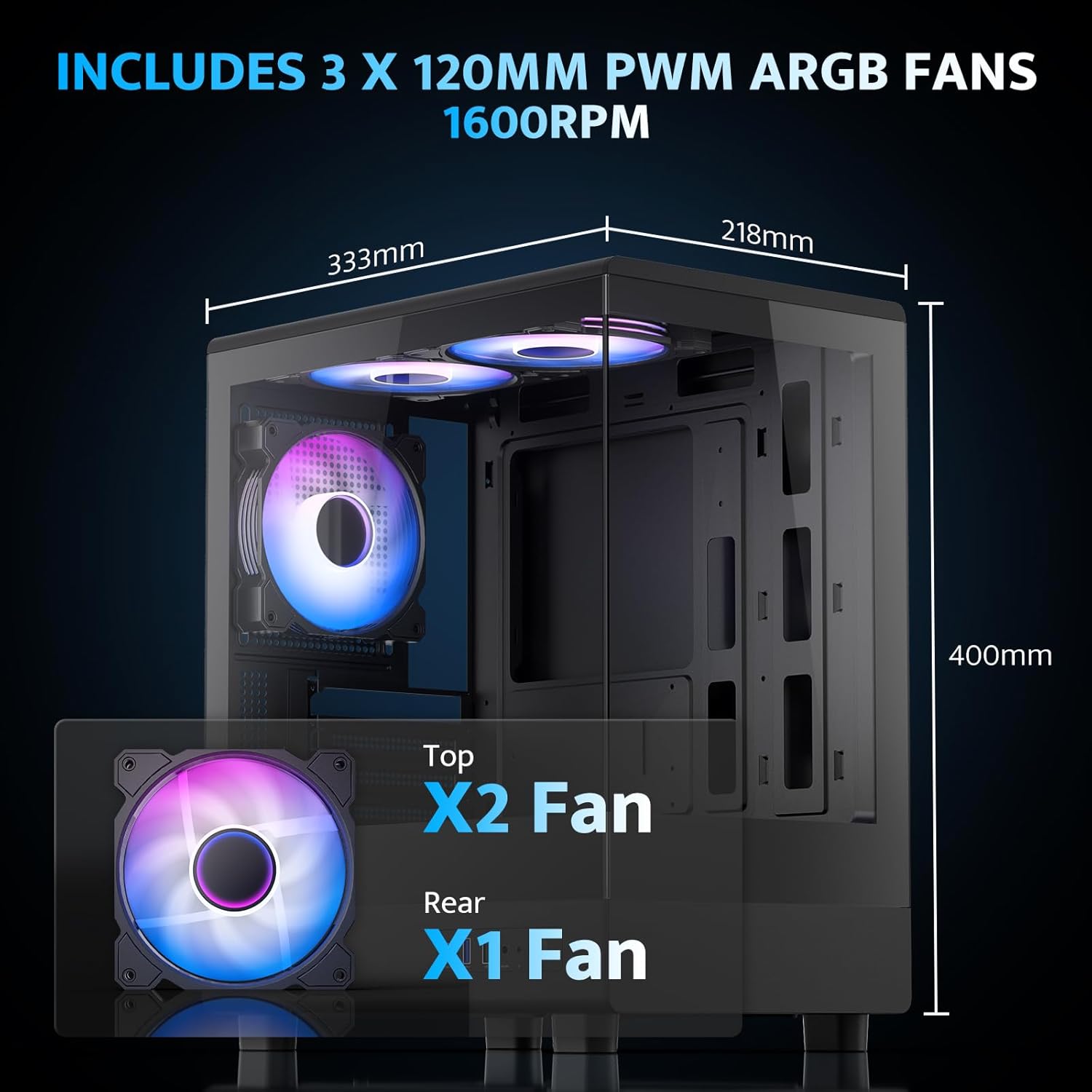
The pre-installed fans are PWM ARGB type, offering speed adjustment and rich lighting modes with motherboard synchronization. Note: An RGB hub controller is not included.

4. Power Supply and Storage Installation
Install your power supply unit (PSU) in the bottom mount. The case supports PSUs up to 140mm in length. Utilize the standard hard drive cage for storage devices.
5. Connecting Front I/O Panel
Connect the front I/O panel cables to your motherboard. The panel includes a Type-C port, USB 3.0 port, and USB 2.0 port for various connectivity needs.
6. Iṣakoso USB
Utilize the cable routing options and tie-downs behind the motherboard tray to ensure clean cable management. This improves airflow and aesthetics.
Awọn ilana Iṣiṣẹ
1. Agbara Lori
After all components are securely installed and connected, plug in the power cable to your PSU and press the power button on the front I/O panel to start your system.
2. ARGB Fan Control
The pre-installed ARGB fans can be controlled via compatible motherboard software (if connected to an ARGB header) to customize lighting effects and fan speeds. Refer to your motherboard manual for specific software instructions.
3. Airflow Configuration
The DB330M is designed with optimized airflow channels. The pre-installed fans facilitate vertical airflow, with the fan above the PSU directing air towards the graphics card. Ensure no obstructions block the airflow paths.


Itoju
1. Ìmọ́tótó Àlẹ̀mọ́ Eruku
Regularly clean the magnetic dust filters located on the top and bottom of the case. Gently remove the filters and clean them with compressed air or a soft brush. Reattach them securely after cleaning.
2. Gbogbogbo Cleaning
Use a soft, dry cloth to wipe down the exterior of the case. For tempered glass panels, use a glass cleaner and a microfiber cloth. Avoid abrasive cleaners or solvents.
Laasigbotitusita
- PC ko ṣiṣẹ:
- Ensure the power supply is properly connected to the wall and the PSU switch is in the 'ON' position.
- Daju gbogbo awọn kebulu agbara lati PSU ni asopọ ni aabo si modaboudu ati awọn paati.
- Check the front panel power switch connection to the motherboard.
- Awọn onijakidijagan Ko Yiyi/RGB Ko Ṣiṣẹ:
- Confirm fan power cables are connected to the motherboard or fan controller.
- Ensure ARGB cables are connected to a compatible ARGB header on the motherboard or an ARGB controller.
- Check motherboard software settings for fan speed and RGB control.
- Awọn ibudo USB Ko Ṣiṣẹ:
- Verify the front panel USB 3.0 and Type-C cables are correctly plugged into the corresponding headers on your motherboard.
- Ensure motherboard drivers are up to date.
Atilẹyin ọja ati Support
darkFlash provides a Idaniloju ọdun mẹta for this computer case. For technical support, warranty claims, or further assistance, please contact darkFlash customer service through their official webaaye tabi alagbata ti o ti ra ọja naa. Jọwọ ṣe idaduro ẹri rira rẹ fun ijẹrisi atilẹyin ọja.
DarkFlash osise Webojula: www.darkflash.com