
Ọrọ Iṣaaju
This manual provides instructions for the safe and effective use of your Ashfly Portable Handheld Kids Microscope. Please read this manual thoroughly before operating the device and retain it for future reference.
The Ashfly Portable Handheld Kids Microscope is designed to introduce young scientists to the microscopic world. Featuring a 2-inch LCD screen and 200x magnification, it allows for real-time observation of small objects.
Package Awọn akoonu
Daju pe gbogbo awọn nkan ti a ṣe akojọ rẹ si isalẹ wa ninu package rẹ:
- Ashfly Portable Handheld Kids Microscope
- Okun Ngba agbara USB
- Lanyard/Wrist Strap
- Afowoyi Olumulo (iwe-ipamọ yii)

Image: Contents of the Ashfly Portable Handheld Kids Microscope package, including the microscope, USB cable, and wrist strap.
Ṣeto
1. Ngba agbara ẹrọ
- Locate the USB charging port on the microscope.
- Connect the provided USB charging cable to the microscope and a compatible USB power source (e.g., computer, wall adapter).
- Ina Atọka gbigba agbara yoo tan imọlẹ. Gba awọn wakati 2-3 laaye fun idiyele ni kikun.
- Ni kete ti o ti gba agbara ni kikun, ge asopọ okun gbigba agbara.
2. Attaching the Lanyard/Wrist Strap
Thread the lanyard or wrist strap through the designated loop on the microscope to prevent accidental drops during use.
Awọn ilana Iṣiṣẹ
1. Agbara Tan / Paa
- To power on, press and hold the power button (usually marked with a power symbol) for a few seconds until the screen illuminates.
- Láti pa iná, tẹ bọtini agbára náà kí o sì di mọ́lẹ̀ lẹ́ẹ̀kan sí i títí tí iboju náà yóò fi pa.
2. Awọn nkan ti n ṣakiyesi
- Place the object you wish to observe on a flat surface.
- Position the microscope's lens directly over the object.
- Adjust the focus wheel (if present) or move the microscope closer/further from the object until a clear image appears on the 2-inch LCD screen.
- Use the zoom adjustment button (4x zoom) to further magnify the image up to 200x.

Image: A child holding the Ashfly microscope, observing a small object on a surface, demonstrating its handheld operation.
3. Yiya Awọn fọto ati awọn fidio
The microscope supports photo and video functions. It comes with built-in memory for storing observations.
- To take a photo: Press the designated photo capture button (refer to device markings).
- To record a video: Press the designated video record button to start recording, and press it again to stop.

Image: The Ashfly microscope's screen displaying a magnified image of an insect, illustrating its digital imaging capability.
4. Dual-Lens Design
This microscope features a dual-lens design. One side is the digital microscope for recording observations, and the other side is a physical magnifier for quick viewing ti awọn nkan.
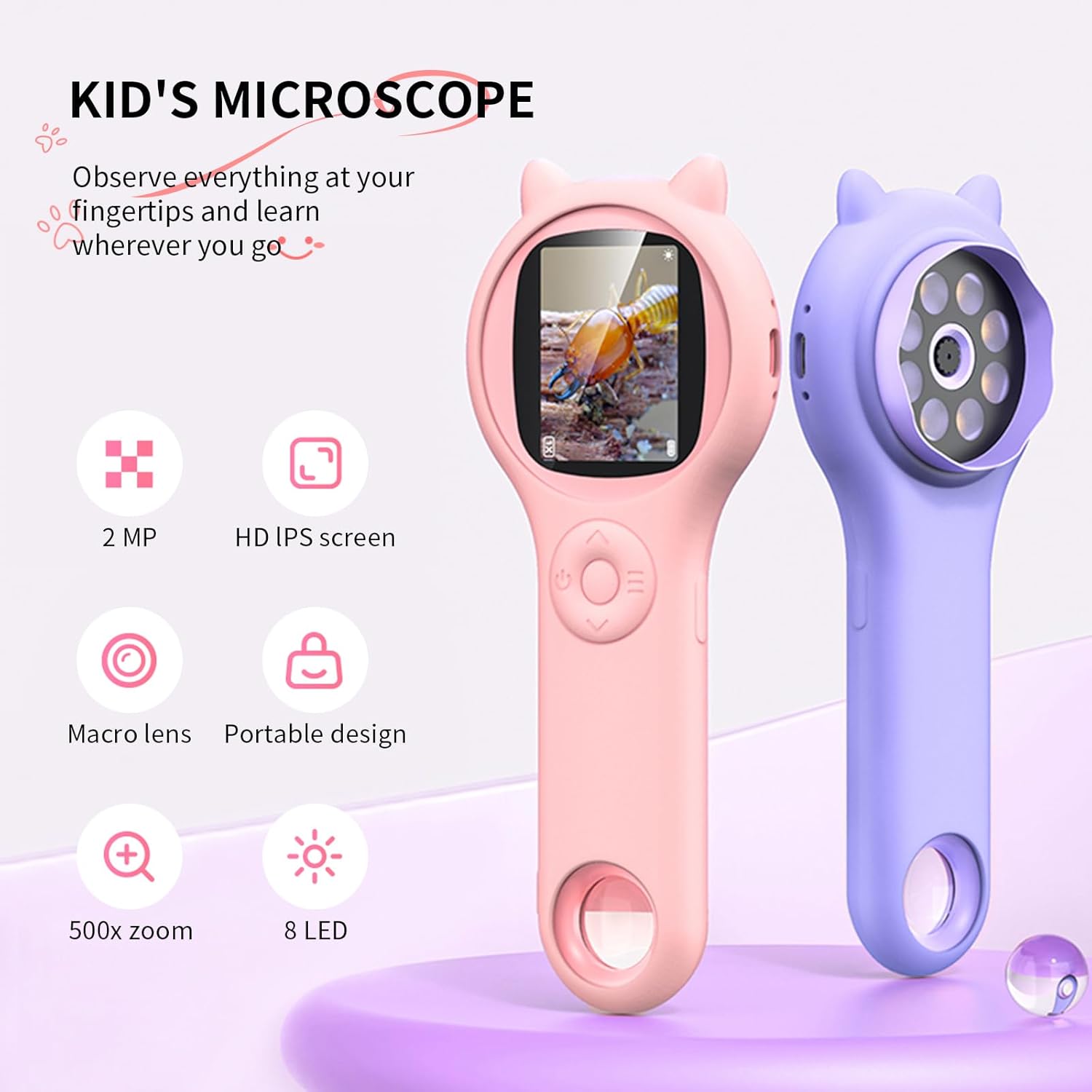
Image: Two Ashfly Kids Microscopes, one pink and one purple, illustrating the compact design and the different lenses/screens on each side.
Itoju
- Ninu: Use a soft, dry cloth to clean the exterior of the microscope. For the lens and screen, use a specialized lens cleaning cloth. Do not use abrasive cleaners or solvents.
- Ibi ipamọ: Store the microscope in a cool, dry place away from direct sunlight and extreme temperatures.
- Itọju Batiri: Lati pẹ aye batiri, yago fun gbigba agbara si batiri ni kikun nigbagbogbo. Gba agbara si ẹrọ nigbagbogbo, paapaa ti ko ba wa ni lilo fun awọn akoko ti o gbooro sii.
Laasigbotitusita
| Isoro | Owun to le Fa | Ojutu |
|---|---|---|
| Ẹrọ naa ko ṣiṣẹ. | Batiri ti wa ni idasilẹ. | Gba agbara si ẹrọ nipa lilo okun USB ti a pese. |
| Image on screen is blurry. | Incorrect focus or distance from object. | Adjust the microscope's distance from the object or use the focus wheel (if applicable) until the image is clear. |
| Cannot capture photos/videos. | Iranti inu ti kun. | Transfer existing photos/videos to a computer to free up space. |
Awọn pato
| Ẹya ara ẹrọ | Ẹ̀kúnrẹ́rẹ́ |
|---|---|
| Awoṣe | ASIN B0DBVB3RGT |
| Brand | Ashfly |
| Igbega | Up to 200x (with 4x zoom adjustment) |
| Iboju | 2-inch LCD, 1080P HD digital imaging |
| Orisun Imọlẹ | LED |
| Ohun elo | Ṣiṣu |
| Àwọ̀ | eleyi ti |
| Orisun agbara | Agbara Batiri |
| Ifojusi lẹnsi | Achromatic |
Alaye atilẹyin ọja
Ashfly products are designed for quality and durability. For specific warranty details, please refer to the warranty card included with your product or visit the official Ashfly webojula. Tọju iwe-ẹri rira rẹ bi ẹri rira fun awọn iṣeduro atilẹyin ọja.
Onibara Support
If you encounter any issues or have questions regarding your Ashfly Portable Handheld Kids Microscope, please contact our customer support team:
- Atilẹyin Ayelujara: Ṣabẹwo si Ashfly Store on Amazon fun FAQs ati olubasọrọ awọn aṣayan.
- Imeeli: Tọkasi apoti ọja tabi osise webaaye fun atilẹyin imeeli taara.