
Ọrọ Iṣaaju
This manual provides comprehensive instructions for the safe installation, configuration, and operation of the THKFMSRC Smart Light LED Dimmer 1/2 Way Switch. Please read this manual thoroughly before installation and retain it for future reference.
Alaye Aabo pataki
Electrical installations should only be performed by qualified personnel. Incorrect installation can lead to electric shock or fire. Always observe local regulations and safety standards.
- Ge Agbara: Always turn off the main power supply at the circuit breaker before performing any electrical work.
- Voltage ibamu: Ensure the dimmer's input voltage (90V~250V/50/60Hz) matches your electrical system.
- Agbara fifuye: Do not exceed the maximum load power of 150W for LED lighting. Overloading can cause damage or fire.
- Asopọmọra to tọ: Follow the wiring diagram precisely. Incorrect wiring can damage the device or connected lights.
- Lilo inu ile Nikan: Ẹrọ yii jẹ apẹrẹ fun lilo inu ile ni awọn ipo gbigbẹ.
Ọja Pariview
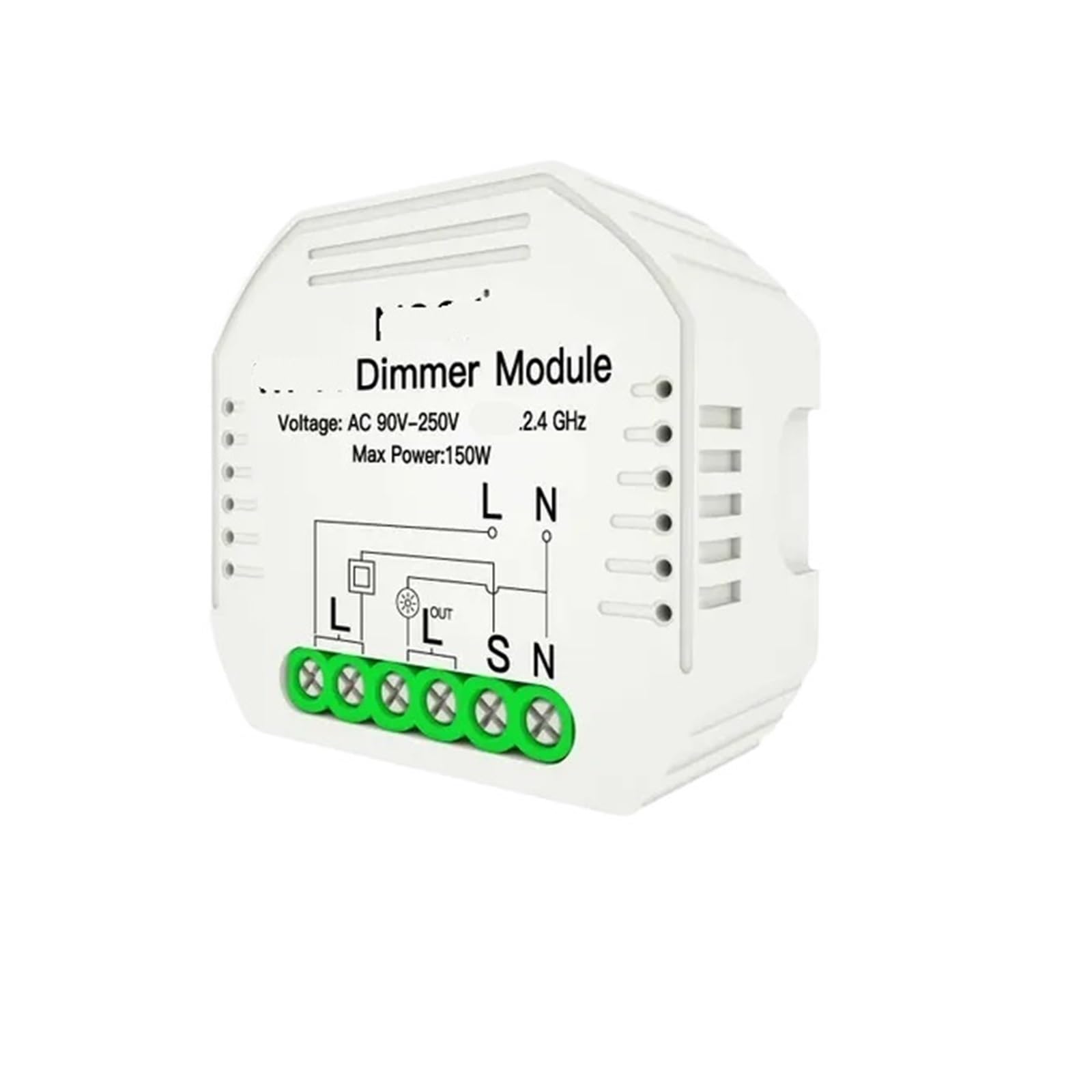
The THKFMSRC Smart Light LED Dimmer is a compact module designed to convert traditional light switches into smart dimmers, allowing for both manual and smart control of LED lighting. It supports 1-way and 2-way switching configurations.
Imọ ni pato
| Ẹya ara ẹrọ | Sipesifikesonu |
|---|---|
| Iṣagbewọle Voltage | 90V~250V/50/60Hz |
| Asopọmọra | Gbe ati Aduroṣinṣin |
| Maximum Load Power (LED) | 150W |
| Igbesi aye Ṣiṣẹ | 100,000 awọn iṣẹ |
| Awọn iwọn (L x W x H) | 53mm x 48mm x 18mm (isunmọ. 2.09 x 1.89 x 0.71 inches) |
| Iwọn Nkan | 1.76 iwon |
| Nọmba awoṣe | THKFMSRC |
Fifi sori Itọsọna
1. Aworan aworan
Refer to the diagram below for correct wiring. Ensure all connections are secure and insulated.
- Igbesẹ 1: Turn off the power at the circuit breaker before starting installation.
- Igbesẹ 2: Connect the Live (L) wire from your mains supply to the 'L' terminal on the dimmer module.
- Igbesẹ 3: Connect the Neutral (N) wire from your mains supply to the 'N' terminal on the dimmer module.
- Igbesẹ 4: Connect the Live wire going to your light fixture to the 'OUT' terminal on the dimmer module.
- Igbesẹ 5: For 1-way switching, connect the existing wall switch's output to the 'S' terminal. For 2-way switching, connect the common wire from the second switch to the 'S' terminal.
- Igbesẹ 6: Securely place the dimmer module within the switch box or ceiling rose, ensuring no wires are pinched.
- Igbesẹ 7: Mu pada agbara ni awọn Circuit fifọ.
2. Iṣagbesori
The compact design of the THKFMSRC dimmer module allows it to be installed behind existing wall switches or within ceiling rose enclosures. Ensure adequate space and ventilation for proper operation.
Awọn ilana Iṣiṣẹ
1. Iṣakoso Afowoyi
Once installed, the connected light can be turned ON/OFF using the existing wall switch. The dimmer module will retain its last dimming state when turned back on.
2. Smart Control / Pairing
This smart dimmer module is designed to integrate with compatible smart home systems (e.g., Tuya Smart, Smart Life app). Follow these general steps to pair your device:
- Igbesẹ 1: Ensure your smartphone or tablet is connected to a 2.4GHz Wi-Fi network.
- Igbesẹ 2: Download and open the compatible smart home application (e.g., Tuya Smart or Smart Life).
- Igbesẹ 3: Put the dimmer module into pairing mode. This is typically done by rapidly toggling the connected light switch ON/OFF several times (e.g., 3-5 times) until the connected light blinks, indicating pairing mode. Refer to your smart home app's instructions for specific pairing sequences.
- Igbesẹ 4: In the app, select 'Add Device' or the '+' icon, then choose 'Lighting' or 'Dimmer Switch'.
- Igbesẹ 5: Tẹle awọn ilana loju iboju ninu app lati pari ilana isopọmọ.
3. Dimming Išė
Once paired, you can control the brightness of the connected LED lights through the smart home application. The app will provide a slider or buttons to adjust the dimming level from 0% to 100%.
Itoju
The THKFMSRC Smart Light LED Dimmer requires minimal maintenance. Ensure the device is kept dry and free from dust. Do not attempt to open or repair the module yourself, as this will void any warranty and may pose a safety risk. Clean the exterior with a soft, dry cloth if necessary, ensuring power is disconnected.
Laasigbotitusita
- Light not turning ON/OFF:
- Check if the main power supply is ON.
- Verify all wiring connections are secure according to the diagram.
- Ensure the connected light bulb is functional.
- Dimmer not responding to app control:
- Confirm the dimmer is successfully paired with the app.
- Check your Wi-Fi connection and ensure it is 2.4GHz.
- Tun olulana Wi-Fi rẹ bẹrẹ ki o si gbiyanju lati so pọ mọ ara rẹ lẹẹkansi.
- Rii daju pe ohun elo naa ti ni imudojuiwọn si ẹya tuntun.
- Light flickers or buzzes:
- Ensure the connected light is a dimmable LED bulb. Non-dimmable bulbs may flicker or be damaged.
- Verify the total wattage of connected lights does not exceed the 150W maximum load.
- Dimmer module feels warm:
- It is normal for the module to feel slightly warm during operation. If it becomes excessively hot, immediately disconnect power and check for overloading or short circuits.
Onibara Support
If you encounter issues not covered in this manual or require further assistance, please contact THKFMSRC customer support through your retailer or the official product website. Provide your product model number (THKFMSRC) and a detailed description of the problem for efficient service.