
Cillso H97
Cillso H97 Wireless Earbuds
Afowoyi Itọsọna olumulo
Alaye Aabo pataki
Please read all safety instructions carefully before using this product. Failure to follow these instructions may result in injury or damage.
- Ma ṣe fi agbekọri tabi apoti gbigba agbara si awọn iwọn otutu to gaju, oorun taara, tabi ina.
- Avoid using the product in environments with high humidity or water, beyond its IP7 waterproof rating.
- Do not disassemble, repair, or modify the product. This will void the warranty.
- Jeki ọja naa kuro ni arọwọto awọn ọmọde ati awọn ohun ọsin.
- Use only the provided charging cable or a certified standard charger (5V/1A; 5V/2A) to charge the case.
- Yago fun gbigbọ ni awọn ipele iwọn didun giga fun awọn akoko gigun lati dena ibajẹ igbọran.
Package Awọn akoonu
Daju pe gbogbo awọn nkan wa ninu apo rẹ:
- 2x Bluetooth Earbuds (Left and Right)
- 1x Apo gbigba agbara to ṣee gbe
- 1x Iru-C Ngba agbara USB
- 1x Itọsọna olumulo
Ọja Pariview
Familiarize yourself with the components of your Cillso H97 Wireless Earbuds.
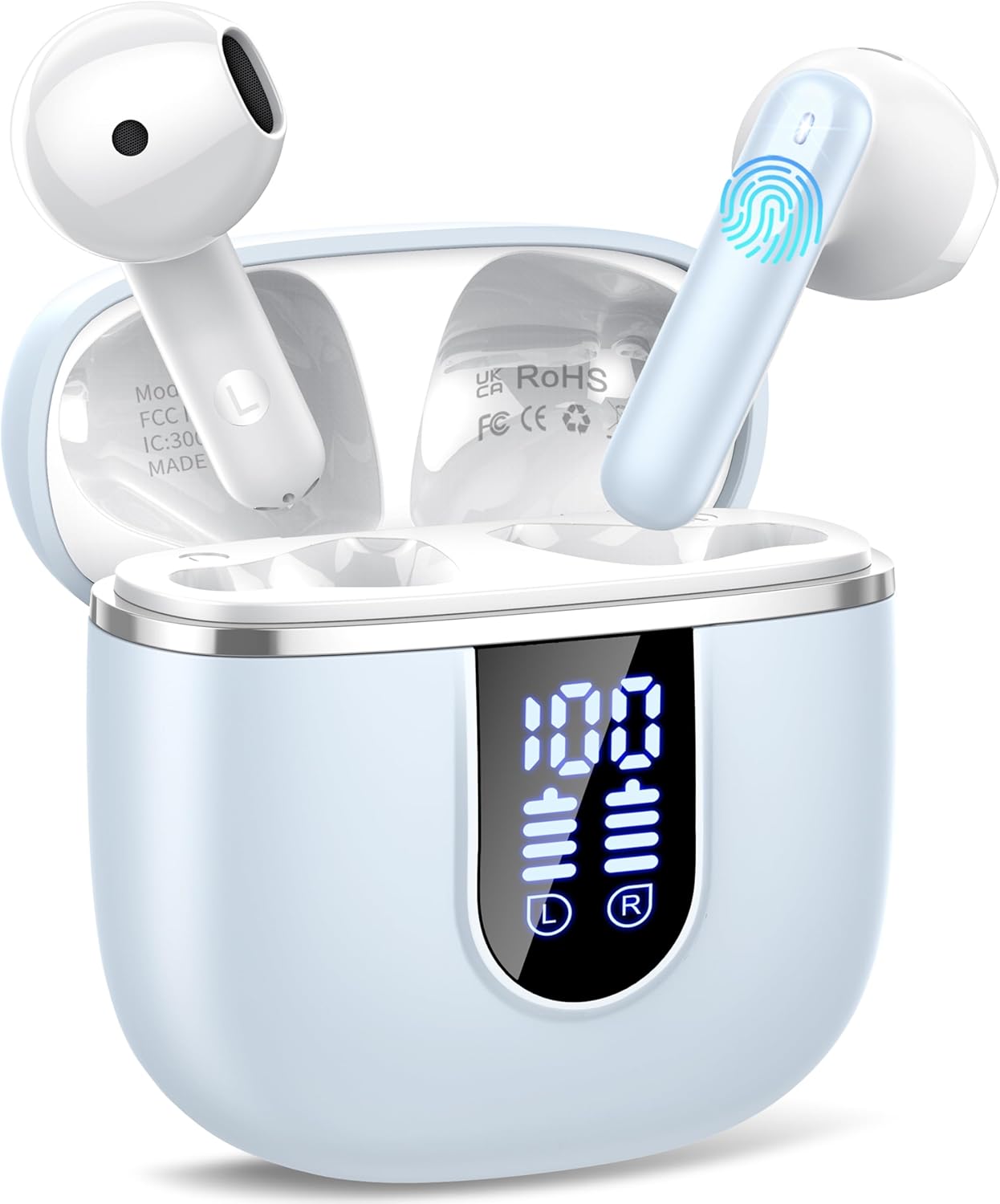
Image: The Cillso H97 Wireless Earbuds are shown inside their open charging case. The case features a dual LED display indicating battery percentages for the case and individual earbuds. The earbuds are white with a sleek design, and the charging case is a light azure color.
The image above displays the earbuds within their charging case. Key features include the dual LED display on the charging case, which shows the battery status for both the case and each earbud. The earbuds themselves are designed for in-ear comfort and feature touch control areas.
Ṣeto
1. Ngba agbara si Earbuds ati Ọran
Ṣaaju lilo akọkọ, gba agbara ni kikun awọn agbekọri ati apoti gbigba agbara.
- Connect the provided Type-C charging cable to the charging port on the case and to a standard USB power adapter (5V/1A or 5V/2A).
- The dual LED display on the charging case will show the charging progress. A full charge for the case takes approximately 1.5 hours.
- Place the earbuds into the charging case. They will automatically begin charging. The LED display will indicate their charging status.
- The earbuds provide up to 8 hours of playback on a single charge, and the charging case provides an additional 32 hours of playtime.
2. Sisopọ pẹlu Ẹrọ Rẹ
The H97 earbuds utilize Bluetooth 5.4 for a stable and efficient connection.
- Pipọpọ akọkọ:
- Rii daju pe Bluetooth ẹrọ rẹ ti wa ni titan.
- Ṣii ideri ti apoti gbigba agbara. Awọn agbekọri yoo tan ina laifọwọyi ati tẹ ipo sisopọ pọ sii.
- On your device, search for Bluetooth devices and select "H97" from the list.
- Nígbà tí o bá ti so pọ̀, o máa gbọ́ ìkìlọ̀ ìjẹ́rìísí, àwọn agbekọrí náà yóò sì ti ṣetán fún lílò.
- Isopọpọ aladaaṣe: After the initial pairing, the earbuds will automatically connect to the last paired device when the charging case lid is opened.
- Ipo Earbud Kan: Either earbud can be used independently. Simply take one out of the case, and it will connect.
Awọn ilana Iṣiṣẹ
1. Wọ awọn Earbuds
The H97 earbuds are designed for an ergonomic and secure fit.

Image: A diagram illustrating the correct angle and position for wearing the earbud in the ear canal for optimal comfort and sound.
- Fi rọra fi agbekọri kọọkan sinu odo eti rẹ.
- Ṣàtúnṣe etí ìgbọ́rọ̀ títí yóò fi rí bíi pé ó rọ̀ tí ó sì rọrùn. Yíyẹra tó yẹ máa ń mú kí ohùn náà dára gan-an àti pé ó máa ya ariwo sọ́tọ̀.
- Each earbud weighs only 3.5 grams, providing lightweight comfort for extended wear.
2. Awọn iṣakoso ifọwọkan
The earbuds feature sensitive touch sensors for easy control of various functions:
| Iṣe | Išẹ |
|---|---|
| Tẹ ẹyọkan (osi/ọtun) | Mu ṣiṣẹ/sinmi orin, Dahun/pari ipe |
| Tẹ lẹẹmeji (Osi) | Orin ti tẹlẹ |
| Tẹ lẹẹmeji (ọtun) | Orin t'okan |
| Fọwọ ba Meta (Osi) | Iwọn didun isalẹ |
| Tẹ lẹẹmẹta (ọtun) | Iwọn didun soke |
| Gun Tẹ (awọn aaya 2) | Kọ ipe, Mu Oluranlọwọ Ohun ṣiṣẹ |
3. Agbara Tan / Paa
- Agbara Tan: Open the charging case lid, or long-press the touch area on both earbuds for 3 seconds if they are outside the case and off.
- Agbara Pa: Place the earbuds back into the charging case and close the lid. Alternatively, long-press the touch area on both earbuds for 5 seconds.
4. Ṣiṣe ati Gbigba awọn ipe
The H97 earbuds are equipped with 4 ENC (Environmental Noise Cancelling) microphones to ensure clear call quality.
- Idahun Ipe: Fọwọ ba ẹyọkan boya agbekọri.
- Ipe Ipari: Tẹ ẹyọkan boya agbekọri nigba ipe kan.
- Kọ Ipe: Gigun tẹ boya agbekọri fun iṣẹju meji 2.
5. Sisisẹsẹhin Audio
Experience immersive HiFi stereo sound with deep bass, delivered by 14.2mm diaphragm drivers and AAC/SBC audio encoding.
- Ṣiṣẹ/Daduro: Fọwọ ba ẹyọkan boya agbekọri.
- Orin to nbọ: Fọwọ ba agbekọri ọtun lẹẹmeji.
- Orin ti tẹlẹ: Fọwọ ba agbekọri osi lẹẹmeji.
Itoju
Ìtọ́jú tó tọ́ yóò mú kí àwọn ètí rẹ pẹ́ sí i.
- Ninu: Lo asọ ti o gbẹ, asọ ti ko ni lint lati nu afikọti ati apoti gbigba agbara. Maṣe lo awọn kẹmika lile tabi awọn ohun elo abrasive.
- Ibi ipamọ: Tí o kò bá lò ó, fi àwọn ètí ìgbọ́rọ̀ náà sínú àpótí ìgbóná wọn láti dáàbò bò wọ́n kí wọ́n sì máa gba agbára. Tọ́jú sí ibi tí ó tutù tí ó sì gbẹ.
- Omi Resistance: The earbuds feature IP7 nano-coating technology, protecting them from daily splashes, sweat, and rain. Do not submerge them in water or expose them to strong jets of water. Ensure they are dry before placing them back in the charging case.
Laasigbotitusita
Ti o ba ni awọn iṣoro eyikeyi, tọka si awọn iṣoro ti o wọpọ ati awọn ojutu wọnyi:
| Isoro | Owun to le Solusan |
|---|---|
| Earbuds ko so pọ pẹlu ẹrọ |
|
| Agbekọri agbekọri kan ṣoṣo ti n ṣiṣẹ |
|
| Ngba agbara ko gba agbara |
|
| Dídára ohùn tí kò dára tàbí ìsopọ̀ tí ó ń lọ lẹ́ẹ̀kọ̀ọ̀kan |
|
Awọn pato
Key technical details of the Cillso H97 Wireless Earbuds:
- Awoṣe: H97
- Ẹya Bluetooth: 5.4
- Iyipada ohun: AAC/SBC
- Iwọn Awakọ: 14.2mm Diaphragm Driver
- Àkókò eré Agbọ́tísí: Titi di wakati 8 (agbara ẹyọkan)
- Àkókò Àkókò Ìgbádùn (pẹ̀lú àpótí ìgbara): Titi di wakati 40
- Akoko Gbigba agbara (Ila): Nǹkan bí wákàtí méjì (Irú-C)
- Idiwon ti ko ni omi: IP7
- Ìwúwo Atẹ́tíkọ́: 3.5 giramu (kọọkan)
- Iwọn gbigba agbara: 32 giramu
- Awọn iwọn ọja: 0.79 x 0.79 x 0.79 inches (earbuds, approximate)
- Ìwọ̀n Nkan: 3.2 iwon (àpapọ iwuwo package)
- Awọn batiri: 2 Batiri ti a beere (pẹlu)
- Ibamu: Most Bluetooth devices (Android 4.4+, iOS 8.0+, Bluetooth 4.0+)
Atilẹyin ọja ati Support
Cillso products are designed for reliability and performance. This product comes with a standard manufacturer's warranty against defects in materials and workmanship.
- For warranty claims or technical support, please refer to the contact information provided with your purchase or visit the official Cillso webojula.
- Jọwọ ṣe idaduro ẹri rira rẹ fun iṣẹ atilẹyin ọja.
Ask a question about this manual
Ask about setup, troubleshooting, compatibility, parts, safety, or missing instructions. Manuals+ will review the question and use this page’s manual context to help answer it.