
WOOPKER AK45
WOOPKER AK45 Stereo Amplifier Afowoyi olumulo
Awoṣe: AK45
1. Ifihan
The WOOPKER AK45 is a versatile 2-channel stereo amplifier designed for home audio systems. It features multiple input options including Bluetooth 5.0, AUX, USB, SD card, and FM radio, making it suitable for various audio sources and environments. This manual provides detailed instructions for setting up and operating your AK45 amplifier lati rii daju iṣẹ ṣiṣe to dara julọ.

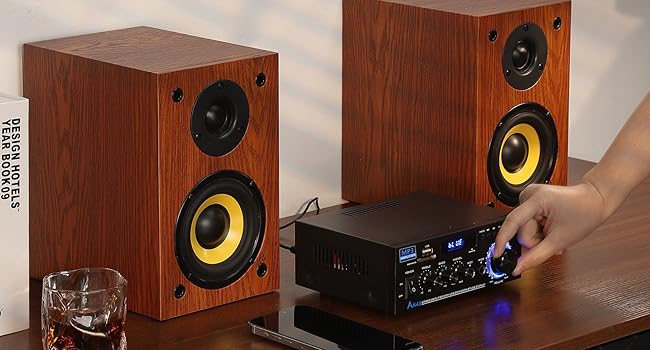
Image 1.1: The WOOPKER AK45 Stereo Amplifier with its included remote control. This image displays the front panel controls and the compact design of the amplifier.
2. Ohun ti o wa ninu Apoti
Jọwọ rii daju pe gbogbo awọn nkan wa ninu package:
- WOOPKER AK45 Stereo Ampalufa x1
- Iṣakoso latọna x 1
- Agbara USB x 1
- FM Antenna x 1
- Ilana olumulo x 1

Image 2.1: Visual representation of the items included in the WOOPKER AK45 amplifier package. This includes the amplifier unit, remote control, power cable, FM antenna, and user manual.
3. Ọja Ipariview
3.1 Igbimọ iwaju

Aworan 3.1: alaye view of the AK45 amplifier's front panel, highlighting the various controls and input ports such as USB, SD Card slot, display, microphone inputs, and adjustment knobs.
- Agbara Yi pada: Yipada awọn amplifier tan tabi pa.
- Ibudo USB: Fun sisopọ awọn awakọ filasi USB fun ṣiṣiṣẹsẹhin ohun.
- Iho Kaadi SD/MMC: For inserting SD or MMC cards for audio playback.
- Ifihan: Ó ń fi ipò ìsinsìnyí, ìwífún nípa orin, tàbí ìgbóhùnsáfẹ́fẹ́ FM hàn.
- Knob Treble: Ṣe atunṣe iṣẹjade ohun igbohunsafẹfẹ giga-giga.
- Knob Bass: Ṣe atunṣe iṣelọpọ ohun-igbohunsafẹfẹ kekere.
- Mic/Vol Knob: Ṣe atunṣe iwọn gbohungbohun.
- MIC1/MIC2 Inputs: Awọn asopọ 6.35mm fun sisopọ awọn gbohungbohun.
- Bọtini Ipo: Cycles through input sources (Bluetooth, AUX, USB, SD, FM).
- Awọn bọtini lilọ kiri: For track control (previous/next), play/pause, and FM station tuning.
- Bọtini Iwọn didun: Main volume control for overall audio output.
3.2 ru Panel
Aworan 3.2: Ẹyin view of the AK45 amplifier, illustrating the speaker output terminals, RCA audio input, FM antenna connection, DC 12V input, and AC power input.
- FM ANT: Asopọ fun eriali FM.
- ÌWỌLÉ OHUN TÍ Ó WỌLE (RCA): Red and white RCA jacks for connecting external audio devices (e.g., CD player, DVD player, TV).
- Ijade awọn agbọrọsọ: Terminals for connecting passive speakers (4-16 Ohms impedance).
- Ìtẹ̀wọlé Agbára DC 12V/5A: For connecting a 12V DC power adapter (if applicable).
- Input Agbara AC: For connecting the main AC power cable (AC90-240V, 50-60Hz).
4. Eto
4.1 Asopọ Agbọrọsọ
The AK45 amplifier is designed for passive speakers with an impedance of 4-16 Ohms. Follow these steps to connect your speakers:
- Ṣàfihàn àwọn ebute rere (+) àti odi (-) lórí àwọn agbọrọsọ rẹ àti lórí wọn amplifier. Positive terminals are typically red, and negative terminals are black.
- Press the clasp on the amplifier ká agbọrọsọ o wu ebute.
- Insert the bare speaker wires into the corresponding terminals. Ensure a secure connection and that no stray wire strands are touching other terminals.
- Connect the right speaker to the 'RIGHT' output and the left speaker to the 'LEFT' output.

Image 4.1: Visual guide for connecting passive speakers to the rear panel of the AK45 amplifier, illustrating the correct polarity for left and right channels.
4.2 Asopọ agbara
Connect the provided AC power cable to the AC Power Input on the rear panel of the amplifier, then plug it into a standard wall outlet. If using a DC 12V power source, connect it to the DC 12V/5A input.
Asopọ Antenna 4.3 FM
Connect the included FM antenna to the 'FM ANT' port on the rear panel for improved FM radio reception.
5. Awọn ilana Iṣiṣẹ
5.1 Agbara Tan / Pa
Flip the 'POWER' switch on the front panel to the 'ON' position to power on the amplifier. Flip it to 'OFF' to power down.
5.2 Aṣayan titẹ sii
Press the 'MODE' button on the front panel or the remote control to cycle through available input sources: Bluetooth (BT), AUX, USB, SD Card, and FM Radio. The selected mode will be displayed on the front panel screen.
5.3 Sisopọ Bluetooth
- Yipada awọn amplifier to 'BT' mode using the 'MODE' button. The display will show 'BLUE' and flash, indicating it's ready for pairing.
- Lori ẹrọ alagbeka rẹ (foonuiyara, tabulẹti, ati bẹbẹ lọ), mu Bluetooth ṣiṣẹ ki o wa awọn ẹrọ to wa.
- Select 'BT' from the list of devices to pair. Once connected, the 'BLUE' indicator on the amplifier will stop flashing.
- Bẹrẹ ohun orin lati ẹrọ rẹ.
Akiyesi: Maintain a distance of less than 30 feet (10 meters) between the amplifier and your Bluetooth device for optimal connection. For TV or PC devices, keep the distance within 15 feet (5 meters).
Video 5.1: A demonstration of connecting speakers, powering on the AK45 amplifier, and pairing a mobile device via Bluetooth. This video also shows the amplifier playing music through connected speakers.
5.4 USB / SD Kaadi Sisisẹsẹhin
Insert a USB flash drive or SD/MMC card containing audio files into the respective port/slot on the front panel. The amplifier will automatically switch to USB or SD mode and begin playback. Use the navigation buttons on the front panel or remote control to manage playback.
5.5 FM Radio isẹ
In FM mode, use the navigation buttons to scan for radio stations. Press and hold the 'Play/Pause' button to auto-scan and save available stations. Use the 'Previous/Next' buttons to cycle through saved stations.
5.6 Gbohungbohun Lilo
Connect up to two microphones to the 'MIC1' and 'MIC2' input jacks on the front panel. Adjust the microphone volume using the 'MIC/VOL' knob. The amplifier supports karaoke functions.

Image 5.2: The AK45 amplifier connected to two microphones, demonstrating its capability for karaoke or dual microphone use.
5.7 Audio Adjustments
Use the 'TREBLE', 'BASS', and 'MIC/VOL' knobs on the front panel to fine-tune the audio output to your preference. The main 'VOLUME' knob controls the overall sound level.
5.8 Latọna Iṣakoso Lilo
The included remote control allows for convenient operation from a distance. Ensure the plastic isolation sheet is removed from the battery compartment before first use. The remote can control power, mode selection, volume, track navigation, and EQ settings.
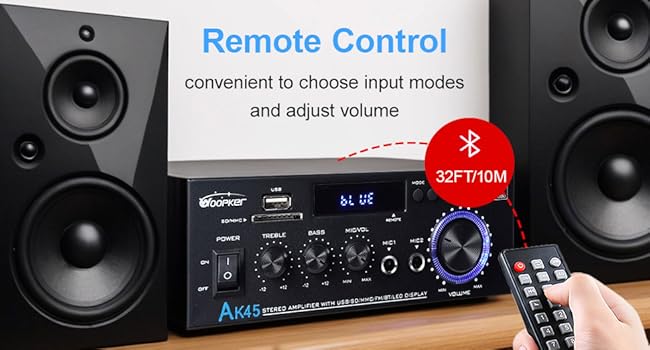
Image 5.3: The AK45 amplifier with its remote control, illustrating the convenience of remote operation for input mode selection and volume adjustments.
6. Awọn pato
| Ẹya ara ẹrọ | Sipesifikesonu |
|---|---|
| Nọmba awoṣe | AK45 |
| Brand | WOOPKER |
| Ijade agbara | 40W + 40W (Rated), 300W + 300W (Max) |
| Ẹya Bluetooth | 5.0 |
| Asopọmọra Technology | AUX, USB, SD Card, Bluetooth |
| Awọn ẹrọ ibaramu | Smartphone, Tablet, PC, TV, MP3 Player, CD Player, DVD Player, Projector |
| Ipo Ijade Ohun | Sitẹrio (ikanni 2.0) |
| Impedance Agbọrọsọ | 4-16 Ohms |
| Iwọn Nkan | 9.6 iwon |
| Package Mefa | 8.58 x 8.11 x 3.82 inches |
| Agbara Input | AC90-240V, 50-60Hz / DC 12V/5A |
7. Laasigbotitusita
If you encounter issues with your AK45 amplifier, tọka si awọn iṣoro ti o wọpọ ati awọn ojutu wọnyi:
- Ko si Agbara:
- Rí i dájú pé okùn agbára náà so mọ́ àwọn méjèèjì dáadáa ampìdènà àti ìjáde agbára tí ń ṣiṣẹ́.
- Check if the power switch on the front panel is in the 'ON' position.
- Ko si Ohun:
- Verify that speakers are correctly connected to the 'SPEAKERS OUTPUT' terminals with correct polarity.
- Ṣayẹwo ipele iwọn didun lori awọn mejeeji amplifier ati ẹrọ orisun ohun rẹ.
- Ensure the correct input mode (Bluetooth, AUX, USB, SD, FM) is selected.
- If using AUX, ensure the audio cable is securely connected to both the amplifier's 'AUDIO INPUT' and your source device.
- Awọn oran Isopọpọ Bluetooth:
- Rii daju pe amplifier is in 'BT' mode and the 'BLUE' indicator is flashing.
- Ensure your device's Bluetooth is enabled and it's within the recommended range (30 feet/10 meters).
- Gbiyanju yiyo ati tun so pọ ẹrọ naa.
- USB/SD Card Not Playing:
- Rii daju pe awakọ USB tabi kaadi SD ti fi sii daradara.
- Ṣayẹwo pe ohun naa files are in a supported format.
- Gbiyanju awakọ USB miiran tabi kaadi SD kan.
- Gbigba redio FM ti ko dara:
- Rii daju pe eriali FM ti sopọ daradara.
- Adjust the position of the FM antenna for better signal reception.
8. Itọju
To ensure the longevity and optimal performance of your AK45 amplifier, tẹle awọn itọnisọna itọju wọnyi:
- Ninu: Lo asọ, gbẹ asọ lati nu awọn ode ti awọn amplifier. Má ṣe lo àwọn ohun èlò ìfọmọ́ omi tàbí àwọn ohun èlò ìpara.
- Afẹfẹ: Rii daju pe amplifier is placed in a well-ventilated area to prevent overheating. Do not block the ventilation openings.
- Ibi ipamọ: Nigbati o ko ba wa ni lilo fun awọn akoko ti o gbooro sii, tọju awọn amplifier ni itura, aye gbigbẹ kuro lati orun taara ati awọn iwọn otutu to gaju.
- Mimu: Yẹra fun sisọ tabi tẹriba awọn ampolùdádúró sí àwọn ipa tó lágbára.
- Agbara Pa: Nigbagbogbo agbara si pa awọn amplifier before connecting or disconnecting any cables or accessories.
9. Atilẹyin ọja ati Support
WOOPKER is committed to providing quality products and customer satisfaction. For any inquiries or support needs, please refer to the following:
- Customer Response: We aim to provide quick responses to customer inquiries within 24 hours.
- Ilana Pada: Awọn ọja le jẹ pada fun paṣipaarọ tabi agbapada laarin awọn ọjọ 30 ti rira.
- Oluranlowo lati tun nkan se: Lifetime technical customer support is available for your product.

Aworan 9.1: Ipariview of WOOPKER's customer support commitments, including response times, return policy, and technical support availability.
Ask a question about this manual
Ask about setup, troubleshooting, compatibility, parts, safety, or missing instructions. Manuals+ will review the question and use this page’s manual context to help answer it.