
Ọrọ Iṣaaju
The HyperGear 4-in-1 Foldable Wireless Charging Station is designed to provide a convenient and efficient charging solution for multiple devices. This station allows you to simultaneously charge your iPhone, Apple Watch, AirPods, and an additional USB-powered device. Its foldable design enhances portability, making it suitable for both home and travel use. Key features include 15W wireless fast charging for compatible iPhones, a dedicated 2.5W Apple Watch charger, a 5W charging pad for AirPods, and an extra 5W USB-A port. The device also incorporates an adjustable charging coil for optimal phone alignment, dimmable LED mood lighting, and advanced safety features to protect your devices.
Package Awọn akoonu
- 1 x HyperGear 4-in-1 Foldable Wireless Charging Station
- 1 x 20W USB-C PD Wall Ṣaja
- 1 x 3ft USB-C Power Cable
Awọn ilana iṣeto
- Yọ Ẹrọ naa kuro: Carefully remove the charging station, 20W USB-C PD wall charger, and USB-C power cable from the packaging.
- So agbara: Insert one end of the provided USB-C power cable into the USB-C input port on the back of the charging station.
- So sinu Odi: Connect the other end of the USB-C power cable to the 20W USB-C PD wall charger, then plug the wall charger into a standard electrical outlet.
- Agbara Tan: The charging station will power on, and the LED indicators may briefly illuminate.

Image: The HyperGear 4-in-1 Foldable Wireless Charger ready for use, showing an iPhone, Apple Watch, and AirPods charging, with the power adapter and cable connected to a wall outlet.
Awọn ilana Iṣiṣẹ
- Charging an iPhone (Wireless Stand):
- Unfold the charging stand to your desired viewing angle (0-60 degrees).
- Place your iPhone on the adjustable wireless charging pad. The charging coil can glide up and down to ensure optimal alignment for various phone sizes and charging coil locations.
- The phone can be charged in both portrait and landscape orientations.
- Ensure your phone is case-friendly (charges through most protective cases up to 3mm thick). Remove cases with magnets, metal, or credit cards.

Image: The charging station demonstrating its fully adjustable design, allowing the phone stand to tilt and the charging coil to move vertically for optimal device placement.

Image: A diagram illustrating the case-friendly charging capability, showing that the charger works through protective cases up to 3mm thick, but not with metal, magnetic, or credit card cases.
- Ngba agbara si Apple Watch:
- Place your Apple Watch on the built-in magnetic charging mount. Ensure the watch is properly aligned and securely attached to initiate charging.
- Charging AirPods (Wireless Pad):
- Place your AirPods charging case on the designated wireless charging pad located on the base of the station.
- Charging a Fourth Device (USB-A Port):
- Connect any compatible USB-powered device (e.g., another phone, tablet, or accessory) to the 5W USB-A output port on the side of the charging station using its respective charging cable.
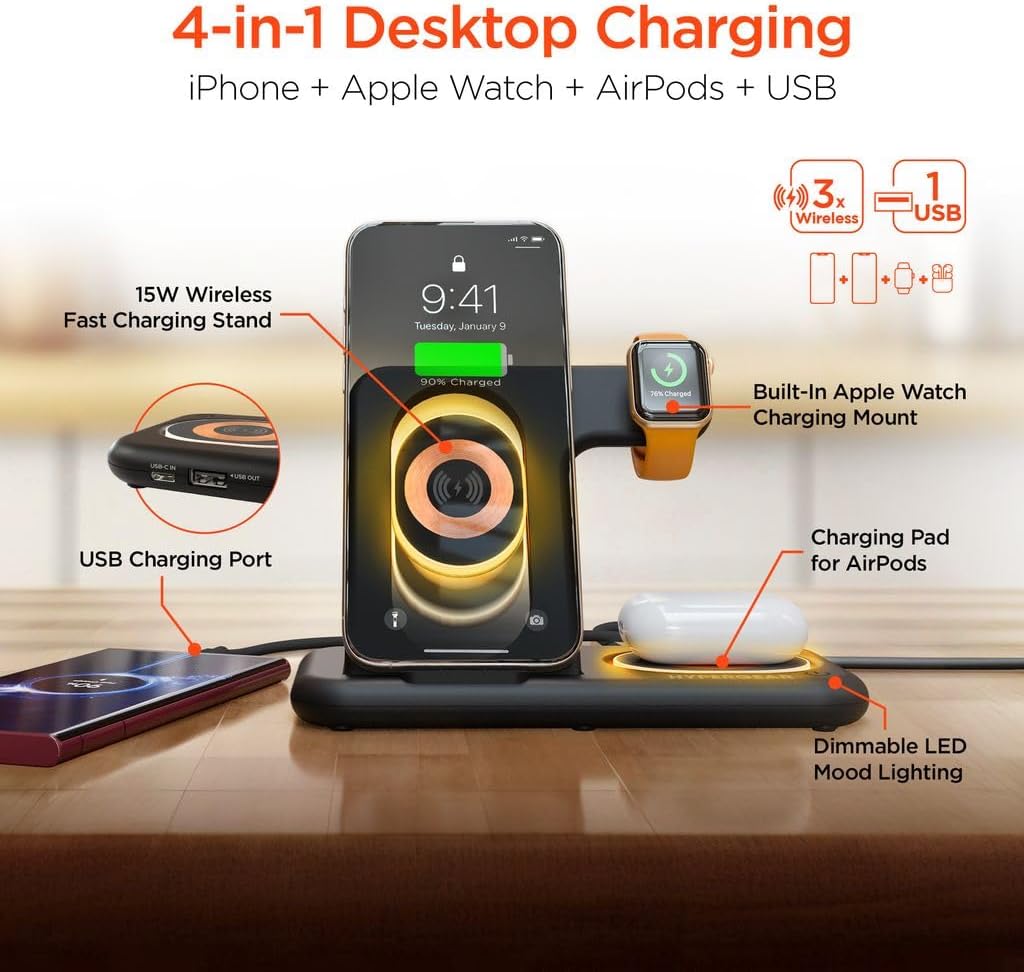
Aworan: An loriview of the 4-in-1 charging station highlighting its components: 15W Wireless Fast Charging Stand, Built-in Apple Watch Charging Mount, Charging Pad for AirPods, and USB Charging Port.
- Dimmable LED Mood Lights:
- The charging station features dimmable LED mood lights. Tap the touch-sensitive control area on the base to cycle through low, medium, bright, and off settings.

Image: The charging station illustrating its dimmable LED mood lights, which can be adjusted to low, medium, or bright settings via touch controls.
Video: An official product video demonstrating the foldable design and multi-device charging capabilities of the HyperGear 4-in-1 Wireless Charging Station.
Itọju ati Itọju
- Ninu: Use a soft, dry cloth to clean the surface of the charging station. Avoid using abrasive cleaners, solvents, or harsh chemicals.
- Ibi ipamọ: When not in use, store the charging station in a cool, dry place away from direct sunlight and extreme temperatures. Its foldable design allows for compact storage.
- Yago fun Olomi: Keep the device away from water and other liquids. Do not operate with wet hands.
- Mu pẹlu Itọju: Avoid dropping or subjecting the device to strong impacts, as this may damage internal components.
- Ge asopọ agbara: Always unplug the charging station from the power outlet before cleaning or if it will not be used for an extended period.
Laasigbotitusita
| Isoro | Owun to le Fa | Ojutu |
|---|---|---|
| Ẹrọ ko gba agbara lailowa. | Incorrect placement; phone case too thick or contains metal/magnets; foreign object on charging pad; device not Qi-compatible. | Adjust device position on the charging pad; remove phone case or use a compatible one; remove any foreign objects; ensure device supports wireless charging. |
| Apple Watch ko gba agbara. | Watch not properly aligned or securely attached to the magnetic mount; watch band interfering. | Ensure the Apple Watch is centered and firmly seated on the magnetic mount. Adjust watch band if it prevents proper contact. |
| Gbigba agbara lọra. | Using a non-original or low-power adapter/cable; device not supporting fast wireless charging. | Use the provided 20W USB-C PD wall charger and cable. Ensure your device supports 15W fast wireless charging. |
| LED mood lights not working. | Not powered on; touch control not activated. | Ensure the charging station is plugged in. Tap the touch-sensitive control area on the base to turn on/adjust lights. |
| Charging station is unstable. | Uneven surface; heavy device causing imbalance. | Place the station on a flat, stable surface. Ensure devices are placed gently and balanced. |
Awọn pato
- Nọmba awoṣe: HYP-PD20-3000
- Iṣawọle: USB Iru C
- Ijade Alailowaya (Foonu): Titi di 15W
- Wireless Output (Apple Watch): 2.5W
- Wireless Output (AirPods): 5W
- Ibudo Ijade USB-A: 5W (3 Amps)
- Lapapọ Awọn ibudo USB: 1
- Awọn ẹrọ ibaramu: iPhone, Apple Watch, AirPods
- Ìwọ̀n Nkan: 12 iwon
- Awọn iwọn idii: 8.12 x 7.53 x 1.3 inches
- Àwọ̀: Retro Transparent Design
Atilẹyin ọja ati Support
For warranty information or technical support, please refer to the official HyperGear website or contact their customer service directly. Keep your purchase receipt for warranty claims. Protection plans may be available for extended coverage; please check with your retailer for details.


