
1. Ifihan
Thank you for choosing the Antec GSK850 ATX3.1 850W Full Modular Power Supply Unit (PSU). This manual provides essential information for the proper installation, operation, and maintenance of your new power supply. The GSK850 is designed to deliver stable and efficient power to your computer system, featuring ATX3.1 and PCIe 5.1 compatibility, 80 PLUS Gold certification, and a full modular design for optimized cable management.

Figure 1.1: Antec GSK850 850W Full Modular Power Supply Unit
2. Alaye Aabo
Please read and follow all safety instructions carefully before installing or operating the PSU. Failure to do so may result in personal injury or damage to the product or system components.
- Ewu Itanna: Ma ṣe ṣi PSU casing. Iwọn gigatages are present inside, even when the unit is unplugged. There are no user-serviceable parts inside.
- Afẹfẹ: Ensure adequate ventilation around the PSU. Do not block the fan or ventilation openings.
- Ọrinrin: Do not expose the PSU to water or excessive humidity.
- Iwọn otutu: Operate the PSU within the specified temperature range. Avoid extreme heat or cold.
- Ilẹ: Always connect the PSU to a grounded power outlet.
- Agbara Pa: Always disconnect the AC power cord from the wall outlet before installing, removing, or servicing the PSU or any connected components.
3. Package Awọn akoonu
Jẹrisi pe gbogbo awọn ohun kan wa ninu package:
- Antec GSK850 ATX3.1 850W Full Modular Power Supply Unit
- Modular Cable Set (see Section 4.2 for details)
- AC Agbara okun
- Iṣagbesori skru
- Afowoyi Olumulo (iwe-ipamọ yii)
4. Ọja Ipariview
4.1 Key Awọn ẹya ara ẹrọ
- ATX3.1 & PCIe 5.1 Compatible: Designed to meet the latest standards for reliability and power efficiency, ensuring compatibility with modern hardware, including NVIDIA GeForce RTX 40 Series graphics cards.
- 80 PLUS Gold Ifọwọsi: Achieves high power efficiency, reducing energy consumption and heat generation.
- Iṣakoso Okun Modulu Kikun: Allows users to connect only the necessary cables, improving airflow and reducing clutter inside the PC case.
- Awọn Capacitors Japanese ti o ga julọ: Ensures tight voltage regulation, minimal ripple and noise, and extended lifespan.
- PhaseWave Design (LLC + DC-DC): Provides stable and efficient power delivery.
- Alabojuto RPM odo: The fan remains off at low loads for silent operation, activating only when necessary.
- Olufẹ ipalọlọ 120mm FDB: Features a fluid-dynamic bearing fan for quiet operation and durability.
- CircuitShield Protection Suite: Comprehensive industrial-grade protections including OCP, OVP, UVP, SCP, OPP, OTP, SIP, and NLO for system safety.
4.2 Modular Cable Management and Compatibility
The full modular design of the GSK850 allows for flexible cable management, enabling you to use only the cables required for your system. This reduces cable clutter, improves internal airflow, and simplifies installation.

Figure 4.1: Modular Cable Connectors and ATX 3.1 / PCIe 5.1 Compatibility

Figure 4.2: Detailed Cable and Connector Information
4.3 Internal Components and Design
The GSK850 incorporates high-quality components for reliable performance and longevity.

Figure 4.3: High-Quality Japanese Capacitors for enhanced stability and lifespan.

Figure 4.4: PhaseWave Design (LLC + DC-DC) for superior power delivery efficiency.
4.4 itutu System
The PSU features an advanced cooling system to maintain optimal temperatures and quiet operation.
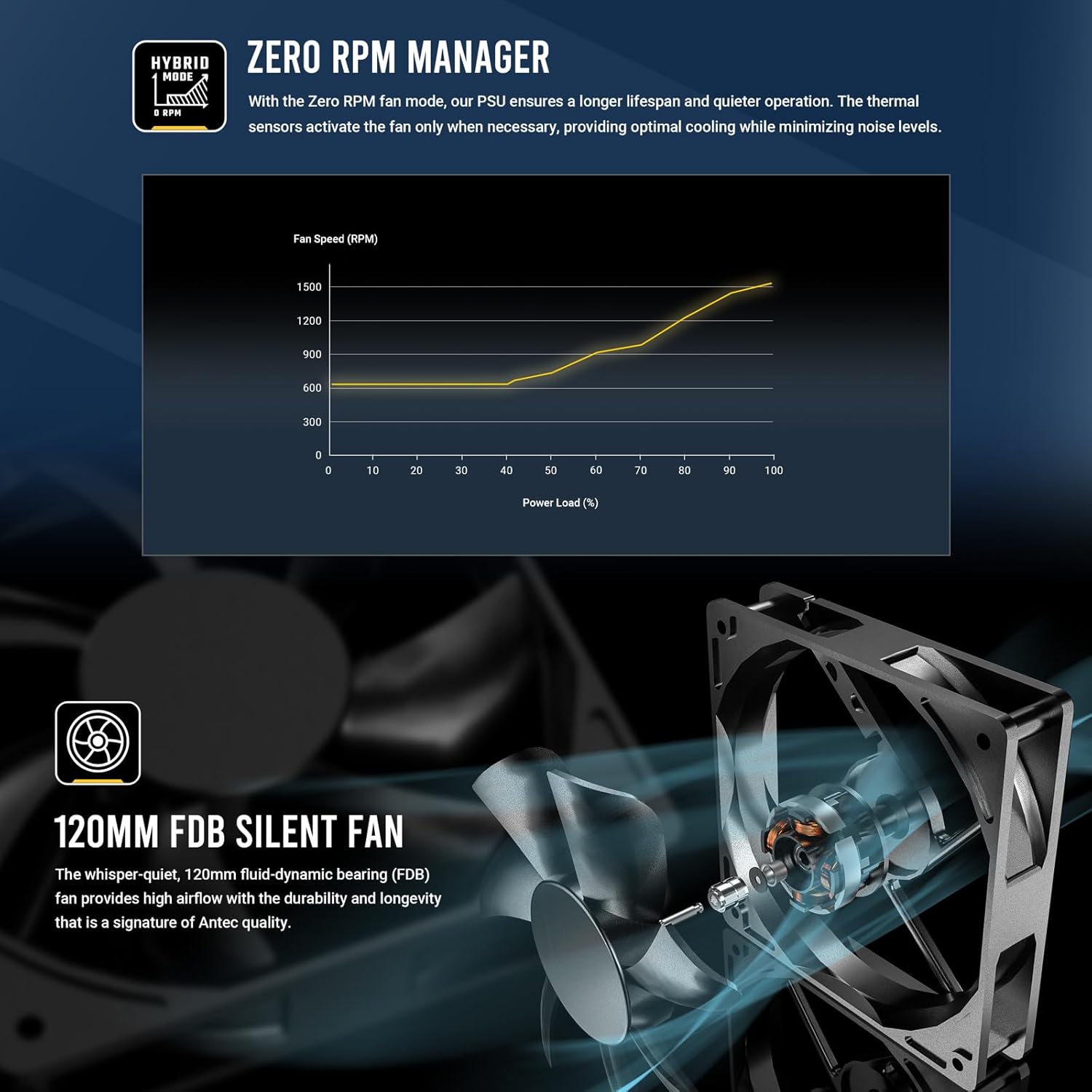
Figure 4.5: Zero RPM Manager fan curve, illustrating silent operation at low loads.

Figure 4.6: The 120mm Fluid-Dynamic Bearing (FDB) fan provides high airflow with low noise.
4.5 Compact Size
The GSK850 is designed with a compact form factor, making it suitable for a wide range of PC cases.

Figure 4.7: Compact dimensions of the GSK850 PSU, showing reduced volume compared to larger units.
5. Eto ati fifi sori
Follow these steps to install your Antec GSK850 PSU into your computer system:
- Mura Eto Rẹ: Rii daju pe kọmputa rẹ ti wa ni pipa patapata ati yọọ kuro lati inu iṣan ogiri. Ṣii apoti kọnputa rẹ.
- Yọ PSU Atijọ kuro (ti o ba wulo): If replacing an existing PSU, disconnect all cables from the old PSU and remove its mounting screws. Carefully slide it out of the case.
- Gbe PSU Tuntun naa: Slide the Antec GSK850 into the PSU mounting bay of your computer case. Align the screw holes and secure the PSU with the provided mounting screws.
- So awọn okun pataki pọ: Refer to Figure 4.2 for cable types and lengths. Connect the necessary modular cables to the PSU first, then to your motherboard and components:
- Okùn Modabọọdu ATX pin 24: Connect to your motherboard's main power connector.
- 8-pin (4+4) CPU Power Cable(s): Connect to your motherboard's CPU power connector(s).
- PCIe 5.1 12VHPWR (16-pin) or 8-pin (6+2) PCIe Cables: Connect to your graphics card(s) as required.
- Awọn okun agbara SATA: Connect to SSDs, HDDs, and optical drives.
- Àwọn okùn Molex: Connect to any peripherals requiring Molex power.
- Iṣakoso USB: Route cables neatly behind the motherboard tray or in designated cable management areas to improve airflow and aesthetics.
- Pa apoti ati Agbara So pọ: Once all connections are secure, close your computer case. Plug the AC power cord into the PSU and then into a grounded wall outlet.
6. Awọn ilana Iṣiṣẹ
Operating the Antec GSK850 PSU is straightforward:
- Agbara Tan: After installation, ensure the power switch on the back of the PSU is in the 'ON' (I) position. Then, power on your computer using the case's power button.
- Ipo RPM odo: The PSU's fan will remain off when the power load is low, providing silent operation. As the system load increases, the fan will automatically activate and adjust its speed to maintain optimal temperatures. This is normal operation and indicates the Zero RPM Manager is functioning correctly.
- Agbara Pa: To power off your system, use the operating system's shutdown function. For complete power disconnection, switch the PSU's power switch to the 'OFF' (O) position and unplug the AC power cord from the wall outlet.
7. Itọju
Itọju to dara ṣe idaniloju igbesi aye gigun ati iṣẹ aipe ti PSU rẹ:
- Yiyọ eruku kuro: Periodically clean dust from the PSU's fan grille and ventilation openings using compressed air. Ensure the PSU is powered off and unplugged before cleaning.
- Ayẹwo USB: Occasionally inspect all connected cables for any signs of wear, damage, or loose connections.
- Ayika: Ensure the PSU operates in a clean, dry, and well-ventilated environment.
8. Laasigbotitusita
If you encounter issues with your Antec GSK850 PSU, refer to the following common troubleshooting steps:
- Ko si Agbara:
- Rí i dájú pé okùn agbára AC ti so mọ́ PSU àti ihò ìtajà ògiri dáadáa.
- Check that the PSU's power switch on the back is in the 'ON' (I) position.
- Verify all modular cables are securely connected to both the PSU and the components.
- Test the wall outlet with another device to ensure it has power.
- Aisedeede/iparun eto:
- Ensure your PSU wattage is sufficient for all your system components.
- Ṣayẹwo awọn asopọ okun alaimuṣinṣin.
- The PSU's CircuitShield protection suite (OCP, OVP, UVP, SCP, OPP, OTP, SIP, NLO) will automatically shut down the PSU in case of an electrical fault to protect your components. If this occurs, disconnect power, check for short circuits or faulty components, and then attempt to restart.

Figure 8.1: CircuitShield Protection Suite
- Olufẹ Ko Yiyi:
- The GSK850 features Zero RPM mode. The fan will not spin at low loads. This is normal. The fan will activate when the system load increases.
- If the fan does not spin even under high load, ensure there are no obstructions and contact support if the issue persists.
If the problem persists after following these steps, please contact Antec customer support.
9. Awọn pato
| Ẹya ara ẹrọ | Sipesifikesonu |
|---|---|
| Orukọ awoṣe | GSK850 US |
| Brand | Antec |
| Ijade Wattage | 850W |
| Fọọmù ifosiwewe | ATX |
| Ijẹrisi ṣiṣe | 80 Plus Gold |
| PFC | PFC ti n ṣiṣẹ |
| Ọna Itutu | Afẹfẹ (FDB FDB 120mm) |
| Modulu Iru | Modulu ni kikun |
| Awọn iwọn (LxWxH) | 5.51 x 3.38 x 5.9 inches (140 x 86 x 150 mm) |
| Iwọn | 5.6 iwon |
| Àwọ̀ | Dudu |
| Awọn ẹrọ ibaramu | Kọmputa ti ara ẹni |
| Asopọmọra Iru | ATX |
10. Atilẹyin ọja ati Support
The Antec GSK850 ATX3.1 850W Full Modular PSU comes with a 7-odun atilẹyin ọja lati ọjọ ti o ra. Atilẹyin ọja yi ni wiwa awọn abawọn ninu awọn ohun elo ati iṣẹ ṣiṣe labẹ lilo deede.
For technical support, warranty claims, or further assistance, please visit the official Antec webojula tabi kan si wọn onibara iṣẹ Eka. Jeki ẹri rira rẹ fun ijẹrisi atilẹyin ọja.
Antec Osise Webojula: www.antec.com