
Ọrọ Iṣaaju
O ṣeun fun riraasing the eKids Disney Junior Ariel Karaoke Microphone with Bluetooth Speaker. This manual provides important information for the safe and optimal use of your new karaoke machine. Please read it thoroughly before use and retain it for future reference.
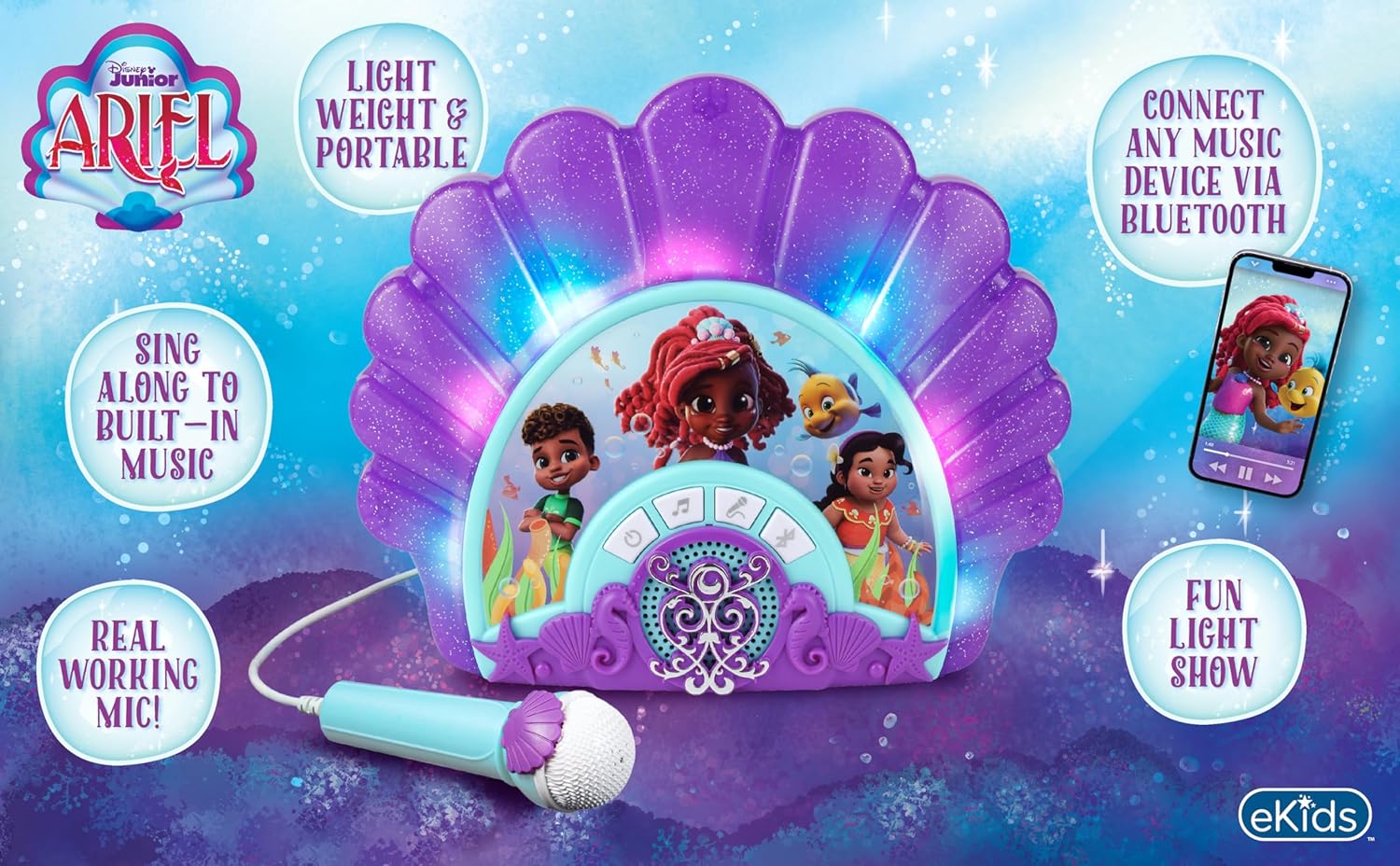
olusin 1: Ọja loriview tí ó ń fi àwọn ohun pàtàkì hàn.
Ṣeto
1. Unpacking
Carefully remove all components from the packaging. Ensure all items listed in the 'What's in the Box' section are present. Retain packaging for storage or shipping if needed.
2. Fifi sori batiri
The unit requires 3 'AA' batteries (not included). Locate the battery compartment on the back of the unit. Open the compartment, insert the batteries according to the polarity indicators (+/-), and close the cover securely.

olusin 2: Ẹyìn view of the unit with battery compartment and controls labeled.
3. Agbara akọkọ Lori
After installing batteries, press the Power button (⏻) located on the front panel to turn on the unit. The unit will emit a sound and the lights will activate.
Isẹ
1. Awọn iṣẹ ipilẹ
The front panel features several control buttons:
- Power Button (⏻): Tan ẹrọ naa si tan tabi pa.
- Play/Repeat Button (♫): Plays the built-in music. Press again to repeat the current song or cycle through built-in tracks.
- Select Song Button (♪): Changes the built-in song.
- Microphone Button (🎤): Activates or deactivates the microphone.
- Bluetooth Button (Ⓑ): Ti bẹrẹ ipo sisopọ Bluetooth.
2. Asopọ Bluetooth
To connect an external music device via Bluetooth:
- Turn on the karaoke machine.
- Press the Bluetooth button (Ⓑ) on the unit. The unit will enter pairing mode, indicated by a flashing light or sound.
- On your external device (smartphone, tablet, etc.), go to its Bluetooth settings and search for available devices.
- Select "eKids Ariel Karaoke" (or similar name) from the list to pair.
- Once paired, you can stream music from your device to the karaoke machine.

Figure 3: Bluetooth compatibility with various devices.
3. Lilo Gbohungbohun
The unit includes a real working microphone. Plug the microphone into the designated port. Press the Microphone button (🎤) to activate it. Sing along to built-in music or music streamed via Bluetooth.
4. Built-in Music
The karaoke machine comes with pre-loaded music. Press the Play/Repeat button (♫) to start playing. Use the Select Song button (♪) to switch between tracks.
5. Light Show Feature
The unit features a fun light show that enhances your performance. The lights activate automatically when the unit is on and music is playing.
6. Iṣakoso iwọn didun
Adjust the overall volume using the HI/MEDIUM/LOW switch located on the back of the unit (refer to Figure 2).
Video 1: Official product demonstration of the eKids Disney Junior Ariel Karaoke Microphone and Boombox, showcasing awọn oniwe-ẹya ara ẹrọ ati isẹ.
Itoju
1. Ninu
Wipe the unit with a soft, dry cloth. Do not use liquid cleaners or abrasive materials, as they may damage the finish or internal components.
2. Ibi ipamọ
Tí o kò bá lò ó fún ìgbà pípẹ́, yọ àwọn bátìrì náà kúrò kí ó má baà jẹ́ kí omi máa jò. Tọ́jú ẹ̀rọ náà sí ibi tí ó tutù, tí ó sì gbẹ, tí kò sí ìmọ́lẹ̀ oòrùn tààrà tàbí ooru tó le koko.
Laasigbotitusita
| Isoro | Owun to le Fa | Ojutu |
|---|---|---|
| Ẹka ko ni agbara lori. | Awọn batiri ti ku tabi ti fi sori ẹrọ ti ko tọ. | Replace batteries with new 'AA' batteries, ensuring correct polarity. |
| Ko si ohun lati agbọrọsọ. | Volume is too low or muted. External device volume is low. | Check the volume switch on the back of the unit. Increase volume on the connected Bluetooth device. |
| Gbohungbohun ko ṣiṣẹ. | Microphone not plugged in or Microphone button is off. | Ensure the microphone is securely plugged into its port. Press the Microphone button (🎤) to activate it. |
| Asopọ Bluetooth kuna. | Unit is not in pairing mode or device is out of range. | Press the Bluetooth button (Ⓑ) to enter pairing mode. Ensure your device is within 30 feet (10 meters) of the unit. Try restarting both devices. |
Awọn pato
| Ẹya ara ẹrọ | Ẹ̀kúnrẹ́rẹ́ |
|---|---|
| Brand | eKids |
| Nọmba awoṣe | B0DCKBB6KW |
| Àwọ̀ | eleyi ti |
| Awọn irinše to wa | Gbohungbohun |
| Iwọn Agbọrọsọ | 1 |
| Asopọmọra Iru | Bluetooth |
| Asopọmọra Technology | Bluetooth |
| Media Iru | Bluetooth |
| Awọn ẹrọ ibaramu | smartphone, tablet, tv, speaker |
| -Itumọ ti Media | Gbohungbohun |
| UPC | 092298961170 |
| Olupese | Awọn apẹrẹ KID |
Atilẹyin ọja & Atilẹyin
Alaye atilẹyin ọja
This product is covered by a standard manufacturer's warranty. Please refer to the warranty card included in your product packaging for specific terms and conditions. For return policy details, please consult your retailer.
Onibara Support
For technical assistance or further inquiries, please visit the official eKids webojula tabi kan si wọn onibara iṣẹ Eka. Alaye olubasọrọ le ṣee rii ni igbagbogbo lori apoti ọja tabi osise ti ami iyasọtọ naa webojula.


