1. Ifihan
Thank you for choosing the Devoko L-Shaped Gaming Desk. This manual provides essential information for the safe assembly, operation, and maintenance of your new desk. Please read it thoroughly before beginning assembly and keep it for future reference.
The Devoko L-Shaped Gaming Desk is designed to provide a spacious and ergonomic workspace for various activities, including gaming, studying, and office work. Its robust construction and thoughtful design ensure stability and durability.
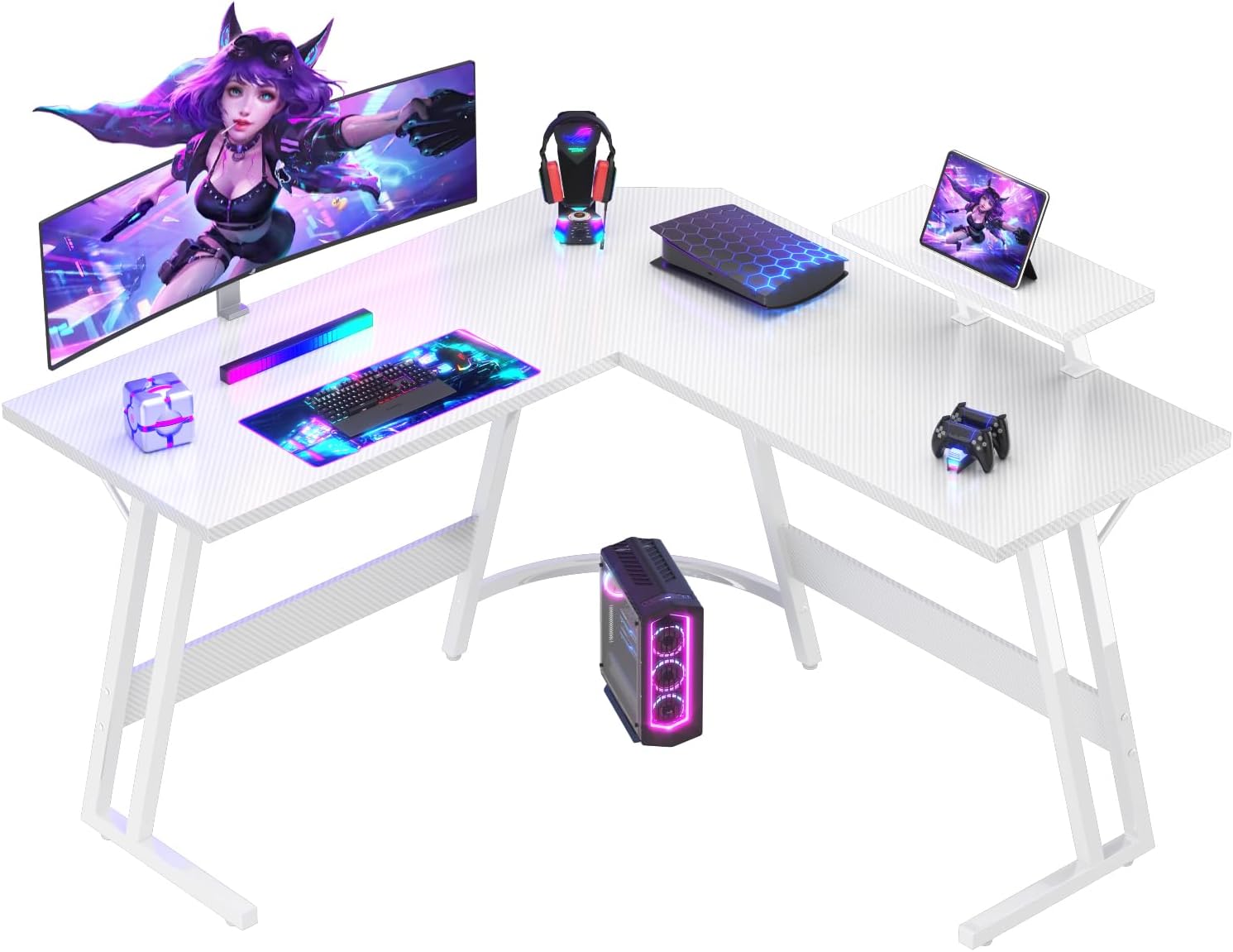
Image: The Devoko L-Shaped Gaming Desk in Carbon White, showcasing its spacious design and integrated monitor stand, set up with gaming peripherals.
2. Alaye Aabo
Jọwọ ṣe akiyesi awọn itọnisọna ailewu wọnyi lati yago fun ipalara tabi ibajẹ ọja naa:
- Do not exceed the maximum weight limit of 60 kg (132 lbs) on the desk surface.
- Ensure the desk is assembled on a flat, stable surface.
- Lokọọkan ṣayẹwo gbogbo awọn skru ati awọn asopọ lati rii daju pe wọn wa ni wiwọ.
- Jeki awọn ẹya kekere ati awọn ohun elo iṣakojọpọ kuro lọdọ awọn ọmọde lati ṣe idiwọ awọn eewu gige.
- Avoid placing hot items directly on the desk surface without protective padding.
- Maṣe duro tabi joko lori tabili.
For enhanced stability, especially if the desk is heavily loaded or placed on uneven flooring, consider anchoring the desk to a wall to prevent tipping. Adjustable feet are provided to help level the desk on slightly uneven surfaces.
3. Package Awọn akoonu
Ṣaaju apejọ, rii daju pe gbogbo awọn paati wa ati ti ko bajẹ. Ti eyikeyi awọn ẹya ba sonu tabi bajẹ, jọwọ kan si atilẹyin alabara.
- Desk panels (L-shaped main surface)
- Z-shaped metal frame legs
- Atẹle atẹle
- Àwọn ohun èlò ìṣàkójọpọ̀ (àwọn skru, àwọn bulọ́ọ̀tì, àti ìfọ́ Allen)
- Cable management compartment (possible inclusion)
- Keyboard drawer (possible inclusion)
- Integrated power outlet (possible inclusion)
- Ilana itọnisọna

Image: A diagram illustrating the dimensions of the L-shaped desk (120x120cm surface, 75cm height) and the monitor stand.
4. Eto ati Apejọ
The Devoko L-Shaped Gaming Desk is designed for quick and easy assembly, typically taking around 30-45 minutes with the provided tools.
- Yọ awọn ohun elo kuro: Carefully remove all parts from the packaging. Lay them out on a clean, soft surface (e.g., a blanket or carpet) to prevent scratches.
- Ṣe idanimọ Awọn apakan: All parts are clearly labeled. Refer to the included assembly diagram to identify each component.
- Apejọ fireemu: Begin by connecting the Z-shaped metal frame legs according to the instructions. Ensure all screws are finger-tight before fully tightening.
- So awọn panẹli tabili pọ mọ: Secure the L-shaped desk panels to the assembled frame. Pay attention to the orientation for the desired left or right L-configuration.
- Fi Iduro Atẹle sori ẹrọ: Attach the monitor stand to the designated area on the desk surface. This stand helps protect your spine, improves posture, and optimizes space.
- Mu gbogbo awọn isopọ pọ: Once all major components are in place, systematically tighten all screws and bolts using the provided Allen wrench. Do not overtighten.
- Ṣatunṣe Ẹsẹ Ipele: If your floor is uneven, adjust the leveling feet at the bottom of the desk legs to ensure the desk is stable and does not wobble.

Aworan: A sunmọ-soke view highlighting the stable Z-shaped leg design of the desk.
5. Awọn ilana Iṣiṣẹ
Your Devoko L-Shaped Gaming Desk is ready for use once assembled. Here are some tips for optimal use:
- Ajo Aye Iṣẹ: Utilize the L-shape to create distinct zones for your computer, monitor, and other accessories. The generous surface allows for comfortable placement of multiple devices.
- Monitor Stand Usage: Place your monitor(s) on the elevated stand to achieve an ergonomic viewing height, reducing strain on your neck and eyes. This also frees up valuable desk space below.
- Iṣakoso USB: If your model includes a cable management compartment, route your cables through it to keep your workspace tidy and prevent tangles.
- Kọkọ agbekọri: Use the integrated headphone hook (if present) to keep your headphones easily accessible and off the desk surface.

Image: A visual comparison showing how the ergonomic monitor stand helps maintain proper posture compared to a desk without one.

Image: Two Devoko L-shaped desks arranged to form a larger workspace, demonstrating flexible configuration options for gaming or office environments.
6. Itọju
To ensure the longevity and appearance of your Devoko L-Shaped Gaming Desk, follow these maintenance guidelines:
- Ninu: The carbon fiber finish is scratch-resistant and easy to clean. Use a soft, damp cloth with mild soap and water to wipe down the surface. Avoid abrasive cleaners or harsh chemicals.
- Idasonu: Wipe up spills immediately to prevent staining or damage to the surface.
- Awọn iṣayẹwo deede: Periodically inspect all screws and connections to ensure they are secure. Tighten any loose fittings to maintain stability.
- Yago fun Imọlẹ Oorun Taara: Prolonged exposure to direct sunlight may cause fading or material degradation over time.
- Pipin iwuwo: Distribute weight evenly across the desk surface to prevent undue stress on any single point.
7. Laasigbotitusita
If you encounter any issues with your Devoko L-Shaped Gaming Desk, refer to the following common troubleshooting tips:
| Isoro | Owun to le Fa | Ojutu |
|---|---|---|
| Tabili naa n mì tabi ko duro ṣinṣin | Uneven floor; Loose screws; Incorrect assembly | Adjust leveling feet; Tighten all screws; Re-check assembly steps. |
| Awọn ẹya ko baamu papọ | Incorrect orientation; Manufacturing defect | Refer to the assembly diagram for correct orientation; Contact customer support if parts are defective. |
| Screws are too long and pierce the surface | Incorrect screws used for specific holes (as reported by some users) | Ensure you are using the correct screw length for each designated hole as per the instructions. If damage occurs, contact customer support. |
If the problem persists after attempting these solutions, please contact Devoko customer support for further assistance.
8. Awọn pato
| Ẹya ara ẹrọ | Ẹ̀kúnrẹ́rẹ́ |
|---|---|
| Brand | Devoko |
| Awoṣe | Wit (0457) |
| Awọn iwọn (L x W x H) | 120 cm x 120 cm x 75 cm (47.2 x 47.2 x 29.5 inches) |
| Àwọ̀ | Carbon White |
| Ohun elo | Carbon Fiber (surface), Metal (base/legs) |
| Agbara iwuwo | Ju 60 kg (132 lbs) |
| Aago Apejọ | Isunmọ. 30-45 iṣẹju |
| Pataki Awọn ẹya ara ẹrọ | L-shaped design, Monitor stand, Z-shaped stability frame, Adjustable feet, Scratch-resistant surface |
9. Atilẹyin ọja ati Support
Devoko is committed to providing high-quality products and professional services. Your satisfaction is our priority.
For any questions, concerns, or warranty claims regarding your Devoko L-Shaped Gaming Desk, please contact our friendly customer service team. Please have your purchase details and model number ready when contacting support.
You can visit the official Devoko store on Amazon for more information and contact options: Devoko Amazon Store