
Ọrọ Iṣaaju
This user manual provides comprehensive instructions for the operation, maintenance, and troubleshooting of your Benetech GT1355B Decibel Meter. This device is designed for accurate measurement of sound and noise levels, suitable for various environments including home, classroom, and industrial settings. Please read this manual thoroughly before using the device to ensure proper and safe operation.
Ọja Pariview ati Key Awọn ẹya ara ẹrọ
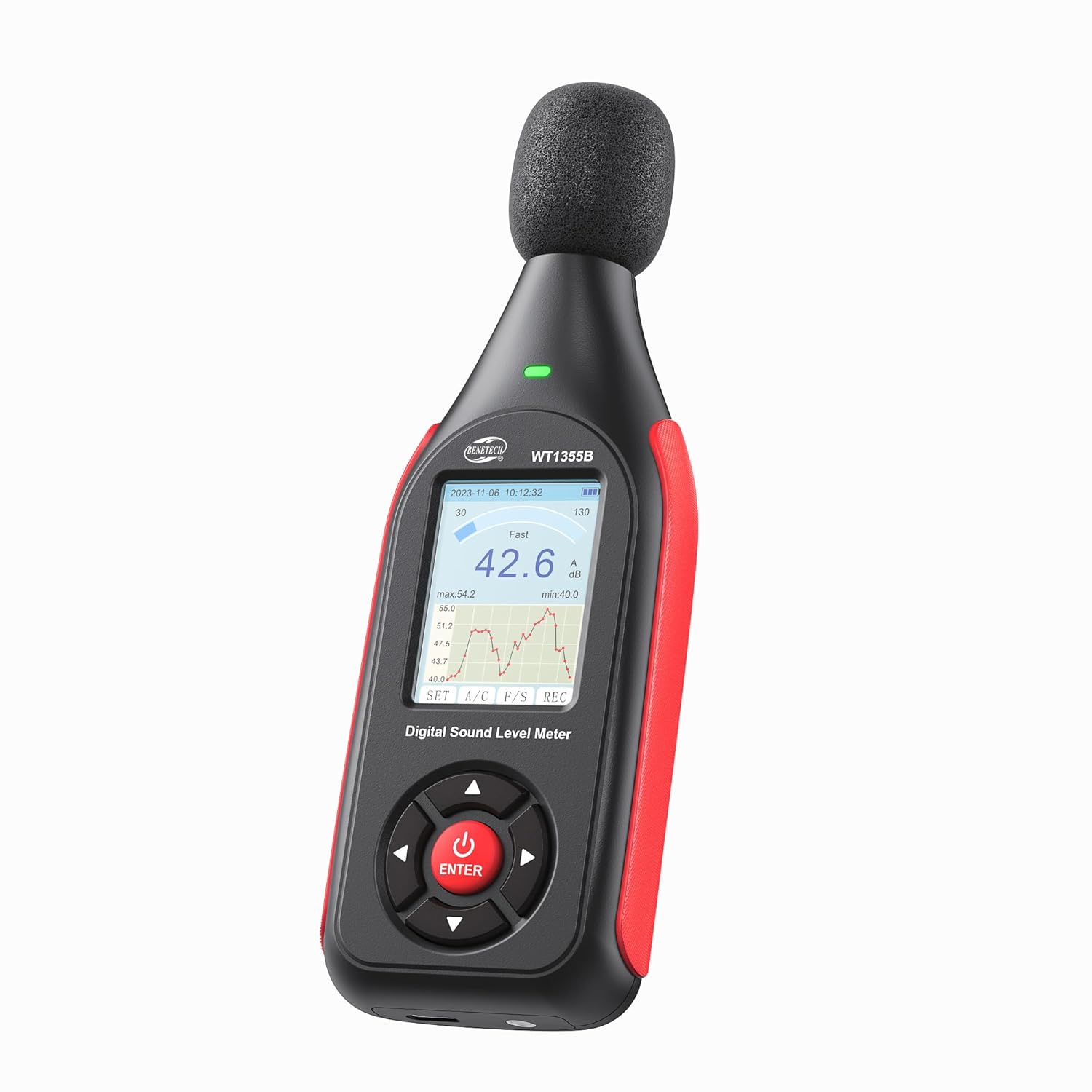
The Benetech GT1355B Decibel Meter, a compact and ergonomic device for sound level measurement.

The GT1355B is designed to be lightweight and portable, making it easy to carry and use in various locations.
- A/C Weighted Measurement: The decibel meter utilizes a condenser microphone to accurately measure sound levels from 30 to 130 dB (A) and 35 to 130 dB (C), with an accuracy of ±1.5 dB. It covers a frequency range from 31.5 Hz to 8,500 Hz.

Illustration of A-weighting for human ear perception and C-weighting for equipment noise measurement.
- Ifihan LCD Rọrun-lati Ka: The backlit LCD screen provides clear visual representation of noise data, including Max value. Users can switch between fast/slow time weighting and freeze current readings. An indicator light and screen color change provide visual alerts when sound levels exceed set alarm values.

Alaye view of the LCD screen showing various indicators like date, time, battery, measurement range, and data graph.
- Real-Time Monitoring & Data Recording: The SPL meter can store up to 43,000 sets of data. Data can be imported to a PC via the USB port for real-time sampling, analysis, downloading, printing charts, and deletion. The device also allows setting date, automatic shutdown time, and features a low battery indicator.

The device supports saving up to 43,000 sets of data, which can be managed via PC connection.
- Long-Lasting Battery & Portability: Equipped with a non-slip rubber grip, the meter is easy to handle. It features 1/4-inch mounting threads for tripod attachment, allowing for extended monitoring. A 1.5-hour charge provides up to 8 hours of standby time.

The decibel meter charges via a USB-C port, offering quick charging and extended duration.

The device can be mounted on a stand for continuous monitoring, as shown with a small tripod.
Package Awọn akoonu
The Benetech GT1355B Decibel Meter package includes the following items:
- 1x Benetech GT1355B Decibel Meter
- 1x USB Cable (for charging and data transfer)
- 1x Itọsọna olumulo
Ọja irinše
Familiarize yourself with the different parts of your decibel meter:

Diagram illustrating the key components of the Benetech GT1355B Decibel Meter, including the condenser microphone, windproof sponge, alarm indicator light, LCD screen, control buttons, tripod mounting screw holes, calibration knob, and Type-C port.
- Gbohungbohun Condenser: High-precision sensor for sound capture.
- Sóńpìnnì tí afẹ́fẹ́ kò lè gbà: Reduces wind noise interference during measurements.
- Imọlẹ Atọka Itaniji: Provides visual alerts for sound level thresholds.
- Iboju Itanna Ẹ̀yìn LCD: Displays measurement data, graphs, and settings.
- Awọn bọtini Iṣakoso:
- Power On/Off / Confirm Key (Red button)
- Move up/Increment/Hold
- Left/Back/Zoom Out Line Chart
- Right/Enter/Enlarge Line Chart
- Shift Down/Decrement
- Tripod Mounting Screw Holes: For attaching the device to a stand.
- Calibration Knob: Used for fine-tuning calibration.
- Iru Ibudo-C: For charging and connecting to a PC.
Ṣeto
1. Ngba agbara ẹrọ
Before first use, fully charge the decibel meter. Connect the provided USB cable to the Type-C port on the device and the other end to a standard USB power adapter (not included) or a computer's USB port. The battery indicator on the LCD screen will show charging status. A full charge takes approximately 1.5 hours and provides up to 8 hours of standby time.
2. Agbara akọkọ Lori
Press and hold the red power button (usually located at the bottom center of the control panel) for a few seconds until the LCD screen illuminates.
3. Eto Ọjọ ati Aago
Upon first power-on or after a long period of disuse, you may need to set the date and time. Tap the red power button once the device is on to cycle through various settings. Use the navigation buttons (left/right/up/down) to adjust values and the red button to confirm.

The device offers various settings including LCD backlight, low battery indicator, auto power off, and date & time settings.
Awọn ilana Iṣiṣẹ
1. Agbara Tan / Paa
- To turn on: Press and hold the red power button until the screen lights up.
- To turn off: Press and hold the red power button until the screen turns off.
2. Measurement Modes (A/C Weighting & Fast/Slow)
The GT1355B supports both A and C frequency weighting, and Fast and Slow time weighting.
- A-Weighting: Simulates the human ear's response to sound, commonly used for environmental noise measurements.
- C-Weighting: Provides a flatter response, suitable for measuring the true sound level of machinery or peak noise.
- Fast Time Weighting: Responds quickly to changes in sound level, ideal for fluctuating or unsteady noise.
- Slow Time Weighting: Provides an averaged reading, suitable for measuring steady-state noise.
Use the "A/C" button to switch between A and C weighting, and the "F/S" button to switch between Fast and Slow time weighting.

Explanation of Fast and Slow time weighting for different noise measurement scenarios.
3. Kíkà Ìfihàn náà
The LCD screen displays the current decibel reading, along with a real-time graph of sound level changes. It also shows minimum (min) and maximum (max) values recorded during the current measurement session.
4. Visual Alarm Function
The device features a visual alarm system that changes the screen color and activates an indicator light when sound levels exceed predefined thresholds.
- Setting Alarm Thresholds: Navigate to the alarm settings menu using the control buttons. You can set a low alarm value (e.g., yellow alert) and a high alarm value (e.g., red alert). Ensure the high alarm value is greater than the low alarm value.
- Itọkasi itaniji:
- Blue Screen: Sound level is below both alarm thresholds.
- Yellow Screen: Sound level is between the low and high alarm thresholds.
- Red Screen: Sound level exceeds the high alarm threshold.

Visual representation of the three-color alarm system: blue for normal, yellow for low alarm exceeded, and red for high alarm exceeded.

Screenshot showing the interface for customizing yellow and red alarm thresholds.
5. Data Recording and Transfer to PC
The GT1355B can record up to 43,000 data sets. To initiate recording, press the "REC" button. To transfer data to a PC:
- Connect the decibel meter to your PC using the provided USB cable.
- The device should be recognized as a storage device or a serial port.
- Install the dedicated software (typically provided on a mini-CD or available for download from the manufacturer's webaaye).
- Use the software to perform real-time data sampling, download recorded data, analyze charts, print reports, and delete data from the device.
Note: The software is compatible with Windows operating systems. macOS (iOS) is not supported for data transfer and analysis.

The decibel meter supports real-time measuring, data import to PC, storage of lab format files, data saving, saving as Excel, and printing data via dedicated Windows software.
Itoju
- Ninu: Lo asọ asọ ti o gbẹ lati nu ẹrọ naa. Ma ṣe lo abrasive ose tabi epo.
- Ibi ipamọ: Tọ́jú ẹ̀rọ náà sí ibi gbígbẹ tí ó tutù, tí kò sí ìmọ́lẹ̀ oòrùn tààrà tàbí ooru tó le koko. Tí o bá ń tọ́jú rẹ̀ fún ìgbà pípẹ́, rí i dájú pé batiri náà ti gba agbára díẹ̀ (ní nǹkan bí 50%) kí ó lè pẹ́ sí i.
- Itọju Gbohungbohun: Keep the microphone and windproof sponge clean and free from dust or debris to ensure accurate readings.
Laasigbotitusita
| Isoro | Owun to le Fa | Ojutu |
|---|---|---|
| Ẹrọ naa ko ṣiṣẹ. | Batiri kekere tabi iṣẹ ṣiṣe ẹrọ. | Gba agbara si ẹrọ ni kikun. Ti ọrọ naa ba wa, kan si atilẹyin alabara. |
| Awọn kika ti ko pe. | Microphone obstructed, incorrect weighting/time settings, or calibration needed. | Ensure microphone is clear. Check A/C and Fast/Slow settings. Refer to calibration instructions if available, or contact support for professional calibration. |
| Cannot connect to PC or transfer data. | Incorrect USB cable, driver issues, or software incompatibility. | Ensure you are using the correct USB cable. Verify that the software drivers are correctly installed. Confirm your operating system is Windows, as macOS is not supported. Try a different USB port or PC. |
| Screen display issues (e.g., frozen, dim). | glitch software tabi kekere batiri. | Restart the device. Charge the device. If the problem continues, contact customer support. |
Awọn pato
| Paramita | Iye |
|---|---|
| Nọmba awoṣe | GT1355B |
| Iwọn Iwọn | 30dB to 130dB(A) / 35dB to 130dB(C) |
| Yiye | ± 1.5 dB |
| Idahun Igbohunsafẹfẹ | 31.5 Hz si 8,500 Hz |
| Ipinnu | 0.1 dB |
| Agbara Ibi ipamọ data | Up to 43,000 sets of data |
| Batiri Iru | 1 Batiri litiumu polima (pẹlu) |
| Akoko gbigba agbara | Isunmọ. wakati meji 1.5 |
| Akoko Iduro | Titi di wakati 8 |
| Ọja Mefa | 6.1 x 2.16 x 1.18 inches |
| Iwọn Nkan | 7.83 iwon |

The device is equipped with a 1/2 condenser microphone, offering high precision with ±1.5 dB accuracy and 0.1 dB resolution across a wide frequency range.

A chart illustrating typical noise levels and their potential impact, ranging from very quiet (0-20dB) to extremely deafening (above 120dB).
Atilẹyin ọja ati Support
Your Benetech GT1355B Decibel Meter comes with a 12-month warranty. For any questions, technical assistance, or warranty claims, please contact Benetech customer service. Our support team is available 24/7 to assist you.
Note: The device is factory calibrated to a standard of 94 dB @ 1kHz before shipment.