
Ọrọ Iṣaaju
This manual provides detailed instructions for the proper use and maintenance of your Deli 1700 240F Scientific Calculator. Please read this manual thoroughly before using the calculator to ensure correct operation and to maximize its lifespan. This calculator is designed for a wide range of mathematical and scientific computations, featuring a two-line display and 10+2 digits for enhanced functionality.
Ṣeto
1. Fifi sori batiri
The Deli 1700 240F Scientific Calculator operates on both solar power and two nonstandard batteries. For optimal performance, ensure batteries are installed correctly.
- Wa ideri iyẹwu batiri ni ẹhin ẹṣiro naa.
- Using a small screwdriver, carefully remove the screw and slide off the battery compartment cover.
- Insert two nonstandard batteries, ensuring the positive (+) and negative (-) terminals are aligned correctly as indicated inside the compartment.
- Rọpo ideri kompaktimenti batiri ki o ni aabo pẹlu dabaru.
Note: The calculator also utilizes solar power. Ensure adequate light exposure for solar operation, especially when batteries are low or not installed.
2. Agbara akọkọ Lori
Tẹ awọn [LORI] button to turn on the calculator. The display should show '0' or a similar initial state. If the display does not appear, check battery installation or ensure sufficient light for solar power.
Awọn ilana Iṣiṣẹ
The Deli 1700 240F features a two-line display, showing the input expression on the upper line and the result on the lower line. It supports 240 types of functions.

Image: The Deli 1700 Scientific Calculator's two-line display, illustrating its ability to show both input and results simultaneously. This image highlights the clear numerical output and function indicators.
1. Basic Arithmetic Operations
Tẹ awọn nọmba sii nipa lilo oriṣi bọtini nọmba. Lo awọn [+], [-], [×], ati [÷] keys for addition, subtraction, multiplication, and division, respectively. Press [=] lati gba abajade.
2. Scientific Functions
The calculator includes various scientific functions accessible via the [SHIFT] bọtini. Tẹ [SHIFT] followed by the desired function key to activate its secondary function (indicated above the key).
- Awọn iṣẹ Trigonometric: [SIN], [COS], [TAN] ati awọn iṣẹ onidakeji wọn ([SHIFT] + [SIN⁻¹], ati bẹbẹ lọ).
- Awọn iṣẹ Logarithmic: [LOG] (mimọ 10) ati [LN] (logarithm adayeba).
- Agbara ati Awọn iṣẹ gbongbo: [x²], [√], [xʸ], [ʸ√x].
- Factorial: [x!].
3. Awọn iṣẹ iranti
Tọju ati ranti awọn iye nipa lilo awọn bọtini iranti:
- [M+]: Ó ń fi iye tí a fi hàn kún ìrántí.
- [M-]: Yí iye tí a fi hàn kúrò nínú ìrántí.
- [Ọgbẹni]: Ó ń rántí ìníyelórí láti inú ìrántí.
- [MC]: Ó ń pa ìrántí mọ́.
4. Angle Units
The calculator supports Degree (DEG), Radian (RAD), and Grad (GRA) angle units. Press [MODE] repeatedly to cycle through the angle units. The current unit is indicated on the display.
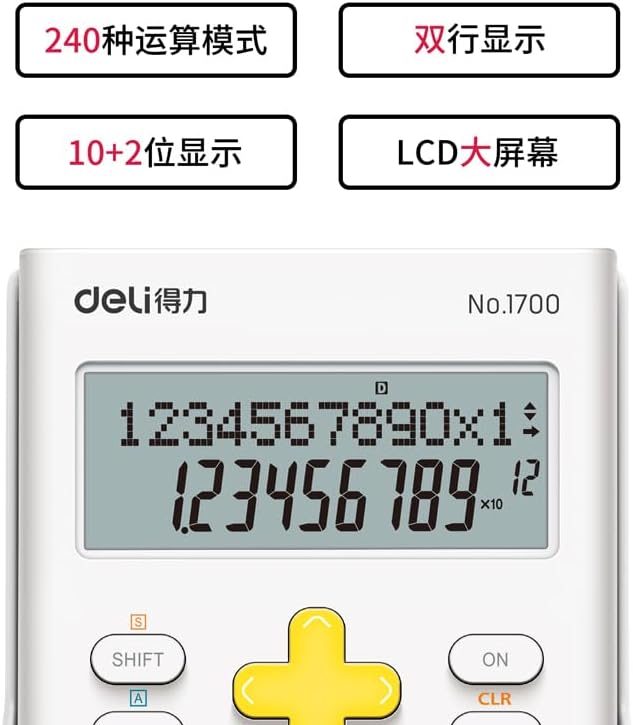
Aworan: A alaye view of the Deli 1700 Scientific Calculator's display and key layout. This image emphasizes the model number and the clarity of the 10+2 digit display, along with key labels like SHIFT and ALPHA.
Itoju
1. Ninu
To clean the calculator, use a soft, dry cloth. Do not use abrasive cleaners, solvents, or spray directly onto the calculator. Avoid excessive moisture.
2. Batiri Rirọpo
When the display becomes dim or calculations are incorrect, it may be time to replace the batteries. Follow the battery installation steps outlined in the Setup section. Always replace both batteries at the same time with new ones of the same type.
3. Ibi ipamọ
Store the calculator in a cool, dry place away from direct sunlight and extreme temperatures. Avoid dropping the calculator or subjecting it to strong impacts.
Laasigbotitusita
| Isoro | Owun to le Fa | Ojutu |
|---|---|---|
| Ifihan ti ṣofo tabi baibai. | Low batteries or insufficient light for solar power. | Replace batteries or move to a brighter area. |
| Awọn abajade iṣiro ti ko tọ. | Incorrect mode setting (e.g., angle unit) or input error. | Check angle unit (DEG/RAD/GRA). Clear all memory and re-enter calculation. Press [CLR] to clear current calculation. |
| Calculator does not respond to key presses. | Temporary system error or very low power. | Tẹ [LORI]/[PA] to restart. If issue persists, remove and reinsert batteries. |
Awọn pato
- Brand: Deli
- Awoṣe: 1700
- Orukọ awoṣe: 240F
- Oniṣiro Iru: Imọ-ẹrọ / Imọ
- Iru ifihan: LCD, Two-line display
- Awọn nọmba: 10+2 Awọn nọmba
- Orisun Agbara: Solar Powered & Battery
- Nọmba Awọn Batiri: 2 Batiri ti kii ṣe deede (a nilo)
- Iwọn iboju: 1 Centimeter (approximate viewable area)
- Àwọ̀: Funfun
- Ohun elo Apoti: Ṣiṣu
- Olupese: Deli
Alaye atilẹyin ọja
This Deli 1700 240F Scientific Calculator is covered by a standard manufacturer's warranty. Please refer to the packaging or contact your retailer for specific warranty terms and conditions. Keep your proof of purchase for warranty claims.
Onibara Support
For further assistance, technical support, or inquiries regarding your Deli 1700 240F Scientific Calculator, please contact Deli customer service through their official website or the contact information provided with your purchase. Ensure you have your model number (1700 240F) ready when contacting support.